
შესავალი
მადლობა შენაძენისთვისasing the Docooler GT77 BT5.4 2-in-1 Wireless Audio Adapter. This device functions as both a Bluetooth transmitter and receiver, allowing you to wirelessly stream audio to and from various devices. It features BT5.4 technology, NFC quick pairing, TF card playback, and RGB ambiance lighting. Please read this manual carefully before use to ensure proper operation and to maximize your experience with the product.
პროდუქტი დასრულდაview
The Docooler GT77 is a versatile audio adapter designed to enhance your audio connectivity. It can upgrade non-Bluetooth devices to be Bluetooth-compatible, offering seamless audio streaming. The device supports multiple audio input/output options including 3.5mm AUX and RCA.

Image: The Docooler GT77 adapter connected to a speaker and a smartphone, illustrating its use for upgrading wired speakers to wireless.
ძირითადი მახასიათებლები:
- 2-1-ში ფუნქციონალობა: Easily switch between Bluetooth Transmitter (TX) and Receiver (RX) modes.
- Bluetooth 5.4: Provides stable and high-quality audio transmission with a range of up to 10 meters.
- NFC Quick Pairing: Simplifies connection with NFC-enabled devices.
- TF ბარათის დაკვრა: Supports direct music playback from a TF card (up to 64GB).
- Multiple Audio Interfaces: Includes 3.5mm AUX and RCA ports for broad compatibility.
- RGB Ambiance Lighting: Customizable lighting to enhance your listening environment.

Image: The Docooler GT77 adapter shown with its various cables, including 3.5mm AUX and RCA, highlighting its rich interface compatibility.
დაყენება
პაკეტის შიგთავსი:
- 1 x Docooler GT77 BT Audio Adapter
- 1 x 3.5 მმ აუდიო კაბელი
- 1 x RCA კაბელი
- 1 x Type-C დენის კაბელი
- 1 x მომხმარებლის სახელმძღვანელო
მოწყობილობის ჩართვა:
- Connect the provided Type-C power cable to the adapter's USB C port.
- Plug the other end of the Type-C power cable into a 5V USB power source (e.g., USB wall adapter, computer USB port).
- The device will power on automatically, indicated by the RGB lighting.
ოპერაციული ინსტრუქციები
Mode Switching (Transmitter/Receiver):
The Docooler GT77 features a single button to switch between Transmitter (TX) and Receiver (RX) modes.
- დააჭირეთ M/☀ button briefly to toggle between TX and RX modes.
- The device's indicator light will change to reflect the current mode.
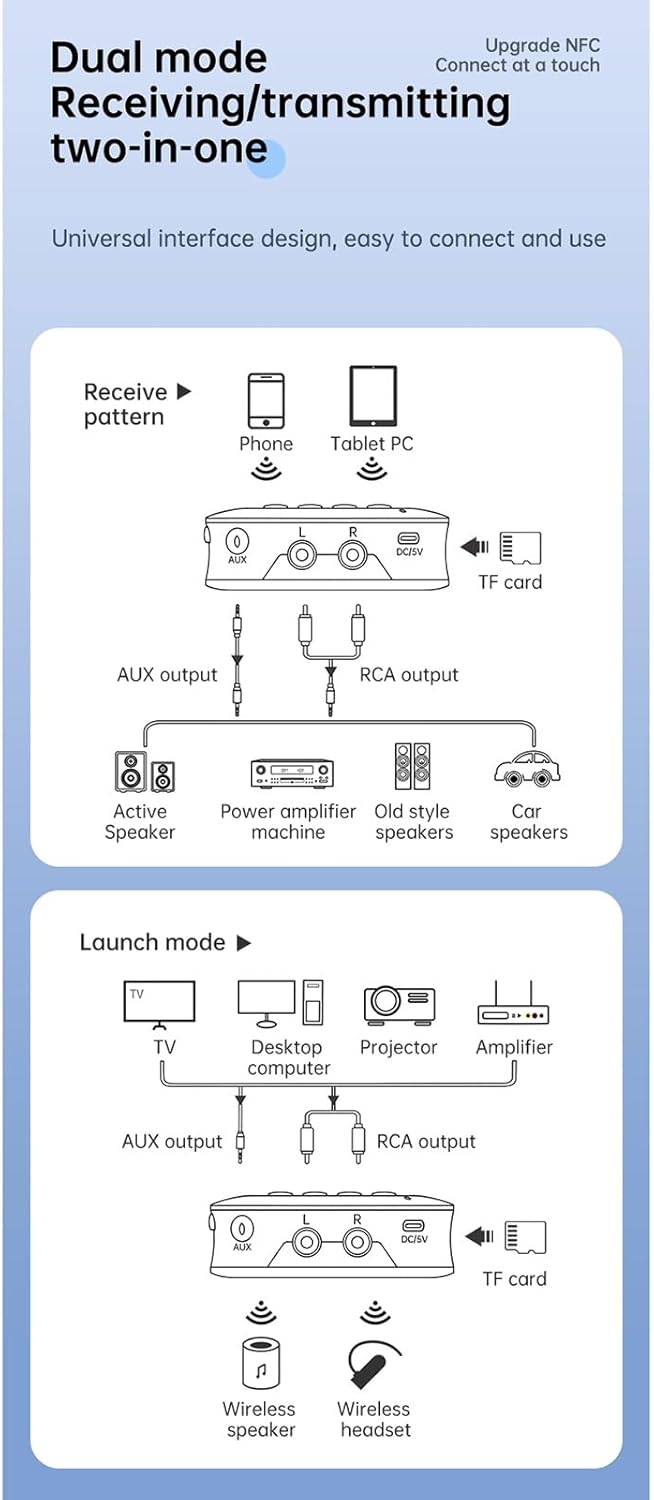
Image: A diagram illustrating the receive (RX) and launch (TX) modes, showing how the adapter connects to various devices like phones, tablets, TVs, speakers, and headphones.
მიმღების (RX) რეჟიმი:
In RX mode, the adapter receives Bluetooth audio from your smartphone, tablet, or other Bluetooth-enabled device and outputs it to a wired speaker, amplifier, or car stereo system.
- Ensure the adapter is in RX mode.
- Connect the adapter's AUX OUT or RCA OUT port to your non-Bluetooth audio device (e.g., speaker, amplifier) using the appropriate cable.
- On your smartphone or tablet, enable Bluetooth and search for "GT77" in the list of available devices.
- Select "GT77" to pair. Once paired, audio from your device will stream wirelessly to your connected speaker.
Image: The Docooler GT77 adapter in Receiver (RX) mode, connected to a traditional speaker, receiving audio wirelessly from a smartphone.
გადამცემის (TX) რეჟიმი:
In TX mode, the adapter transmits audio from a non-Bluetooth device (like a TV or PC) to Bluetooth headphones or speakers.
- Ensure the adapter is in TX mode.
- Connect your audio source (e.g., TV, desktop computer, projector) to the adapter's AUX IN or RCA IN port using the appropriate cable.
- გადაიყვანეთ თქვენი Bluetooth ყურსასმენები ან დინამიკი დაწყვილების რეჟიმში.
- The adapter will automatically search for and connect to nearby Bluetooth audio devices. Once connected, audio from your source will be transmitted wirelessly.

Image: The Docooler GT77 adapter in Transmitter (TX) mode, connected to a television, sending audio wirelessly to a user's headphones for private listening.
NFC Quick Pairing:
For NFC-enabled devices, pairing is even faster.
- დარწმუნდით, რომ NFC ჩართულია თქვენს სმარტფონზე ან პლანშეტზე.
- Hold your NFC-enabled device close to the NFC area on the Docooler GT77 adapter.
- დაადასტურეთ დაწყვილების მოთხოვნა თქვენს მოწყობილობაზე.
Note: NFC pairing is primarily for Receiver (RX) mode.
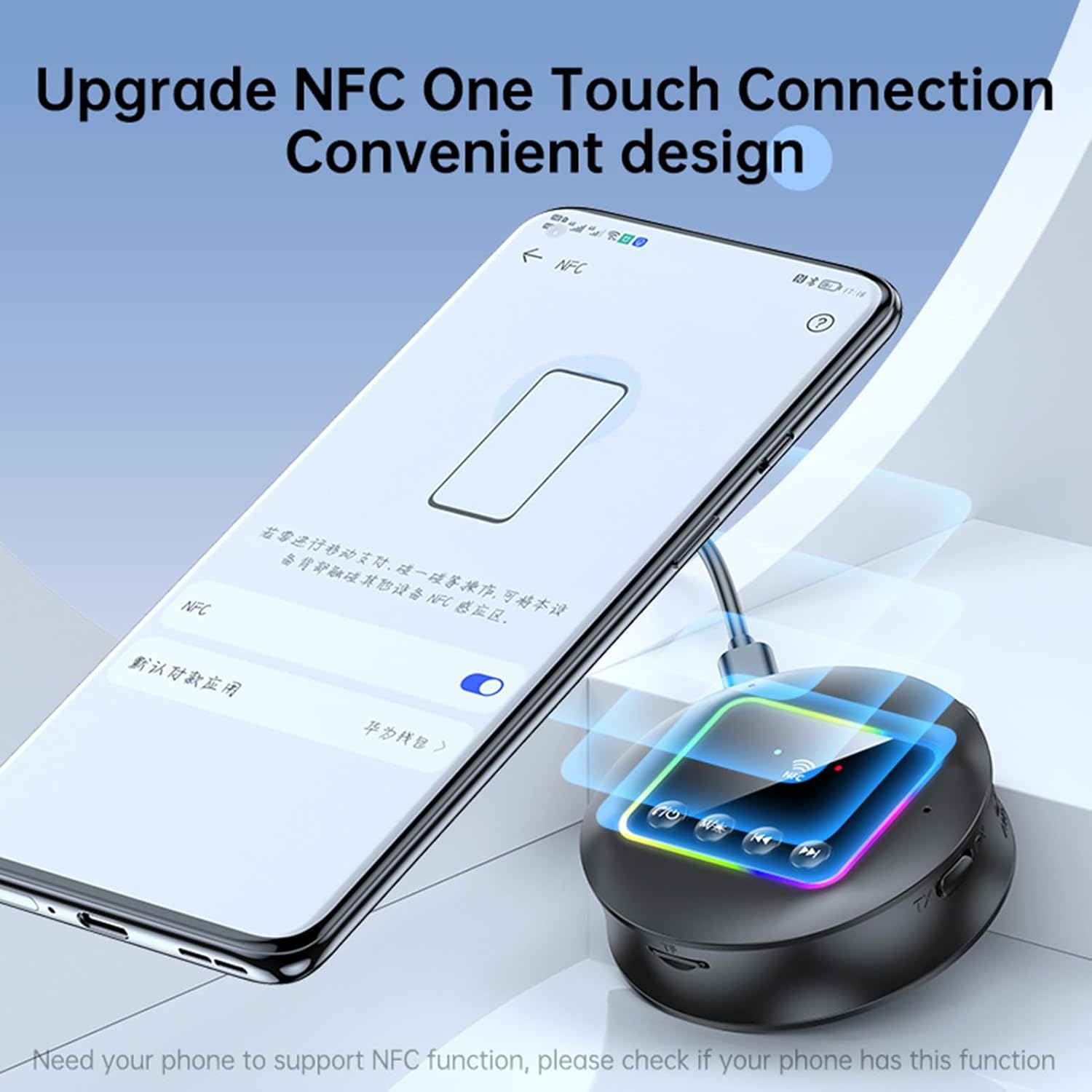
Image: A smartphone displaying an NFC connection prompt, positioned near the Docooler GT77 adapter, demonstrating the NFC quick pairing feature.
TF ბარათის დაკვრა:
The adapter supports direct music playback from a TF (MicroSD) card.
- Insert a TF card (up to 64GB, not included) loaded with MP3, FLAC, WMA, MAV, or APE audio files into the TF card slot on the adapter.
- დიდხანს დააჭირეთ M/☀ button to switch between wireless and TF card playback modes.
- Use the previous/next track buttons on the adapter to navigate your music.

Image: The Docooler GT77 adapter with a TF card being inserted into its dedicated slot, highlighting the TF card playback functionality.
RGB Ambiance Lighting:
The adapter features RGB lighting that can be adjusted to suit your preference. Refer to the device's controls for specific RGB adjustment options (e.g., short press M/☀ button for color cycle, long press for off/on).
მოვლა
- Keep the device dry. Moisture can damage the internal circuits.
- არ დაუშვათ მოწყობილობა ექსტრემალურ ტემპერატურაზე.
- გაწმინდეთ მოწყობილობა რბილი, მშრალი ქსოვილით. არ გამოიყენოთ უხეში ქიმიკატები ან სარეცხი საშუალებები.
- მოერიდეთ მოწყობილობის ჩამოვარდნას ან ძლიერ ზემოქმედებას.
პრობლემების მოგვარება
ძალა არ არის:
- Ensure the Type-C power cable is securely connected to both the adapter and a working 5V power source.
- სცადეთ სხვა USB კვების ადაპტერი ან USB პორტი.
დაწყვილება/დაკავშირება შეუძლებელია:
- Make sure the adapter is in the correct mode (RX for receiving, TX for transmitting).
- Ensure your Bluetooth device (for RX mode) or Bluetooth headphones/speaker (for TX mode) is in pairing mode.
- Move the devices closer to each other (within 10 meters).
- გაწმინდეთ Bluetooth დაწყვილების ისტორია თქვენს მოწყობილობაზე და ხელახლა სცადეთ დაწყვილება.
- If using NFC, ensure NFC is enabled on your phone and you are tapping the correct area.
ხმა არ არის:
- Check all audio cable connections (3.5mm AUX, RCA) are secure and correctly plugged into the input/output ports.
- Ensure the volume on both the adapter and the connected audio device is turned up.
- Verify that the adapter is successfully paired and connected to the audio source/receiver.
- If using TF card, ensure the card is inserted correctly and the adapter is in TF card playback mode.
დაბალი აუდიო ხარისხი/ჩარევა:
- შეამცირეთ მანძილი ადაპტერსა და დაკავშირებულ Bluetooth მოწყობილობას შორის.
- Avoid physical obstructions (walls, large objects) between the devices.
- Move away from other wireless devices that might cause interference (e.g., Wi-Fi routers, microwaves).
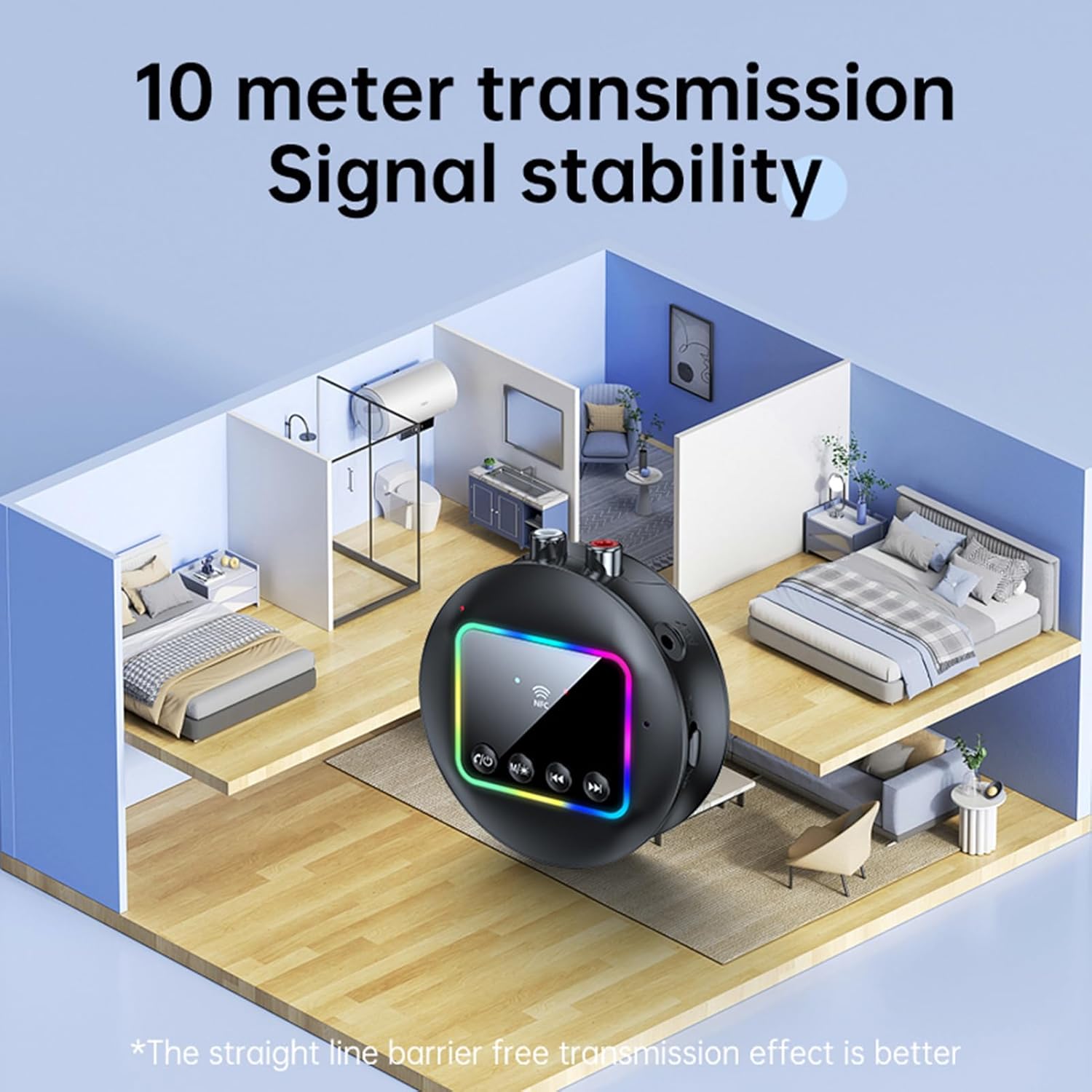
Image: A visual representation of the Docooler GT77's 10-meter transmission range, showing stable signal coverage within a typical home environment.
სპეციფიკაციები
| მოდელის ნომერი | ZRV0656844287655XH |
| Bluetooth ვერსია | V5.4 |
| Bluetooth პროტოკოლები | A2DP, AVRCP |
| საოპერაციო მანძილი | 10 მეტრამდე (ღია ტერიტორია) |
| NFC მხარდაჭერა | დიახ |
| სიხშირის პასუხი | 10Hz - 20kHz |
| სიგნალი ხმაურის თანაფარდობა | > 90 დბ |
| TF ბარათის მხარდაჭერა | მაქსიმუმ 64 GB (არ შედის) |
| TF ბარათის ფორმატები | MP3, FLAC, WMA, MAV, APE |
| აუდიო კოდეკები | SBC |
| დატენვის პორტი | USB Type-C |
| შეყვანის მოცულობაtagე/მიმდინარე | DC 5V 500mA |
| ფერი | შავი |
| Dimensions (ϕ x H) | 7.3 სმ x 2.2 სმ (2.87 x 0.86 ინჩი) |
| წონა | 44გრ |
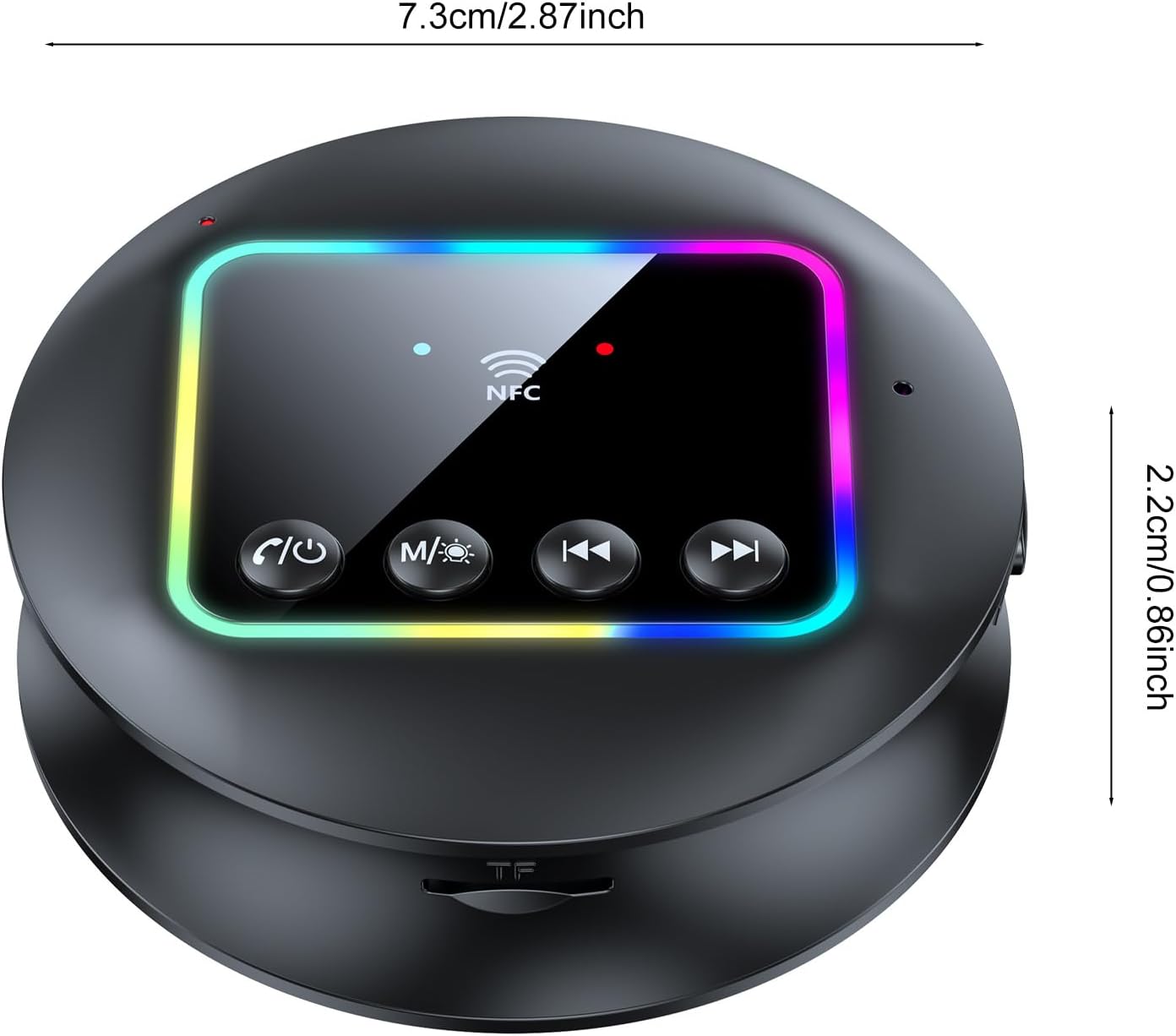
სურათი: ზემოდან ქვემოთ view of the Docooler GT77 adapter, showing its compact dimensions of 7.3 cm diameter and 2.2 cm height.
გარანტია და მხარდაჭერა
გარანტიის შესახებ ინფორმაციისა და ტექნიკური მხარდაჭერისთვის, გთხოვთ, იხილოთ თქვენს შენაძენთან ერთად მოწოდებული დოკუმენტაცია ან დაუკავშირდეთ თქვენს გამყიდველს. შეინახეთ შეძენის დამადასტურებელი საბუთი გარანტიასთან დაკავშირებული პრეტენზიებისთვის.