
შესავალი
This manual provides essential instructions for setting up, operating, and maintaining your AOLON Tetra R4 Smart Watch. Please read it carefully to ensure proper use and to maximize the device's features.
დაწყება
1. Unboxing
Your AOLON Tetra R4 Smart Watch package includes the following items:
- AOLON Tetra R4 Smart Watch
- დამტენი კაბელი
- მომხმარებლის სახელმძღვანელო
- Watch Band

Image: Product Size And Packaging List
2. მოწყობილობის დატენვა
Before first use, fully charge your smart watch. The device features a 350 mAh battery, providing up to 7 days of typical use and up to 30 days of standby time. A full charge takes approximately 2.5 hours.
- მაგნიტური დამტენი კაბელი შეაერთეთ საათის უკანა მხარეს განთავსებულ დამტენ წერტილებთან.
- კაბელის USB ბოლო შეაერთეთ სტანდარტულ USB კვების ადაპტერში (არ მოყვება) ან კომპიუტერის USB პორტში.
- საათის ეკრანი აჩვენებს დატენვის სტატუსს.
Video: This video demonstrates the unboxing and initial setup of the Tetra R4 Smart Watch, including charging and basic UI navigation.
3. აპლიკაციის ინსტალაცია და დაწყვილება
თქვენი ჭკვიანი საათის სრული პოტენციალის გამოსაყენებლად, ჩამოტვირთეთ და დააინსტალირეთ GloryFitPro აპლიკაცია თქვენს სმარტფონზე.
- Scan the QR code in the included user manual or search for "GloryFitPro" in your smartphone's app store (App Store for iOS, Google Play for Android).
- ჩართეთ Bluetooth თქვენს სმარტფონზე.
- Open the GloryFitPro app and follow the on-screen instructions to add your device.
- Select "Aolon Tetra R4" from the list of available devices to connect.

Image: Connect the Smart Watch Via APP GloryFitPro "Aolon Tetra R4"
თქვენი ჭკვიანი საათის მართვა
1. ძირითადი ნავიგაცია
The AOLON Tetra R4 features a 1.43-inch AMOLED full touch screen, a rotating crown, and two physical buttons for intuitive control.
- სენსორული ეკრანი: მენიუებსა და ფუნქციებში ნავიგაციისთვის გადაფურცლეთ მარცხნივ, მარჯვნივ, ზემოთ ან ქვემოთ. შეეხეთ ასარჩევად.
- მბრუნავი გვირგვინი: Rotate to scroll through lists or adjust settings. Press to confirm or return to the watch face.
- ფიზიკური ღილაკები: Use for quick access to specific functions or to power on/off the device.
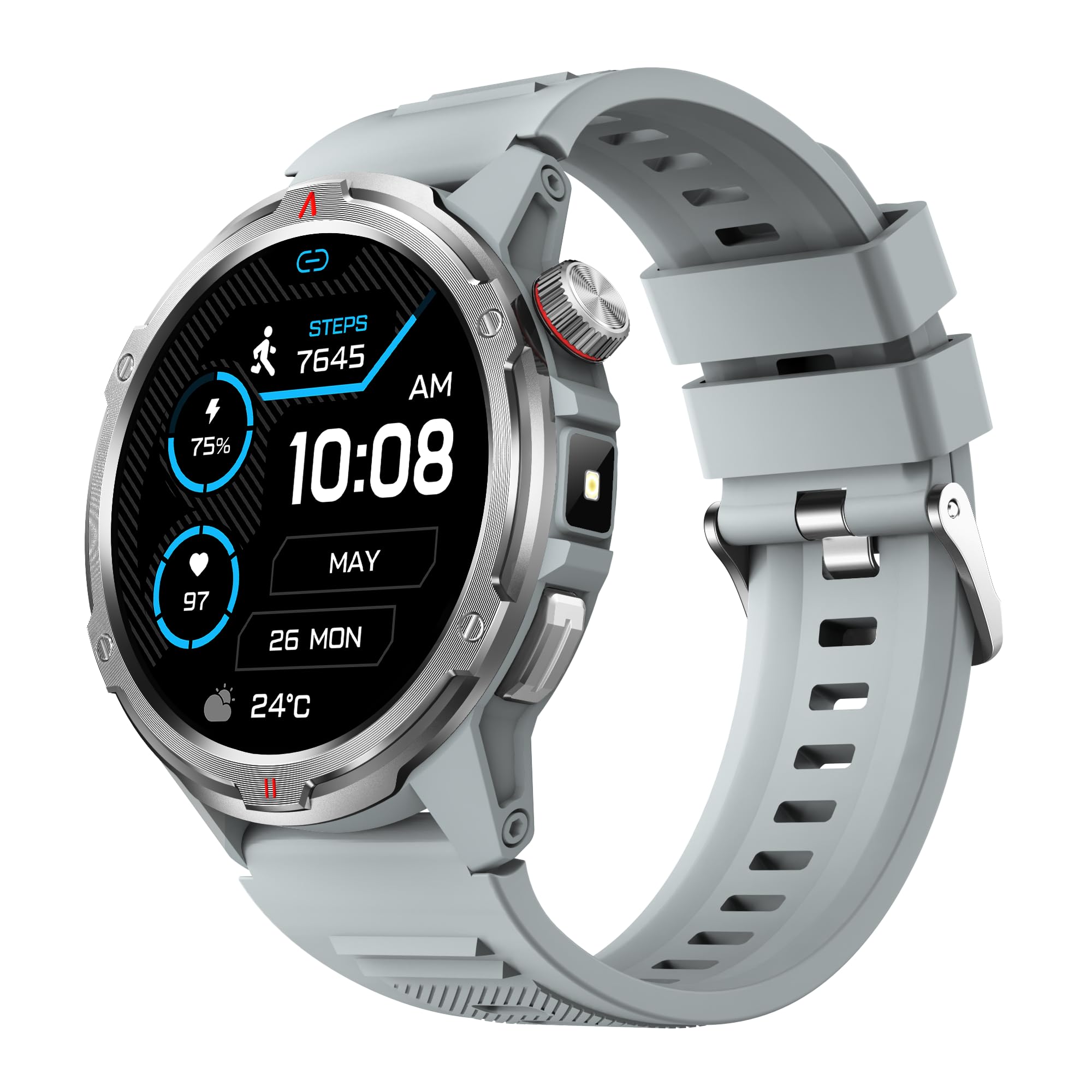
სურათი: მთავარი პროდუქტი view showing the 1.43" AMOLED HD Full Touch Screen and physical buttons.
2. კომუნიკაციის მახასიათებლები
Stay connected directly from your wrist with Bluetooth calling and smart notifications.
- Bluetooth დარეკვა: With the latest Bluetooth 5.2 chip, a high-quality speaker, and microphone, you can make and receive calls directly from your watch. You can also add up to 100 contacts and view ზარის ჟურნალი.
- ჭკვიანი შეტყობინებები: Receive message alerts, alarms, and other daily essentials from your paired smartphone. (Note: Message reply is not supported).

Image: BT Call & Message Sync Watch
Video: This video highlights the stylish design and various features of the smartwatch, including communication capabilities.
3. ჯანმრთელობის მონიტორინგი
The AOLON Tetra R4 utilizes Cywee Professional Algorithms for accurate health tracking, providing insights into your well-being.
- გულისცემის მონიტორინგი: Real-time heart rate monitoring throughout the day, whether at rest or during high-intensity exercise.
- სისხლის ჟანგბადის (SpO2) მონიტორი: Measure your blood oxygen level anytime to regulate your body.
- სტრესის დონის მონიტორინგი: Built-in PPG, SAR, AFE sensors and advanced algorithms monitor stress levels and provide alerts.
- ძილის მონიტორი: Combined with advanced algorithm analysis, it tracks deep sleep, light sleep, awake time, and REM sleep to help you understand and improve your sleep quality.
- მენსტრუალური ციკლის თვალყურის დევნება: Provides intelligent management and thoughtful reminders for women's health.
- One-Tap Measurement: Check your heart rate, blood oxygen, and stress level simultaneously with a single tap.

Image: Heart Rate Monitoring
Video: This video demonstrates the heart rate and SpO2 monitoring features of the smartwatch.
4. სპორტული რეჟიმები და აქტივობის თვალყურის დევნება
Track your fitness journey with over 100 sports modes and comprehensive activity tracking.
- 100+ სპორტული რეჟიმი: Supports a wide range of activities, from running and cycling to swimming and mountaineering.
- აქტივობის ტრეკერი: Records steps, calories burned, and distance covered.
- AGPS Function: Built-in AGPS provides accurate positioning and trajectory tracking for outdoor activities.

Image: 100+ More Sport Modes
Video: This video showcases the smart health features and the variety of over 100 sports modes available on the watch.
5. Outdoor Tools
Designed for outdoor enthusiasts, the Tetra R4 includes practical tools for navigation and convenience.
- კომპასი: Built-in compass for navigation.
- ფანარი: A convenient flashlight function for low-light situations.
- AGPS, Altimeter, Barometer: Auxiliary functions to assist with outdoor exploration.

Image: Built-in AGPS Movement
Video: This video demonstrates the IP68 waterproof rating and suitability for daily activities, including outdoor use.
6. მორგება
Personalize your watch to match your style and preferences.
- ნახეთ სახეები: Choose from over 150 pre-designed dials in the app, or customize your watch face with your own photos.

Image: Choose from a variety of watch faces
7. სხვა პრაქტიკული ფუნქციები
The Tetra R4 offers a range of additional features to enhance your daily life.
- ამინდის განახლებები
- მაღვიძარა
- წამზომი და ტაიმერი
- მუსიკის კონტროლი
- Remote Shutter for camera control
- Find Mobile Phone function
- კალკულატორი
- მსოფლიო საათი
- გადაუდებელი ზარი
- ხმის ასისტენტი

Image: Multiple Practical Functions
Video: This video demonstrates various multi-functional aspects of the Aolon Tetra R4 Smart Watch.
მოვლა
1. წყალგაუმტარი რეიტინგი
The AOLON Tetra R4 Smart Watch has an IP68 წყალგაუმტარი ნიშანი. This means it is resistant to dust and can withstand immersion in water up to 1.5 meters for up to 30 minutes. It is suitable for daily use, including hand washing, rain, and shallow swimming. However, it is not recommended for hot showers, saunas, or diving, as steam and high water pressure can compromise the seals.

Image: IP68 Level Waterproof
2. დასუფთავება და მოვლა
To maintain your watch's performance and appearance:
- რეგულარულად გაწმინდეთ საათი და სამაჯური რბილი ქსოვილით.amp ქსოვილი.
- მოერიდეთ უხეში ქიმიკატების ან აბრაზიული საწმენდების გამოყენებას.
- დატენვამდე დარწმუნდით, რომ დამტენის კონტაქტები სუფთა და მშრალია.
3. ბატარეის მუშაობის ოპტიმიზაცია
ბატარეის მუშაობის გასაგრძელებლად:
- Adjust screen brightness to a lower level.
- Disable the Always-On Display (AOD) feature if not needed.
- შეზღუდეთ ფონური აპლიკაციების განახლება და შეტყობინებები.
- Turn off continuous heart rate monitoring if not required for extended periods.
პრობლემების მოგვარება
If you encounter issues with your AOLON Tetra R4 Smart Watch, try the following solutions:
- საათი არ ირთვება/არ იტენება: Ensure the charging cable is securely connected to both the watch and a power source. Try a different USB port or power adapter.
- კავშირის პრობლემები (Bluetooth): Make sure Bluetooth is enabled on your smartphone and the watch is within range. Restart both the watch and your phone, then attempt to re-pair via the GloryFitPro app.
- Time synchronization incorrect: Ensure the watch is properly connected to the GloryFitPro app, as time is usually synced automatically from your phone. Reinstalling the app might resolve persistent issues.
- Inaccurate step count or health data: Ensure the watch is worn snugly on your wrist. Calibrate the device through the app if available.
- ეკრანი არ რეაგირებს: Restart the watch by pressing and holding the power button. If unresponsive, allow the battery to fully drain and then recharge.
სპეციფიკაციები
| ფუნქცია | სპეციფიკაცია |
|---|---|
| მოდელის ნომერი | Tetra R4 |
| ჩვენება | 1.43-inch AMOLED, 466x466 resolution |
| ბატარეის ტევადობა | 350 mAh |
| Typical Use Battery Life | 7 დღემდე |
| ლოდინის დრო | 30 დღემდე |
| დატენვის დრო | დაახლ. 2.5 საათი |
| წყალგაუმტარი რეიტინგი | IP68 |
| დაკავშირება | Bluetooth 5.2 |
| ოპერაციული სისტემის თავსებადობა | Android 4.4+, iOS 9.0+ |
| ჯანმრთელობის მონიტორინგი | Heart Rate, SpO2, Stress, Sleep, Menstrual Cycle |
| სპორტული რეჟიმები | 100+ |
| გარე მახასიათებლები | Compass, Flashlight, AGPS, Altimeter, Barometer |
| წონა | 52 გრამი |
გარანტია და მხარდაჭერა
AOLON provides a 12 თვიანი გარანტია for the Tetra R4 Smart Watch. For any questions or issues, please contact AOLON Customer Support through Amazon. Our support team aims to provide a responsive resolution within 24 hours.