
უსაფრთხოების მნიშვნელოვანი ინფორმაცია
Please read all safety instructions before using this product to ensure proper and safe operation.
- არ დაამუშაოთ ყურსასმენები ან დამტენი ქეისი ექსტრემალურ ტემპერატურაზე.
- მოერიდეთ მოწყობილობის ჩამოვარდნას ან გადამეტებული ძალის გამოყენებას.
- შეინახეთ ბავშვებისა და შინაური ცხოველებისთვის მიუწვდომელ ადგილას.
- Use only a 5V adapter to charge the charging case to prevent battery damage.
- Do not use the earbuds in the bath or while swimming.
პაკეტის შიგთავსი
დარწმუნდით, რომ თქვენს პაკეტში ყველა ნივთია:
- ZIUTY A1 Wireless Earbuds (x1 pair)
- Portable Charging Case (x1)
- USB-C დამტენი კაბელი (x1)
- Eartips (pre-installed size M, plus 2 extra pairs in sizes S & L)
- მომხმარებლის სახელმძღვანელო (ეს დოკუმენტი)
პროდუქტი დასრულდაview
Familiarize yourself with the components of your ZIUTY A1 Wireless Earbuds.
ყურსასმენები და დამტენი ჩანთა
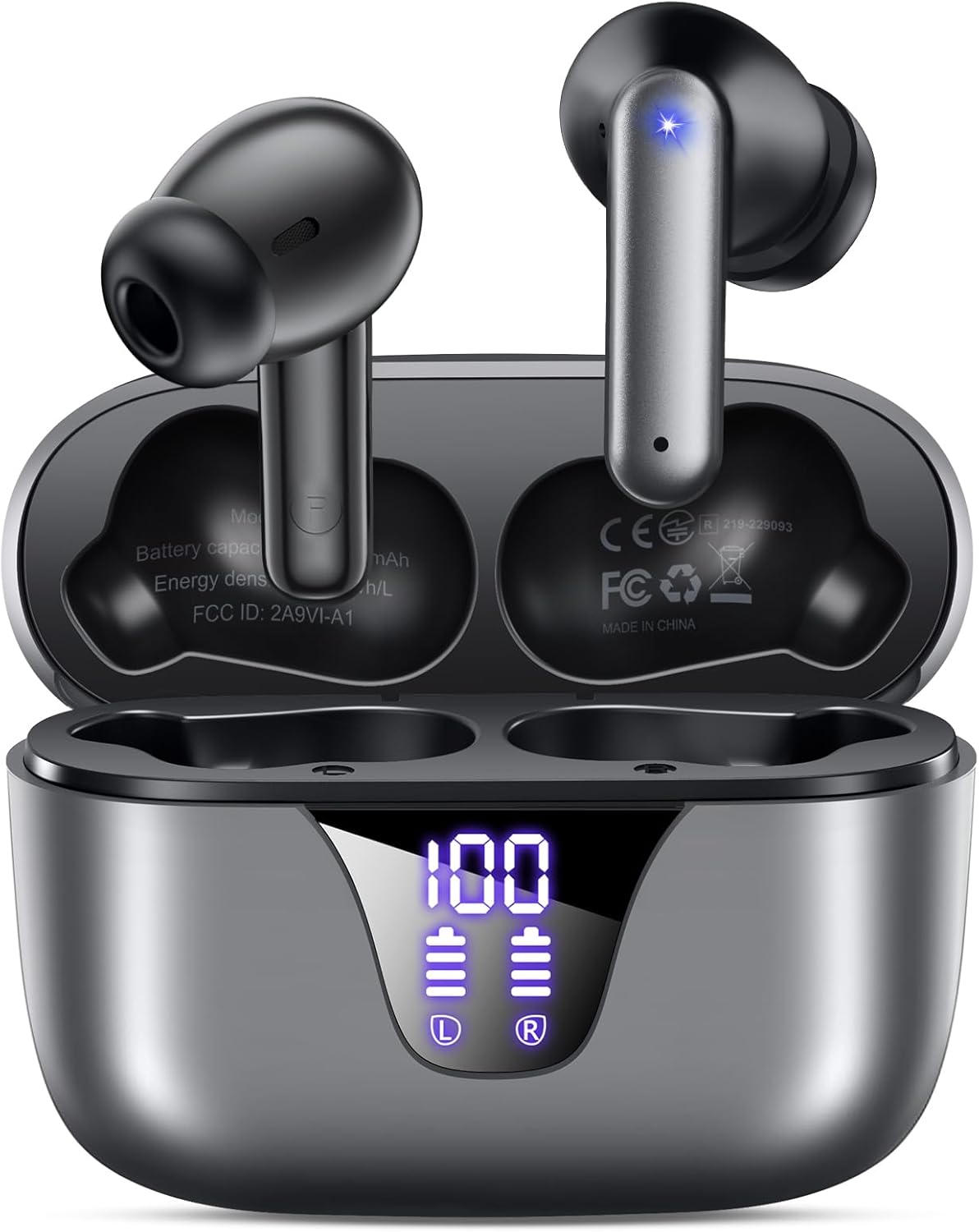
Image: ZIUTY A1 Wireless Earbuds shown inside their open charging case. The case features an LED digital display indicating battery levels for both the case and individual earbuds.
LED დენის ეკრანი

Image: Close-up of the ZIUTY A1 charging case's LED display, showing '100' for the case battery and individual battery icons for the left (L) and right (R) earbuds.
The charging case features an LED digital display that shows the exact remaining power percentage (0-100%) for the case and individual battery levels for each earbud.
დაყენება
1. ყურსასმენებისა და ქეისის დატენვა
პირველი გამოყენების წინ, სრულად დატენეთ ყურსასმენები და დამტენი ქეისი.
- მოათავსეთ ყურსასმენები დამტენ ქეისში. დარწმუნდით, რომ ისინი სწორად არის მოთავსებული შესაბამის ჭრილებში (L - მარცხნივ, R - მარჯვნივ).
- Connect the USB-C charging cable to the charging port on the case and the other end to a 5V USB power adapter (not included).
- The LED display on the case will show the charging status. A full charge typically takes approximately 2 hours.

Image: ZIUTY A1 earbuds resting in their charging case, with the LED display showing battery levels.

Image: Diagram illustrating how to connect the USB-C cable to the charging case and a 5V power adapter for charging.
2. ყურსასმენების ტარება
For optimal sound quality and comfort, select the correct ear tip size and ensure a secure fit.
- Choose the ear tips (S, M, L) that provide the best seal and comfort for your ears.
- Insert the earbuds into your ears, gently twisting them to find a snug and stable position.
- The ergonomic semi-in-ear design is intended for a comfortable fit during various activities.

Image: Diagram showing the ergonomic design of the earbuds and the three available ear tip sizes (S, M, L) for a customized fit.

Image: Step-by-step visual guide on how to correctly insert and adjust the earbuds for a secure fit.
3. დაწყვილება Bluetooth მოწყობილობასთან
ყურსასმენები დამტენი ქეისიდან ამოღების შემდეგ ავტომატურად გადავა დაწყვილების რეჟიმში.
- გახსენით დამტენი ქეისი და ამოიღეთ ორივე ყურსასმენი. ისინი ავტომატურად ჩაირთვება და ერთმანეთთან დაწყვილებას შეეცდებიან.
- თქვენს მოწყობილობაზე (სმარტფონი, პლანშეტი, ლეპტოპი) ჩართეთ Bluetooth და მოძებნეთ ხელმისაწვდომი მოწყობილობები.
- Select "A1" from the list of found devices.
- დაკავშირების შემდეგ, თქვენ გაიგონებთ ხმოვან დადასტურებას და ყურსასმენები მზად იქნება გამოსაყენებლად.
- The earbuds will automatically reconnect to the last paired device when removed from the case.

Image: Illustration showing the ZIUTY A1 earbuds connecting via Bluetooth 5.3 to a smartphone, indicating a stable and fast connection.

Image: Diagram demonstrating the one-step auto-pairing process when the earbuds are removed from the charging case.
ოპერაციული ინსტრუქციები
შეეხეთ კონტროლს
The ZIUTY A1 earbuds feature intuitive touch controls for managing audio playback and calls.

Image: Diagram illustrating the touch control area on the earbuds and various functions like Play/Pause, Voice Assistant, Answer/Hang up, Previous/Next Track, and Volume adjustment.

Image: A more detailed visual guide to the touch controls, showing specific tap and hold gestures for different commands.
| მოქმედება | ფუნქცია |
|---|---|
| ერთჯერადი შეხება (მარცხნივ/მარჯვნივ) | მუსიკის დაკვრა/პაუზა, ზარის პასუხი/ზარის დასრულება |
| ორმაგი შეხება (L) | წინა სიმღერა |
| ორმაგი შეხება (R) | შემდეგი სიმღერა |
| სამმაგი შეხება (მარცხნივ/მარჯვნივ) | ხმის ასისტენტის გააქტიურება (Siri, Google ასისტენტი) |
| Press and Hold (L) | ხმის დაკლება |
| Press and Hold (R) | ხმის ამაღლება |
| Press and Hold (L/R) during incoming call | ზარის უარყოფა |
ზარების განხორციელება და მიღება
Use the touch controls to manage your phone calls:
- ზარის პასუხი/დასრულება: ყურსასმენზე ერთხელ შეხება.
- ზარის უარყოფა: შემომავალი ზარის დროს დააჭირეთ და გეჭიროთ რომელიმე ყურსასმენი.

Image: Illustration showing a user interacting with a voice assistant (Siri) via the earbuds for clear call support.
ხმის ასისტენტი
Activate your device's voice assistant by triple-tapping either earbud. This allows you to issue commands such as making calls or checking information hands-free.
მოვლა
დასუფთავება
რეგულარული დასუფთავება ხელს უწყობს ოპტიმალური მუშაობისა და ჰიგიენის შენარჩუნებას.
- Clean the charging contacts on both the earbuds and inside the charging case with a dry cotton swab or alcohol pad.
- Gently clean the mesh of the ear tips to remove any dust or earwax that might affect sound volume.
- Wipe the exterior of the earbuds and case with a soft, dry cloth.

Image: Visual guide demonstrating how to clean the earbud charging contacts and ear tip mesh to resolve potential volume or charging issues.
შენახვა
როდესაც ყურსასმენები არ იყენებთ, შეინახეთ დამტენ ქეისში, რათა დაიცვათ ისინი და დატენილი იყოს.
პრობლემების მოგვარება
If you encounter issues with your ZIUTY A1 earbuds, refer to the following common solutions:
- ყურსასმენები ერთმანეთთან არ წყვილდება: Place both earbuds back into the charging case, close the lid, wait a few seconds, then open the lid and remove them again. They should automatically pair.
- ყურსასმენები არ უკავშირდება მოწყობილობას: Ensure Bluetooth is enabled on your device and the earbuds are in pairing mode. Forget the device from your Bluetooth list and attempt to re-pair.
- ხმა არ აქვს ან ხმა დაბალია: Check the volume levels on both your device and the earbuds. Ensure the ear tips are clean and properly seated in your ears. Refer to the cleaning instructions in the Maintenance section.
- დატენვის პრობლემები: Ensure the charging cable is securely connected and the power adapter is 5V. Clean the charging contacts on both the earbuds and the case.
- Accidental touch control activation: When adjusting the earbuds in your ear, grasp them by the sides to avoid touching the control area.
სპეციფიკაციები
Key technical specifications for the ZIUTY A1 Wireless Earbuds:
| ფუნქცია | სპეციფიკაცია |
|---|---|
| მოდელის სახელი | A1 |
| დაკავშირების ტექნოლოგია | უსადენო (Bluetooth 5.3) |
| Bluetooth დიაპაზონი | 15 მეტრამდე (49 ფუტი) |
| ყურსასმენის ბატარეის ხანგრძლივობა | 8 საათამდე |
| სათამაშო დროის ჯამური რაოდენობა (ქეისით) | 50 საათამდე |
| დამუხტვის კეის ბატარეის ტევადობა | 500 mAh |
| დატენვის დრო | დაახლოებით 2 საათი |
| აუდიო დრაივერის ზომა | 14.5 მმ დინამიური დრაივერი |
| სიხშირის დიაპაზონი | 20 ჰც - 20,000 ჰც |
| წყლის წინააღმდეგობის დონე | IPX7 (წყალგამძლე) |
| კონტროლის ტიპი | შეეხეთ Control |
| ყურის წონა | Approximately 0.14 oz (3.9g) per earbud |
| მოყვება კომპონენტები | Earbuds, Charging Case, USB-C Cable, Eartips, User Manual |
გარანტია და მხარდაჭერა
საგარანტიო ინფორმაცია
ZIUTY provides an 18-month battery promise for this product. This warranty covers defects in materials and workmanship under normal use.
მომხმარებელთა მხარდაჭერა
For any questions, technical assistance, or warranty claims, please contact ZIUTY customer service. Refer to the product packaging or the official ZIUTY webსაიტი მიმდინარე საკონტაქტო ინფორმაციისთვის.