
1. შესავალი
მადლობა შენაძენისთვისasing the Hiwill A51 Dolby Atmos 5.1ch Soundbar System. This manual provides essential information for setting up, operating, and maintaining your soundbar system to ensure optimal performance and longevity. Please read this manual thoroughly before use and retain it for future reference.
2. მნიშვნელოვანი უსაფრთხოების ინფორმაცია
ელექტროშოკის, ხანძრის ან მოწყობილობის დაზიანების რისკის შესამცირებლად, გთხოვთ, დაიცვათ შემდეგი უსაფრთხოების ზომები:
- არ დაუშვათ ეს მოწყობილობა წვიმის ან ტენიანობის ქვეშ.
- არ დადოთ მოწყობილობაზე სითხით სავსე საგნები, როგორიცაა ვაზები.
- არ დაბლოკოთ ვენტილაციის ღიობები. დაამონტაჟეთ მწარმოებლის ინსტრუქციის შესაბამისად.
- არ დააინსტალიროთ სითბოს წყაროსთან ახლოს, როგორიცაა რადიატორები, სითბოს რეგისტრები, ღუმელები ან სხვა მოწყობილობა (მათ შორის ampგამხსნელები), რომლებიც წარმოქმნიან სითბოს.
- დაიცავით დენის კაბელი სიარულისგან ან დაჭიმვისგან, განსაკუთრებით შტეფსელებთან, მოსახერხებელ კონტეინერებთან და იმ ადგილას, სადაც ისინი გამოდიან აპარატიდან.
- გამოიყენეთ მხოლოდ მწარმოებლის მიერ მითითებული დანართები/აქსესუარები.
- გამორთეთ ეს მოწყობილობა ელვისებური ქარიშხლის დროს ან დიდი ხნის განმავლობაში გამოუყენებლობისას.
- მიმართეთ ყველა მომსახურება კვალიფიციურ მომსახურე პერსონალს. სერვისი საჭიროა, როდესაც აპარატი რაიმე ფორმით დაზიანებულია, მაგალითად, დაზიანებულია კვების კაბელი ან შტეფსელი, დაიღვარა სითხე ან ჩავარდა მოწყობილობაში საგნები, აპარატი წვიმს ან ტენიანობას ექვემდებარება, ნორმალურად არ მუშაობს. , ან ჩამოაგდეს.
3. პაკეტის შიგთავსი
გთხოვთ, შეამოწმოთ, რომ ქვემოთ ჩამოთვლილი ყველა ნივთი შედის თქვენს პაკეტში:
- Hiwill A51 საუნდბარი
- სადენიანი საბვუფერი
- 2x სადენიანი Surround დინამიკი
- დენის კაბელი
- სწრაფი დაწყების სახელმძღვანელო
- დისტანციური მართვა (მოყვება ბატარეა)
- საგარანტიო ბარათი
- HDMI კაბელი
4. პროდუქტი დასრულდაview
4.1 სისტემის კომპონენტები
The Hiwill A51 system consists of a main soundbar unit, a wired subwoofer, and two wired surround speakers.
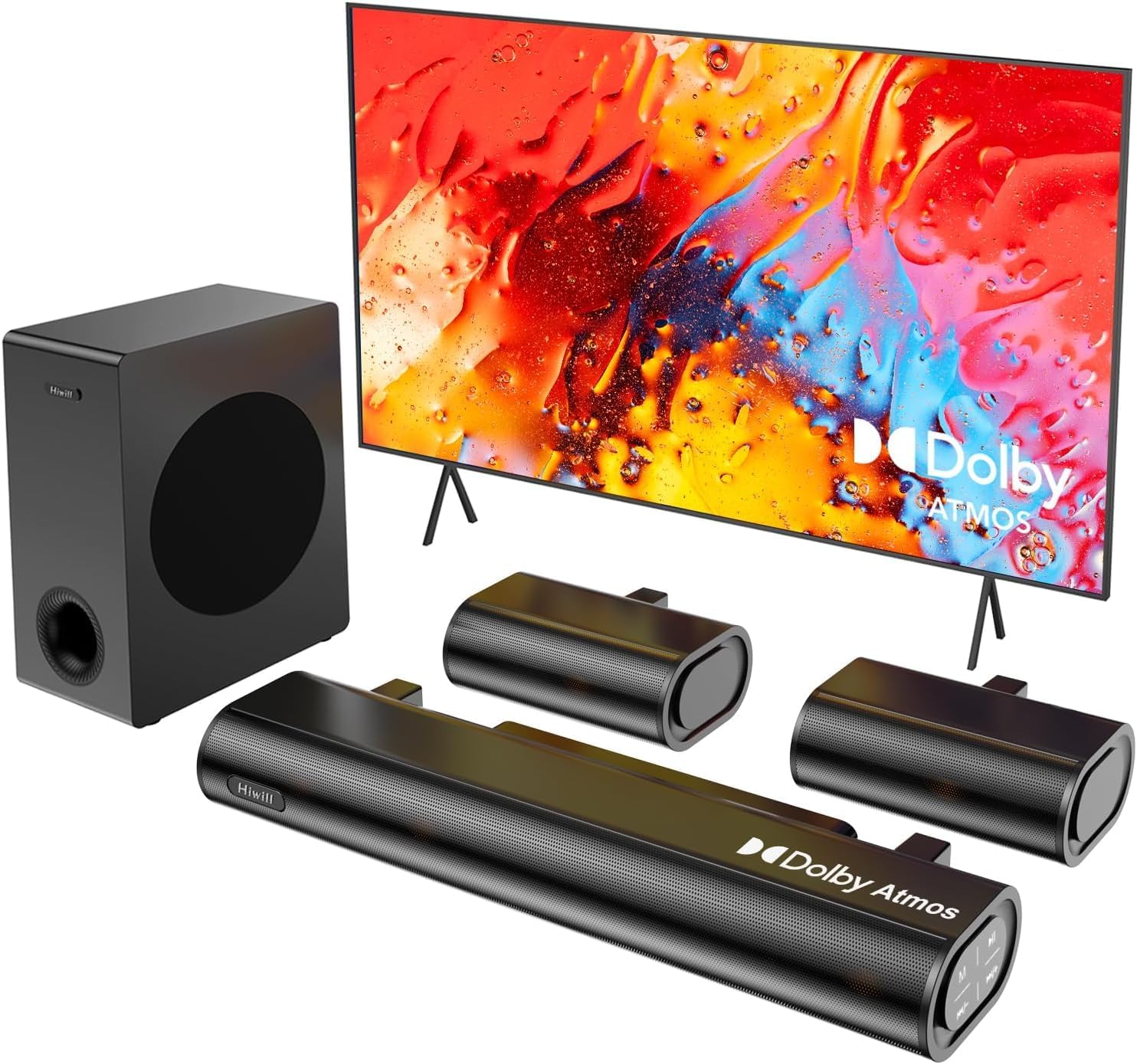
Figure 4.1: Hiwill A51 Soundbar System Components
4.2 Soundbar Features
The soundbar features multiple input ports for versatile connectivity and an integrated display for status information.

სურათი 4.2: საუნდბარის უკანა პანელის შეერთებები
4.3 Speaker Driver Construction
The system utilizes high-quality speaker drivers with aluminum-magnesium alloy diaphragms and copper shorting rings for enhanced audio clarity and reduced interference.

Figure 4.3: Speaker Driver Internal Components
5. დაყენება
5.1 ფიზიკური კავშირი
Follow these steps to connect your Hiwill A51 Soundbar System:
- Place the soundbar in front of your television, ensuring it does not obstruct the TV's remote sensor.
- Position the wired subwoofer on the floor, ideally near the soundbar.
- Connect the two wired surround speakers to the designated ports on the soundbar or subwoofer as per the connection diagram.
- Connect the soundbar to your TV using one of the recommended connection methods (HDMI eARC is preferred).
- კვების კაბელი შეაერთეთ საუნდბართან, შემდეგ კი დენის წყაროსთან.

Figure 5.1: Typical 5.1ch Sound System Setup
5.2 დინამიკის განლაგება
Proper placement of the surround speakers is crucial for an immersive audio experience. The system supports independent 12-level adjustment for rear speaker volume.
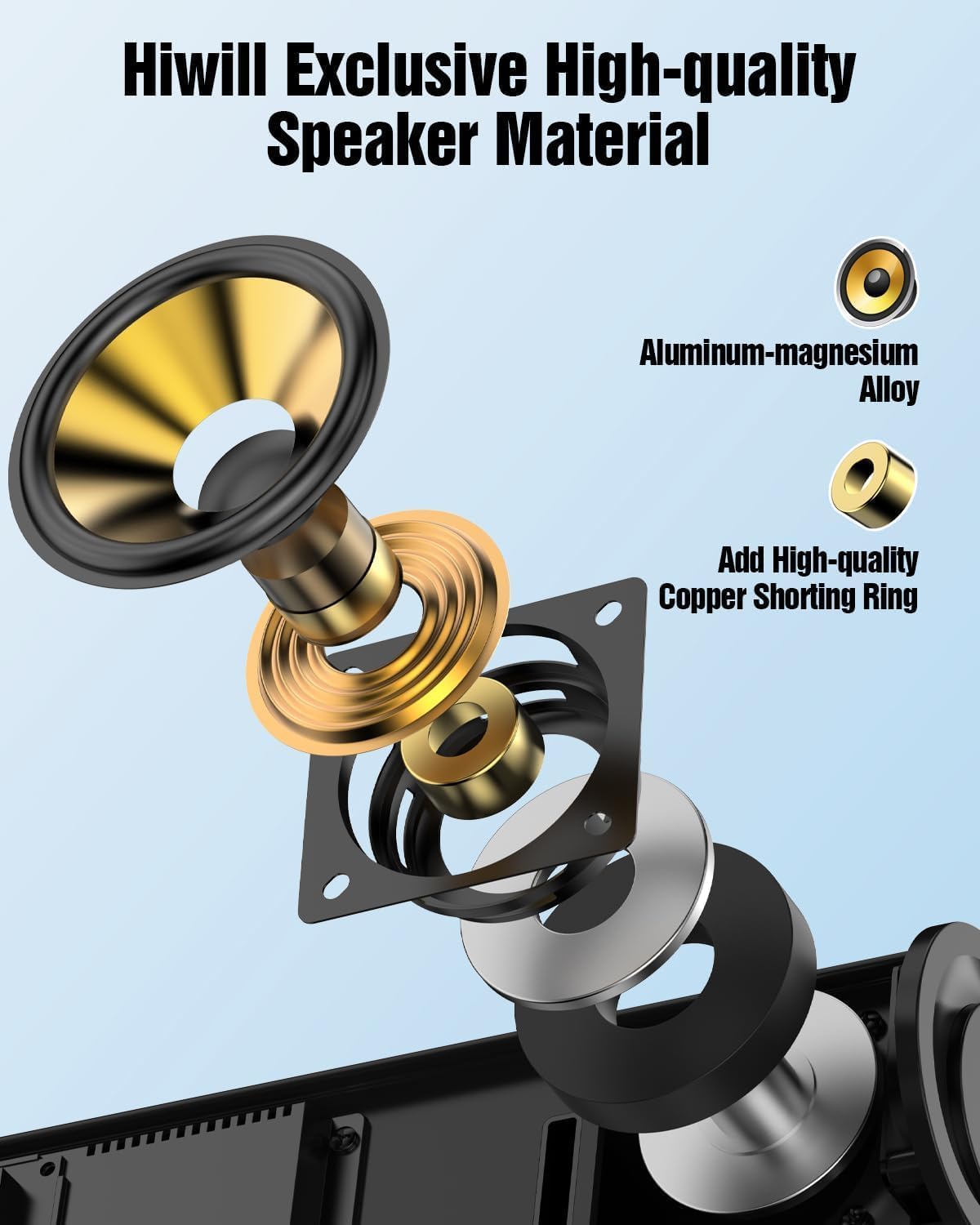
Figure 5.2: Rear Surround Speaker Placement and Adjustment
5.3 კავშირის მეთოდები
The Hiwill A51 offers multiple connectivity options. HDMI eARC is recommended for the best audio quality and Dolby Atmos support.
| ფუნქცია | HDMI eARC | HDMI ARC |
|---|---|---|
| სრული სახელი | გაძლიერებული აუდიო დაბრუნების არხი | აუდიო დაბრუნების არხი |
| გამტარუნარიანობა | 37 Mbps-მდე | 1 Mbps-მდე |
| აუდიო ფორმატის მხარდაჭერა | Uncompressed audio (e.g., Dolby Atmos/Dolby TrueHD/DTS:X/PCM 7.1/DTS-HD Master Audio) | Compressed audio (e.g., Dolby Digital/DTS/PCM 2.0 (stereo)) |
| არხის მხარდაჭერა | Up to 7.1 channels, even 32 channels (e.g., Dolby Atmos) | 5.1-მდე არხი |
| აუდიო ხარისხი | High-resolution audio (e.g., 24-bit/192kHz) | Standard-definition audio |
| შეყოვნება | Very low (optimized lip-sync) | Higher (may affect lip-sync) |
| მოწყობილობის თავსებადობა | Requires HDMI 2.1 or later | Requires HDMI 1.4 or later |
| საკაბელო მოთხოვნები | High-speed HDMI cable (package has included) | სტანდარტული HDMI კაბელი |
For optimal performance, use the connection method that best suits your TV and content:
| კავშირის მეთოდი | აუდიო ხარისხი | Supports Dolby Atmos | Recommendation Rating |
|---|---|---|---|
| HDMI eARC | Best (uncompressed high-res audio) | სრულად მხარდაჭერილი | ★★★★★ |
| HDMI ARC | Good (compressed audio) | Partially supported* | ★★★★☆ |
| ოპტიკური | Fair (compressed audio) | არ არის მხარდაჭერილი | ★★★☆☆ |
| Bluetooth | Fair (wireless transmission) | არ არის მხარდაჭერილი | ★★☆☆☆ |
| AUX | Poor (stereo audio) | არ არის მხარდაჭერილი | ★☆☆☆☆ |
*Partially supports means that HDMI ARC can only support Atmos transmitted via Dolby Digital Plus, but not Dolby TrueHD Atmos.
6. საოპერაციო ინსტრუქციები
6.1 ძირითადი ოპერაცია
- ჩართვა/გამორთვა: დააჭირეთ ჩართვის ღილაკს საუნდბარზე ან დისტანციურ მართვაზე.
- ხმის კონტროლი: Use the Volume Up/Down buttons on the soundbar or remote.
- შეყვანის შერჩევა: Press the 'Input' button on the remote or soundbar to cycle through HDMI eARC, Optical, Bluetooth, and AUX inputs.
6.2 დისტანციური მართვა
The included remote control provides full functionality for your soundbar system, including independent adjustment for bass, surround sound, and treble.
სურათი 6.1: დისტანციური მართვის განლაგება
6.3 EQ რეჟიმი
Select from various EQ modes to optimize your audio experience for different content types:
- სუფთა ხმა: Provides a balanced, uncolored audio profile.
- ფილმი: აძლიერებს დიალოგს და დინამიურ დიაპაზონს კინემატოგრაფიული კონტენტისთვის.
- მუსიკა: Optimizes for musical playback with rich bass and clear highs.
- სიახლე: Focuses on vocal clarity for news broadcasts and spoken content.

Figure 6.2: Soundbar Display with EQ Modes
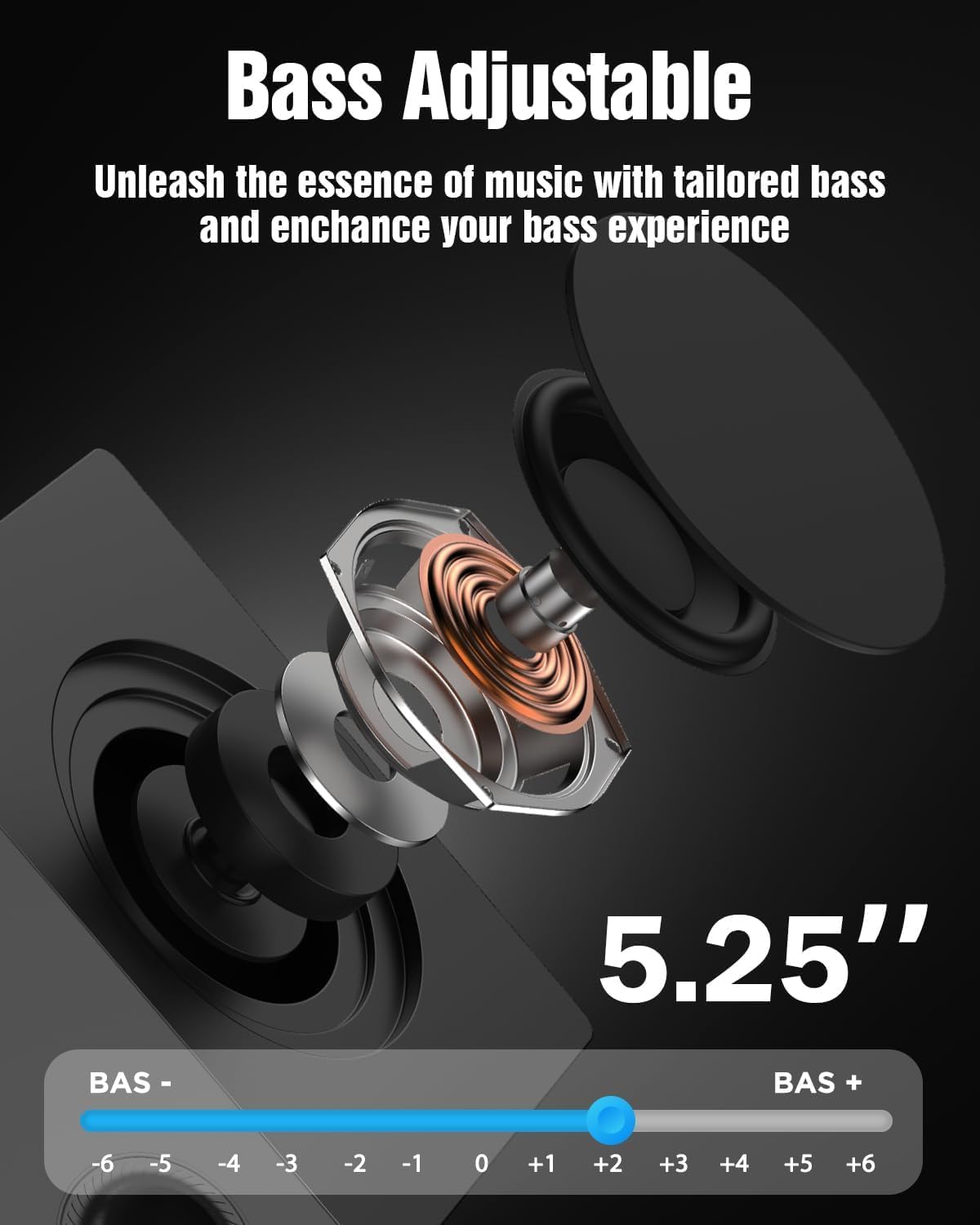
6.4 ბასის რეგულირება
The subwoofer's bass level can be adjusted to your preference using the remote control. This allows you to tailor the low-frequency response to your listening environment and content.

Figure 6.3: Bass Level Adjustment
6.5 Firmware განახლება
New firmware versions may be released to enhance performance, add features, or address issues. Please contact Hiwill support for information on available firmware upgrades and instructions on how to apply them.

Figure 6.4: Firmware Upgrade Benefits
7. მოვლა
7.1 დასუფთავება
თქვენი საუნდბარის სისტემის გარეგნობისა და მუშაობის შესანარჩუნებლად:
- გაწმინდეთ ზედაპირები რბილი, მშრალი ქსოვილით.
- არ გამოიყენოთ აბრაზიული საწმენდები, ცვილები ან გამხსნელები, რადგან მათ შეიძლება დააზიანონ საფარი.
- დასუფთავებამდე დარწმუნდით, რომ მოწყობილობა გამორთულია.
7.2 შენახვა
თუ მოწყობილობას დიდი ხნის განმავლობაში ინახავთ, გამორთეთ ის დენის წყაროდან და შეინახეთ გრილ, მშრალ ადგილას, მზის პირდაპირი სხივებისა და ექსტრემალური ტემპერატურისგან მოშორებით.
8. Დიაგნოსტიკა
If you encounter issues with your Hiwill A51 Soundbar System, refer to the table below for common problems and solutions.
| პრობლემა | შესაძლო მიზეზი | გამოსავალი |
|---|---|---|
| არავითარი ძალა | კვების კაბელი არ არის შეერთებული; კვების წყარო არ არის აქტიური | დარწმუნდით, რომ კვების კაბელი საიმედოდ არის შეერთებული; შეამოწმეთ სოკეტი სხვა მოწყობილობასთან. |
| ხმა არ არის | Incorrect input selected; Volume too low; Mute activated; Incorrect TV audio settings | Select correct input source; Increase volume; Deactivate mute; Check TV audio output settings (e.g., PCM, Bitstream). |
| No sound from surround speakers | Surround speakers not connected; Surround volume too low; Source content is stereo | Ensure surround speakers are properly connected; Increase surround speaker volume via remote; Note that some content may not have discrete surround channels. |
| Bluetooth დაწყვილების პრობლემები | Device too far; Soundbar not in pairing mode; Interference | Move device closer; Put soundbar into Bluetooth pairing mode; Avoid other wireless devices. |
| დისტანციური მართვა არ მუშაობს | Battery depleted; Obstruction; Remote sensor blocked | Replace battery; Remove obstructions; Ensure remote is pointed at the soundbar's sensor. |
If the problem persists after trying these solutions, please contact Hiwill customer support.
9. სპეციფიკაციები
Below are the technical specifications for the Hiwill A51 Dolby Atmos 5.1ch Soundbar System:
| ფუნქცია | დეტალი |
|---|---|
| მოდელის სახელი | A51 |
| სპიკერის ტიპი | საუნდბარი სადენიანი სუბვუფერით და სადენიანი Surround დინამიკებით |
| გარემომცველი ხმის არხის კონფიგურაცია | 5.1 |
| სპეციალური ფუნქცია | Dolby Atmos Soundbar |
| დაკავშირების ტექნოლოგია | Auxiliary, Bluetooth, HDMI (eARC), Optical, USB |
| უსადენო საკომუნიკაციო ტექნოლოგია | Bluetooth |
| დინამიკის მაქსიმალური გამომავალი სიმძლავრე | 380 ვატი |
| სიხშირის პასუხი | 45 ჰც |
| პროდუქტის ზომები (საუნდბარი) | 16.93"D x 2.36"W x 4.45"H |
| ნივთის წონა | 13.22 ფუნტი (მთლიანი სისტემა) |
| მასალა | Metal or High-Quality Plastic |
| ფერი | შავი |
| მწარმოებელი | ჰაივილი |
10. გარანტია და მხარდაჭერა
10.1 ინფორმაცია გარანტიის შესახებ
This product comes with a limited manufacturer's warranty. Please refer to the included Warranty Card for specific terms, conditions, and duration of coverage. Retain your proof of purchase for warranty claims.
10.2 მომხმარებელთა მხარდაჭერა
For technical assistance, troubleshooting beyond this manual, or warranty inquiries, please contact Hiwill customer support. Contact details can typically be found on the Warranty Card or the official Hiwill webსაიტი.