
პროდუქტი დასრულდაview
The HP OmniDesk Desktop PC M02-0127c is a high-performance computer designed for everyday computing and productivity. It features an AMD Ryzen 7 8700G processor, 32GB DDR5 memory, and a 1TB NVMe SSD, along with integrated AMD Radeon 780M Graphics. This manual provides essential information for setting up, operating, maintaining, and troubleshooting your device.

Წინა მარჯვენა view of the HP OmniDesk Desktop PC, showcasing its minimalist black design with a wood-inspired front panel.
1. დაყენების გზამკვლევი
1.1 ყუთის გახსნა და პირველადი განთავსება
Carefully remove all components from the packaging. Ensure the desktop tower, wireless keyboard, and wireless mouse are present. Place the desktop on a stable, flat surface with adequate ventilation.
1.2 პერიფერიული მოწყობილობების შეერთება
Connect your monitor, keyboard, mouse, and power cable to the appropriate ports on the desktop.
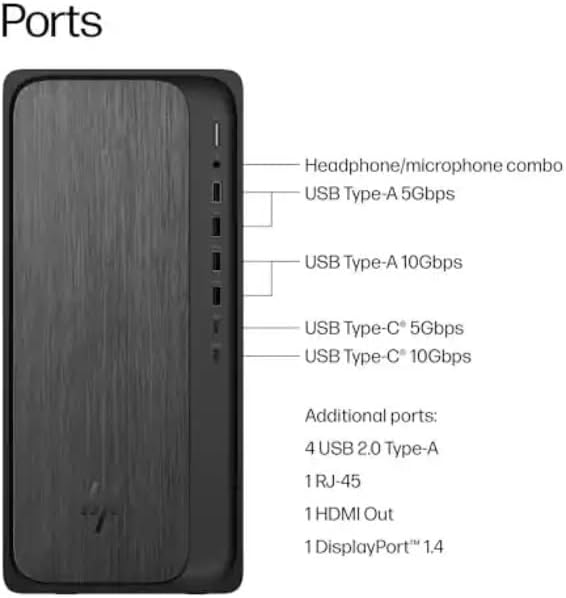
Diagram illustrating the various ports on the front and rear of the HP OmniDesk Desktop PC, including USB Type-A, USB Type-C, HDMI Out, RJ-45, and headphone/microphone combo.
- დენის კავშირი: Connect the power cable to the power input on the rear of the desktop and then to a wall outlet.
- მონიტორის კავშირი: Use an HDMI cable to connect your monitor to the HDMI Out port on the rear of the desktop. The system also supports DisplayPort 1.4.
- კლავიატურა და მაუსი: The included HP black wireless keyboard and mouse combo connect wirelessly. Insert the USB receiver into an available USB port on the desktop. Ensure batteries are installed in the keyboard and mouse.
1.3 პირველი ჩატვირთვა და Windows 11-ის დაყენება
Press the power button on the front of the desktop. The system will boot into the Windows 11 Home setup process. Follow the on-screen instructions to configure your operating system, including language, region, network connection, and user account.
2. საოპერაციო ინსტრუქციები
2.1 ჩართვა/გამორთვა და ძილის რეჟიმები
- ჩართვა: დააჭირეთ დესკტოპის წინა მხარეს არსებულ ჩართვის ღილაკს.
- გამორთვა: დააჭირეთ ღილაკს „დაწყება“, შემდეგ „ჩართვის“ და აირჩიეთ „გამორთვა“.
- გადატვირთვა: დააჭირეთ ღილაკს „დაწყება“, შემდეგ ჩართვის ღილაკს და აირჩიეთ „გადატვირთვა“.
- ძილი: Click the Start button, then Power, and select "Sleep". The system will enter a low-power state, allowing for quick resume.
2.2 ქსელებთან დაკავშირება
- Wi-Fi: Click the network icon in the taskbar, select your Wi-Fi network, enter the password, and click "Connect". The system supports Wi-Fi 6 (802.11ax).
- Ethernet: Connect an Ethernet cable from your router or modem to the RJ-45 port on the rear of the desktop for a wired network connection.
2.3 Using Bluetooth Devices
Bluetooth მოწყობილობების დასაკავშირებლად, გადადით პარამეტრები > Bluetooth და მოწყობილობები. Ensure Bluetooth is turned on, then click "Add device" and follow the pairing instructions for your device. The system supports Bluetooth 5.4.
2.4 Utilizing the Copilot Key
The included keyboard features a dedicated Copilot key. Press this key to instantly access your AI Assistant for enhanced productivity and quick task management within Windows 11.
3. მოვლა
3.1 თქვენი სამუშაო მაგიდის გაწმენდა
Regularly clean the exterior of your desktop with a soft, dry, lint-free cloth. For dust accumulation in vents, use compressed air. Ensure the system is powered off and unplugged before cleaning.
3.2 პროგრამული უზრუნველყოფის განახლებები
Keep your Windows operating system and drivers updated to ensure optimal performance and security. Go to პარამეტრები > Windows-ის განახლება ხელმისაწვდომი განახლებების შესამოწმებლად და დასაინსტალირებლად.
3.3 შენახვის მართვა
The 1TB NVMe SSD provides fast storage. Regularly manage your files and uninstall unused applications to maintain free space and system performance.
3.4 გარემოსდაცვითი მოსაზრებები
The HP OmniDesk PC is designed with recycled materials and is EPEAT Gold Climate+ Registered and ENERGY STAR certified. Ensure proper disposal of electronic waste according to local regulations.
4. Დიაგნოსტიკა
4.1 ძალა არ არის
სიმპტომი: დესკტოპი არ ირთვება ჩართვის ღილაკზე დაჭერისას.
გამოსავალი:
- Verify the power cable is securely connected to both the desktop and a working wall outlet.
- შეამოწმეთ კედლის სოკეტი სხვა მოწყობილობით, რათა დარწმუნდეთ, რომ მას აქვს დენი.
- Ensure the power supply unit (PSU) switch (if present) is in the ON position.
4.2 ჩვენების გარეშე
სიმპტომი: The desktop powers on, but nothing appears on the monitor.
გამოსავალი:
- Check that the monitor is powered on and the video cable (HDMI) is securely connected to both the desktop and the monitor.
- დარწმუნდით, რომ თქვენს მონიტორზე სწორი შეყვანის წყაროა შერჩეული.
- თუ შესაძლებელია, შეამოწმეთ სხვა მონიტორით ან ვიდეო კაბელით.
4.3 System Not Booting (Advanced)
სიმპტომი: The system powers on but fails to load the operating system, or displays error messages.
გამოსავალი:
- Attempt to access the BIOS/UEFI settings (usually by pressing F10 or Delete during startup) to check boot order or run diagnostics.
- If installing a new operating system like Linux, ensure any existing drive encryption is disabled and consider updating the BIOS first, as noted by some users.
- If the issue persists, contact HP Support.
4.4 დაკავშირების პრობლემები
სიმპტომი: Unable to connect to Wi-Fi, Bluetooth, or wired network.
გამოსავალი:
- Wi-Fi/Bluetooth: Ensure wireless adapters are enabled in Windows settings. Restart your router/modem.
- Ethernet: Check cable connections. Verify router/modem status.
- Update network drivers if necessary.
5. ტექნიკური მახასიათებლები
| ფუნქცია | დეტალი |
|---|---|
| მოდელის სახელი | OmniDesk |
| მოდელის ნომერი | M02-0127c |
| პროცესორი | AMD Ryzen 7 8700G (4.2GHz base, up to 5.1GHz max boost) with AMD Ryzen AI (16 NPU TOPS) |
| ოპერაციული სისტემა | Microsoft Windows 11 Home (64-bit) |
| მეხსიერება | 32 GB DDR5-5200 MT/s (Max 64 GB) |
| შენახვა | 1 TB PCIe Gen4 NVMe M.2 Solid State Drive |
| გრაფიკა | AMD Radeon 780M Graphics (Integrated) |
| უსადენო კავშირი | Wi-Fi 6 (2x2) 802.11ax, Bluetooth 5.4 |
| სადენიანი კავშირი | ინტეგრირებული 10/100/1000 GbE LAN |
| პორტები (წინა) | ყურსასმენის/მიკროფონის კომბინაცია, USB ტიპი-A 5 გბ/წმ, USB ტიპი-A 10 გბ/წმ, USB ტიპი-C 5 გბ/წმ, USB ტიპი-C 10 გბ/წმ |
| პორტები (უკანა) | 4x USB 2.0 ტიპი-A, 1x RJ-45, 1x HDMI გამომავალი, 1x DisplayPort 1.4 |
| ზომები (L x W x H) | 12.40" x 6.10" x 13.27" (31.5 სმ x 15.5 სმ x 33.7 სმ) |
| წონა | 12.7 ფუნტი (5.76 კგ) |
| შედის პერიფერიული მოწყობილობები | HP black wireless keyboard and mouse combo |
6. ინფორმაცია გარანტიის შესახებ
This HP OmniDesk Desktop PC M02-0127c comes with a 1 წლიანი შეზღუდული გარანტია from the date of purchase. This warranty covers defects in materials and workmanship under normal use. For specific terms and conditions, please refer to the warranty documentation included with your product or visit the official HP support webსაიტი.
გთხოვთ, შეინახოთ თქვენი შეძენის მტკიცებულება გარანტიის პრეტენზიებისთვის.
7. მომხმარებელთა მხარდაჭერა
For technical assistance, troubleshooting beyond this manual, or warranty service, please contact HP Customer Support.
- ონლაინ დახმარება: ეწვიეთ HP-ის ოფიციალურ მხარდაჭერის საიტს webსაიტი დრაივერებისთვის, სახელმძღვანელოებისთვის და პრობლემების მოგვარების სახელმძღვანელოებისთვის. support.hp.com
- ტელეფონის მხარდაჭერა: Refer to the contact information provided in your product documentation for regional phone support numbers.
When contacting support, please have your product model number (M02-0127c) and serial number ready.