
შესავალი
მადლობა შენაძენისთვისasing the Anker Soundcore P31i True Wireless Earbuds. This manual provides detailed instructions on how to set up, operate, and maintain your earbuds to ensure optimal performance and longevity. Please read this manual carefully before use and retain it for future reference.
რა შედის
Your Soundcore P31i package includes the following items:
- Soundcore P31i Earbuds (Left and Right)
- დამუხტვის ქეისი
- Ear Tips (XS, S, M, L - M size pre-installed)
- USB-C to USB-A დატენვის კაბელი
- სწრაფი დაწყების სახელმძღვანელო
- უსაფრთხოების სახელმძღვანელო
პროდუქტი დასრულდაview
The Soundcore P31i earbuds are designed for comfort and high-quality audio. Each earbud features a touch control area and an indicator light. The charging case protects the earbuds and provides additional battery life.
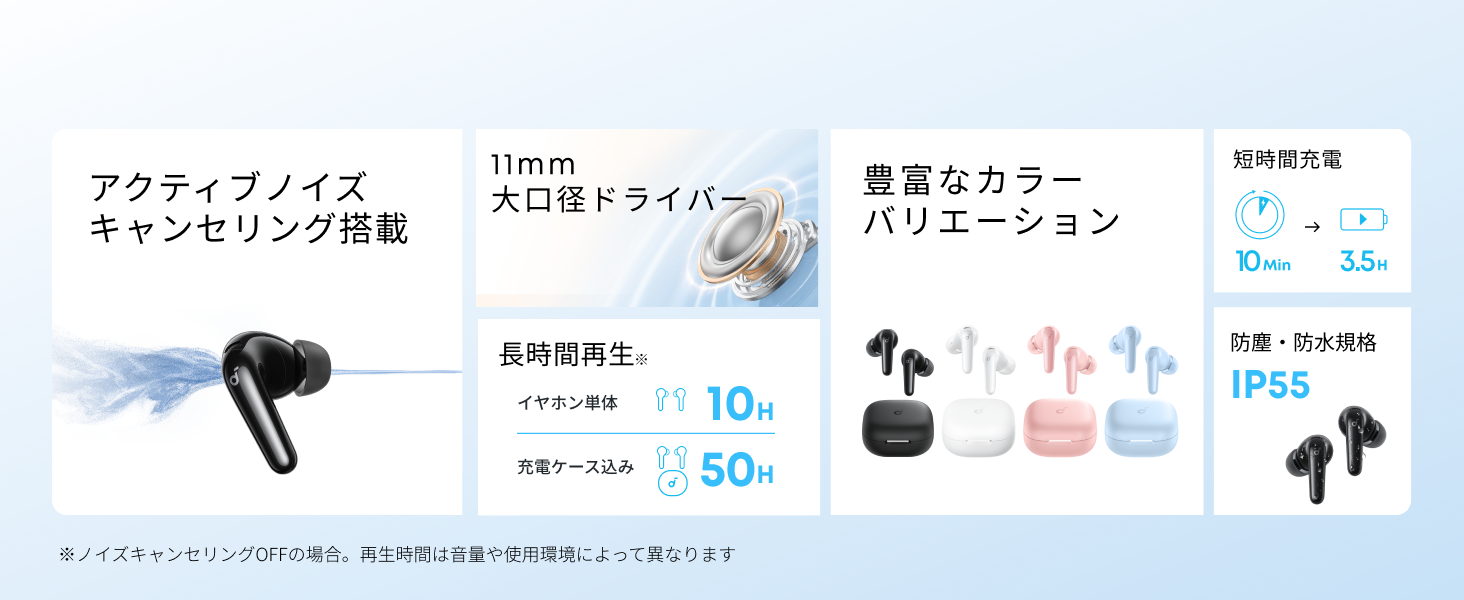
Diagram showing the Soundcore P31i earbuds and charging case with key components labeled.
ყურები Each earbud is equipped with an 11mm dynamic driver for powerful bass and clear sound. They feature active noise cancellation and AI noise reduction for calls. The ergonomic design ensures a secure and comfortable fit.
დამუხტვის საქმე: The compact charging case not only stores and protects your earbuds but also recharges them on the go. It has a USB-C charging port and a strap hole for portability.
ყურსასმენების და ქეისის დამუხტვა
პირველი გამოყენების წინ სრულად დატენეთ როგორც ყურსასმენები, ასევე დამტენი ქეისი.
- ყურსასმენების დატენვა: Place the earbuds into the charging case. The indicator lights on the earbuds will show charging status.
- საქმის დატენვა: Connect the charging case to a power source using the provided USB-C to USB-A cable. A full charge for the case and earbuds takes approximately 3 hours.
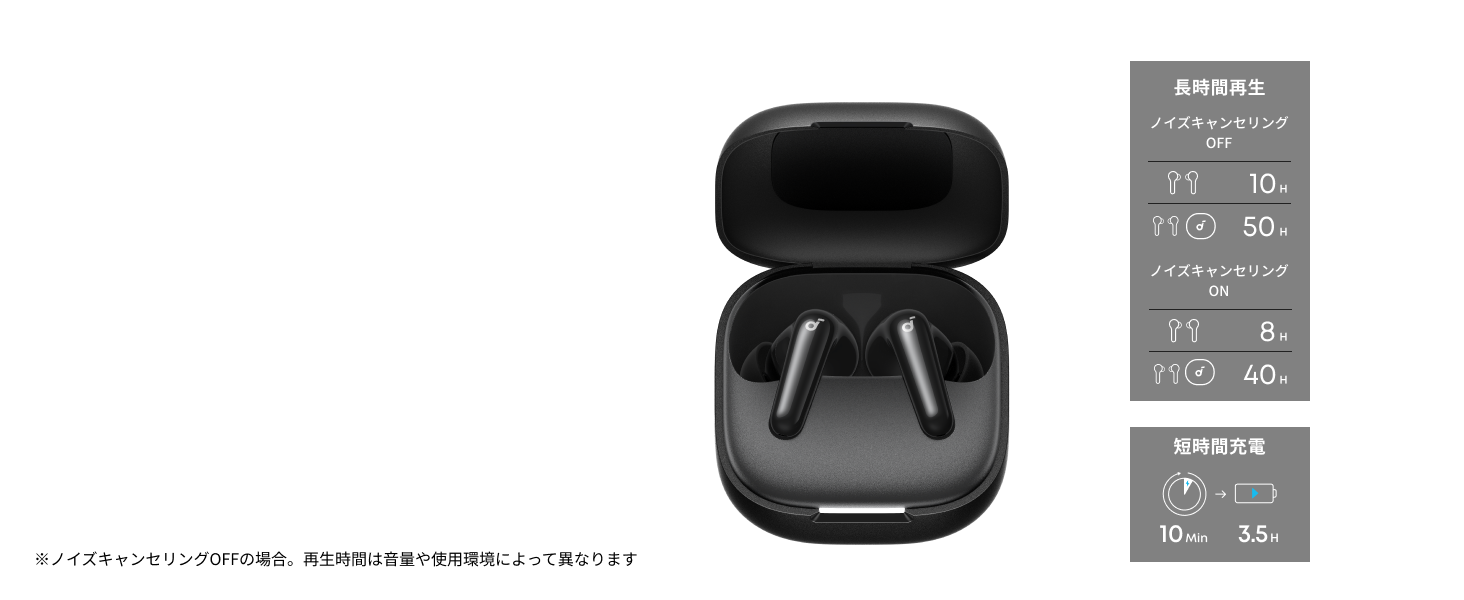
Diagram illustrating charging times and playback duration for Soundcore P31i earbuds.
ბატარეის ხანგრძლივობა:
- Up to 10 hours of playback on a single charge (earbuds only).
- დამტენი ქეისით სულ 50 საათამდე დაკვრის დრო.
- A quick 10-minute charge provides up to 3.5 hours of listening time.
Note: Playback time varies depending on volume level and audio content.
ყურსასმენების ტარება
For optimal sound quality and comfort, it is important to wear your earbuds correctly.
- აირჩიეთ სწორი ყურის რჩევები: Select the ear tips that provide the best seal and comfort for your ears. Experiment with different sizes (XS, S, M, L) to find the perfect fit.
- ჩადეთ ყურსასმენები: ფრთხილად ჩადეთ ყურსასმენები ყურის არხებში.
- დამაგრებისთვის მოატრიალეთ: Twist the earbuds slightly until they fit snugly and securely in your ears.

Image showing a person wearing the Soundcore P31i earbuds correctly.
Bluetooth დაწყვილება
Follow these steps to pair your Soundcore P31i earbuds with your device:
- პირველად დაწყვილება:
- Open the charging case. The earbuds will automatically enter Bluetooth pairing mode. The indicator lights on the earbuds will flash white.
- თქვენს მოწყობილობაზე (სმარტფონი, პლანშეტი და ა.შ.) გადადით Bluetooth პარამეტრებში.
- Select "Soundcore P31i" from the list of available devices.
- Once connected, the indicator lights on the earbuds will turn solid white for 1 second and then turn off.
- სხვა მოწყობილობასთან დაწყვილება:
- ყურსასმენები დამტენ ქეისში მოათავსეთ და სახურავი ღია დატოვეთ.
- Press and hold the button on the charging case for 3 seconds until the earbud indicator lights flash white rapidly.
- Repeat steps 2 and 3 from "First-Time Pairing" on your new device.
კონტროლი
The Soundcore P31i earbuds feature touch controls for managing playback, calls, and other functions. Specific control configurations can often be customized via the Soundcore app.
General Touch Controls (Default):
- დაკვრა/პაუზა: შეეხეთ ერთხელ ყურის ორივე ყურსასმენზე.
- შემდეგი სიმღერა: ორჯერ შეეხეთ მარჯვენა ყურსასმენს.
- წინა ჩანაწერი: ორჯერ შეეხეთ მარცხენა ყურსასმენს.
- ზარის პასუხი/დასრულება: შეეხეთ ერთხელ ყურის ორივე ყურსასმენზე.
- ზარის უარყოფა: ხანგრძლივად დააჭირეთ რომელიმე ყურსასმენს 2 წამის განმავლობაში.
- ხმოვანი ასისტენტის გააქტიურება: Triple-tap either earbud (may vary).
- ANC/გამჭვირვალობის რეჟიმის გადართვა: Press and hold the right earbud for 2 seconds (may vary).
For detailed and customizable controls, please refer to the Soundcore app or the included Quick Start Guide.
აქტიური ხმაურის გაუქმება (ANC)
The Soundcore P31i earbuds feature Active Noise Cancelling technology to minimize ambient noise, allowing for an immersive listening experience.

Illustration demonstrating the active noise cancelling feature of the Soundcore P31i earbuds.
ANC detects and reduces various types of noise, such as engine hum on trains or buses, and chatter in cafes. This allows you to enjoy your music or podcasts with greater clarity and fewer distractions.
To switch between ANC, Normal, and Transparency modes, use the touch controls on the earbuds or adjust settings within the Soundcore app.
ხმის ხარისხი
The Soundcore P31i earbuds are engineered to deliver a rich audio experience.

Diagram illustrating the 11mm dynamic driver responsible for the audio output.
- 11 მმ დინამიური დრაივერები: Equipped with large 11mm drivers, these earbuds produce a wide frequency range and detailed sound.
- BassUp™ Technology: Anker's proprietary BassUp™ technology enhances low frequencies, delivering powerful and impactful bass.
You can further customize the sound profile using the equalizer settings within the Soundcore app.
ზარის ხარისხი
The Soundcore P31i earbuds ensure clear voice calls and web კონფერენციები.

Illustration depicting AI noise reduction technology for clear voice calls.
ხელოვნური ინტელექტის ხმაურის შემცირება: Integrated AI noise reduction technology effectively filters out background noise, ensuring your voice is transmitted clearly to the person on the other end of the call, even in noisy environments.
მრავალპუნქტიანი კავშირი
The Soundcore P31i supports multi-point connection, allowing you to connect to two Bluetooth devices simultaneously.

Illustration showing the Soundcore P31i connected to multiple devices simultaneously.
This feature enables seamless switching between devices. For example, you can listen to music on your laptop and instantly switch to answer a call on your phone without manually re-pairing.
To enable multi-point connection, ensure both devices are paired with your earbuds. The earbuds will automatically connect to the last two paired devices when powered on.
Soundcore აპლიკაცია
Download the Soundcore app to enhance your experience with the P31i earbuds. The app offers various features and customization options.

Screenshots of the Soundcore app interface, highlighting customization features.
App Features include:
- დააკონფიგურიროთ კონტროლი: Personalize touch controls for playback, calls, and voice assistant.
- ექვალაიზერის პარამეტრები: დაარეგულირეთ აუდიო პროfiles to your preference or choose from preset EQs.
- ANC/Transparency Mode Switching: Easily toggle between noise cancelling and transparency modes.
- Firmware განახლებები: ყურსასმენები განახლებული გქონდეთ უახლესი ფუნქციებითა და გაუმჯობესებებით.
- AI Translation Function: (Available from Spring 2026, requires Soundcore app ver 4.0.0 or higher).
The Soundcore app is available for download on both iOS and Android devices.
პროდუქტი დასრულდაview ვიდეო
ოფიციალური პროდუქტის ვიდეო ჩვენებაasing the key features and design of the Soundcore P31i True Wireless Earbuds, including active noise cancellation, powerful bass, long battery life, and multi-point connectivity.
მოვლა და მოვლა
Proper maintenance ensures the longevity and performance of your Soundcore P31i earbuds.
- დასუფთავება: ყურსასმენები და დამტენი ქეისი რეგულარულად გაწმინდეთ რბილი, მშრალი, ბუსუსების გარეშე ქსოვილით. არ გამოიყენოთ უხეში ქიმიკატები ან აბრაზიული მასალები.
- ყურის რჩევები: Remove the ear tips and clean them with water and mild soap if necessary. Ensure they are completely dry before reattaching.
- დატენვის კონტაქტები: სათანადო დატენვის უზრუნველსაყოფად, ყურსასმენებსა და ქეისზე დამტენი კონტაქტები სუფთა და მშრალი უნდა იყოს.
- შენახვა: როდესაც ყურსასმენები არ იყენებთ, შეინახეთ დამტენ ქეისში, რათა დაიცვათ ისინი მტვრისგან და დაზიანებისგან.
- წყლის წინააღმდეგობა: The earbuds are rated IP55 for dust and water resistance. This means they can withstand sweat and light rain, but are not designed for submersion in water. Ensure the earbuds are dry before placing them back in the charging case.

Image showing Soundcore P31i earbuds with water droplets, highlighting their IP55 water resistance.
პრობლემების მოგვარება
If you encounter any issues with your Soundcore P31i earbuds, refer to the following common solutions:
- ყურსასმენები არ არის დაწყვილებული:
- დარწმუნდით, რომ ორივე ყურსასმენი სრულად დატენულია.
- მოათავსეთ ყურსასმენები ქეისში, დახურეთ სახურავი და შემდეგ ხელახლა გახსენით დაწყვილების რეჟიმში ხელახლა გადასასვლელად.
- Forget "Soundcore P31i" from your device's Bluetooth list and try pairing again.
- Reset the earbuds (refer to the Quick Start Guide for specific reset instructions).
- Only One Earbud Playing Audio:
- Place both earbuds back into the charging case and close the lid for 5 seconds, then open it again.
- დარწმუნდით, რომ ორივე ყურსასმენს საკმარისი ბატარეა აქვს.
- ყურსასმენების გადატვირთვა.
- ხმის ცუდი ხარისხი:
- დარწმუნდით, რომ ყურის წვერები კარგად ერევა ყურის არხში. სცადეთ სხვადასხვა ზომის.
- ყურსასმენების საქშენებიდან ნარჩენების გასუფთავება.
- ჩარევის თავიდან ასაცილებლად, მიუახლოვდით თქვენს დაკავშირებულ მოწყობილობას.
- დატენვის საკითხები:
- შეამოწმეთ დამტენის კაბელი და ადაპტერი დაზიანებისთვის.
- დარწმუნდით, რომ ყურსასმენებსა და ქეისზე დამტენი კონტაქტები სუფთაა.
- სცადეთ სხვა დამტენი კაბელი ან კვების წყარო.
სპეციფიკაციები
| ფუნქცია | დეტალი |
|---|---|
| ბრენდი | საუნდკორი |
| მოდელის სახელი | P31i |
| მოდელის ნომერი | D1202 |
| ფერი | Black (This specific variant) |
| ფორმის ფაქტორი | ყურში |
| დაკავშირების ტექნოლოგია | უსადენო (Bluetooth 6.1) |
| ხმაურის კონტროლი | აქტიური ხმაურის გაუქმება |
| დრაივერის ზომა | 11 მმ დინამიური დრაივერები |
| დაკვრის დრო (ყურსასმენები) | 10 საათამდე |
| დაკვრის საერთო დრო (ქეისით) | 50 საათამდე |
| სწრაფი დატენვა | 10 წუთიანი დატენვა 3.5 საათიანი დაკვრისთვის |
| დატენვის დრო (სრული) | დაახლოებით 3 საათი |
| წყლის წინააღმდეგობა | IP55 |
| მრავალპუნქტიანი კავშირი | მხარდაჭერილი |
| UPC | 194644251543 |
| წარმოშობის ქვეყანა | ჩინეთი |
გარანტია და მომხმარებელთა მხარდაჭერა
Soundcore provides a comprehensive warranty for your P31i earbuds.

Image detailing the warranty period and extension for Soundcore P31i.
- სტანდარტული გარანტია: An 18-month warranty is provided for products purchased from authorized retailer AnkerDirect.
- გაფართოებული გარანტია: Anker members can extend their warranty up to a maximum of 24 months.
- მნიშვნელოვანი შენიშვნა: Purchases from unauthorized sellers may not be covered under warranty.
For product inquiries, delivery questions, or technical support, please contact Soundcore customer support. Contact details can typically be found on the official Soundcore webსაიტზე ან თქვენს სწრაფი დაწყების სახელმძღვანელოში.
უსაფრთხოების ინფორმაცია
გთხოვთ, წაიკითხოთ და დაიცვათ ეს უსაფრთხოების ინსტრუქციები, რათა თავიდან აიცილოთ თქვენი მოწყობილობის დაზიანება ან საკუთარი თავის დაზიანება:
- არ დაშალოთ ან შეცვალოთ ყურსასმენები ან დამტენი ქეისი.
- მოწყობილობა მოარიდეთ ექსტრემალურ ტემპერატურას, მზის პირდაპირ სხივებს და ღია ცეცხლს.
- Avoid exposing the device to excessive moisture or liquids, beyond its IP55 rating.
- Do not use the device at high volume levels for extended periods to prevent hearing damage.
- შეინახეთ ბავშვებისა და შინაური ცხოველებისთვის მიუწვდომელ ადგილას.
- გადაყარეთ პროდუქტი პასუხისმგებლობით ადგილობრივი წესების შესაბამისად.