
შესავალი
This manual provides detailed instructions for the installation, operation, and maintenance of the ASUS B760M-AYW WiFi D4 II microATX motherboard. Please read this manual thoroughly before installing or using the product to ensure correct setup and optimal performance.
უსაფრთხოების ინფორმაცია
- შიდა კომპონენტებთან შეხებამდე ყოველთვის გამორთეთ კვების კაბელი კედლის როზეტიდან.
- Wear an anti-static wrist strap or frequently touch a grounded object to prevent electrostatic discharge (ESD) damage to components.
- კომპონენტები კიდეებით დაიჭირეთ, რათა თავიდან აიცილოთ მგრძნობიარე ნაწილებთან შეხება.
- გადახურების თავიდან ასაცილებლად, უზრუნველყავით თქვენი კომპიუტერის კორპუსის სათანადო ვენტილაცია.
დაყენება
1. პროცესორის ინსტალაცია
The motherboard supports Intel LGA 1700 socket processors. Carefully align the CPU with the socket, ensuring the triangular mark on the CPU matches the mark on the socket. Lower the CPU gently into the socket, then close the load plate and secure the retention lever.
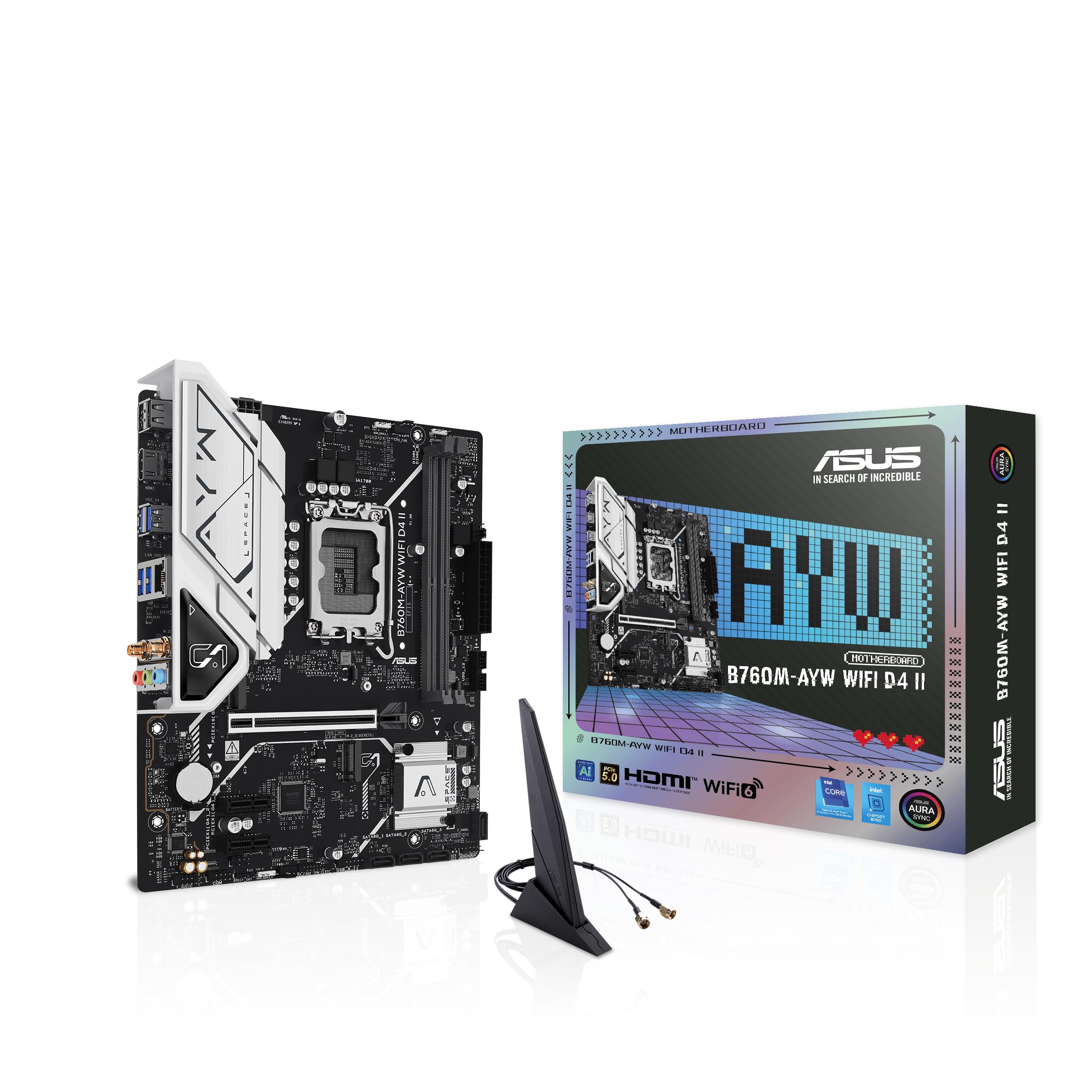
სურათი: ზემოდან ქვემოთ view of the ASUS B760M-AYW WiFi D4 II motherboard, highlighting the LGA 1700 CPU socket.
2. ოპერატიული მეხსიერების (RAM) ინსტალაცია
This motherboard features two DDR4 DIMM slots. For optimal performance, install memory modules in a dual-channel configuration. Open the clips on both ends of the DIMM slot, align the memory module with the slot key, and press down firmly until the clips snap into place.
3. საცავის ინსტალაცია (M.2 და SATA)
The motherboard includes two M.2 slots for NVMe SSDs and four SATA 6 Gbps ports for traditional hard drives or SSDs.
- M.2 SSD: Insert the M.2 SSD into the slot at a 30-degree angle, then push it down and secure it with the provided M.2 screw package.
- SATA დისკები: Connect SATA data cables from your storage drives to the SATA ports on the motherboard. Connect power cables from your power supply to the drives.

Image: The ASUS B760M-AYW WiFi D4 II motherboard shown with its retail box, Wi-Fi antenna, SATA cables, and M.2 screw packages.
4. გაფართოების ბარათის ინსტალაცია (PCIe)
The motherboard features one PCIe 5.0 x16 slot for graphics cards and additional PCIe 4.0 x1 slots for other expansion cards. Insert the card firmly into the desired slot until it clicks into place and secure it with a case screw.
5. დენის კავშირები
შეაერთეთ კვების ბლოკის 24-პინიანი ATX კვების კონექტორი და 8-პინიანი CPU კვების კონექტორი დედაპლატზე არსებულ შესაბამის პორტებთან.
6. წინა პანელის შეერთებები
Connect your PC case's front panel cables (USB 5Gbps, audio, power switch, reset switch, power LED, HDD LED) to the corresponding headers on the motherboard. Refer to the motherboard layout for exact header locations.
7. უკანა შემავალი/გამომავალი კავშირები
Connect your peripherals to the rear I/O ports. These include HDMI, USB 5Gbps Type-A, Realtek 2.5Gb Ethernet, and audio jacks.
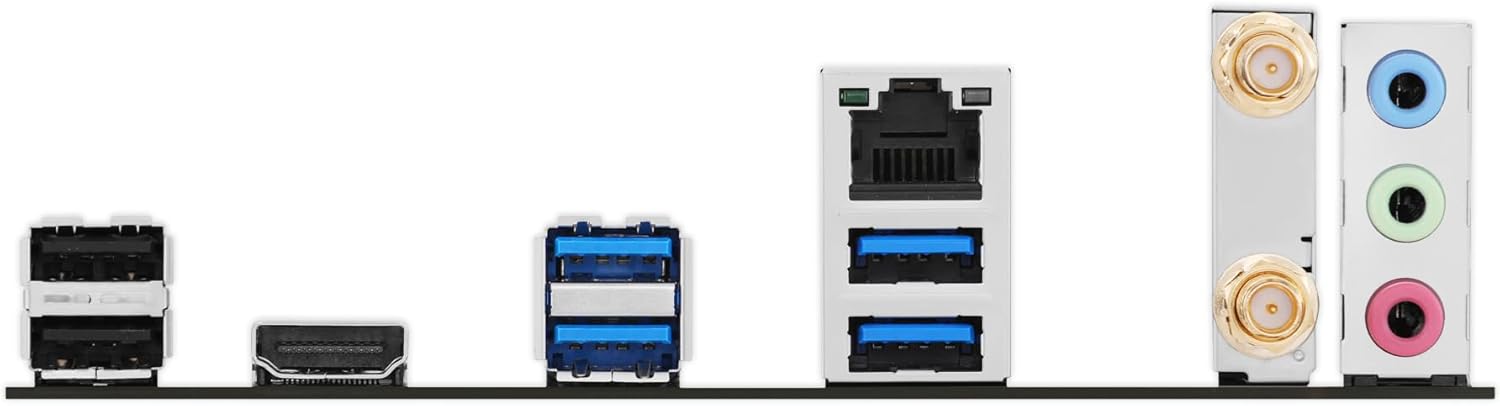
სურათი: დეტალური view of the rear input/output panel of the ASUS B760M-AYW WiFi D4 II motherboard, showing USB ports, Ethernet, and audio jacks.
8. Wi-Fi ანტენის მონტაჟი
Screw the included Wi-Fi antenna onto the two antenna connectors on the rear I/O panel. Position the antenna for optimal signal reception.
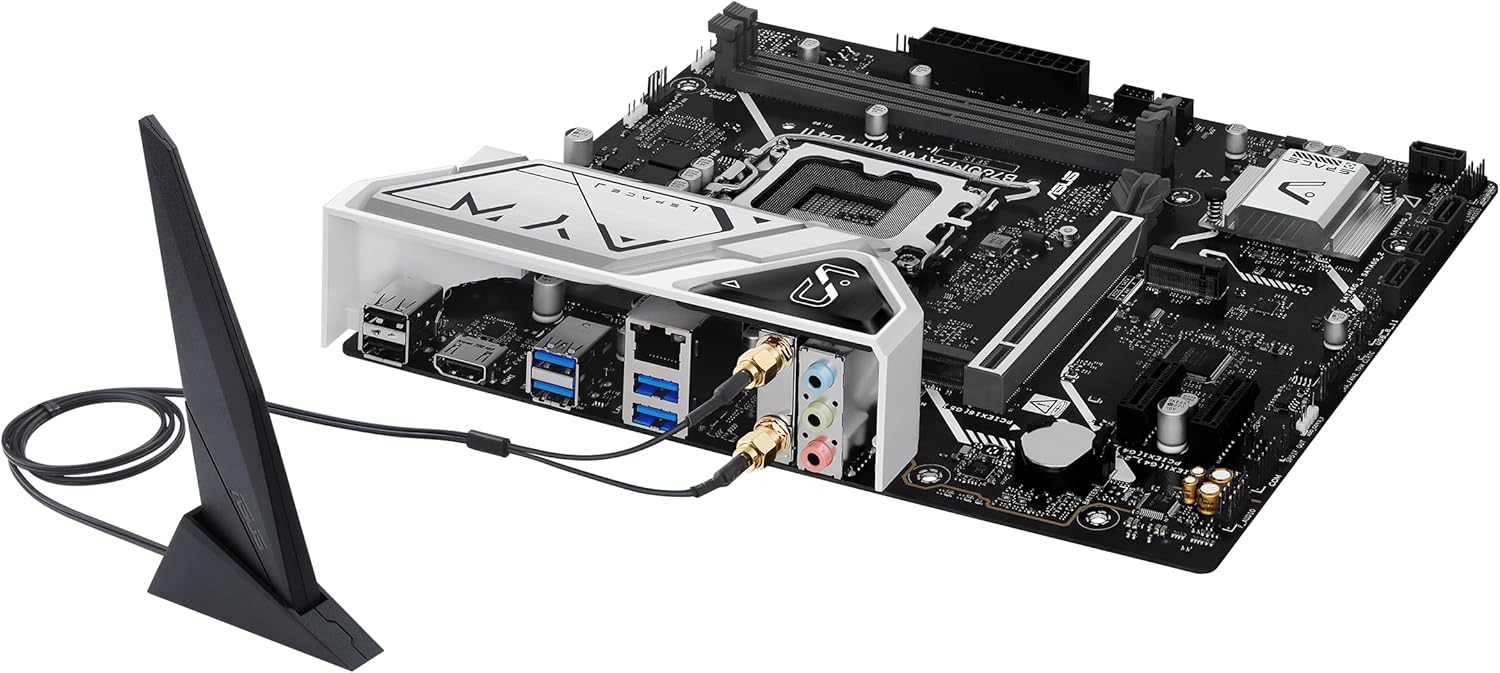
Image: The ASUS B760M-AYW WiFi D4 II motherboard with its external Wi-Fi antenna connected to the rear I/O ports.
ოპერაციული
1. BIOS/UEFI კონფიგურაცია
BIOS/UEFI დაყენების პროგრამაზე წვდომისთვის დააჭირეთ ღილაკს წაშლა key during the Power-On Self-Test (POST). Here you can configure boot order, enable XMP for memory, adjust fan speeds, and manage other system settings.
2. დრაივერის ინსტალაცია
After installing your operating system, install the necessary drivers for the motherboard's components. These include chipset drivers, LAN drivers, Wi-Fi drivers, and audio drivers. Drivers can be found on the ASUS support webსაიტი თქვენი კონკრეტული დედაპლატის მოდელისთვის.
3. პროგრამული უზრუნველყოფის კომუნალური პროგრამები
ASUS provides several utilities to enhance your system experience:
- აურა სინქრონიზაცია: For controlling RGB lighting on compatible components.
- Fan Xpert 2+: For advanced fan control and system cooling optimization.
- იარაღის საწყობის ყუთი: A centralized software suite for system monitoring, driver updates, and utility management.
მოვლა
1. BIOS-ის განახლებები
პერიოდულად შეამოწმეთ ASUS-ის მხარდაჭერა website for BIOS updates. BIOS updates can improve system stability, add support for new hardware, or fix bugs. Use the ASUS EZ Flash utility within the BIOS to perform updates, following the instructions carefully.
2. დრაივერის განახლებები
Keep your drivers updated to ensure optimal performance and compatibility. Regularly check the ASUS support webსაიტი თქვენი დედაპლატის უახლესი დრაივერებისთვის.
3. დასუფთავება
To maintain optimal performance and longevity, regularly clean dust from your PC case and motherboard components. Use compressed air to remove dust from heatsinks, fans, and slots. Ensure the system is powered off and unplugged before cleaning.
პრობლემების მოგვარება
1. Q-LED Core Indicators
The motherboard features Q-LED Core indicators that light up to indicate the status of key components during POST. These LEDs can help diagnose issues:
- პროცესორის LED ინდიკატორი: მიუთითებს CPU-ს ინიციალიზაციის სტატუსზე.
- DRAM LED: Indicates memory detection status.
- VGA LED: Indicates graphics card detection status.
- ჩატვირთვის LED: Indicates boot device detection status.
If an LED remains lit, it suggests an issue with the corresponding component.
2. გავრცელებული პრობლემები
- ძალა არ არის: შეამოწმეთ ყველა კვების შეერთება (24-პინიანი ATX, 8-პინიანი CPU, GPU). დარწმუნდით, რომ კვების წყარო ჩართულია.
- ჩვენების გარეშე: Verify the graphics card is properly seated and connected to power. Ensure the monitor cable is connected to the graphics card, not the motherboard (unless using integrated graphics).
- სისტემის არასტაბილურობა: Check memory seating, run memory diagnostic tools, ensure CPU cooler is properly installed, and verify BIOS settings.
- პერიფერიული მოწყობილობა არ არის გამოვლენილი: Ensure the device is properly connected and its drivers are installed. Try a different port if available.
სპეციფიკაციები
| ფუნქცია | სპეციფიკაცია |
|---|---|
| ბრენდი | ASUS |
| მოდელის სახელი | B760M-AYW WIFI D4 II |
| CPU სოკეტი | LGA 1700 |
| თავსებადი პროცესორები | Intel Core 14th, 13th, 12th Gen, Pentium Gold, Celeron Processors |
| ჩიპსეტის ტიპი | Intel B760 |
| RAM მეხსიერების ტექნოლოგია | DDR4 |
| მეხსიერების სლოტები ხელმისაწვდომია | 2 |
| მეხსიერების მაქსიმალური მოცულობა | 96 GB |
| გრაფიკული ბარათის ინტერფეისი | PCI Express 5.0 x16 |
| Total M.2 Slots | 2 |
| SATA პორტების ჯამური რაოდენობა | 4 |
| Ethernet | Realtek 2.5 გბ Ethernet |
| Wi-Fi | Wi-Fi 6 |
| HDMI პორტები | 1 |
| წინა USB | USB 5Gbps support |
| უკანა USB | USB 5Gbps Type-A |
| ფორმის ფაქტორი | microATX |
| ელემენტის ზომები (L x W x H) | 9.6" სიგრძე x 8.3" სიგანე x 1.4" სიმაღლე |
საგარანტიო ინფორმაცია
The ASUS B760M-AYW WiFi D4 II motherboard comes with a 3-year limited warranty. For detailed terms and conditions, please refer to the warranty card included with your product or visit the official ASUS support webსაიტი.
მხარდაჭერა
ტექნიკური მხარდაჭერის, დრაივერების ჩამოტვირთვის, BIOS-ის განახლებების და პროდუქტის შესახებ დამატებითი ინფორმაციისთვის, გთხოვთ, ეწვიოთ ASUS-ის ოფიციალურ მხარდაჭერის საიტს. webსაიტი:
You can also find FAQs and troubleshooting guides on the support portal.