
1. შესავალი
Thank you for choosing the Thomson 24-inch HD LED Smart TV, model 24HT2S15. This manual provides essential information to help you set up, operate, and maintain your new television. Please read it thoroughly before use and retain it for future reference.

სურათი: წინა მხარე view of the Thomson 24-inch HD LED Smart TV, showcasing its frameless design and key features like HD resolution and Dolby Audio.
ძირითადი მახასიათებლები:
- TiVo OS with Voice Control: Intuitive interface combining live TV and streaming apps, personalized recommendations, and voice commands.
- უკაბელო ეკრანი: Mirror your smartphone, tablet, or laptop screen to the TV.
- Dolby აუდიო: Enhanced sound experience with improved dialogue, detail, and surround effects.
- HDR10: Sharper contrast and realistic colors for an immersive viewგამოცდილება.
- განათებული დისტანციური მართვა: Easy navigation in low light with direct access buttons for popular streaming services.
- Adjustable Side Feet: Flexible positioning options for the TV.
- სამმაგი ტიუნერი: Integrated tuners for cable, satellite, and antenna reception.
2. რა არის ყუთში
შეფუთვის გახსნისას, დარწმუნდით, რომ ყველა შემდეგი ნივთი ხელთ არის:
- Thomson 24-inch HD LED Smart TV (Model 24HT2S15)
- დისტანციური მართვა
- დენის ადაპტერი
- მომხმარებლის სახელმძღვანელო
- საგარანტიო ბარათი
- Adjustable Side Feet (2x)
If any items are missing or damaged, please contact your retailer or Thomson customer support.
3. დაყენება
3.1 შეფუთვა და განთავსება
Carefully remove the TV from its packaging. It is recommended to have two people for this process. Place the TV on a stable, flat surface or mount it on a wall using a compatible VESA mount (not included).
ტელევიზორის გარშემო უზრუნველყოფილი უნდა იყოს საკმარისი ვენტილაცია. არ დაბლოკოთ ვენტილაციის ღიობები.
3.2 სადგამის მიმაგრება
If you are not wall-mounting the TV, attach the included side feet:
- Place the TV face down on a soft, clean cloth to prevent screen damage.
- თითოეული სადგამი ტელევიზორის ქვედა მხარეს შესაბამის ხრახნების ნახვრეტებთან გაასწორეთ.
- Secure the stands using the provided screws. The feet are adjustable from 30 cm to 60 cm distance.

Image: The Thomson 24-inch Smart TV showing its dimensions, including a screen diagonal of 60 cm (24 inches), width of 53 cm, and height of 37 cm with the stand. The adjustable stand feet are also illustrated.
3.3 პერიფერიული მოწყობილობების შეერთება
Connect your external devices to the TV's ports. Refer to the diagram below for port locations.

სურათი: დეტალური view of the rear connection panel of the Thomson 24-inch Smart TV, illustrating various ports including 2x USB 2.0, Antenna input, Satellite input, 3x HDMI 1.4 (one with ARC), Service port, Headphone jack, AV IN, Digital Optical Audio Out, and LAN port.
- სიმძლავრე: Connect the power adapter to the TV and then to a wall outlet.
- ანტენა/თანამგზავრი: Connect your antenna or satellite cable to the respective input.
- HDMI: Use HDMI cables to connect devices like Blu-ray players, game consoles, or set-top boxes. HDMI 1.4/ARC supports Audio Return Channel.
- USB: ჩადეთ USB დისკები მედიის დაკვრის ან პროგრამული უზრუნველყოფის განახლებებისთვის.
- LAN: სადენიანი ინტერნეტ კავშირისთვის შეაერთეთ Ethernet კაბელი.
- AV IN: კომპოზიტური ვიდეოს და სტერეო აუდიოს გამოყენებით ძველი მოწყობილობებისთვის.
- ყურსასმენი: შეაერთეთ ყურსასმენები პირადი მოსასმენად.
- ციფრული ოპტიკური აუდიო გამომავალი: ციფრული აუდიოსთვის დაუკავშირდით გარე ხმის სისტემას.
3.4 პირველადი ჩართვა და პირველად დაყენება
- შეაერთეთ ტელევიზორი დენის წყაროში.
- დააჭირეთ ჩართვის ღილაკს დისტანციური მართვის პულტზე ან ტელევიზორზე.
- Follow the on-screen instructions to select your language, country, and perform channel scanning for your triple tuner (cable/satellite/antenna).
- Connect to your Wi-Fi network by selecting it from the list and entering the password.
- Complete the TiVo OS setup, including signing in or creating an account.
4. თქვენი ტელევიზორის მართვა
4.1 დისტანციური მართვის ფუნქციები
The backlit remote control provides easy access to all TV functions, even in dim lighting. It includes dedicated buttons for popular streaming services.

Image: The Thomson Smart TV remote control, highlighting its backlit buttons, voice control microphone, and direct access buttons for Netflix, YouTube, Prime Video, Disney+, and Canal+.
- დენის ღილაკი: რთავს/გამორთავს ტელევიზორს.
- ნომრის ღილაკები: არხების პირდაპირ შერჩევა.
- ნავიგაციის პანელი (ზემოთ/ქვემოთ/მარცხნივ/მარჯვნივ/კარგი): მენიუში ნავიგაცია და პარამეტრების არჩევა.
- უკან/გასვლა: დაბრუნდით წინა ეკრანზე ან გამოდით მენიუდან.
- ხმის აწევა/დაკლება: დაარეგულირეთ ხმის დონე.
- არხი ზემოთ/ქვემოთ: შეცვალეთ სატელევიზიო არხები.
- დადუმება: ხმის დადუმება ან დადუმება.
- მთავარი: Access the TiVo OS home screen.
- ხმის მართვის ღილაკი: Activate voice commands (microphone icon).
- პირდაპირი წვდომის ღილაკები: Launch Netflix, YouTube, Prime Video, Disney+, Canal+ instantly.
4.2 TiVo OS and Smart Features
The TiVo OS provides a unified platform for live TV and streaming content. Explore personalized recommendations and access your favorite apps.

Image: The Thomson Smart TV screen showing various streaming application icons like Netflix, YouTube, Disney+, Prime Video, Plex, DAZN, Canal+, and Pluto TV, indicating integrated smart TV capabilities.
- აპის წვდომა: Navigate to the home screen to find and launch pre-installed apps or download new ones from the app store.
- ხმის კონტროლი: Press the voice control button on your remote and speak commands to search for content, launch apps, or control TV functions.
- უკაბელო ეკრანი: Use the Wireless Display feature to mirror content from your compatible smartphone, tablet, or laptop directly to your TV screen.

Image: An illustration demonstrating the voice control feature of the Thomson Smart TV, showing a remote control with a microphone icon and examples of voice commands like "Open Netflix" or "Play movies with Tom Hanks."

Image: The Thomson Smart TV displaying content mirrored from a smartphone, illustrating the Wireless Display and Google Cast features for seamless content sharing.
4.3 გამოსახულების და ხმის გაუმჯობესება
- HDR10: Experience improved contrast, brightness, and color accuracy with HDR10 content. This technology enhances both bright and dark scenes for a more dynamic picture.
- Dolby აუდიო: Enjoy rich, clear, and powerful sound. Dolby Audio optimizes dialogue, enhances detail, and provides an immersive surround sound experience.

Image: A side-by-side comparison of picture quality, demonstrating the enhanced contrast and color vibrancy of HDR10 on the right compared to standard SDR on the left, with a building and landscape scene.

Image: An illustration depicting sound waves emanating from a TV screen, with the Dolby Audio logo prominently displayed, signifying enhanced audio quality for an immersive viewგამოცდილება.
5. მოვლა
5.1 ტელევიზორის გაწმენდა
- ეკრანი: ფრთხილად გაწმინდეთ ეკრანი რბილი, ბუსუსების გარეშე ქსოვილით. ჯიუტი ლაქების შემთხვევაში, ოდნავ გაწმინდეთampქსოვილი წყლით ან სპეციალური ეკრანის საწმენდი საშუალებით დაასველეთ. არასდროს შეასხუროთ სითხე პირდაპირ ეკრანზე.
- კაბინეტი: Wipe the TV cabinet and stand with a soft, dry cloth.
- დისტანციური მართვა: გაწმინდეთ დისტანციური მართვის პულტი რბილი, მშრალი ქსოვილით.
სიფრთხილე:
- ტელევიზორის გაწმენდამდე ყოველთვის გამორთეთ დენის წყაროდან.
- არ გამოიყენოთ აბრაზიული საწმენდები, ცვილები ან გამხსნელები.
5.2 პროგრამული უზრუნველყოფის განახლებები
Your Smart TV may receive software updates to improve performance and add new features. It is recommended to enable automatic updates or check for updates periodically through the TV's settings menu to ensure optimal functionality and security.
6. Დიაგნოსტიკა
თუ თქვენს ტელევიზორთან დაკავშირებით პრობლემები შეგექმნათ, იხილეთ შემდეგი გავრცელებული პრობლემები და მათი გადაჭრის გზები:
| პრობლემა | შესაძლო მიზეზი | გამოსავალი |
|---|---|---|
| არავითარი ძალა | დენის კაბელი გათიშულია; დენის წყაროს პრობლემაა | დარწმუნდით, რომ კვების კაბელი საიმედოდ არის შეერთებული. შეამოწმეთ როზეტი სხვა მოწყობილობით. |
| სურათი არ არის, მაგრამ ხმა არის | არასწორი შეყვანის წყარო; გაუმართავი კაბელი | Check the input source (e.g., HDMI 1, Antenna). Ensure cables are connected correctly. |
| ხმა არ არის, მაგრამ სურათი არის | ხმა დახშულია ან ძალიან დაბალია; გარე აუდიო სისტემის პრობლემა | Unmute the TV or increase volume. Check audio settings and external audio connections. |
| დისტანციური მართვა არ მუშაობს | Dead batteries; obstruction; remote not paired | Replace batteries. Remove any obstructions. Re-pair the remote if necessary (refer to TV settings). |
| Wi-Fi-თან დაკავშირება შეუძლებელია | არასწორი პაროლი; როუტერის პრობლემა; ტელევიზორი როუტერიდან ძალიან შორსაა | Verify Wi-Fi password. Restart your router. Move TV closer or use a wired LAN connection. |
| Smart features not responding | Network issue; temporary software glitch | Check internet connection. Restart the TV by unplugging it for a minute and plugging it back in. |
If the problem persists after trying these solutions, please contact Thomson customer support.
7. სპეციფიკაციები
Detailed technical specifications for the Thomson 24HT2S15 Smart TV:
| ფუნქცია | დეტალი |
|---|---|
| ბრენდი | ტომსონი |
| მოდელის ნომერი | 24HT2S15 |
| ეკრანის ზომა | 24 ინჩი (60 სმ) |
| ჩვენების ტექნოლოგია | LED |
| რეზოლუცია | 768p (1366 x 768 პიქსელი) |
| განახლების სიხშირე | 60 ჰც |
| ასპექტის თანაფარდობა | 16:9 |
| დაკავშირების ტექნოლოგია | Ethernet, HDMI, USB, Wi-Fi |
| განსაკუთრებული თვისებები | Parental Controls, TiVo OS, Voice Control, HDR10, Dolby Audio |
| პროდუქტის ზომები (სადგამით) | 8P x 53l x 37H cm (approx. 8 x 53 x 37 cm) |
| წონა | 3.33 კგ |
| მოყვება კომპონენტები | Power Adapter, User Manual, Warranty Card, Remote Control |
| მხარდაჭერილი ენები | ფრანგული, ინგლისური, იტალიური, ესპანური, გერმანული |
| ენერგოეფექტურობის კლასი | E |
| EPREL-ის პროდუქტის ინფორმაცია | https://eprel.ec.europa.eu/qr/1969520 |
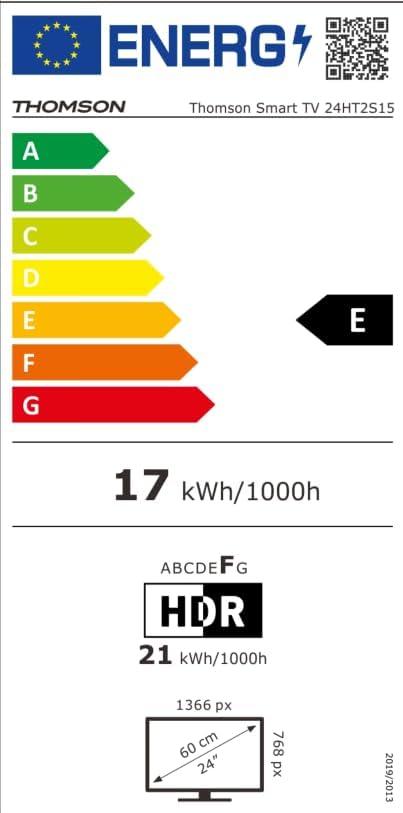
Image: The EU Energy Label for the Thomson Smart TV 24HT2S15, showing an energy efficiency class of E and energy consumption of 17 kWh/1000h for SDR and 21 kWh/1000h for HDR.
8. გარანტია და მხარდაჭერა
8.1 ინფორმაცია გარანტიის შესახებ
Thomson products are covered by a 3-year warranty. For detailed information regarding warranty claims, returns, or defective products, please refer to the warranty card included in your package or visit the Thomson support webსაიტი.
For specific information on purchases made via Amazon, consult Amazon's help pages regarding returns and defective products.
8.2 მომხმარებელთა მხარდაჭერა
If you require further assistance or have questions not covered in this manual, please contact Thomson customer support:
- მწარმოებელი: ნაკადიview GmbH
- ელფოსტა: კონტაქტი@ნაკადიview.com
- Webსაიტი: www.streamview.com
- ტელეფონი: +4318900066
Please have your model number (24HT2S15) and purchase details ready when contacting support.