
1. შესავალი
This manual provides essential information for the safe and efficient use of your suevery Prebuilt Gaming PC. Please read these instructions carefully before operating the device and retain them for future reference. This gaming PC is designed for high-performance computing, suitable for gaming, business, and everyday use.

სურათი 1.1: დასრულდაview of the suevery Prebuilt Gaming PC with internal RGB lighting.
2. დაყენების გზამკვლევი
Follow these steps to set up your new suevery Prebuilt Gaming PC:
- შეფუთვა: Carefully remove the PC from its packaging. Inspect for any visible damage.
- განთავსება: მოათავსეთ კომპიუტერი სტაბილურ, ბრტყელ ზედაპირზე, სათანადო ვენტილაციით. დარწმუნდით, რომ ვენტილაციის არხები არ არის დაბლოკილი.
- პერიფერიული მოწყობილობების დაკავშირება:
- Connect your monitor(s) to the graphics card's HDMI or DisplayPort outputs.
- შეაერთეთ თქვენი კლავიატურა და მაუსი არსებულ USB პორტებთან.
- Connect speakers or headphones to the audio output ports.
- For wired internet, connect an Ethernet cable to the LAN port. For Wi-Fi, ensure antennas are attached if external.
- დენის კავშირი: Connect the power cable to the PC's power supply unit and then to a grounded electrical outlet.
- პირველი ჩატვირთვა: Press the power button on the front of the PC. The system will initiate the boot process. Follow any on-screen instructions for initial operating system setup.
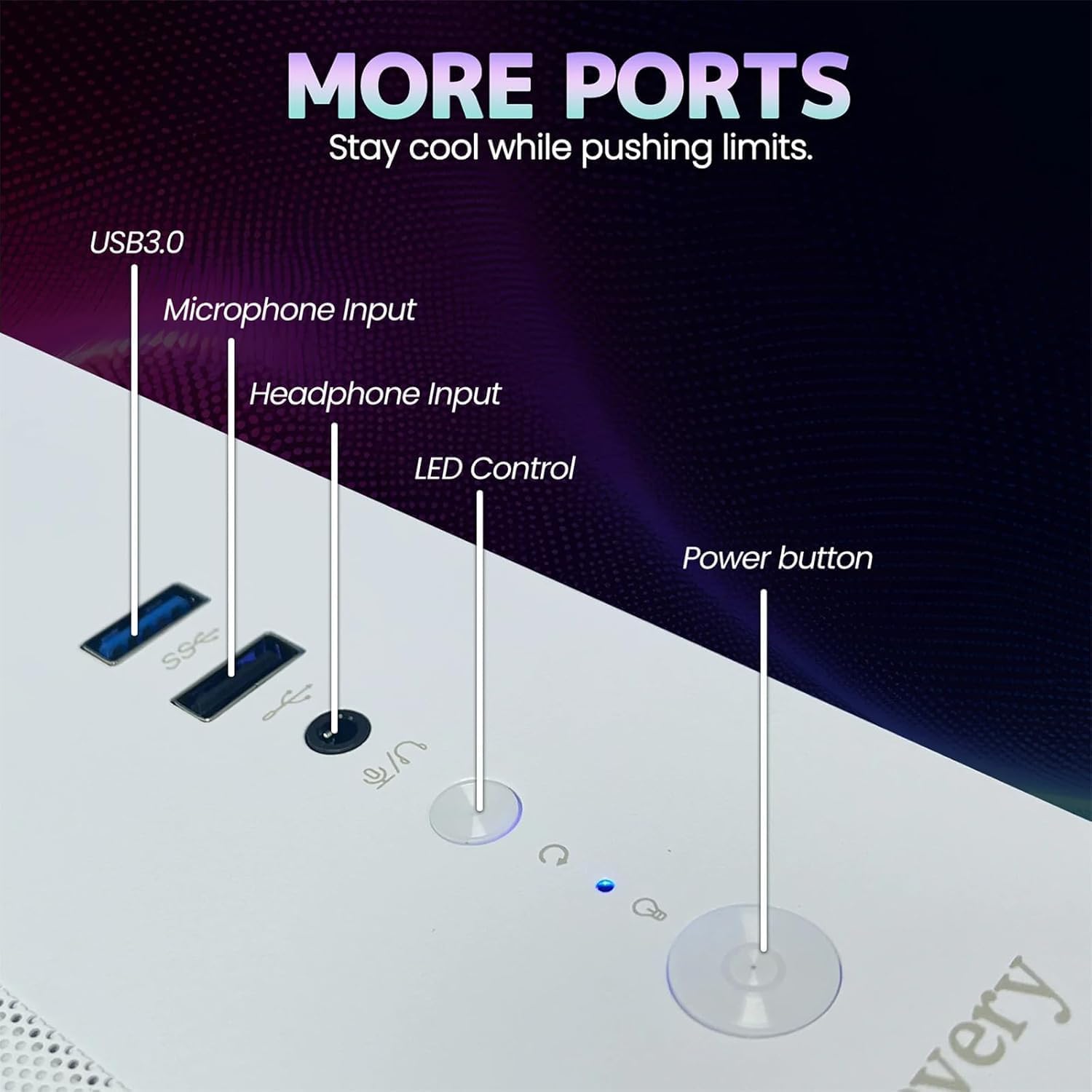
Image 2.1: Rear panel of the PC illustrating various connectivity ports including USB, HDMI, and audio jacks.
3. საოპერაციო ინსტრუქციები
Your suevery Prebuilt Gaming PC comes with a pre-installed operating system (DOS, requiring user installation of a full OS). Once your preferred operating system is installed and configured, you can begin using your PC.
- ჩართვა/გამორთვა: Press the power button to turn the PC on. To turn off, use the operating system's shutdown function. Avoid direct power-off unless necessary to prevent data loss.
- RGB განათების კონტროლი: The PC features customizable RGB lighting. Refer to the specific software or physical button (if available, as indicated in Image 2.1) for adjusting lighting modes and colors.
- პროგრამული უზრუნველყოფის ინსტალაცია: Install necessary drivers for your graphics card and other components from the manufacturer's websites for optimal performance. Install your desired games and applications.
- დაკავშირება: Utilize the Wi-Fi 6 for high-speed wireless internet or the Ethernet port for a stable wired connection. The multiple USB ports allow for connecting various peripherals.
Video 3.1: An official video demonstrating the suevery Prebuilt Gaming PC Desktop Computer, showcasinგ მისი დიზაინი და მახასიათებლები.
4. მოვლა
Regular maintenance ensures the longevity and optimal performance of your PC.
- მტვრისგან გაწმენდა: Periodically clean dust from the internal components, especially fans and heatsinks, using compressed air. Ensure the PC is powered off and unplugged before cleaning.
- პროგრამული განახლებები: Keep your operating system, drivers, and antivirus software updated to ensure security and performance.
- საკაბელო მენეჯმენტი: Ensure internal and external cables are neatly organized to improve airflow and prevent accidental disconnections.
- ვენტილაცია: Always ensure the PC has clear space around its vents for proper airflow.

სურათი 4.1: შიდა view of the PC highlighting the cooling fans and component layout, emphasizing the importance of dust removal.
5. Დიაგნოსტიკა
ეს განყოფილება განიხილავს გავრცელებულ პრობლემებს, რომლებსაც შეიძლება წააწყდეთ.
| პრობლემა | შესაძლო გამოსავალი |
|---|---|
| კომპიუტერი არ ირთვება. | Check power cable connections to the PC and wall outlet. Ensure the power supply switch on the back of the PC is in the 'On' position. Test the outlet with another device. |
| მონიტორზე ჩვენება არ არის. | Ensure the monitor is powered on and connected to the graphics card (not the motherboard's video output). Try a different cable or monitor. |
| სისტემა ნელია ან იყინება. | Check for background applications consuming resources. Update drivers. Scan for malware. Ensure adequate ventilation to prevent overheating. |
| Wi-Fi კავშირის პრობლემები. | Ensure Wi-Fi antennas are securely attached. Restart your router and PC. Update Wi-Fi drivers. |
| RGB განათება არ მუშაობს. | Check connections to the RGB controller. Use the dedicated RGB control button or software to adjust settings. |
6. სპეციფიკაციები
Detailed technical specifications for your suevery Prebuilt Gaming PC.
| ფუნქცია | დეტალი |
|---|---|
| ბრენდი | საჩივარი |
| მოდელის სახელი | SU-V9W2-V9W4 |
| CPU მოდელი | AMD Ryzen 5 (6 Cores, 3.6 GHz up to 4.1 GHz) |
| RAM მეხსიერება | 16 GB DDR4 3200 MHz (Max 32 GB) |
| შენახვა | 512 GB M.2 PCIe NVMe SSD |
| გრაფიკული კოპროცესორი | RX 560 4G GDDR5 (Dedicated) |
| ოპერაციული სისტემა | DOS (User-installed OS required) |
| დაკავშირება | Wi-Fi 6 (802.11ax), USB (2x USB 3.0, 4x USB 2.0), HDMI |
| ენერგიის მოხმარება | 400 ვატი |
| ზომები (L x W x H) | 13.35 x 10.87 x 12.99 ინჩი |
| ფერი | თეთრი |

Image 6.1: Dimensional diagram of the suevery Prebuilt Gaming PC, indicating its compact size.
7. გარანტია და მხარდაჭერა
Your suevery Prebuilt Gaming PC comes with a 1 წლიანი გარანტია შეძენის დღიდან, წარმოების დეფექტების დაფარვით.
For technical support, warranty claims, or further assistance, please contact suevery customer service through the retailer's platform or visit the official suevery webსაიტი საკონტაქტო ინფორმაციისთვის.
Please have your product model number (Ryzen5-16G-512G-RX560 4G) and proof of purchase ready when contacting support.