
შესავალი
This manual provides essential information for setting up, operating, and maintaining your Origimagic C2 Neo N95 Mini PC. Please read these instructions carefully before using the device to ensure proper functionality and longevity. The C2 Neo N95 is a compact and powerful mini PC designed for various applications, from daily office tasks and entertainment to more advanced uses like network firewalls and home servers.
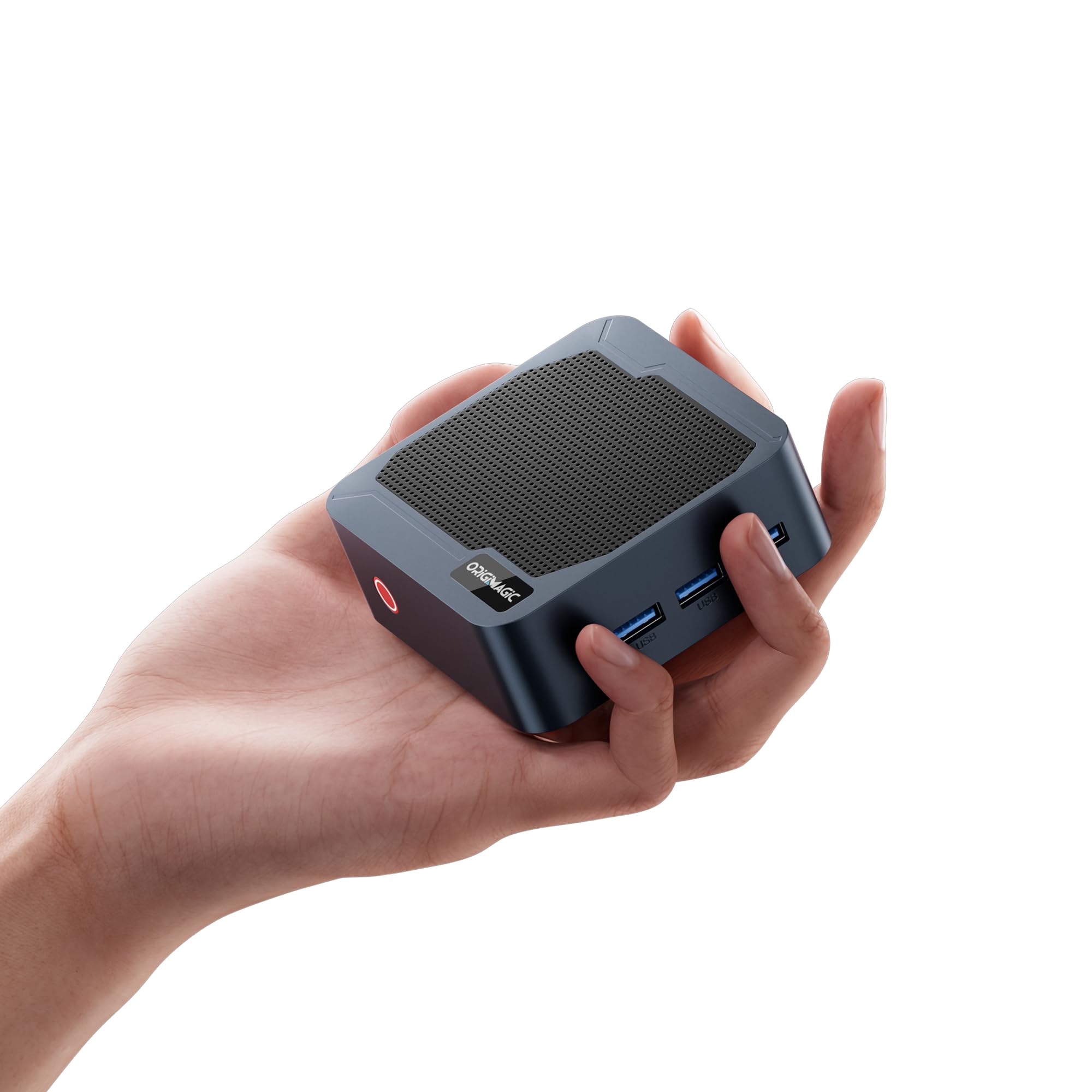
Image: The Origimagic C2 Neo N95 Mini PC, a compact desktop computer.
პაკეტის შიგთავსი
დარწმუნდით, რომ შეფუთვაში ყველა ნივთია:
- Origimagic C2 Neo Mini PC x1
- დენის ადაპტერი x1
- HDMI კაბელი x1
- მომხმარებლის სახელმძღვანელო x1

Image: The C2 Neo Mini PC, power adapter, HDMI cable, and user manual.
პროდუქტი დასრულდაview
The Origimagic C2 Neo N95 Mini PC is equipped with a range of features and ports to support diverse computing needs.
ძირითადი მახასიათებლები:
- პროცესორი: Intel N95 (12th Gen Alder Lake-N95, 4 Cores, 4 Threads, up to 3.4GHz, 6MB Cache, 15W TDP)
- მეხსიერება: 12GB LPDDR5 Onboard RAM
- შენახვა: 512GB M.2 PCIe 3.0x1 NVMe SSD
- გრაფიკა: Intel UHD Graphics, supporting 4K@60Hz
- ეკრანის გამომავალი: 2x HDMI 2.0, 1x DisplayPort (supports triple 4K@60Hz displays)
- ქსელი: Dual 1GbE RJ45 LAN ports, Wi-Fi 5 (802.11ac), Bluetooth 5.0
- USB პორტები: 3x USB 3.2 Gen1 Type-A (5Gbps)
- აუდიო: 3.5 მმ აუდიო კომბინირებული ჯეკი
- ოპერაციული სისტემა: Pre-installed Windows 11 Pro, supports Linux
- გაგრილება: Efficient and quiet heat dissipation system
პორტის განლაგება:

სურათი: წინა მხარე view showing power button and USB 3.2 ports. Rear view showing dual 1G RJ45 LAN, audio jack, DC power input, 2x HDMI 2.0, and 1x DisplayPort.
შიდა კომპონენტები:

Image: Visual representation of the Intel N95 processor, highlighting its 4 cores, 4 threads, 3.40GHz max boost clock, and 15W default TDP.

Image: Illustration of the high-capacity, high-performance memory and storage, featuring 12GB LPDDR5 onboard RAM and a 512GB M.2 PCIe 3.0x1 SSD.
გაგრილების სისტემა:

სურათი: აფეთქებული view showing the internal cooling system, including a smart fan and heat conduits, designed for efficient and quiet operation.
დაყენების სახელმძღვანელო
Follow these steps for initial setup of your C2 Neo Mini PC:
- პერიფერიული მოწყობილობების დაკავშირება: Connect your keyboard, mouse, and other USB devices to the available USB 3.2 ports on the mini PC.
- ეკრანის დაკავშირება: Connect your monitor(s) to the HDMI 2.0 or DisplayPort outputs using the provided HDMI cable or a compatible DisplayPort cable. The device supports up to three 4K@60Hz displays simultaneously.
- ქსელთან დაკავშირება (არასავალდებულო): For a wired internet connection, connect an Ethernet cable from your router or modem to one of the 1GbE RJ45 LAN ports. For wireless, ensure your Wi-Fi network is available during OS setup.
- დაკავშირება ძალა: Plug the power adapter into the DC input port on the mini PC, then plug the adapter into a power outlet.
- ჩართვა: Press the power button on the front of the mini PC. The system will boot up.
- Initial OS Setup: Follow the on-screen instructions to complete the Windows 11 Pro setup. This typically involves selecting language, region, and setting up user accounts.
Triple Display Setup:

Image: A setup demonstrating the C2 Neo Mini PC connected to three monitors, enabling an expanded desktop for multitasking.
ოპერაციული ინსტრუქციები
Your C2 Neo Mini PC comes with Windows 11 Pro pre-installed. It also supports Linux operating systems.
ძირითადი ოპერაცია:
- ჩართვა/გამორთვა: Press the power button once to turn on. To shut down, use the operating system's shutdown function. A short press while on will put the system to sleep. A long press (5-7 seconds) will force a shutdown.
- გადატვირთვა: გამოიყენეთ ოპერაციული სისტემის გადატვირთვის ფუნქცია.
- Wi-Fi-თან დაკავშირება: In Windows, navigate to Settings > Network & internet > Wi-Fi to connect to your preferred wireless network.
- Bluetooth მოწყობილობები: In Windows, go to Settings > Bluetooth & devices to pair Bluetooth peripherals.
Operating System Flexibility:

Image: Displays illustrating the pre-installed Windows 11 Pro and support for Ubuntu Linux systems, showcasing the device's OS flexibility.
Advanced Uses:
The dual 1GbE LAN ports make this mini PC suitable for advanced networking applications such as:
- Soft Router: Configure the mini PC to act as a custom router with advanced features.
- Network Firewall: Enhance network security by deploying it as a dedicated firewall.
- Lightweight NAS: Set up a Network Attached Storage solution for centralized data storage.
- Smart Home Hub: Integrate and manage various smart home devices.
მოვლა
Regular maintenance helps ensure optimal performance and extends the lifespan of your mini PC.
- დასუფთავება: Use a soft, dry cloth to clean the exterior of the device. For vents, use compressed air to remove dust buildup. Ensure the device is powered off and unplugged before cleaning.
- პროგრამული განახლებები: Regularly update your operating system and drivers to the latest versions to benefit from performance improvements and security patches.
- შენახვის მენეჯმენტი: პერიოდულად გაწმინდეთ არასაჭირო files and applications to maintain adequate free storage space for optimal system responsiveness.
- ვენტილაცია: Ensure the mini PC is placed in a well-ventilated area, away from direct sunlight or heat sources, to prevent overheating. Do not block the ventilation holes.
პრობლემების მოგვარება
If you encounter issues with your C2 Neo Mini PC, refer to the following common solutions:
| პრობლემა | შესაძლო გამოსავალი |
|---|---|
| No power/System won't turn on | Ensure the power adapter is securely connected to both the mini PC and a working power outlet. Try a different outlet. |
| ეკრანის გამომავალი არ არის | Check that the HDMI/DisplayPort cable is securely connected to both the mini PC and the monitor. Ensure the monitor is powered on and set to the correct input source. Try a different cable or monitor if possible. |
| Wi-Fi or Bluetooth not working | Check device manager for driver issues. Ensure Wi-Fi/Bluetooth is enabled in Windows settings. Restart the mini PC and your router/modem. |
| ნელი შესრულება | Close unnecessary applications. Check for background processes consuming high resources. Ensure sufficient free storage space. Run Windows Update. |
| პერიფერიული მოწყობილობა არ არის ამოცნობილი | Try connecting the peripheral to a different USB port. Ensure drivers are installed (if required). Restart the mini PC. |
სპეციფიკაციები
Detailed technical specifications for the Origimagic C2 Neo N95 Mini PC:
| ფუნქცია | დეტალი |
|---|---|
| პროცესორი | Intel N95 (4 Cores, 4 Threads, 3.4 GHz Max Turbo Frequency, 6MB Smart Cache) |
| გრაფიკა | Intel UHD Graphics (1.2GHz Graphics Frequency) |
| ოპერატიული მეხსიერება | 12GB LPDDR5 (Onboard) |
| შენახვა | 512GB M.2 2280 PCIe 3.0x1 SSD |
| ოპერაციული სისტემა | Windows 11 Pro (Supports Linux) |
| ვიდეო გამომავალი | 2x HDMI 2.0 (4K@60Hz), 1x DisplayPort (4K@60Hz) |
| USB პორტები | 3x USB 3.2 Gen1 (5Gbps) |
| LAN | 2x 1G RJ45 LAN |
| უსადენო კავშირი | Wi-Fi 5 (802.11ac), Bluetooth 5.0 |
| აუდიო | 3.5 მმ კომბინირებული ჯეკი |
| დენის ადაპტერი | 12V-3A DC Input (5.5*2.5mm DC Jack) |
| ზომები (LxWxH) | 87.45 x 86.8 x 31.4 მმ (დაახლოებით 3.44 x 3.42 x 1.24 ინჩი) |
| წონა | დაახლ. 1.21 ფუნტი (0.55 კგ) |
| დამატებითი ფუნქციები | Wake on LAN (WOL), Auto Power On |

Image: A visual summary of the C2 Neo N95 Mini PC's key specifications, including CPU, RAM, SSD, display outputs, and connectivity.
გარანტია და მხარდაჭერა
Origimagic provides comprehensive support for your C2 Neo Mini PC.
საგარანტიო ინფორმაცია:
- Your Origimagic mini desktop computer is backed by a 1 წლიანი შეზღუდული გარანტია შეძენის დღიდან.
- This warranty covers all design and workmanship defects.
- დამატებით, ა 2-year free maintenance მოწოდებულია მომსახურება.
- A 30-დღიანი დაბრუნების პერიოდი შეძენის დღიდან არის ხელმისაწვდომი.
მომხმარებელთა მხარდაჭერა:
For technical assistance or warranty claims, please contact us through the following channels:
- ელ.ფოსტის მხარდაჭერა: support@origimagic.com
- Amazon Orders: Log in to your Amazon buyer account, find your order, and click "Get Help" for direct assistance.

Image: Origimagic customer care information, detailing 2 years free maintenance, 7-day a week service, and a 30-day return period.
პროდუქტის ვიდეო დასრულდაview
ვიზუალური ვერსიისთვის უყურეთ ამ ვიდეოსview of the Origimagic C2 Neo Mini PC's features and connectivity options.
ვიდეო: დეტალური მიმოხილვაview of the Origimagic C2 Neo Mini PC, showcasing its compact design, various ports, triple display support, 4K capabilities, Intel N95 processor, LPDDR5 memory, NVMe SSD, Wi-Fi 5, Bluetooth 5.0, efficient cooling, dual LAN, and USB 3.2 ports.