
1. შესავალი
The KAIWEETS KTL01 is a non-contact AC voltage tester designed for safe and efficient electrical testing. It features dual-range sensitivity, an LCD display with signal percentage, audible and visual alerts, and a built-in flashlight. This manual provides essential information for the proper setup, operation, maintenance, and troubleshooting of your device.

Image: The KAIWEETS KTL01 Non-Contact Voltage Tester Pen, highlighting its design and display.
2. უსაფრთხოების ინფორმაცია
Always prioritize safety when working with electrical systems. This device is rated for CAT IV 1000V measurement environments, indicating a high level of protection against transient overvoltages. Adhere to all local and national safety codes.
- Do not use the tester if it appears damaged or is not operating correctly.
- Ensure the battery compartment is securely closed before use.
- Always test on a known live circuit first to confirm the tester is functioning.
- Non-contact detection does not guarantee the absence of voltage. Always verify with a contact method if necessary.
- Keep hands and fingers away from the probe tip during testing.

Image: The KAIWEETS KTL01 detecting voltage in an electrical outlet, showing the red light indicator and CAT IV 1000V safety rating.
3. პროდუქტი დასრულდაview
The KTL01 features an ergonomic design with clear indicators for ease of use.

Image: A detailed diagram labeling the components of the KAIWEETS KTL01, including the battery cover, sensitivity adjustment button, flashlight switch, power button, LCD screen, signal indicator, and probe (NCV sensor).
ძირითადი კომპონენტები:
- Probe (NCV Sensor): ამოიცნობს AC voltagე კონტაქტის გარეშე.
- სიგნალის ინდიკატორი: LED light that illuminates to indicate voltagე ყოფნა.
- ფანარი: უზრუნველყოფს განათებას ბნელ სამუშაო ადგილებში.
- LCD ეკრანი: აჩვენებს ტtage strength percentage, bar graph, and mode.
- დენის ღილაკი: რთავს/გამორთავს მოწყობილობას.
- ფანრის ჩამრთველი: Activates/deactivates the flashlight.
- SENS Button (Sensitivity Adjustment): Switches between high and low sensitivity modes.
- ბატარეის საფარი: ბატარეის დამონტაჟების წვდომა.

Image: Close-up of the KAIWEETS KTL01's intuitive LCD display, showing a signal percentage readout and an analog bar graph.
4. დაყენება
ბატარეის დაყენება:
- Unscrew the battery cover at the bottom of the tester.
- ჩადეთ ორი 1.5 ვოლტიანი AAA ელემენტი, დარწმუნდით, რომ სწორი პოლარობაა (+/-).
- უსაფრთხოდ შეცვალეთ ბატარეის საფარი.
5. საოპერაციო ინსტრუქციები
ჩართვა/გამორთვა:
- დააჭირეთ დენის ღილაკი to turn the tester on. The LCD will illuminate.
- დააჭირეთ და გააჩერეთ დენის ღილაკი again to turn the tester off.
- The device will automatically shut off after 5 minutes of inactivity to conserve battery.
Dual-Range Voltage მგრძნობელობა:
The KTL01 offers two sensitivity modes for various applications:
- High Sensitivity Mode (12V-1000V AC): Suitable for general household wiring, outlets, and circuit breakers.
- Low Sensitivity Mode (70V-1000V AC): Ideal for sensitive devices like doorbells, thermostats, and irrigation systems to minimize false alarms.
დააჭირეთ SENS ღილაკი to switch between high and low sensitivity modes. The LCD will indicate the current mode.
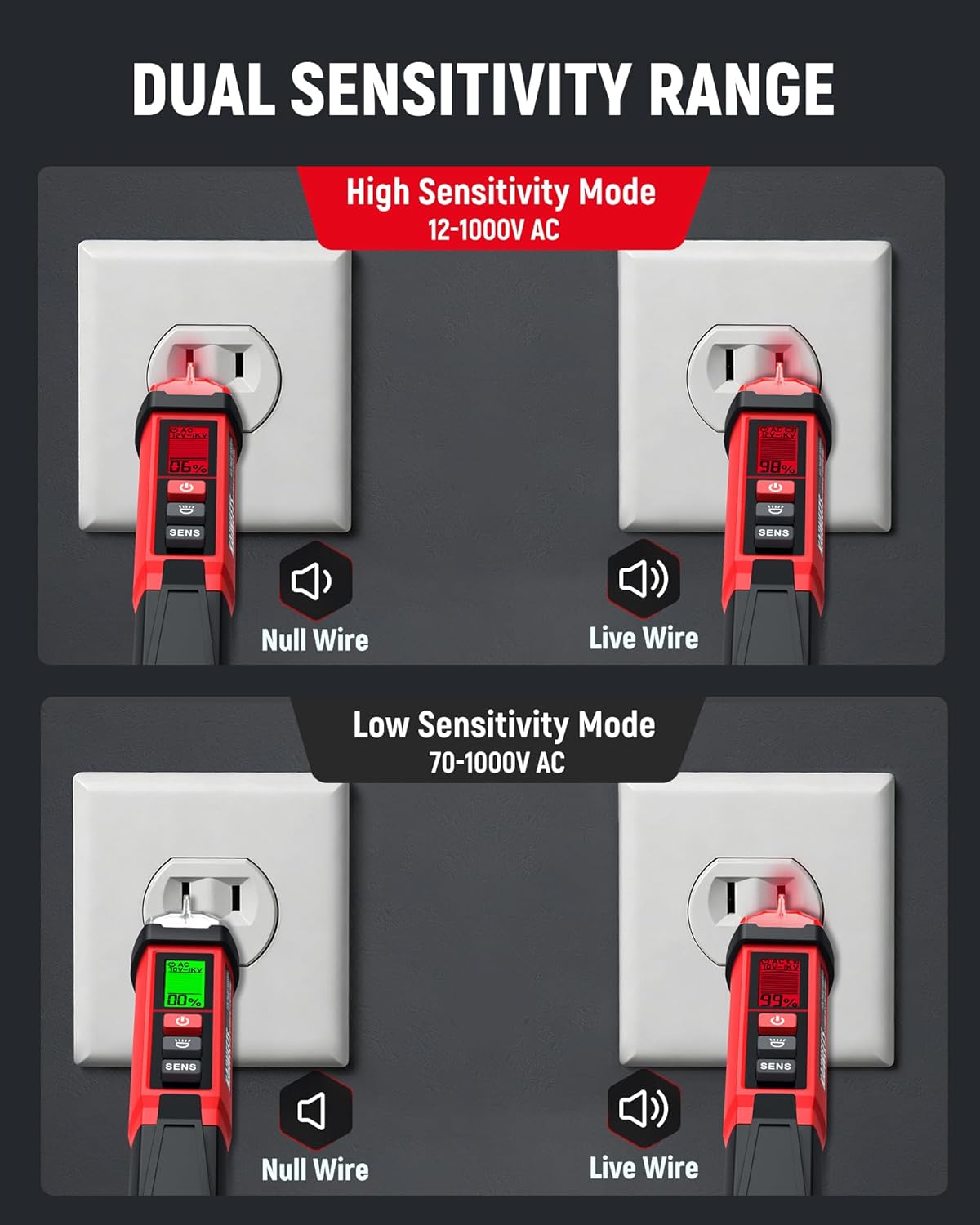
Image: Illustration of the KAIWEETS KTL01 in both High Sensitivity Mode (12-1000V AC) and Low Sensitivity Mode (70-1000V AC), showing detection of Null Wire (green light) and Live Wire (red light) in an outlet.
უკონტაქტო AC Voltage Detection (Live/Neutral Wire):
- Turn on the tester and select the desired sensitivity mode.
- Place the probe tip near the wire, outlet, or component you wish to test.
- თუ AC voltage is detected, the signal indicator will light up (red for live/high voltage, green for low voltage/no current), the buzzer will sound, and the LCD will display the signal strength percentage and bar graph. The buzzer frequency increases with stronger voltage.
Breakpoint Finder:
To locate a breakpoint in a live wire:
- Ensure the wire is live and the tester is in an appropriate sensitivity mode.
- გადაიტანეთ ზონდი მავთულის სიგრძის გასწვრივ.
- The tester will indicate voltage presence up to the breakpoint. The absence of a signal beyond a certain point indicates a break in the circuit.

Image: The KAIWEETS KTL01 demonstrating its breakpoint test function on an electrical cable, showing how it detects the presence or absence of voltage along the wire.
ფანრის მოქმედება:
- დააჭირეთ ფანარი შეცვლა to turn the built-in LED flashlight on.
- დააჭირეთ ფანარი შეცვლა ისევ გამორთეთ.
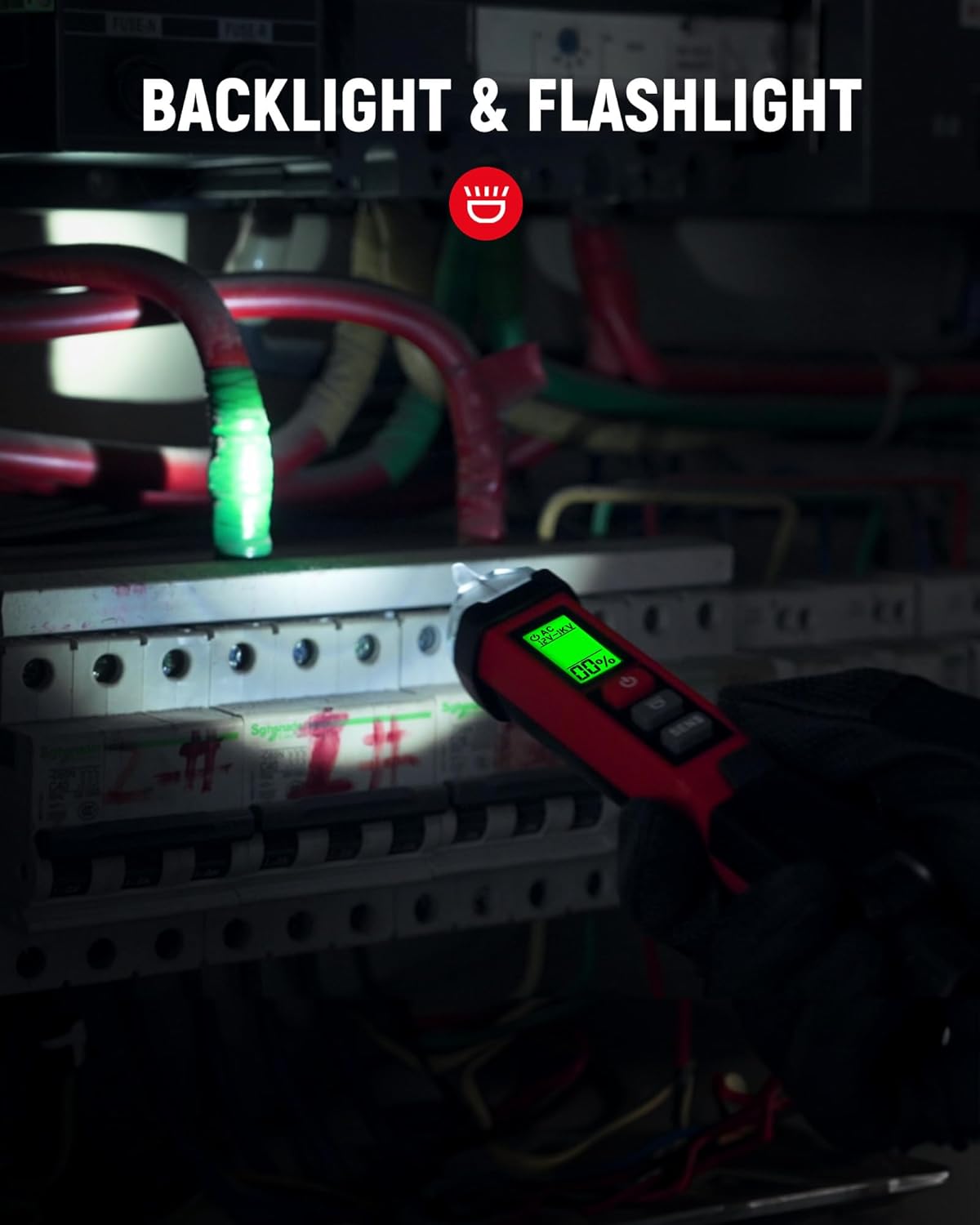
Image: The KAIWEETS KTL01's flashlight illuminating a dark breaker panel, demonstrating its utility in low-light conditions.
Video: KAIWEETS Non-Contact Voltage Tester KTL01, CAT IV 1000V
Video: An official product video demonstrating the features and usage of the KAIWEETS KTL01 Non-Contact Voltage Tester, including its CAT IV 1000V safety rating.
6. მოვლა
- დასუფთავება: Wipe the device with a dry, clean cloth. Do not use abrasive cleaners or solvents.
- ბატარეის გამოცვლა: Replace batteries when the low-battery indicator appears on the LCD. Always use fresh 1.5V AAA batteries.
- შენახვა: Store the tester in a cool, dry place away from direct sunlight and extreme temperatures. Remove batteries if storing for extended periods.
7. Დიაგნოსტიკა
| პრობლემა | შესაძლო მიზეზი | გამოსავალი |
|---|---|---|
| No indication when testing a live circuit | Dead batteries; Tester malfunction | Replace batteries; Contact support |
| False positives or inconsistent readings | Interference; Incorrect sensitivity mode | Move away from other electrical devices; Switch to Low Sensitivity Mode |
| დაბალი ბატარეის მაჩვენებელი | ბატარეები დაბალია | Replace with new 1.5V AAA batteries |
8. სპეციფიკაციები
| ფუნქცია | დეტალი |
|---|---|
| ბრენდი | KAIWEETS |
| მოდელი | KTL01 |
| დენის წყარო | Battery Powered (2 x 1.5V AAA) |
| AC ტომიtage Range (High Sensitivity) | 12V - 1000V ცვლადი დენი |
| AC ტომიtage Range (Low Sensitivity) | 70V - 1000V ცვლადი დენი |
| უსაფრთხოების რეიტინგი | CAT IV 1000V |
| ჩვენება | LCD with Percentage and Bar Graph |
| გაფრთხილებები | Audible (Buzzer) and Visual (LED, LCD) |
| განსაკუთრებული თვისებები | Flashlight, Auto Shut-off, Low Battery Indicator, Breakpoint Finder |
| ნივთის წონა | 120 გრამი |
| ნივთის ზომები | 1.57 x 1.18 x 6.69 ინჩი |
| ოპერაციული ტემპერატურა | 50 გრადუს ცელსიუსამდე |
| სერთიფიკატები | CE, FCC |
9. გარანტია და მხარდაჭერა
გარანტია:
The KAIWEETS KTL01 Non-Contact Voltage Tester Pen comes with a 36 თვიანი (3 წლიანი) გარანტია შეძენის დღიდან. ეს გარანტია ფარავს წარმოების დეფექტებს და უზრუნველყოფს, რომ პროდუქტი აკმაყოფილებს მის მიერ მითითებულ შესრულების სტანდარტებს ნორმალური გამოყენების პირობებში. გთხოვთ, შეინახოთ შეძენის დამადასტურებელი საბუთი გარანტიის მოთხოვნებისთვის.
მომხმარებელთა მხარდაჭერა:
For technical assistance, warranty inquiries, or any questions regarding the KAIWEETS KTL01, please contact KAIWEETS customer support through their official website or the retailer where the product was purchased. Provide your model number (KTL01) and a detailed description of the issue for efficient service.