
შესავალი
This manual provides essential information for the safe and efficient use of your Samsung 43-Inch Class U8000H Series Crystal UHD 4K Smart TV. Please read all instructions carefully before using the product and retain this manual for future reference.
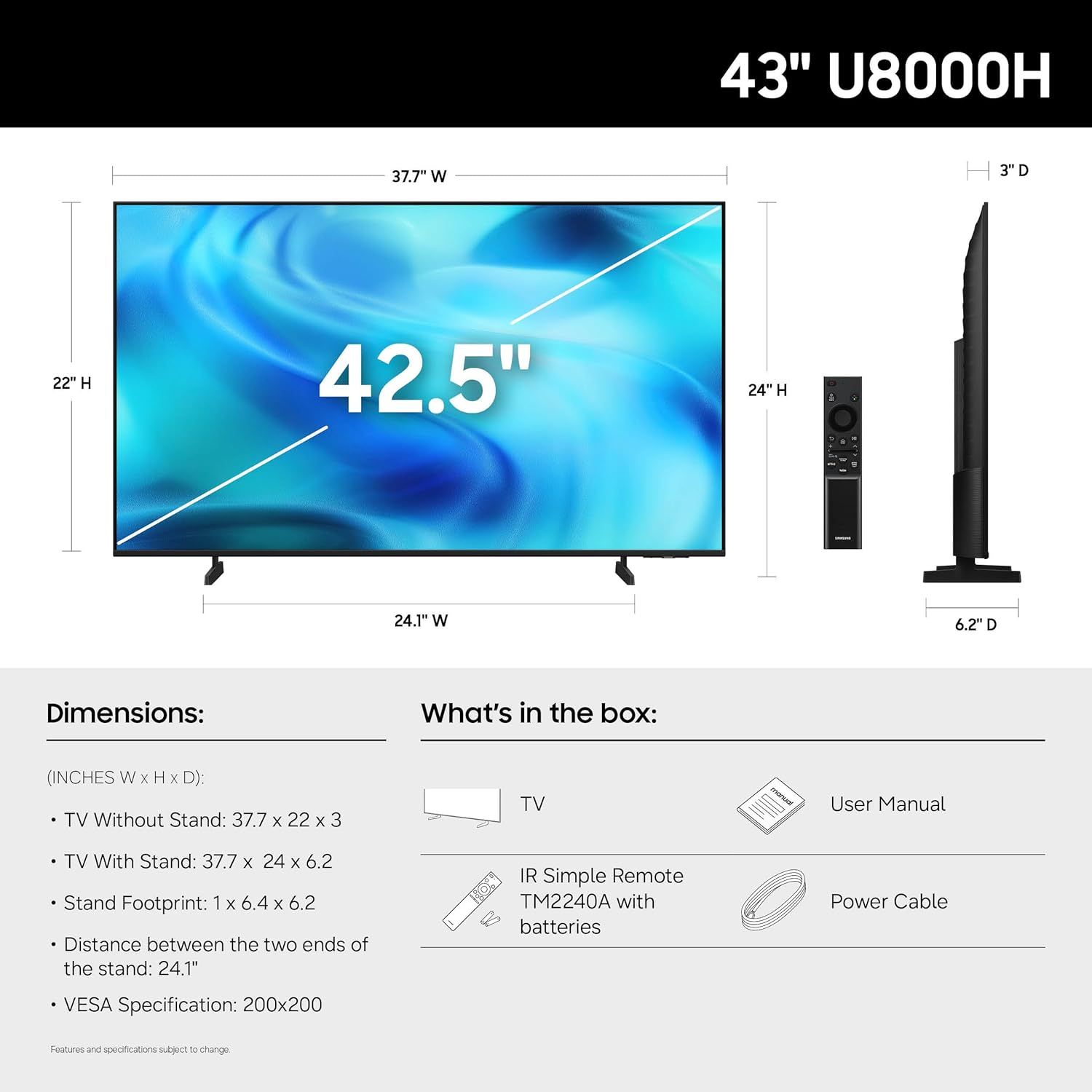
რა არის ყუთში
დარწმუნდით, რომ შეფუთვაში ყველა კომპონენტია:
- Samsung 43-Inch U8000H Series Crystal UHD 4K Smart TV
- დენის კაბელი
- დისტანციური მართვა
- ადექი
- მომხმარებლის სახელმძღვანელო (ეს დოკუმენტი)
- საგარანტიო ბარათი

Image: Included components for the Samsung U8000H Series TV.
დაყენება
1. Physical Setup (Stand or Wall Mount)
Before proceeding, ensure the TV is placed on a stable, level surface or securely mounted to a wall. Refer to the separate wall mount instructions if applicable.
- სტენდის მიმაგრება: Carefully place the TV screen-down on a soft, clean cloth. Align the stand with the designated slots on the bottom of the TV. Secure the stand using the provided screws.
- კედელზე მონტაჟი: If wall mounting, ensure you use a VESA-compatible mount (200 x 200 mm) and follow the mount manufacturer's instructions. Disconnect the stand if already attached.
სურათი: უკანა view of the TV, highlighting VESA mounting points and input panel.
2. მოწყობილობების დამაკავშირებელი
Connect your external devices (cable box, Blu-ray player, gaming console, etc.) to the TV's input ports.
- HDMI: Use HDMI cables for high-definition video and audio. The TV has 3 HDMI ports. HDMI 1 supports eARC for enhanced audio return.
- USB: Connect USB devices for media playback or power. The TV has 1 USB port.
- Ethernet (LAN): სტაბილური სადენიანი ინტერნეტ კავშირისთვის.
- ანტენა/კაბელი: Connect an antenna or cable TV signal for over-the-air or cable channels.

სურათი: დეტალური view of the TV's connectivity panel.
3. პირველადი ჩართვა და ქსელის დაყენება
- დენის კაბელი შეაერთეთ ტელევიზორთან, შემდეგ კი კედლის სოკეტთან.
- დააჭირეთ ჩართვის ღილაკს დისტანციური მართვის პულტზე ან ტელევიზორზე.
- საწყისი დაყენების დასასრულებლად, მათ შორის ენის შერჩევის, ქსელური კავშირის (Wi-Fi ან Ethernet) და არხების სკანირებისთვის, მიჰყევით ეკრანზე მოცემულ ინსტრუქციებს.
- For smart features, you may be prompted to log in to or create a Samsung Account.
ტელევიზორის მართვა
დისტანციური მართვა
ტელევიზორის ინტერფეისში ნავიგაციის, პარამეტრების შეცვლისა და ჭკვიანი ფუნქციების გამოყენების საშუალებას გაძლევთ. ოპტიმალური გამოყენებისთვის გაეცანით ღილაკების განლაგებას.

Image: The standard remote control for the Samsung U8000H Series TV.
ძირითადი მახასიათებლები და ფუნქციები
-
კრისტალური პროცესორი 4K: This powerful processor enhances colors and sharpens details, providing a vibrant 4K viewing experience. It also performs 4K upscaling for lower-resolution content.

Image: Visual representation of the Crystal Processor 4K technology.
-
მოძრაობის დაჩქარება: Enjoy clear picture and smooth motion, especially in fast-paced scenes like sports and games. This technology estimates and adjusts frame transitions in real-time.

Image: Motion Xcelerator in action, demonstrating smooth visuals.
-
ფერის გამაძლიერებელი: This feature enhances color intensity, making reds fiery and blues sparkling, transforming content into a visually rich experience.

Image: Demonstrating the enhanced colors with Color Booster.
-
4K გაფართოება: Upgrade your favorite shows and movies to crisp 4K clarity. This advanced technology enhances details and clarity even from lower-quality sources.

Image: Illustration of 4K Upscaling improving image detail.
-
Endless Free Content (Samsung TV Plus): Access over 2,700 free streaming options, including 750+ subscription-free channels. Content includes news, sports, movies, and more.

Image: Samsung TV Plus interface with free streaming options.
-
Samsung-ის სათამაშო ცენტრი: Play thousands of video games without a console. This central hub brings together games from consoles, cloud services, and gaming apps.

Image: Samsung Gaming Hub interface.
-
Vision AI Companion: Ask your TV questions and access powerful AI features. Get personalized answers with Bixby, and utilize AI agents like Microsoft Copilot for enhanced viewინგ.

Image: Vision AI Companion features.
-
One UI Tizen: The TV's operating system provides an intuitive smart TV platform tailored to you, with personal data secured by Samsung Knox. It also receives 7 years of automatic OS updates.

Image: One UI Tizen smart TV interface.
-
Samsung Knox-ის უსაფრთხოება: Enjoy peace of mind with built-in triple-layer data protection. Your TV experiences are secured against harmful apps and phishing sites.

Image: Samsung Knox Security features.
მოვლა
- ეკრანის გაწმენდა: ფრთხილად გაწმინდეთ ეკრანი რბილი, მშრალი მიკროფიბრის ქსოვილით. ჯიუტი ლაქების შემთხვევაში, მსუბუქად გაწმინდეთ.ampქსოვილი წყლით ან სპეციალური ეკრანის საწმენდი საშუალებით გაწმინდეთ. მოერიდეთ უხეში ქიმიკატების ან აბრაზიული მასალების გამოყენებას.
- ჩარჩოს გაწმენდა: ტელევიზორის ჩარჩოსა და სადგამის გასაწმენდად გამოიყენეთ რბილი, მშრალი ქსოვილი.
- ვენტილაცია: გადახურების თავიდან ასაცილებლად, ტელევიზორის გარშემო უზრუნველყოფილია სათანადო ვენტილაცია. არ დაბლოკოთ ვენტილაციის ღიობები.
- დენის კაბელი: რეგულარულად შეამოწმეთ კვების კაბელი დაზიანების არსებობაზე. დაზიანების შემთხვევაში, დაუყოვნებლივ შეცვალეთ იგი Samsung-ის ავტორიზებული ნაწილით.
პრობლემების მოგვარება
| პრობლემა | შესაძლო გამოსავალი |
|---|---|
| არ არის ძალა |
|
| სურათის არარსებობა / დამახინჯებული სურათი |
|
| ხმა არ არის / დაბალი ხმა |
|
| დისტანციური მართვა არ მუშაობს |
|
| Smart Features Not Working / Network Issues |
|
სპეციფიკაციები
| ფუნქცია | დეტალი |
|---|---|
| მოდელის სახელი | U8000H |
| მოდელის ნომერი | UN43U8000HFXZA |
| ეკრანის ზომა | 43 ინჩი |
| ჩვენების ტექნოლოგია | LED |
| რეზოლუცია | 4K UHD (3840 x 2160) |
| განახლების სიხშირე | 60 ჰც |
| პროცესორი | კრისტალური პროცესორი 4K |
| HDR ფორმატის მხარდაჭერა | HDR10+ |
| დაკავშირება | 3x HDMI, 1x USB, Ethernet (LAN), Wi-Fi, Bluetooth 5.3 |
| ოპერაციული სისტემა | ტიზენი |
| კონტროლის მეთოდი | აპლიკაცია, დისტანციური, ხმა |
| აუდიო გამომავალი | ჩამონტაჟებული სპიკერი |
| VESA სამაგრი სტანდარტული | 200 x 200 მმ |
| პროდუქტის ზომები (D x W x H) | 6.2" სიღრმე x 37.7" სიგანე x 24" სიმაღლე (სადგამით) |
| ნივთის წონა | 14.8 ფუნტი (სადგამით) |
| ფერი | შავი |

Image: Dimensional diagram of the Samsung 43-inch U8000H TV.
გარანტია და მხარდაჭერა
Your Samsung 43-Inch U8000H Series Crystal UHD 4K Smart TV comes with a 1 წლიანი მწარმოებლის გარანტია. For warranty claims, technical support, or service inquiries, please contact Samsung Customer Service.
You can find additional support resources, FAQs, and contact information on the official Samsung support webსაიტი.
ონლაინ დახმარება: www.samsung.com/us/support/