
SmallRig RF20C
SmallRig RF20C RGB Portable LED Photo Torch User Manual
Model: RF20C (5335)
ბრენდი: SmallRig
1. შესავალი
The SmallRig RF20C RGB Portable LED Photo Torch is a versatile and powerful lighting tool designed for photographers, videographers, and content creators. It features 5-color LED beads, adjustable beam angle, and supports creative lighting effects with included gobos. This manual provides essential information for the safe and effective use of your device.
2. უსაფრთხოების ინფორმაცია
- არ დაუშვათ მოწყობილობის წყალთან ან ჭარბ ტენიანობასთან შეხება.
- მოერიდეთ LED ნათურის თვალებთან პირდაპირ კონტაქტს.
- არ დაშალოთ ან შეცვალოთ მოწყობილობა. შეკეთება უნდა განახორციელოს მხოლოდ უფლებამოსილმა პერსონალმა.
- შეინახეთ ბავშვებისთვის მიუწვდომელ ადგილას.
- Ensure proper ventilation during extended use, as the device may become warm.
- გამოიყენეთ მხოლოდ მითითებული დამტენი კაბელი და კვების ადაპტერი.
3. პაკეტის შიგთავსი
დარწმუნდით, რომ თქვენს პაკეტში ყველა ნივთია:
- RF20C Portable Focusable LED Video Light x 1
- Gobos x 20
- Silicone Gobo Holder x 1
- შენახვის ჩანთა x 1
- მომხმარებლის სახელმძღვანელო x 1 (ეს დოკუმენტი)
- დამტენი კაბელი x 1
4. დაყენება
4.1 საწყისი დატენვა
Before first use, fully charge the RF20C. Connect the provided USB-C charging cable to the device's charging port and to a compatible USB power adapter (PD 36W recommended). The device can be used while charging.

Figure 4.1: Internal battery illustration and runtime information.

Figure 4.2: Portable design, mounting options, cooling fan, and charging capability.
4.2 Attaching Gobos
To use the creative pattern gobos, first remove the plano-convex lens from the front of the light. Then, attach the silicone gobo holder and insert the desired gobo. This ensures optimal projection effects.

Figure 4.3: Gobo projection examples and installation tip.
5. საოპერაციო ინსტრუქციები
5.1 ჩართვა/გამორთვა და ძირითადი მართვის საშუალებები
The RF20C features a single multi-function button for control. To prevent accidental activation during transport, the device requires a specific action to turn on.
- ჩართვა: Rotate the control button to turn on the device.
- Გამორთვა: დააჭირეთ და გააჩერეთ მართვის ღილაკი 3 წამის განმავლობაში.
- ფერის შეცვლა: Short press the control button to cycle through the available colors (Red, 5600K White, Purple, Orange, Cyan).
- სიკაშკაშის კორექტირება: Rotate the control button to increase or decrease the light brightness.
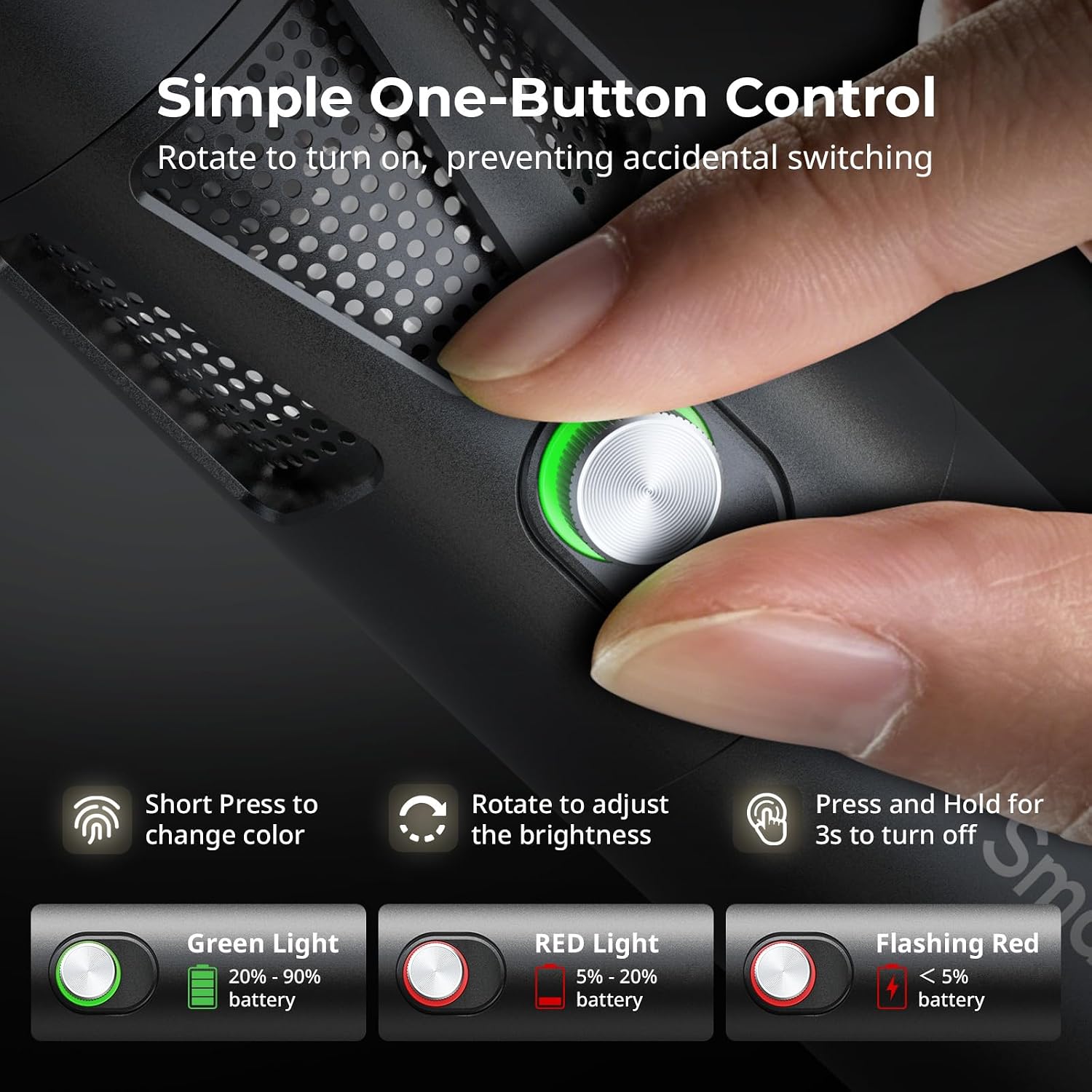
Figure 5.1: One-button control and battery indicator.

Figure 5.2: Available LED colors.
5.2 სხივის კუთხის რეგულირება
The front plano-convex lens allows for adjustment of the beam angle. Push or pull the lens to change the focus of the light from a narrow 24° beam to a wider 60° diffusion.
- Extend the lens: Narrows the beam (e.g., 24°).
- Retract the lens: Diffuses the beam (e.g., 60°).

Figure 5.3: Beam angle adjustment mechanism.
ბატარეის მაჩვენებელი 5.3
The control button's LED indicates the battery status:
- მწვანე შუქი: ბატარეის დატენვა 20%-90%-ია დარჩენილი.
- წითელი შუქი: ბატარეის დატენვა 5%-20%-ია დარჩენილი.
- მოციმციმე წითელი შუქი: ბატარეის დატენვის 5%-ზე ნაკლები დარჩა.

Figure 5.4: Brightness comparison of RF20C.
6. მოვლა
- რეგულარულად გაწმინდეთ მოწყობილობა რბილი, მშრალი ქსოვილით. არ გამოიყენოთ უხეში ქიმიკატები ან აბრაზიული მასალები.
- შეინახეთ მოწყობილობა გრილ, მშრალ ადგილას, მოარიდეთ მზის პირდაპირ სხივებს და ექსტრემალურ ტემპერატურას.
- When not in use for extended periods, charge the battery to approximately 50% every three months to prolong battery life.
- Keep the lens and LED surface free from dust and fingerprints for optimal light output.
7. Დიაგნოსტიკა
| პრობლემა | შესაძლო მიზეზი | გამოსავალი |
|---|---|---|
| მოწყობილობა არ ჩართულია. | Low battery; incorrect power-on procedure. | Charge the device. Ensure you rotate the control button to power on. |
| სინათლის გამომუშავება სუსტია. | Low battery; brightness set too low; dirty lens. | Charge the device. Rotate the control button to increase brightness. Clean the lens. |
| Gobo projection is blurry. | Plano-convex lens not removed; gobo not seated correctly. | Remove the plano-convex lens before attaching the silicone gobo holder. Ensure gobo is properly inserted. |
| Device becomes warm during use. | Normal operation, especially at high power; fan obstruction. | This is normal. Ensure the fan vents are not obstructed for proper heat dissipation. If excessively hot, reduce brightness or allow to cool. |
| ვენტილატორის ხმაური შესამჩნევია. | Normal operation for cooling. | The device uses a high-speed fan for efficient heat dissipation. This noise is part of normal operation. Consider distance from audio recording equipment. |
8. სპეციფიკაციები
| ფუნქცია | დეტალი |
|---|---|
| მოდელი | RF20C (5335) |
| ძალაუფლება | 20 W |
| შეყვანა | 20 V / 1.8 A (max. 36 W) |
| LED ფერები | Red, 5600K White, Purple, Orange, Cyan |
| ფერის რენდერის ინდექსი (CRI) | ≥ 97 |
| ტელევიზორის განათების თანმიმდევრულობის ინდექსი (TLCI) | ≥ 99 (at 5600 K) |
| სიკაშკაშე | 5400 Lux @ 1m / 5600K |
| ბატარეის ტევადობა | 10000mAh (2 x 5000mAh / 7.4V / 37Wh) |
| Runtime (Full Power) | 1.5 საათამდე |
| დამუხტვა | USB-C PD 36W Fast Charging, supports charging while operating |
| სხივის კუთხის რეგულირება | 24°-დან 60°-მდე |
| მასალა | ალუმინის შენადნობი, ABS |
| პროდუქტის ზომები | φ49.0 x 200.0 mm / φ1.9 x 7.9 inches |
| პროდუქტის წონა | 520.0 ± 20.0 გ / 18.3 ± 0.7 ოცი |
| დაკავშირების ტექნოლოგია | USB |
| წარმოშობის ქვეყანა | ჩინეთი |
9. გარანტია და მხარდაჭერა
SmallRig products are designed and manufactured to the highest quality standards. This product is covered by a limited warranty from the date of purchase. For detailed warranty terms, technical support, or service inquiries, please refer to the official SmallRig webსაიტზე ან დაუკავშირდით თქვენს ადგილობრივ დისტრიბუტორს.
გთხოვთ, შეინახოთ თქვენი შეძენის მტკიცებულება გარანტიის პრეტენზიებისთვის.
10. გამოყენების სცენარები
The SmallRig RF20C is suitable for various applications, including:
- ფოტოგრაფია
- ვიდეო გადაღება
- პირდაპირი სტრიმინგი
- Creative Accent Lighting
- Macro Work and Close-ups

სურათი 10.1: მაგamples of RF20C usage scenarios.
Ask a question about this manual
Ask about setup, troubleshooting, compatibility, parts, safety, or missing instructions. Manuals+ will review the question and use this page’s manual context to help answer it.