
1. მნიშვნელოვანი შეტყობინება
Please carefully check the store name and ensure you are purchasing products sold by "LUZHAN." We have received customer feedback stating that products received did not match the description and were of poor quality. Upon investigation, we found that these customers did not purchase the products from us. To prevent such incidents from happening again in the future and to avoid unnecessary misunderstandings, please carefully verify the store name LUZHAN.

Image: Important notice to verify seller name LUZHAN for authentic products.
2. დასრულდაview
The XIAOMI POCO X8 Pro Max 5G is a high-performance smartphone designed for advanced users. It features a powerful Mediatek Dimensity 9500s processor, a vibrant 1.5K 120Hz AMOLED display, a large 8500mAh battery with 100W HyperCharge, and a 50 MP Light Fusion 600 camera system with OIS. This manual provides essential information for setting up and operating your device.
სურათი: წინა და უკანა მხარე view of the POCO X8 Pro Max 5G smartphone.
ვიდეო: ოვერview of the POCO X8 Pro Series, highlighting key features and design.
3. დაყენება
3.1 რა არის ყუთში
- XIAOMI POCO X8 Pro Max 5G Smartphone
- დამტენი
- ეკრანის დამცავი (წინასწარ დატანილი ან მოყვება)
3.2 მოწყობილობის საწყისი დაყენება
- ჩართვა: Press and hold the power button located on the side of the device until the XIAOMI logo appears.
- ენა და რეგიონი: სასურველი ენისა და რეგიონის ასარჩევად, მიჰყევით ეკრანზე გამოტანილ მითითებებს.
- დაუკავშირდით Wi-Fi-ს: Select your Wi-Fi network and enter the password to connect to the internet. This is necessary for initial setup and software updates.
- Google ანგარიში: შედით თქვენი Google ანგარიშით ან შექმენით ახალი. ეს აუცილებელია Google Play Store-სა და Google-ის სხვა სერვისებზე წვდომისთვის.
- მონაცემთა გადაცემა: If you are upgrading from another device, you may have the option to transfer your data (apps, photos, contacts) during this stage.
- უსაფრთხოების დაყენება: Set up your preferred security method, such as a PIN, pattern, password, or fingerprint. The device supports an ultrasonic fingerprint sensor.
- სრული დაყენება: დაყენების პროცესის დასასრულებლად მიჰყევით დარჩენილ მითითებებს.
3.3 SIM Card and eSIM Setup
The POCO X8 Pro Max 5G supports physical SIM cards and eSIM functionality.
- ფიზიკური SIM ბარათი: Use the provided SIM ejector tool to open the SIM tray. Insert your Nano-SIM card(s) into the tray, ensuring proper orientation. Close the tray securely.
- eSIM: eSIM-ის გასააქტიურებლად, გადადით შემდეგ ბმულზე: პარამეტრები > ქსელი და ინტერნეტი > SIM ბარათები და მიჰყევით ინსტრუქციებს eSIM pro-ს დასამატებლადfile provided by your carrier.
4. საოპერაციო ინსტრუქციები
4.1 ჩვენების მახასიათებლები
Your device features a 6.83-inch 1.5K ultra-bright AMOLED display with a 120Hz refresh rate for smooth visuals and a 24x super resolution touch for enhanced responsiveness. It also includes eye protection features and Corning Gorilla Glass 7i for durability.
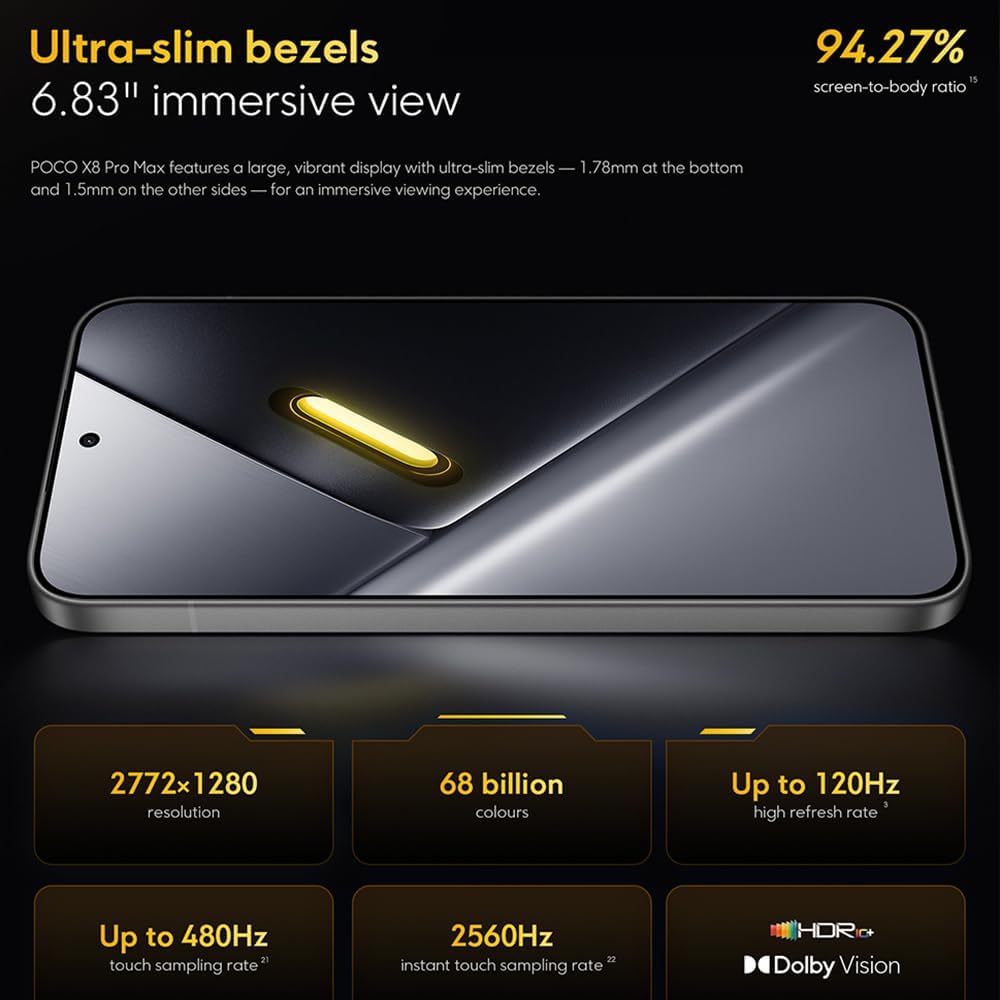
Image: The 6.83-inch 1.5K ultra-bright AMOLED display with minimal bezels.
4.2 შესრულება
Powered by the Mediatek Dimensity 9500s chipset (3nm, 4+4 All Big Core architecture, NPU890 AI processor), the POCO X8 Pro Max 5G delivers high performance. The POCO 3D IceLoop cooling system ensures efficient heat dissipation, maintaining optimal performance during intensive tasks like gaming.

Image: Diagram illustrating the Mediatek Dimensity 9500s flagship platform.

Image: Illustration of the 5800mm² ultra-large LHP area for cooling.
4.3 კამერის სისტემა
The device features a 50 MP Light Fusion 600 main camera with OIS (Optical Image Stabilization) and an 8 MP ultra-wide camera. It supports portrait mode with bokeh + HDR and dynamic video-to-still conversion.

Image: Close-up of the 50 MP main camera and 8 MP ultra-wide camera system.
4.4 ბატარეა და დატენვა
Equipped with a massive 8500 mAh (typical) battery, the POCO X8 Pro Max 5G offers extended usage. It supports 100W HyperCharge, allowing for rapid recharging. A 16% ultra-high carbon-silicon content contributes to its high energy density.

Image: Illustration highlighting the massive 8500mAh battery capacity.

Image: Visual representation of the 100W HyperCharge technology.
4.5 აუდიო
The device features symmetrical dual stereo speakers (1115F) for a balanced and immersive audio experience.
პროგრამული უზრუნველყოფა
The POCO X8 Pro Max 5G comes with Xiaomi HyperOS 3 installed, offering an optimized and user-friendly interface based on Android 16.
5. მოვლა
5.1 თქვენი მოწყობილობის გაწმენდა
- ეკრანისა და უკანა პანელის გასაწმენდად გამოიყენეთ რბილი, უბუშტო ქსოვილი.
- მოერიდეთ უხეში ქიმიკატების, აბრაზიული მასალების ან აეროზოლური სპრეის გამოყენებას.
- ჯიუტი ლაქებისთვის, ოდნავ შეიზილეთampქსოვილი გაწმინდეთ წყლით ან ელექტრონიკისთვის განკუთვნილი ეკრანის საწმენდი საშუალებით.
5.2 Dust and Water Resistance
The device is certified for IP68 dust and water resistance. This means it can withstand immersion in up to 2 meters of water for 30 minutes under specific laboratory conditions. However, water and dust resistance may deteriorate over time with normal wear and tear. The warranty does not cover liquid damage. Avoid exposing the device to hot water, saltwater, or other liquids.

Image: Visual representation of the IP68 dust and water resistance.
5.3 პროგრამული უზრუნველყოფის განახლებები
რეგულარულად შეამოწმეთ და დააინსტალირეთ პროგრამული უზრუნველყოფის განახლებები, რათა დარწმუნდეთ, რომ თქვენს მოწყობილობას აქვს უახლესი ფუნქციები, უსაფრთხოების პატჩები და მუშაობის გაუმჯობესებები. როგორც წესი, ამ ვარიანტს იპოვით პარამეტრები > ტელეფონის შესახებ > სისტემის განახლება.
6. Დიაგნოსტიკა
6.1 საერთო საკითხები და გადაწყვეტილებები
- მოწყობილობა არ ირთვება: დარწმუნდით, რომ აკუმულატორი დატენილია. შეაერთეთ მოწყობილობა დამტენთან და დაელოდეთ რამდენიმე წუთი, სანამ ხელახლა ჩართავთ.
- ეკრანი არ რეაგირებს: სცადეთ მოწყობილობის გადატვირთვა ჩართვის ღილაკის დიდი ხნის განმავლობაში (მაგალითად, 10-15 წამი) დაჭერით, სანამ ის არ გადაიტვირთება.
- აპლიკაციების გაჭედვა: პრობლემური აპლიკაციის ქეშის გასუფთავება (პარამეტრები > აპლიკაციები > [აპლიკაციის სახელი] > მეხსიერება > ქეშის გასუფთავება) ან ხელახლა დააინსტალირეთ აპლიკაცია. დარწმუნდით, რომ თქვენი მოწყობილობის პროგრამული უზრუნველყოფა განახლებულია.
- ცუდი ბატარეის ხანგრძლივობა: Check background app usage, reduce screen brightness, disable unnecessary features like GPS or Bluetooth when not in use, and ensure your software is updated.
- ქსელთან დაკავშირების პრობლემები: Restart your device. Check if your SIM card is properly inserted. Toggle Airplane Mode on and off. Reset network settings (პარამეტრები > სისტემა > პარამეტრების გადატვირთვა > Wi-Fi-ს, მობილურის და Bluetooth-ის გადატვირთვა).
6.2 ქარხნული პარამეტრების გადატვირთვა
If you encounter persistent issues, a factory reset may be necessary. გაფრთხილება: ეს თქვენს მოწყობილობაზე არსებული ყველა მონაცემის წაშლას გამოიწვევს. გაგრძელებამდე შექმენით მნიშვნელოვანი მონაცემების სარეზერვო ასლი. გადადით პარამეტრები > სისტემა > გადატვირთვის ოფციები > წაშალე ყველა მონაცემი (ქარხნული პარამეტრების გადატვირთვა) და მიჰყევით ეკრანზე მითითებებს.
7. სპეციფიკაციები
| ფუნქცია | სპეციფიკაცია |
|---|---|
| ბრენდი | XIAOMI |
| მოდელის სახელი | POCO X8 Pro Max 5G |
| ოპერაციული სისტემა | Android 16 (with Xiaomi HyperOS 3) |
| მეხსიერების შენახვის მოცულობა | 512 GB |
| ეკრანის ზომა | 6.83 ინჩი |
| ჩვენების ტიპი | AMOLED, 1.5K, 120Hz refresh rate |
| ფიჭური ტექნოლოგია | 5G |
| ფერი | Noir (Black) |
| კონექტორის ტიპი | USB ტიპი C |
| ბიომეტრიული უსაფრთხოება | Fingerprint Recognition (Ultrasonic) |
| ბატარეის ტევადობა | 8500 mAh (ლითიუმ-პოლიმერი) |
| დამუხტვა | 100W ჰიპერდამუხტვა |
| მთავარი კამერა | 50 MP Light Fusion 600 with OIS |
| ულტრაფართო კამერა | 8 დეპუტატი |
| პროცესორი | Mediatek Dimensity 9500s |
| მტვრისა და წყლის წინააღმდეგობა | IP68 |
| მოდელის წელი | 2025 |
| წარმოშობის ქვეყანა | ჩინეთი |
8. გარანტია და მხარდაჭერა
For detailed warranty information and customer support, please refer to the warranty card included with your product or visit the official XIAOMI webსაიტი. შეინახეთ შეძენის დამადასტურებელი საბუთი გარანტიის მოთხოვნისთვის.
Online resources and FAQs may also be available on the XIAOMI support portal.