შესავალი
The Canon EOS Elan 7 is a sophisticated 35mm Single-Lens Reflex (SLR) camera designed for both advanced enthusiasts and professionals. It features a highly advanced autofocus system, precise metering capabilities, and robust construction, making it suitable for a wide range of photographic situations. This manual provides detailed instructions for the proper setup, operation, and maintenance of your camera.
კამერის კომპონენტები
Familiarize yourself with the main components of your Canon EOS Elan 7 camera.

სურათი 1: წინა view of the Canon EOS Elan 7 camera with the lens cap attached. This view shows the camera body, grip, and strap attachment points.

სურათი 2: ზედა view of the Canon EOS Elan 7 camera. This perspective highlights the mode dial, shutter button, and top LCD panel for settings display.

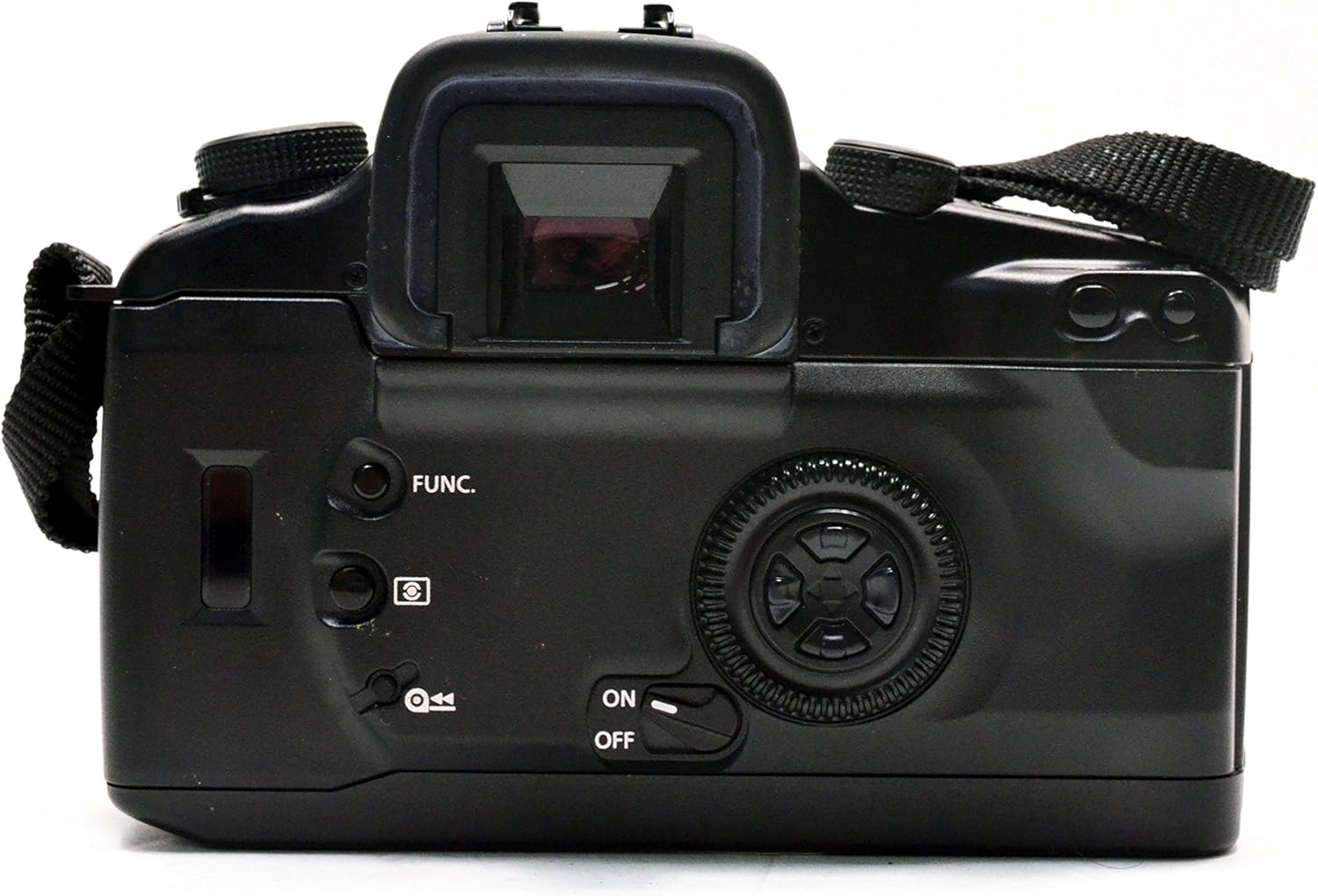
სურათი 3: უკანა view of the Canon EOS Elan 7 camera. Visible elements include the viewfinder, various control buttons, and the main command dial.
დაყენება
ბატარეის მონტაჟი
The Canon EOS Elan 7 requires Lithium batteries for operation. Ensure the camera is powered off before installing or replacing batteries.
- იპოვეთ ბატარეის განყოფილების საფარი, რომელიც, როგორც წესი, კამერის კორპუსის ქვედა ნაწილშია.
- Open the cover by sliding or rotating the latch.
- Insert the new Lithium batteries, ensuring correct polarity (+/-) as indicated inside the compartment.
- Close the battery compartment cover securely until it latches.
ლინზის დანართი
The EOS Elan 7 uses Canon EF mount lenses. Always handle lenses by their barrel and avoid touching the glass elements or electrical contacts.

სურათი 4: წინა view of the Canon EOS Elan 7 camera with the lens cap removed, revealing the EF lens mount and mirror box.
- მოხსენით კამერის კორპუსის თავსახური და ლინზიდან უკანა თავსახური.
- Align the red index mark on the lens with the red index mark on the camera's lens mount.
- Rotate the lens clockwise (when viewed from the front) until it clicks into place. Do not force the lens.
To detach a lens, press the lens release button on the camera body and rotate the lens counter-clockwise until it stops, then remove it.
ფილმის ჩატვირთვა
The EOS Elan 7 uses standard 35mm film cartridges.
სურათი 5: უკანა view of the Canon EOS Elan 7 camera with the film compartment door open, showing the film chamber and take-up spool.

სურათი 6: ახლოდან view of the film compartment, detailing the film take-up spool, film pressure plate, and film guides.
- Open the camera back by sliding the film door release latch (usually on the side).
- მოათავსეთ ფირის კარტრიჯი ფირის კამერაში მარცხენა მხარეს.
- Pull the film leader across to the right, aligning it with the red mark on the take-up spool.
- Ensure the film perforations engage with the sprockets.
- კამერა მჭიდროდ დახურეთ მანამ, სანამ არ დაიჭერს. კამერა ავტომატურად გადაიტანს ფირს პირველ კადრზე.
კამერის მართვა
ჩართვა/გამორთვა
Use the ON/OFF switch, typically located near the main control dial, to power the camera on or off.
ფოკუსირების სისტემა
The EOS Elan 7 features a 7-point wide-area autofocus system with a central cross-type sensor. This system provides fast and accurate focusing even with off-center subjects or in low-light conditions.
- Automatic Focus Point Selection: The camera automatically selects the optimal focus point.
- Manual Focus Point Selection: Use the focusing-point selection keys (often a multi-controller on the back) to manually choose one of the seven focus points.
- ფოკუსირების რეჟიმები: The camera supports Continuous-Servo AF (AI Servo AF) for moving subjects and One-Shot AF for stationary subjects.
გაზომვის რეჟიმები
The camera's 35-zone evaluative metering system is linked to the focusing points, ensuring accurate exposure. Available metering modes include:
- შეფასებითი გაზომვა: Measures light across the entire scene, giving priority to the active focus point.
- Partial Metering: Measures approximately 10% of the viewfinder area around the center, useful for backlit subjects.
- Center-Weighted Average Metering: Measures the entire scene with a greater emphasis on the central area.
ექსპოზიციის კონტროლი
The command dial allows for various exposure control options:
- პროგრამა AE (P): Camera automatically sets both shutter speed and aperture for optimal exposure.
- Shutter-Priority AE (Tv): You select the shutter speed, and the camera automatically sets the aperture. Ideal for controlling motion blur.
- Aperture-Priority AE (Av): You select the aperture, and the camera automatically sets the shutter speed. Useful for controlling depth of field.
- მექანიკური ექსპოზიცია (M): You set both shutter speed and aperture independently.
Shutter Speed and Aperture Adjustment
Adjust these settings using the main dial and sub-dial, typically located near the shutter button and on the back of the camera, respectively. The maximum shutter speed is 1/4000 second.
Film Advance and Rewind
The camera automatically advances film after each shot. Once a roll is complete, the camera will automatically rewind the film. You can also manually initiate rewind, with options for high-speed or silent rewind modes.
თვითმმართველობის ტაიმერი
Activate the self-timer function for a delayed shutter release, typically 10 seconds, allowing the photographer to be included in the shot.
გაფართოებული ფუნქციები
სროლის რეჟიმები
Beyond the basic exposure modes, the Elan 7 may offer specialized shooting modes such as 'Sports' mode, optimized for capturing fast-moving subjects with appropriate shutter speeds.
თეთრი ბალანსის პარამეტრები
While film cameras primarily rely on film type for color balance, the Elan 7 may offer settings to optimize exposure for different light sources, such as Auto, Cloudy, Daylight, and Flash torch, influencing the metering system.
ფლეშის გამოყენება
The camera includes a built-in flash with various modes:
- ავტომატური: Flash fires automatically in low light.
- Fill Flash: Flash fires regardless of ambient light, useful for brightening shadows.
- Flash Override: ითიშება ფლეში.
მოვლა და მოვლა
Proper care ensures the longevity and performance of your camera.
- დასუფთავება: Use a soft, lint-free cloth to clean the camera body. For lenses, use a specialized lens cleaning solution and cloth. Avoid touching the mirror or shutter curtain.
- შენახვა: Store the camera in a cool, dry place, away from direct sunlight and extreme temperatures. If storing for extended periods, remove the batteries.
- ბატარეის გამოცვლა: Replace batteries promptly when the low battery indicator appears to avoid interruption during shooting.
- ფილმის დამუშავება: Store film in a cool, dry place. Load and unload film in subdued light to prevent accidental exposure.
პრობლემების მოგვარება
If you encounter issues with your Canon EOS Elan 7, refer to the following common problems and solutions:
| პრობლემა | შესაძლო მიზეზი | გამოსავალი |
|---|---|---|
| კამერა არ ირთვება | მკვდარი ან არასწორად დაყენებული ბატარეები | Replace batteries or re-install them with correct polarity. |
| ფილმი წინ არ მიდის | Film not loaded correctly; film leader not engaged | Open camera back in subdued light, re-load film ensuring leader is properly engaged with take-up spool. |
| ავტოფოკუსი ნელი ან არაზუსტია | Low light conditions; low contrast subject; dirty lens contacts | Use flash or focus assist lamp; try manual focus; clean lens and camera contacts. |
| ფლეშ არ ირთვება | Flash disabled; insufficient charge; camera mode prevents flash | Check flash settings; allow time for flash to recharge; switch to a flash-compatible shooting mode. |
სპეციფიკაციები
Key technical specifications for the Canon EOS Elan 7 35mm SLR Camera.
- მოდელის სახელი: Canon EOS Elan 7
- მოდელის ნომერი: 4587A005
- თავსებადი სამონტაჟოები: Canon EF
- ფოტო სენსორის ტექნოლოგია: N/A (35mm FILM SLR camera)
- ასპექტის თანაფარდობა: 3:2
- გაფართოებული ISO მინიმალური: 100
- აღრიცხვის აღწერა: Average, Center Weighted, Multi-Zone, Partial, Spot
- ჩამკეტის მაქსიმალური სიჩქარე: 1/4000 წმ
- ჩამკეტის მინიმალური სიჩქარე: 30 წამი
- ავტოფოკუსის წერტილები: 7
- ფოკუსის ტიპი: Manual-and-Auto
- უწყვეტი სროლა: 4 FPS
- თვითმმართველობის ტაიმერი: 10 წამი
- თეთრი ბალანსის პარამეტრები: Auto, Cloudy, Daylight, Flash torch
- კამერის ფლეშ: Built-In (Automatic, Fill Flash, Flash Override)
- Viewმპოვნელი: ოპტიკური
- ბატარეის ტიპი: ლითიუმი
- ნივთის წონა: Approximately 0.01 Pounds (body only)
- ფერი: შავი
გარანტია და მხარდაჭერა
For information regarding warranty coverage, service, or technical support for your Canon EOS Elan 7 camera, please refer to the warranty card included with your purchase or visit the official Canon support website. Contacting Canon customer service directly will provide the most accurate and up-to-date assistance.


