1. შესავალი
მადლობა შენაძენისთვისasing the JVC KW-AVX810 Vehicle Multimedia Receiver. This unit is designed to provide advanced audio and video entertainment in your vehicle, featuring a 7-inch touch panel monitor, DVD playback, USB connectivity for iPod/iPhone, and Bluetooth readiness. This manual provides essential information for the proper installation, operation, and maintenance of your new multimedia receiver.
2. უსაფრთხოების ინფორმაცია
- რეკომენდირებულია პროფესიონალური ინსტალაცია: Due to the complexity of vehicle electrical systems, professional installation is highly recommended to prevent damage to the unit or your vehicle.
- ელექტრომომარაგება: This unit is designed for 12V DC negative ground electrical systems. Ensure correct wiring to avoid short circuits or damage.
- მართვის უსაფრთხოება: Do not operate the unit's advanced features or watch videos while driving. Always prioritize safe driving practices.
- მოსახსნელი საფარი: Handle the detachable faceplate with care. Avoid exposing it to direct sunlight or high temperatures for extended periods.
- ვენტილაცია: გადახურების თავიდან ასაცილებლად, უზრუნველყავით მოწყობილობის გარშემო საკმარისი ვენტილაცია. არ დაბლოკოთ ვენტილაციის ღიობები.
3. პაკეტის შიგთავსი
გთხოვთ, შეამოწმოთ, რომ ყველა ნივთი შეფუთვაშია:
- JVC KW-AVX810 Multimedia Receiver
- Detachable Faceplate
- გაყვანილობა აღკაზმულობა
- სამონტაჟო აპარატურა
- დისტანციური მართვა (თუ შედის)
- მომხმარებლის სახელმძღვანელო (ეს დოკუმენტი)
4. დაყენება და ინსტალაცია
4.1 გაყვანილობის კავშირები
Refer to the wiring diagram below for proper connection of the power, speaker, and auxiliary cables. Incorrect wiring can cause damage to the unit or vehicle electrical system.
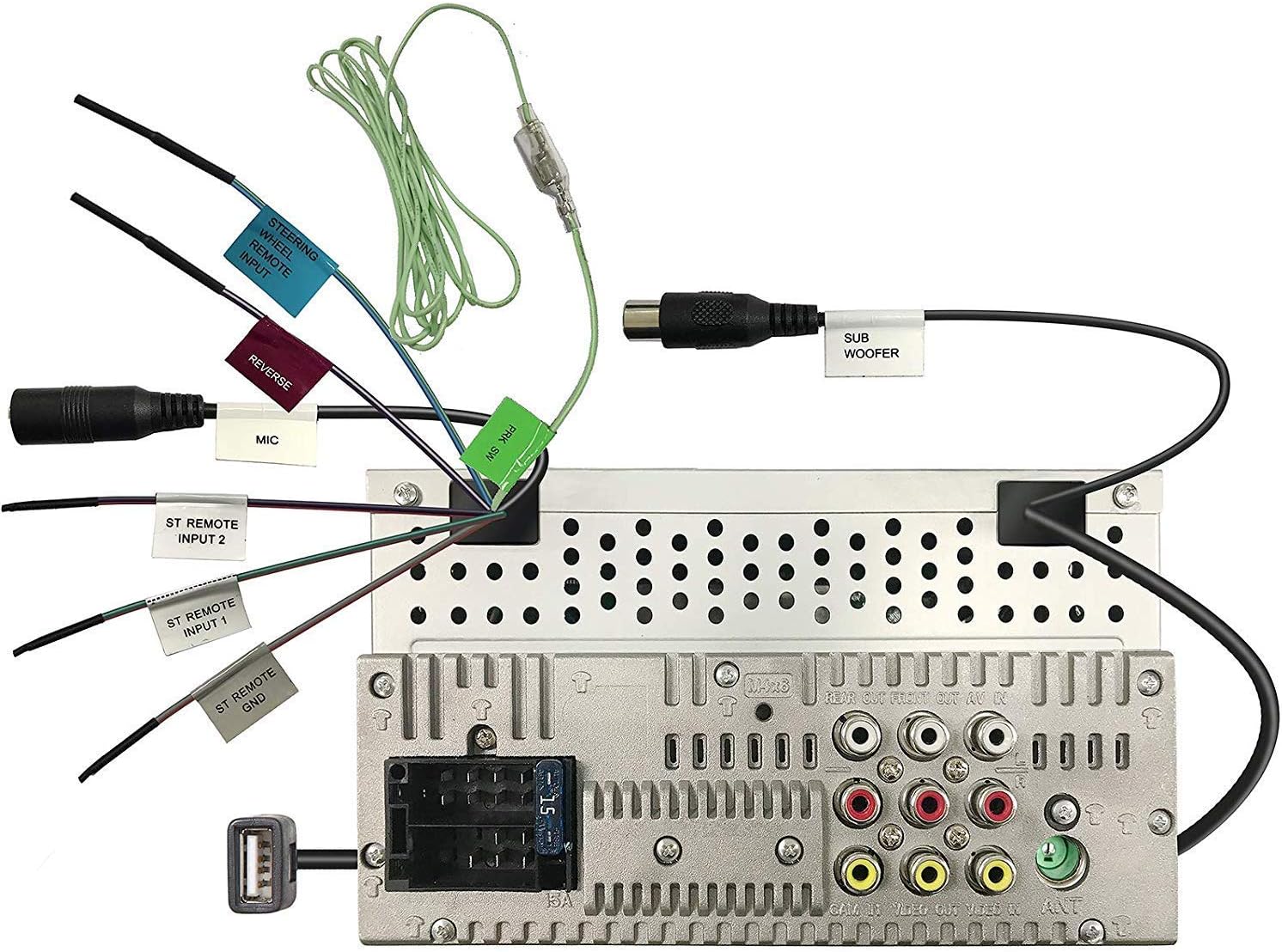
Figure 4.1: Rear panel wiring connections. This image displays the back of the JVC KW-AVX810 unit, illustrating various input and output ports. Key connections include the main power harness, speaker outputs, RCA pre-outs for front, rear, and subwoofer, video input/output, USB port, microphone input, and steering wheel remote input. Each connection is clearly labeled for identification.
- დენის კავშირები: Connect the yellow wire to the constant 12V supply, the red wire to the accessory 12V supply, and the black wire to a good chassis ground.
- სპიკერის კავშირი: Connect the speaker wires to the corresponding vehicle speakers, ensuring correct polarity.
- USB შეყვანა: The USB port allows connection of compatible devices like iPods/iPhones for audio and video playback, and charging.
- RCA გამომავალი: გამოიყენეთ ეს გარე მოწყობილობების დასაკავშირებლად ampლიფიერები წინა, უკანა და საბვუფერის არხებისთვის.
- ვიდეო შეყვანა/გამომავალი: For connecting external video sources or monitors.
- საჭის დისტანციური მართვის შეყვანა: Connect to a compatible steering wheel control interface (sold separately) for integrated control.
4.2 დანადგარის დამონტაჟება
The KW-AVX810 is a double-DIN unit. Ensure your vehicle's dashboard opening is compatible. Secure the unit using the provided mounting brackets and screws. After mounting, connect all wiring harnesses before reassembling the dashboard.
5. საოპერაციო ინსტრუქციები
5.1 ძირითადი კონტროლი და ჩვენება
The unit features a 7-inch touch panel monitor for intuitive control. The main interface provides access to various functions.

Figure 5.1: Front panel and display. This image shows the JVC KW-AVX810's 7-inch touch panel display, featuring a graphical user interface with icons for various functions such as Tuner, Mirroring, AV-IN, Phone, BT Audio, and Settings. Volume controls and power button are visible on the left bezel. The current time is displayed prominently in the center.
- ჩართვა/გამორთვა: Press the power button (usually located on the left bezel) to turn the unit on or off.
- ხმის კონტროლი: Use the volume up/down buttons or the on-screen controls to adjust the audio level.
- წყაროს შერჩევა: Tap the desired source icon (e.g., Tuner, DVD, USB, BT Audio, AV-IN) on the touch screen to switch between functions.
- მოსახსნელი საფარი: To detach the faceplate, press the release button (refer to the unit's specific mechanism). Always detach the faceplate when leaving the vehicle to deter theft.
5.2 მედიის დაკვრა
- DVD/CD დაკვრა: Insert a disc into the slot. The unit will automatically switch to DVD/CD mode. Use the touch screen for playback controls (play, pause, skip, menu).
- USB/iPod/iPhone: Connect your device to the USB port. The unit will detect the device and allow you to browse and play media files. The KS-U20 cable (sold separately) may be required for iPod video functionality.
- Bluetooth აუდიო: Pair your Bluetooth-enabled device with the KW-AVX810. Once paired, you can stream audio wirelessly.
- რადიო ტიუნერი: Select the Tuner source. Use the touch screen to scan for stations, save presets, and switch between AM/FM bands.
5.3 პარამეტრები და პერსონალიზაცია
Access the 'Settings' menu from the main screen to customize various aspects of the unit, including:
- აუდიო პარამეტრები: Adjust equalizer (7-Band iEQ), balance, fader, subwoofer levels, and sound effects (Dolby 5.1 headphone surround sound).
- ეკრანის პარამეტრები: Adjust brightness, contrast, and background.
- სისტემის პარამეტრები: Language, time, and other general preferences.
- Bluetooth პარამეტრები: Manage paired devices and connection options.
6. მოვლა
- ეკრანის გაწმენდა: Use a soft, dry cloth to wipe the touch screen. For stubborn smudges, lightly dampქსოვილი წყლით ან ელექტრონიკისთვის განკუთვნილი ეკრანის საწმენდი საშუალებით დაასველეთ. არ გამოიყენოთ აბრაზიული საწმენდები.
- Cleaning the Faceplate: Wipe the detachable faceplate with a soft, dry cloth. Avoid harsh chemicals.
- დისკის მოვლა: დისკებს კიდეებიდან მოეჭიდეთ. შეინარჩუნეთ ისინი სუფთა და ნაკაწრებისგან თავისუფალი. როდესაც არ იყენებთ, დისკები შეინახეთ ქეისებში.
- ზოგადი მოვლა: Keep the unit free from dust and moisture. Avoid extreme temperatures.
7. Დიაგნოსტიკა
If you encounter problems with your KW-AVX810, refer to the following common issues and solutions:
| პრობლემა | შესაძლო მიზეზი | გამოსავალი |
|---|---|---|
| არავითარი ძალა | არასწორი გაყვანილობა; გაფუჭებული დამცველი; ავტომობილის აკუმულატორის პრობლემა. | Check power connections (yellow, red, black wires). Inspect the unit's fuse and vehicle's fuse box. Ensure vehicle battery is charged. |
| ხმა არ არის | ხმა ძალიან დაბალია; დადუმება გააქტიურებულია; დინამიკის არასწორი გაყვანილობა; Ampგამხსნელის საკითხი. | Increase volume. Check if mute is on. Verify speaker connections. If using external amplifier, check its power and connections. |
| ჩვენება არ მუშაობს | Faceplate not properly attached; Display settings. | Ensure faceplate is securely attached. Check display brightness/contrast settings. |
| USB/iPod not recognized | Incompatible format; Loose connection; Device issue. | უზრუნველყოს მედია files are in a supported format. Reconnect the USB device. Try a different USB device. Update iPod/iPhone software if necessary. |
| Bluetooth კავშირის პრობლემები | Device not in pairing mode; Interference; Already paired to another device. | Ensure Bluetooth is enabled on both devices and in pairing mode. Delete previous pairings and re-pair. Move closer to the unit. |
თუ პრობლემა ამ გადაწყვეტილებების მოსინჯვის შემდეგაც არ მოგვარებულა, დაუკავშირდით JVC-ის მომხმარებელთა მხარდაჭერის სამსახურს ან კვალიფიციურ სერვის ტექნიკოსს.
8. სპეციფიკაციები
- პროდუქტის ზომები: 18.39 x 17.81 x 10.01 სმ; 2.6 კგ
- საქონლის მოდელის ნომერი: KWM150BT+XV95BK+MAGNET
- ბრენდი: JVC
- კავშირის ტექნოლოგია: Bluetooth, USB
- კონტროლერის ტიპი: Android (თავსებადი)
- განსაკუთრებული მახასიათებლები: Built-In Bluetooth, FM Tuner, Subwoofer Pre-out
- თავსებადი მოწყობილობები: სმარტფონი
- სულ HDMI პორტები: 1 (Note: This may refer to an internal component or specific model variant, as the main description does not highlight HDMI)
- კონექტორის ტიპი: USB
- აუდიო გამომავალი რეჟიმი: გარს
- გარშემორტყმული ხმის არხის კონფიგურაცია: 4.1
- მწარმოებელი: JVC
9. გარანტია და დახმარება
9.1 ინფორმაცია გარანტიის შესახებ
The JVC KW-AVX810 Vehicle Multimedia Receiver comes with a warranty. For Mobile Products, the warranty covers 1 წლიანი ნაწილები და შრომა from the date of purchase. Please retain your proof of purchase for warranty claims. The warranty does not cover damage caused by improper installation, accident, misuse, abuse, or unauthorized modification.
9.2 მომხმარებელთა მხარდაჭერა
For technical assistance, service, or warranty inquiries, please contact JVC customer support. Refer to the official JVC webუახლესი საკონტაქტო ინფორმაციისთვის იხილეთ საიტი ან თქვენი პროდუქტის შეფუთვა.


