1. შესავალი
Thank you for choosing the NEC LCD4215 42-inch MultiSync LCD Monitor. This manual provides essential information for the safe and efficient use of your new display. Please read these instructions thoroughly before installation and operation, and retain them for future reference.
2. უსაფრთხოების ინფორმაცია
მონიტორის დაზიანების თავიდან ასაცილებლად და მომხმარებლის უსაფრთხოების უზრუნველსაყოფად დაიცავით შემდეგი უსაფრთხოების ზომები:
- დენის წყარო: Connect the monitor only to a grounded power outlet with the correct voltagე, როგორც მითითებულია პროდუქტის ეტიკეტზე.
- ვენტილაცია: მონიტორის გარშემო უზრუნველყოფილია საკმარისი ვენტილაცია. არ დაბლოკოთ ვენტილაციის ღიობები.
- სითხის ექსპოზიცია: Avoid exposing the monitor to rain, moisture, or excessive humidity. Do not place liquid-filled objects on or near the monitor.
- დასუფთავება: გაწმენდის წინ გამორთეთ კვების კაბელი. გამოიყენეთ რბილი, მშრალი ქსოვილი. მოერიდეთ თხევადი ან აეროზოლური საწმენდების გამოყენებას.
- მომსახურება: ნუ ეცდებით ამ პროდუქტის საკუთარ მომსახურებას. მიაწოდეთ ყველა სერვისი კვალიფიციურ მომსახურე პერსონალს.
- განთავსება: მონიტორი სტაბილურ, ბრტყელ ზედაპირზე მოათავსეთ, რათა არ ჩამოვარდეს.
3. პაკეტის შიგთავსი
Verify that all items are present in the package. If any items are missing or damaged, contact your dealer immediately.
- NEC LCD4215 42-inch MultiSync LCD Monitor
- დენის კაბელი
- VGA კაბელი
- დისტანციური მართვა ბატარეებით
- მომხმარებლის სახელმძღვანელო (ეს დოკუმენტი)
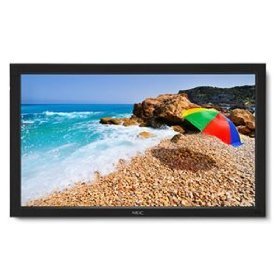
Image: The NEC LCD4215 42-inch MultiSync LCD Monitor, shown from the front with its stand. This image represents the primary display unit.
4. დაყენება
4.1 შეფუთვა
- Carefully open the packaging and remove the monitor and accessories.
- Place the monitor face down on a soft, clean surface to avoid scratching the screen.
4.2 Stand/Mounting Installation
The monitor can be used with its included desktop stand or mounted using a VESA-compatible wall mount (sold separately).
4.2.1 Desktop Stand Installation
- Attach the stand base to the stand neck using the provided screws.
- Secure the assembled stand to the back of the monitor using the designated mounting points and screws.
- Carefully lift the monitor and place it on a stable, level surface.
4.2.2 კედელზე დამონტაჟება (არასავალდებულო)
If using a VESA-compatible wall mount, follow the instructions provided with your wall mount kit. Ensure the mount supports the weight and VESA pattern of the NEC LCD4215 monitor.
4.3 დამაკავშირებელი კაბელი
Before connecting any cables, ensure the monitor and all connected devices are powered off.
- ვიდეო კაბელი: Connect one end of the appropriate video cable (VGA, DVI, HDMI, etc.) to the video output port of your computer or media device and the other end to the corresponding input port on the monitor.
- Audio Cable (Optional): If using the monitor's internal speakers or audio output, connect an audio cable from your source device to the monitor's audio input.
- დენის კაბელი: Connect the power cord to the monitor's AC input and then plug the other end into a grounded electrical outlet.
5. საოპერაციო ინსტრუქციები
5.1 ჩართვა/გამორთვა
- Press the power button on the front panel of the monitor or on the remote control to turn the monitor on. The power indicator light will illuminate.
- მონიტორის გამორთვისთვის კვლავ დააჭირეთ ჩართვის ღილაკს.
5.2 შეყვანის შერჩევა
The monitor can display content from multiple sources. To switch between inputs:
- Press the 'Input' or 'Source' button on the remote control or the monitor's control panel.
- Use the navigation buttons to select the desired input source (e.g., VGA, DVI, HDMI).
- Press 'Enter' or 'OK' to confirm your selection.
5.3 ეკრანის ძირითადი პარამეტრები
Access the On-Screen Display (OSD) menu to adjust various settings:
- Press the 'Menu' button on the remote control or the monitor's control panel.
- Use the navigation buttons (Up/Down/Left/Right) to browse through menu options such as 'Brightness', 'Contrast', 'Color Temperature', and 'Aspect Ratio'.
- Press 'Enter' or 'OK' to select an option and adjust its value.
- Press 'Menu' again to exit the OSD menu.
6. მოვლა
6.1 ეკრანის გაწმენდა
To maintain optimal display quality, clean the screen and casing regularly:
- მონიტორის გაწმენდამდე ყოველთვის გამორთეთ და გამორთეთ დენის წყაროდან.
- გამოიყენეთ რბილი, უბინავის ქსოვილი ოდნავ დampened with water or a non-abrasive, ammonia-free, and alcohol-free screen cleaner.
- ნაზად გაწმინდეთ ეკრანი დაasing. Do not apply excessive pressure.
- მოერიდეთ სითხის პირდაპირ ეკრანზე ან რაიმე ღიობში შესხურებას.
6.2 შენახვა
If storing the monitor for an extended period, ensure it is powered off, unplugged, and stored in a cool, dry place away from direct sunlight and extreme temperatures. Use the original packaging if available for protection.
7. Დიაგნოსტიკა
Before contacting customer support, refer to the following table for common issues and their solutions:
| პრობლემა | შესაძლო მიზეზი | გამოსავალი |
|---|---|---|
| ეკრანზე სურათი არ არის | Monitor not powered on; Video cable loose or disconnected; Incorrect input source selected. | Press the power button; Check video cable connections; Select the correct input source. |
| სურათი ძალიან მუქი/ნათელია | სიკაშკაშის/კონტრასტის პარამეტრები არასწორია. | Adjust 'Brightness' and 'Contrast' in the OSD menu. |
| აუდიო არ არის | Audio cable disconnected; Volume too low; Muted. | Check audio cable connection; Increase volume; Unmute audio. |
| მბჟუტავი სურათი | Video cable faulty; Resolution/Refresh rate mismatch. | Replace video cable; Adjust display settings on your computer. |
8. სპეციფიკაციები
Detailed technical specifications for the NEC LCD4215 MultiSync LCD Monitor:
| ფუნქცია | სპეციფიკაცია |
|---|---|
| მოდელის ნომერი | LCD 4215 |
| ეკრანის ზომა | 42 ინჩი |
| ეკრანის მაქსიმალური გარჩევადობა | 1366 x 768 |
| ასპექტის თანაფარდობა | 1.78:1 |
| ნივთის წონა | 47 ფუნტი |
| პროდუქტის ზომები (LxWxH) | 44 x 27.5 x 9.25 ინჩი |
| ფერი | შავი |
| მწარმოებელი | Nec Computers |
| პირველი ხელმისაწვდომი თარიღი | 31 წლის 2008 ივლისი |
9. გარანტია და მხარდაჭერა
9.1 ინფორმაცია გარანტიის შესახებ
This NEC LCD4215 monitor comes with a standard manufacturer's warranty. Please refer to the separate warranty card included in your product packaging for specific terms, conditions, and duration of coverage. Keep your proof of purchase for warranty claims.
9.2 მომხმარებელთა მხარდაჭერა
For technical assistance, troubleshooting beyond this manual, or warranty service, please contact NEC customer support. Visit the official NEC webსაიტი უახლესი საკონტაქტო ინფორმაციისთვის, მათ შორის ტელეფონის ნომრებისა და ონლაინ მხარდაჭერის რესურსებისთვის.
Webსაიტი: www.nec.com


