1. შესავალი
This manual provides essential information for the safe and effective use of your Kodak Easyshare M530 Digital Camera. Please read it thoroughly before operating the device and retain it for future reference. The Kodak Easyshare M530 is a compact digital camera featuring a 12-megapixel sensor, 3x optical zoom, and a 2.7-inch LCD screen, designed for capturing high-quality photos and videos with ease.
2. რა არის ყუთში
- Kodak Easyshare M530 ციფრული კამერა
- USB კაბელი
- მრავალჯერადი დატენვის ლითიუმ-იონური ბატარეა
- მაჯის სამაჯური
- ინსტრუქციის სახელმძღვანელო (ეს დოკუმენტი)
3. კამერა დასრულდაview
გაეცანით თქვენი კამერის ძირითად კომპონენტებს.

სურათი 1: წინა view of the Kodak Easyshare M530 Digital Camera, showing the lens, flash, and brand logo.

სურათი 2: უკან view of the Kodak Easyshare M530 Digital Camera, displaying the 2.7-inch LCD screen and control buttons.

სურათი 3: ზედა view of the Kodak Easyshare M530 Digital Camera, highlighting the power button and shutter release.

სურათი 4: მხარე view of the Kodak Easyshare M530 Digital Camera, illustrating the USB port for connectivity.
4. დაყენება
4.1. ბატარეის დაყენება
- გახსენით ბატარეის განყოფილების საფარი, რომელიც კამერის ქვედა ნაწილში მდებარეობს.
- Insert the rechargeable Lithium-Ion battery with the contacts facing the correct direction, as indicated inside the compartment.
- ბატარეის განყოფილების საფარი მჭიდროდ დახურეთ მანამ, სანამ არ ჩაჯდება.
4.2. მეხსიერების ბარათის დაყენება
The camera supports SD/SDHC memory cards (not included).
- გახსენით მეხსიერების ბარათის სლოტის საფარი, რომელიც ჩვეულებრივ ბატარეის განყოფილების მახლობლად მდებარეობს.
- ჩადეთ SD/SDHC ბარათი ეტიკეტით კამერის წინა მხარეს, სანამ არ დააწკაპუნებს.
- დახურეთ მეხსიერების ბარათის სლოტის საფარი.
4.3. ბატარეის დატენვა
- დარწმუნდით, რომ ბატარეა სწორად არის დამონტაჟებული კამერაში.
- მოწოდებული USB კაბელი შეაერთეთ კამერის USB პორტთან.
- USB კაბელის მეორე ბოლო შეაერთეთ თავსებად USB კვების ადაპტერთან ან კომპიუტერის USB პორტთან.
- The charging indicator light will illuminate. Charging is complete when the light turns off or changes color (refer to camera display for exact status).
5. კამერის მართვა
5.1. ჩართვა/გამორთვა
- ჩართვისთვის: დააჭირეთ ღილაკს ძალაუფლება ღილაკი, რომელიც კამერის ზედა ნაწილში მდებარეობს.
- გამორთვისთვის: დააჭირეთ და გააჩერეთ ძალაუფლება button until the camera shuts down.
5.2. ფოტოების გადაღება
- ჩართეთ კამერა.
- კადრირება მოახდინეთ 2.7 დიუმიანი LCD ეკრანის გამოყენებით.
- დააჭირეთ ჩამკეტი ფოკუსირებისთვის დააჭირეთ ღილაკს ნახევრად ქვემოთ. ფოკუსირების ჩარჩო მწვანედ გადაიქცევა ფოკუსირების მიღწევის შემდეგ.
- დააჭირეთ ჩამკეტი button all the way down to capture the photo.
5.3. ვიდეოების ჩაწერა
- Switch the camera to video mode (refer to your camera's specific mode dial or menu for this option).
- დააჭირეთ ჩამკეტი button to start recording. A red indicator will typically appear on the screen.
- დააჭირეთ ჩამკეტი კვლავ დააწკაპუნეთ ჩაწერის შესაჩერებლად.
5.4. Zoom ფუნქცია
Use the zoom lever (often labeled W for Wide and T for Telephoto) to adjust the 3x optical zoom.
- დააჭირეთ ბერკეტს მიმართულებით T to zoom in (telephoto).
- დააჭირეთ ბერკეტს მიმართულებით W to zoom out (wide-angle).
5.5. ფლეშის რეჟიმები
დააჭირეთ ფლეში button (often indicated by a lightning bolt icon) to cycle through available flash modes:
- ავტომატური ფლეშ: კამერა ავტომატურად განსაზღვრავს, საჭიროა თუ არა ფლეში.
- Fill Flash: ფლეში ყოველი გასროლის დროს ანათებს.
- წითელი თვალის ეფექტის შემცირება: წითელი თვალის ეფექტის შესამცირებლად წინასწარი განათებით ანათებს.
- ფლეშის გამორთვა: ფლეში გამორთულია.
5.6. რეviewფოტოებისა და ვიდეოების გადაღება
- დააჭირეთ Review ღილაკი (ხშირად მითითებულია დაკვრის ხატულით).
- Use the directional pad to navigate through your captured images and videos.
- დააჭირეთ OK or აირჩიეთ ღილაკი view შერჩეული ნივთი.
5.7. Smart Capture and Face Recognition
The Kodak Easyshare M530 features Smart Capture, which automatically adjusts camera settings for optimal results, and Face Recognition, which detects and optimizes settings for faces in your shots.
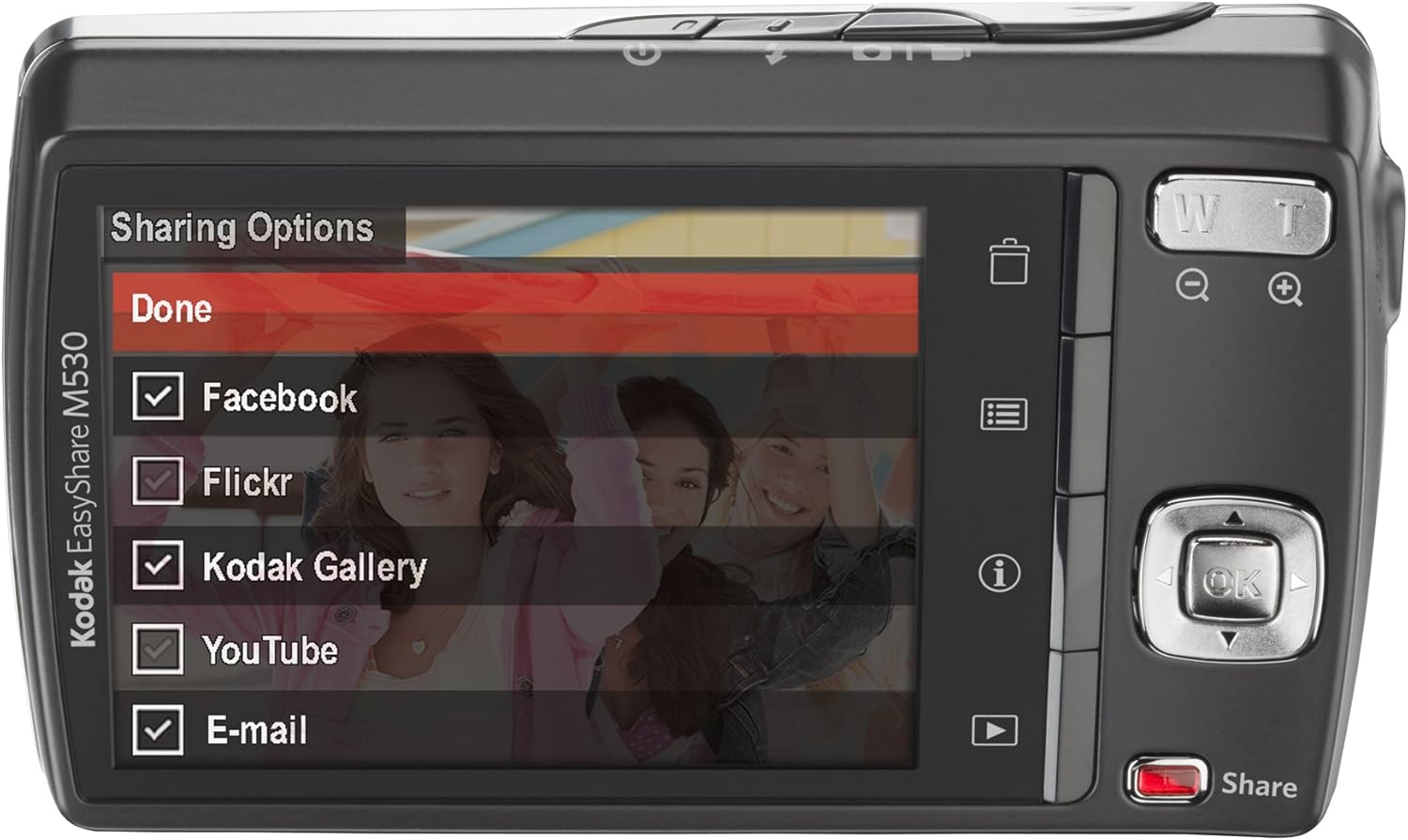
სურათი 5: The camera's LCD screen displaying sharing options, including Facebook, Flickr, Kodak Gallery, YouTube, and Email.
5.8. თქვენი კონტენტის გაზიარება
Utilize the dedicated Share button for easy uploading of your photos and videos to various platforms when connected to a computer with Kodak's EasyShare software.
6. მოვლა
6.1. კამერის გაწმენდა
- კამერის კორპუსის გასაწმენდად გამოიყენეთ რბილი, უბუშტო ქსოვილი.
- ლინზისა და LCD ეკრანისთვის გამოიყენეთ სპეციალიზებული ლინზების საწმენდი ქსოვილი და ხსნარი. მოერიდეთ უხეში ქიმიკატების გამოყენებას.
6.2. ბატარეის მოვლა
- შეინახეთ ბატარეები გრილ, მშრალ ადგილას, როდესაც არ იყენებთ.
- მოერიდეთ ბატარეების ექსტრემალურ ტემპერატურაზე ზემოქმედებას.
- ხანგრძლივი შენახვის წინ სრულად დატენეთ ბატარეა.
6.3. შენახვა
When storing the camera for long periods, remove the battery and memory card. Store the camera in a dry, dust-free environment, preferably in a camera bag.
7. Დიაგნოსტიკა
| პრობლემა | შესაძლო მიზეზი | გამოსავალი |
|---|---|---|
| კამერა არ ირთვება | დაბალი ან ამოწურული ბატარეა | ბატარეის სრულად დატენვა. |
| ბატარეა არასწორად არის ჩასმული | Reinsert the battery correctly. | |
| ბუნდოვანი სურათები | კამერის რყევა | კამერა სტაბილურად დაიჭირეთ ან გამოიყენეთ სამფეხა. |
| Subject out of focus | Ensure the camera focuses before fully pressing the shutter. | |
| მეხსიერების ბარათის შეცდომა | Card not inserted correctly or corrupted | Reinsert the card. If the problem persists, try formatting the card (this will erase all data) or use a different card. |
| ფლეში არ ანათებს | Flash mode set to 'Off' | Change the flash mode to Auto or Fill Flash. |
8. სპეციფიკაციები
- ფოტო სენსორის გარჩევადობა: 12 დეპუტატი
- ოპტიკური ზუმი: 3x
- ეკრანის ზომა: 2.7 ინჩი (LCD)
- ვიდეო რეზოლუცია: 640 x 480 (30 fps)
- ბატარეის ტიპი: ლითიუმის იონი
- გამოსახულების სტაბილიზაცია: არცერთი
- მხარდაჭერილი File ფორმატი: RAW
- კავშირის ტექნოლოგია: USB
- ნივთის წონა: 0.33 ფუნტი
- ფერი: Blue (for this specific model variant)
9. გარანტია და მხარდაჭერა
Your Kodak Easyshare M530 Digital Camera comes with a 30-day warranty from the manufacturer, Eastman Kodak Company. This warranty covers defects in materials and workmanship under normal use. For warranty claims or technical support, please refer to the contact information provided with your purchase documentation or visit the official Kodak support webსაიტი.
დამატებითი მხარდაჭერისა და რესურსებისთვის შეგიძლიათ ეწვიოთ KODAK-ის მაღაზია Amazon-ზე.