შესავალი
The iHome iM60LT is a compact, rechargeable mini speaker designed to deliver enhanced audio from various devices. Its vacuum bass design provides surprising volume and bass response for its small size. This speaker is ideal for use with laptops, cell phones, MP3 players, and other audio sources equipped with a 3.5 mm headphone jack.
This manual provides detailed instructions for setting up, operating, maintaining, and troubleshooting your iM60LT speaker to ensure optimal performance and longevity.
პაკეტის შიგთავსი
- iHome iM60LT Rechargeable Mini Speaker (Blue Translucent)
- 2-in-1 USB Charging and Audio Cable
დაყენება
1. სპიკერის დატენვა
Before initial use, fully charge the iM60LT speaker. The speaker contains a long-lasting internal lithium-ion battery.
- Locate the 2-in-1 USB charging and audio cable.
- Connect the small end of the cable to the charging port on the iM60LT speaker.
- Connect the USB plug of the cable to a powered USB port on a computer or a USB power adapter (not included).
- The charging indicator light will illuminate during charging and turn off when the battery is fully charged.
Note: You can charge the speaker while listening to audio.
2. აუდიო წყაროსთან დაკავშირება
The iM60LT speaker connects to any audio device with a standard 3.5 mm headphone jack.
- Ensure the speaker is charged or connected to a power source.
- Connect the 3.5 mm audio plug of the 2-in-1 cable to the audio input jack on the iM60LT speaker.
- Connect the other 3.5 mm audio plug to the headphone jack of your audio device (e.g., laptop, cell phone, MP3 player).
- Turn on the iM60LT speaker using the power switch (if available, typically located near the ports).
- Begin playing audio on your connected device. Adjust the volume on your device and the speaker for desired sound levels.
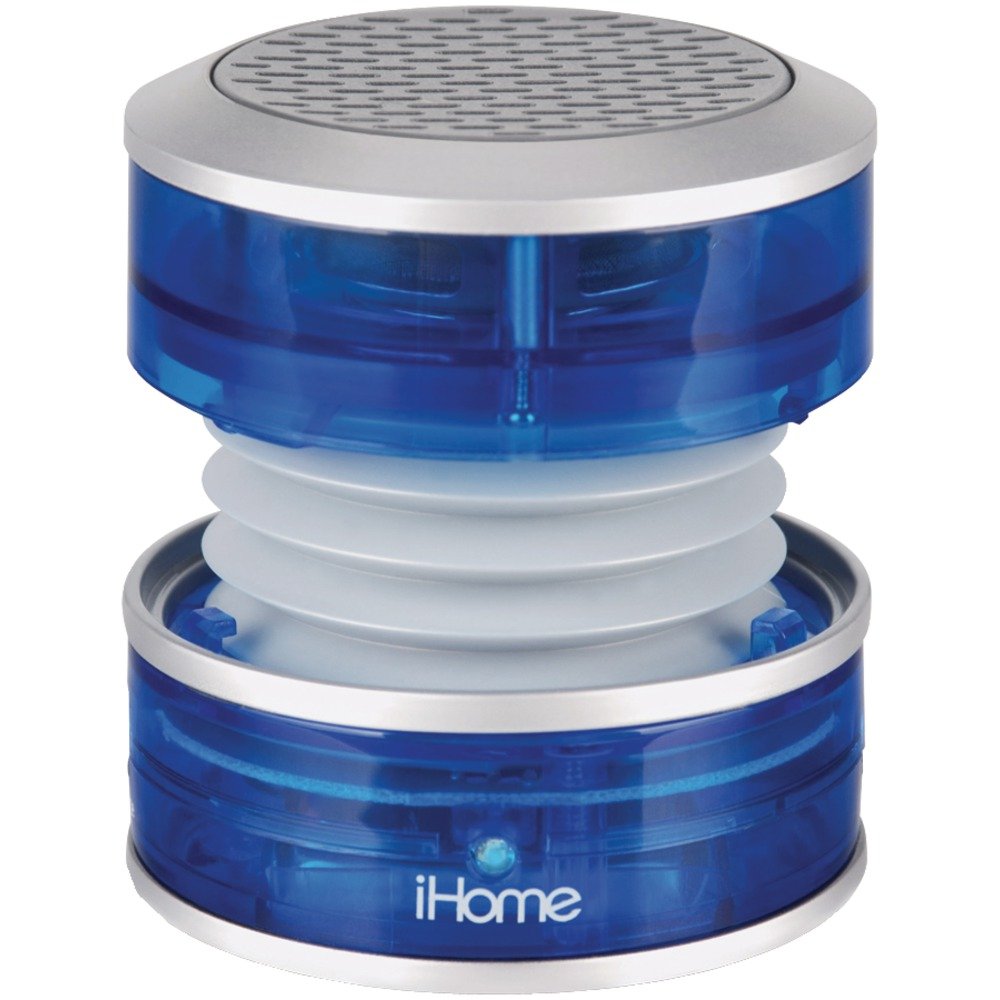
Image: The iHome iM60LT Mini Speaker, blue translucent, connected to a laptop via its audio cable, demonstrating its compact size and connectivity.
ოპერაციული ინსტრუქციები
1. ჩართვა/გამორთვა
- To power on the speaker, slide the power switch to the 'ON' position. A power indicator light may illuminate.
- გამორთვისთვის, გადაწიეთ კვების ჩამრთველი „გამორთვის“ პოზიციაზე.
2. ხმის რეგულირება
Volume is primarily controlled through your connected audio device. Ensure the device's volume is set to an appropriate level.
3. Enhancing Bass with Vacuum Bass Design
The iM60LT features a unique vacuum bass design that allows for enhanced bass response.
- To activate the vacuum bass feature, gently twist the top and bottom sections of the speaker to expand its body. This creates a larger resonance chamber for deeper bass.
- To return to a compact form, twist the sections back together.
4. Connecting Multiple Speakers (Simulated Stereo)
For a simulated stereo sound experience or increased volume, you can connect multiple iM60LT speakers.
- Connect the first iM60LT speaker to your audio source as described in the 'Connecting to an Audio Source' section.
- Using an additional 3.5mm audio cable (not included), connect the line-out jack of the first speaker to the audio input jack of a second iM60LT speaker.
- Repeat this process to daisy-chain additional speakers.
მოვლა
- Keep the speaker clean by wiping it with a soft, dry cloth. Do not use liquid cleaners or solvents.
- Avoid exposing the speaker to extreme temperatures, direct sunlight, or moisture. The speaker is not waterproof.
- შეინახეთ დინამიკი გრილ, მშრალ ადგილას, როდესაც არ იყენებთ.
- Do not attempt to disassemble or modify the speaker, as this will void the warranty and may cause damage.
პრობლემების მოგვარება
| პრობლემა | გამოსავალი |
|---|---|
| დინამიკიდან ხმა არ ისმის. |
|
| დაბალი ხმის ან დამახინჯებული ხმა. |
|
| დინამიკი არ იტენება. |
|
სპეციფიკაციები
- მოდელის სახელი: iM60LT
- სპიკერის ტიპი: პორტატული დინამიკები
- განსაკუთრებული თვისება: პორტატული
- თავსებადი მოწყობილობები: MP3 Player, Laptops, Cell Phones, Portable Game Devices
- ფერი: Blue Translucent
- ნივთის წონა: 91 გრამი (3.21 უნცია)
- წინაღობა: 2 Ohms
- წყალგაუმტარია: არა
- ნივთების რაოდენობა: 1
- უსადენო კომუნიკაციის ტექნოლოგია: Bluetooth (Note: While listed, primary connection is wired 3.5mm)
- სპიკერის ზომა: 3.5 Millimeters (referring to audio jack size)
- დენის წყარო: იკვებება ბატარეით (დატენვადი ლითიუმ-იონი)
- აუდიო დრაივერის ტიპი: დინამიური დრაივერი
- პროდუქტის ზომები: 2.36 x 2.13 x 2.28 ინჩი
- დინამიკის მაქსიმალური გამომავალი სიმძლავრე: 5 ვატი
- კავშირის ტექნოლოგია: USB (for charging), 3.5mm Audio Jack (for audio input)
- აუდიო გამომავალი რეჟიმი: Stereo (when two speakers are connected)
საგარანტიო ინფორმაცია
The iHome iM60LT Rechargeable Mini Speaker comes with a Limited Warranty. Please refer to the warranty card included with your product or visit the official iHome website for specific terms and conditions regarding warranty coverage, duration, and claims procedures.
This warranty typically covers defects in materials and workmanship under normal use. It does not cover damage caused by misuse, accidents, unauthorized modifications, or normal wear and tear.
მხარდაჭერა
For further assistance, technical support, or to inquire about replacement parts, please contact iHome customer service. You can typically find contact information on the official iHome webსაიტზე ან პროდუქტის შეფუთვაზე.
Please have your product model number (iM60LT) and purchase information ready when contacting support.


