1. შესავალი
This manual provides essential information for the proper installation, operation, and maintenance of your Behringer Truth B1031A Active 2-Way Reference Studio Monitor. Please read this manual thoroughly to ensure optimal performance and longevity of your device. The B1031A is designed for professional audio applications, offering ultra-linear frequency response and precise sound reproduction.
2. უსაფრთხოების მნიშვნელოვანი ინსტრუქციები
- დენის წყარო: Connect the unit only to a power supply of the voltage specified in the manual or on the unit.
- დამიწება: ელექტროშოკის თავიდან ასაცილებლად, დარწმუნდით, რომ მოწყობილობა სათანადოდ არის დამიწებული.
- ვენტილაცია: არ დაბლოკოთ სავენტილაციო ღიობები. დააინსტალირეთ მწარმოებლის ინსტრუქციის შესაბამისად.
- წყალი და ტენიანობა: Do not use this apparatus near water or expose it to rain or moisture.
- სითბო: არ დააინსტალიროთ სითბოს წყაროსთან ახლოს, როგორიცაა რადიატორები, სითბოს რეგისტრები, ღუმელები ან სხვა მოწყობილობა (მათ შორის ampგამხსნელები), რომლებიც წარმოქმნიან სითბოს.
- დასუფთავება: გაწმინდეთ მხოლოდ მშრალი ქსოვილით.
- მომსახურება: მიმართეთ ყველა მომსახურება კვალიფიციურ მომსახურე პერსონალს. სერვისი საჭიროა, როდესაც აპარატი რაიმე ფორმით დაზიანებულია, მაგალითად, დაზიანებულია კვების კაბელი ან შტეფსელი, დაიღვარა სითხე ან ჩავარდა მოწყობილობაში საგნები, აპარატი წვიმს ან ტენიანობას ექვემდებარება, ნორმალურად არ მუშაობს. , ან ჩამოაგდეს.
3. პაკეტის შიგთავსი
Upon unpacking your Behringer Truth B1031A, please verify that all components are present and in good condition:
- Behringer Truth B1031A Active Studio Monitor (1 unit)
- დენის კაბელი
- მომხმარებლის სახელმძღვანელო (ეს დოკუმენტი)
თუ რაიმე ნივთი აკლია ან დაზიანებულია, დაუყოვნებლივ დაუკავშირდით თქვენს დილერს.
4. პროდუქტი დასრულდაview
The Behringer Truth B1031A is an active 2-way reference studio monitor featuring an 8-inch Kevlar woofer and a 1-inch silk dome tweeter. It incorporates precision Class A/B amplifiers with active protection circuits, delivering 100 W for low frequencies and 50 W for high frequencies. Its design aims for ultra-linear frequency response and wide dispersion characteristics.
4.1. Წინა პანელი

The front panel features the primary acoustic components: the 8-inch Kevlar woofer for low-frequency reproduction and the 1-inch silk dome tweeter for high frequencies. Indicator LEDs provide visual feedback on the monitor's power status and signal clipping.
4.2. უკანა პანელი
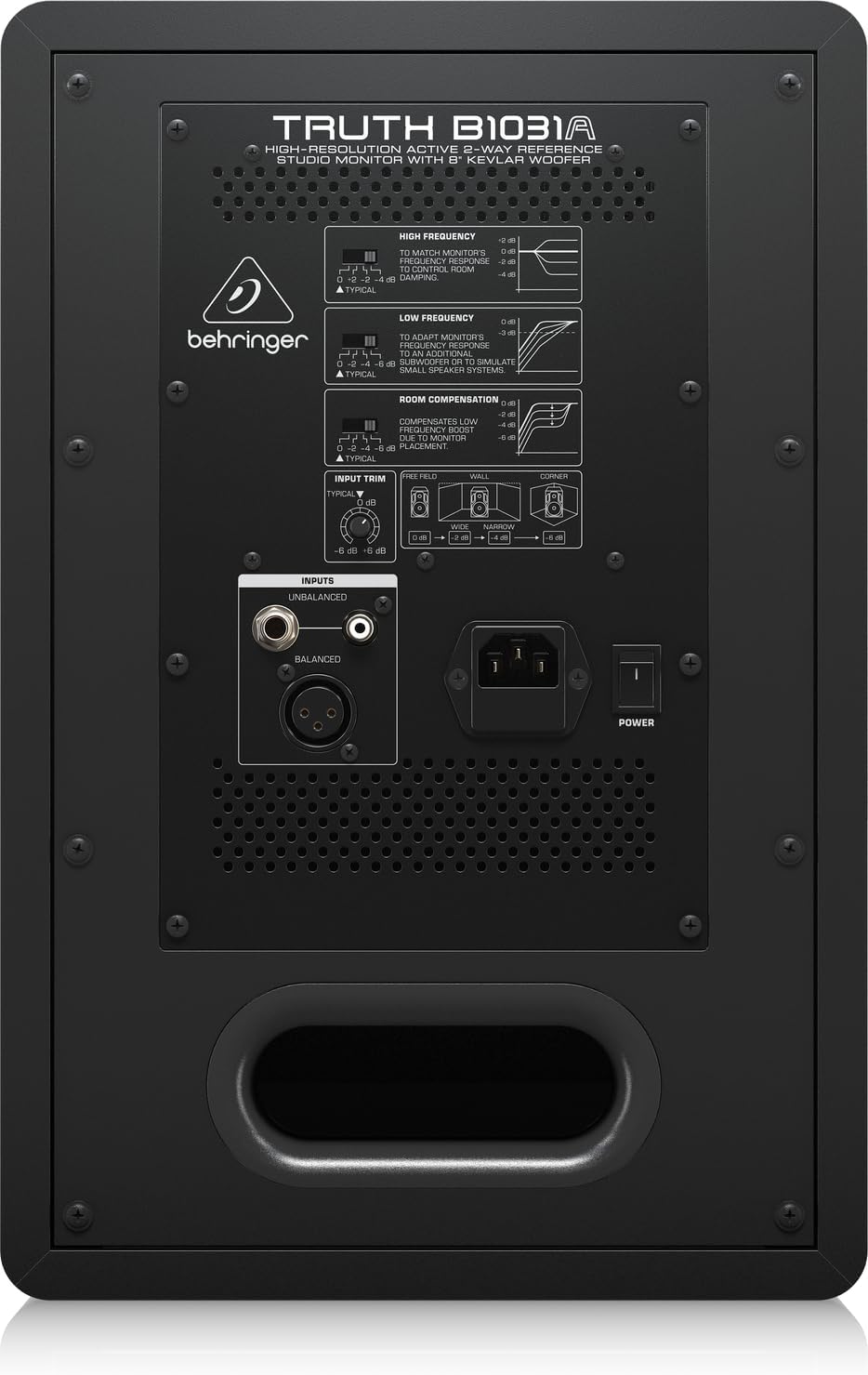
The rear panel houses all input connections and acoustic adjustment controls. These include:
- დაბალანსებული XLR შეყვანა: For professional audio connections.
- Balanced 1/4" TRS Input: For professional audio connections.
- Unbalanced RCA Input: სამომხმარებლო აუდიო მოწყობილობებისთვის.
- შეყვანის მორთვა: არეგულირებს შეყვანის მგრძნობელობას.
- High Frequency Adjustment: Allows tailoring of the high-frequency response.
- Low Frequency Adjustment: Allows tailoring of the low-frequency response.
- Room Compensation Switches: Adjusts the monitor's response to compensate for room acoustics (e.g., placement near walls or corners).
- Power Switch and IEC Power Inlet: For connecting the power cable and turning the unit on/off.
5. დაყენება
5.1. დასაქმების
Proper placement of your studio monitors is crucial for accurate sound reproduction. Consider the following guidelines:
- სტერეო სამკუთხედი: Position the monitors and your listening position to form an equilateral triangle. The distance between the two monitors should be equal to the distance from each monitor to your head.
- ყურის დონე: The tweeters should ideally be at ear level when you are in your primary listening position.
- კედლებიდან დაშორება: Avoid placing monitors directly against walls or in corners, as this can exaggerate bass frequencies. If unavoidable, use the ოთახის კომპენსაცია switches on the rear panel to adjust.
- სიმეტრია: Ensure the left and right monitors are placed symmetrically within the room to maintain a balanced stereo image.
5.2. კავშირები
Before making any connections, ensure the monitor is powered off and unplugged from the mains.
- აუდიო შეყვანა: Connect your audio source (e.g., audio interface, mixer) to the B1031A using either an XLR, 1/4" TRS, or RCA cable. For optimal signal integrity, balanced XLR or TRS connections are recommended.
- დენის კავშირი: Insert the supplied power cable into the IEC power inlet on the rear panel of the monitor, then plug the other end into a suitable AC power outlet.
6. მოქმედებს
6.1. ჩართვა/გამორთვა
- Ensure all audio connections are secure and the input trim is set to a low level.
- Flip the power switch on the rear panel to the 'ON' position. The power indicator LED on the front panel will illuminate.
- To power off, flip the power switch to the 'OFF' position. It is recommended to power off your audio source first, then the monitors.
6.2. კონტროლის რეგულირება
- შეყვანის მორთვა: Use this knob to match the output level of your audio source. Start with a low setting and gradually increase until you achieve a comfortable listening level without distortion.
- High Frequency Adjustment: This switch allows you to boost or cut high frequencies to suit your listening environment or preference.
- Low Frequency Adjustment: This switch allows you to boost or cut low frequencies. This is particularly useful for compensating for room acoustics or if you are using a separate subwoofer.
- ოთახის კომპენსაცია: These switches are designed to optimize the monitor's performance based on its placement in your room. Refer to the diagram on the rear panel for recommended settings when placing the monitor near walls or in corners.
7. მოვლა
To ensure the longevity and optimal performance of your Behringer Truth B1031A monitor, follow these maintenance guidelines:
- დასუფთავება: Use a soft, dry cloth to clean the exterior of the monitor. Avoid using abrasive cleaners, solvents, or waxes, as these can damage the finish.
- მტვერი: რეგულარულად გაწმინდეთ მტვერი დინამიკის კონუსებსა და ვენტილაციის ღიობებში, რათა თავიდან აიცილოთ მტვრის დაგროვება, რამაც შეიძლება გავლენა მოახდინოს ხმის ხარისხსა და გაგრილებაზე.
- გარემო: მონიტორი გამოიყენეთ სტაბილურ გარემოში, ექსტრემალური ტემპერატურის, ტენიანობისა და მზის პირდაპირი სხივებისგან მოშორებით.
- ტრანსპორტირება: When moving the monitor, ensure it is powered off and disconnected. Use appropriate packaging to protect it from physical damage.
8. Დიაგნოსტიკა
If you encounter issues with your B1031A monitor, consult the following table for common problems and solutions:
| პრობლემა | შესაძლო მიზეზი | გამოსავალი |
|---|---|---|
| ხმა არ არის | No power; incorrect input connection; input trim too low; audio source issue. | Check power cable and switch; verify audio cable connections; increase input trim; check audio source output. |
| დამახინჯებული ხმა | Input signal too high; damaged cable; faulty audio source. | Reduce input trim or output level from source; try a different audio cable; test with another audio source. |
| გუგუნის ან ზუზუნის ხმაური | Ground loop; interference from other electronics; unbalanced cable used for long runs. | Ensure proper grounding; move monitor away from other electronic devices; use balanced cables (XLR/TRS). |
| არათანაბარი სტერეო გამოსახულება | Improper monitor placement; differing acoustic settings between monitors. | Adjust monitor placement for symmetry; ensure High/Low Frequency and Room Compensation settings are identical on both monitors. |
თუ პრობლემა ამ გადაწყვეტილებების მცდელობის შემდეგაც გაგრძელდა, გთხოვთ, დაუკავშირდეთ Behringer-ის მომხმარებელთა მხარდაჭერის სამსახურს ან კვალიფიციურ სერვის ტექნიკოსს.
9. სპეციფიკაციები
Technical specifications for the Behringer Truth B1031A Active Studio Monitor:
| ფუნქცია | სპეციფიკაცია |
|---|---|
| მოდელის სახელი | სიმართლე B1031A |
| სპიკერის ტიპი | Active 2-Way Reference Studio Monitor |
| ვუფერის დიამეტრი | 8 Inches (Kevlar cone) |
| ტვიტერის ტიპი | 1 Inch Silk Dome |
| Ampუფრო ცოცხალი ტიპი | კლასი A/B |
| LF Amplifier გამომავალი | 100 ვატი |
| HF Amplifier გამომავალი | 50 ვატი |
| ჯამური გამომავალი ვატიtage | 150 ვატი |
| დაკავშირების ტექნოლოგია | XLR, 1/4" TRS, RCA |
| დენის წყარო | საკაბელო ელექტრო (110 ვოლტი) |
| პროდუქტის ზომები (D x W x H) | 13.3" x 10.28" x 15.47" |
| ნივთის წონა | 24.91 ფუნტი |
| ფერი | შავი |
| მასალა | მეტალი |
10. გარანტია და მხარდაჭერა
Behringer products are designed and manufactured to high-quality standards. For detailed warranty information, including terms and conditions, please refer to the warranty card included with your product or visit the official Behringer website. For technical support, service, or spare parts, please contact your local Behringer dealer or authorized service center. You can also find support resources and contact information on the Behringer-ის მაღაზია.


