შესავალი
This manual provides essential information for the safe and effective operation of your Laserliner SoundTest-Master 082.070A Noise Level Meter. Please read these instructions carefully before using the device and keep them for future reference. The SoundTest-Master 082.070A is designed for precise measurement of noise levels, featuring integrated long-term memory and PC connectivity for comprehensive documentation.
უსაფრთხოების ინსტრუქციები
- Always operate the device within its specified environmental conditions.
- არ დაუშვათ მოწყობილობა ექსტრემალურ ტემპერატურაზე, ტენიანობაზე ან მზის პირდაპირ შუქზე.
- მოერიდეთ მოწყობილობის ჩამოგდებას ან ძლიერ ზემოქმედებას.
- Do not attempt to open or modify the device. Repairs should only be performed by authorized personnel.
- შეინახეთ მოწყობილობა ძლიერი მაგნიტური ველებისგან.
- Ensure the microphone is clean and free from obstructions for accurate measurements.
პროდუქტი დასრულდაview
The Laserliner SoundTest-Master 082.070A is a handheld noise level meter equipped with a sensitive electret condenser microphone and a clear, illuminated display. It features various controls for measurement settings and data management.

სურათი 1: წინა view of the SoundTest-Master 082.070A, showing the display, microphone with windshield, and control buttons.
ძირითადი კომპონენტები:
- Electret Condenser Microphone: For capturing sound. Includes a removable windshield.
- განათებული ეკრანი: Shows measurement values, settings, and status.
- საკონტროლო ღილაკები: Power, Setup, Max, Record, A/C weighting, Fast/Slow time weighting, Level adjustment, Data send.
- ანალოგური გამომავალი: DC and AC outputs for external connections.
- RS232 ინტერფეისი: Optoisolated port for PC connection and data transfer.
დაყენება
1. ბატარეის მონტაჟი
The device requires batteries for operation. Ensure correct polarity when inserting batteries into the compartment, typically located on the rear of the unit.
2. პირველადი ჩართვა
დააჭირეთ ძალაუფლება button to turn on the device. The display will illuminate and show initial readings.
3. Windshield Attachment
Attach the removable windshield to the microphone to minimize wind noise interference during outdoor measurements.
ოპერაციული ინსტრუქციები
1. ძირითადი გაზომვა
- Turn on the device using the ძალაუფლება ღილაკი.
- Point the microphone towards the sound source.
- The current noise level will be displayed in decibels (dB).
2. Frequency Weighting (dB(A), dB(C))
გამოიყენეთ კონდიციონერი button to switch between frequency weighting curves:
- dB (A): ახდენს ადამიანის ყურის ხმის რეაქციის სიმულირებას, რომელიც ხშირად გამოიყენება გარემოს ხმაურის გაზომვებისთვის.
- dB(C): Provides a flatter response, suitable for measuring peak sound pressure levels or low-frequency noise.
3. Time Weighting (Fast/Slow)
დააჭირეთ ᲩᲥᲐᲠᲐ ᲜᲔᲚᲐ button to select the desired time weighting:
- FAST (125 ms): For measuring rapidly changing noise levels.
- SLOW (1 second): For measuring average noise levels over a longer period, suitable for stable noise sources.
4. Data Logging and PC Connection
The device features a long-term recording function with 16,000 memory points and real-time logging capabilities when connected to a PC.
- Internal Data Logging: დააჭირეთ ჩანაწერი button to start/stop internal data recording. The device can store up to 16,000 measurement points.
- PC კავშირი: Connect the device to a computer using the provided RS232 cable.
- პროგრამული უზრუნველყოფა: Install the provided software on your PC. This software allows for real-time data display, analysis, and download of recorded data.
- Sending Data: გამოიყენეთ გაგზავნეთ მონაცემები button to initiate data transfer to the connected PC.
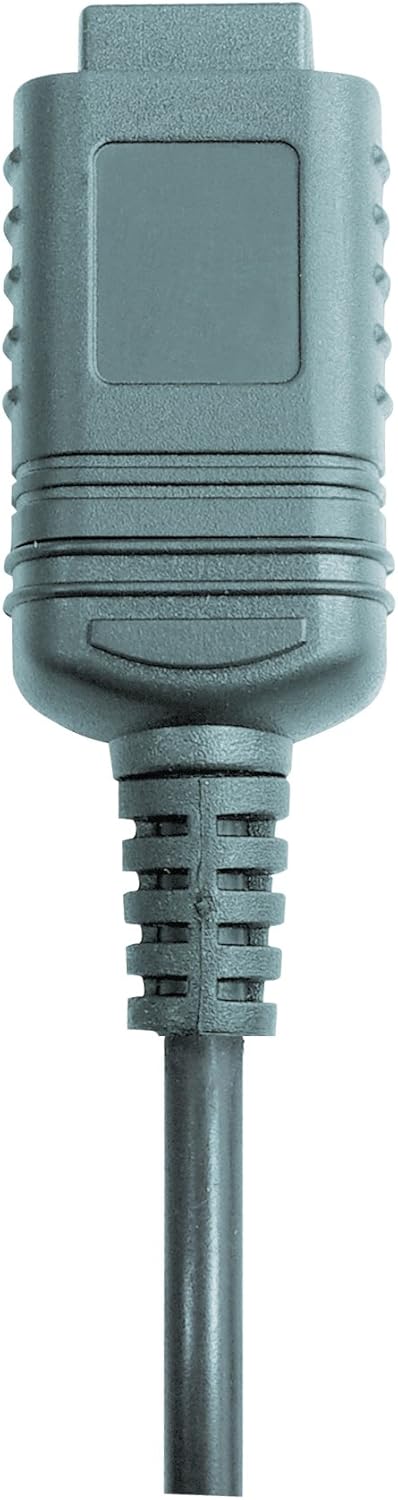

სურათი 2: RS232 cable connectors used for connecting the SoundTest-Master to a PC.
5. კალიბრაცია
The device can be calibrated and adjusted using a standard noise level calibrator (94 dB / 1 kHz). Refer to the calibrator's instructions for the specific calibration procedure.
მოვლა
1. დასუფთავება
- გაწმინდეთ მოწყობილობა გasinგ რბილი, მშრალი ქსოვილით.
- არ გამოიყენოთ აბრაზიული გამწმენდები ან გამხსნელები.
- Ensure the microphone is kept clean and free of dust or debris.
2. შენახვა
When not in use, store the SoundTest-Master in its protective case in a cool, dry place, away from direct sunlight and extreme temperatures. Remove batteries if storing for extended periods.
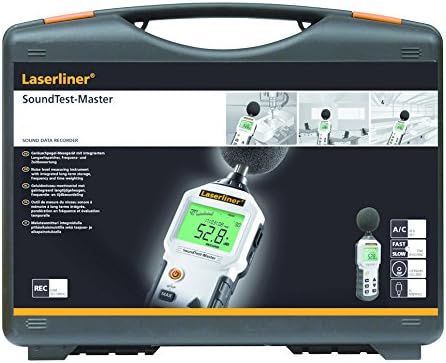
სურათი 3: The SoundTest-Master 082.070A stored in its protective carrying case.
პრობლემების მოგვარება
| პრობლემა | შესაძლო მიზეზი | გამოსავალი |
|---|---|---|
| მოწყობილობა არ ჩაირთვება. | მკვდარი ან არასწორად დამონტაჟებული ბატარეები. | შეცვალეთ ბატარეები, დარწმუნდით, რომ სწორი პოლარობაა. |
| არაზუსტი წაკითხვები. | Microphone obstructed or dirty; device needs calibration. | Clean microphone; perform calibration with a standard calibrator. |
| No data transfer to PC. | Incorrect cable connection; software not installed or configured. | Check RS232 cable connection; ensure PC software is correctly installed and running. |
| ეკრანი ბნელია ან არ იკითხება. | Low battery power; display backlight off. | Replace batteries; check device settings for backlight control. |
სპეციფიკაციები
| ფუნქცია | დეტალი |
|---|---|
| მოდელის სახელი | SoundTest-Master |
| ნაწილის ნომერი | 082.070A |
| მწარმოებელი | Umarex |
| ბრენდი | ლაზერლინერი |
| სიხშირის წონა | dB(A), dB(C) |
| დროის წონა | FAST (125 ms), SLOW (1 second) |
| მონაცემთა მეხსიერება | 16,000 საზომი წერტილი |
| ინტერფეისი | Optoisolated RS232 |
| ანალოგური გამომავალი | DC და AC |
| კალიბრაცია | Adjustable with 94 dB / 1 kHz standard calibrator |
| მიკროფონი | Sensitive electret condenser with removable windshield |
| ჩვენება | Illuminated, clear display |
| ნივთის წონა | 1.18 კილოგრამი (2.6 ფუნტი) |
| პროდუქტის ზომები | 10.33 x 5.51 x 13.78 ინჩი |
| მასალა | Metal (Frame, Barrel) |
| ფერი | შავი და ნაცრისფერი |
| საჭიროა ბატარეები | Yes (not included, type not specified in data) |
გარანტია და მხარდაჭერა
For warranty information and technical support, please refer to the documentation included with your purchase or visit the official Laserliner webსაიტი.


