1. მნიშვნელოვანი უსაფრთხოების ინფორმაცია
Please read this entire manual before assembling or operating your ZIPRO One S exercise bike. Retain this manual for future reference. Failure to follow these instructions can result in injury or damage to the product.
- ნებისმიერი სავარჯიშო პროგრამის დაწყებამდე გაიარეთ კონსულტაცია ექიმთან, განსაკუთრებით თუ გაქვთ ჯანმრთელობის პრობლემები.
- ამ მოწყობილობის მომხმარებლის მაქსიმალური წონაა 110 კგ (242 ფუნტი).
- ყოველი გამოყენების წინ დარწმუნდით, რომ ყველა ჭანჭიკი, თხილი და შეერთება საიმედოდ არის დამაგრებული.
- Place the exercise bike on a flat, stable surface. Use a protective mat if necessary.
- მოარიდეთ ბავშვებს და შინაურ ცხოველებს მოწყობილობისგან მუშაობის დროს.
- ჩაიცვით შესაბამისი სავარჯიშო ტანსაცმელი და ფეხსაცმელი. მოერიდეთ ფხვიერ ტანსაცმელს, რომელიც შეიძლება მოძრავ ნაწილებში გაიჭედოს.
- დაუყოვნებლივ შეწყვიტეთ ვარჯიში, თუ გრძნობთ სისუსტეს, თავბრუსხვევას ან ტკივილს.
- ეს პროდუქტი განკუთვნილია მხოლოდ შიდა გამოყენებისთვის.
2. პროდუქტი დასრულდაview
The ZIPRO One S is a compact exercise bike designed for home cardio training. It features 8 levels of magnetic resistance, an LCD display for tracking workout metrics, and an adjustable saddle for user comfort.

სურათი 2.1: წინა view of the ZIPRO One S Exercise Bike.

Image 2.2: The ZIPRO One S Exercise Bike highlighting its compact dimensions (897mm length, 435mm width, 1100mm height) and key features such as modern design, silent operation, practical adjustment, and compact size.
3. შეკრების ინსტრუქცია
Assembly typically takes 30-40 minutes. All necessary tools are included. Follow these steps carefully.
- ამოალაგე კომპონენტები: Carefully remove all parts from the packaging and lay them out. Check against the parts list (refer to included diagram in the box) to ensure all components are present.
- სტაბილიზატორების დამაგრება: Secure the front and rear stabilizer bars to the main frame using the provided bolts and washers. Ensure they are firmly attached for stability.
- დააინსტალირეთ პედლები: Identify the left (L) and right (R) pedals. Thread the left pedal counter-clockwise and the right pedal clockwise into their respective crank arms. Tighten securely with a wrench. Ensure the pedal straps are correctly oriented.

სურათი 3.1: ახლო ხედი view of the pedal with an adjustable strap, ensuring proper foot positioning during exercise.
- Assemble Seat Post and Saddle: Insert the seat post into the main frame. Adjust the height to your preference and secure it with the adjustment knob. Attach the saddle to the seat post.

სურათი 3.2: დეტალური view of the saddle and its adjustment mechanism, allowing users to customize seat height for optimal comfort.
- Install Handlebars and Console: Attach the handlebar post to the main frame. Connect any necessary sensor cables from the main frame to the console. Mount the console onto the handlebar post and secure it. Insert 2 AAA batteries (included) into the console.
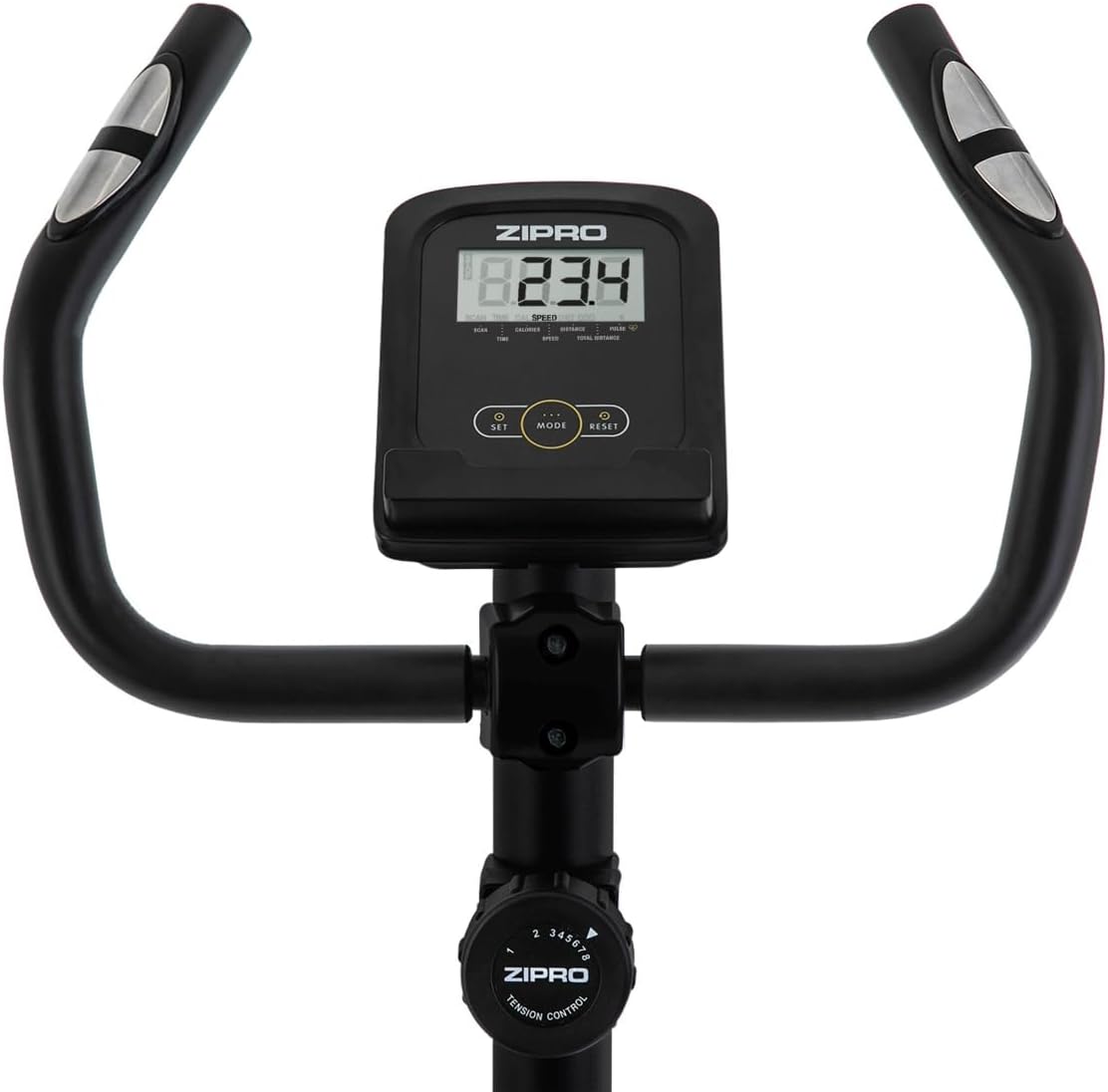
სურათი 3.3: View of the handlebars, integrated LCD display, and the manual resistance control knob, showing the primary user interface.
- საბოლოო შემოწმება: Before first use, double-check all connections and ensure the bike is stable.
4. საოპერაციო ინსტრუქციები
4.1 ველოსიპედის რეგულირება
- საჯდომის სიმაღლე: Loosen the adjustment knob on the seat post, raise or lower the saddle to a comfortable height (recommended: 65-80 cm from the ground, 55-75 cm from pedals), and re-tighten the knob. Your leg should have a slight bend at the knee when the pedal is at its lowest point.
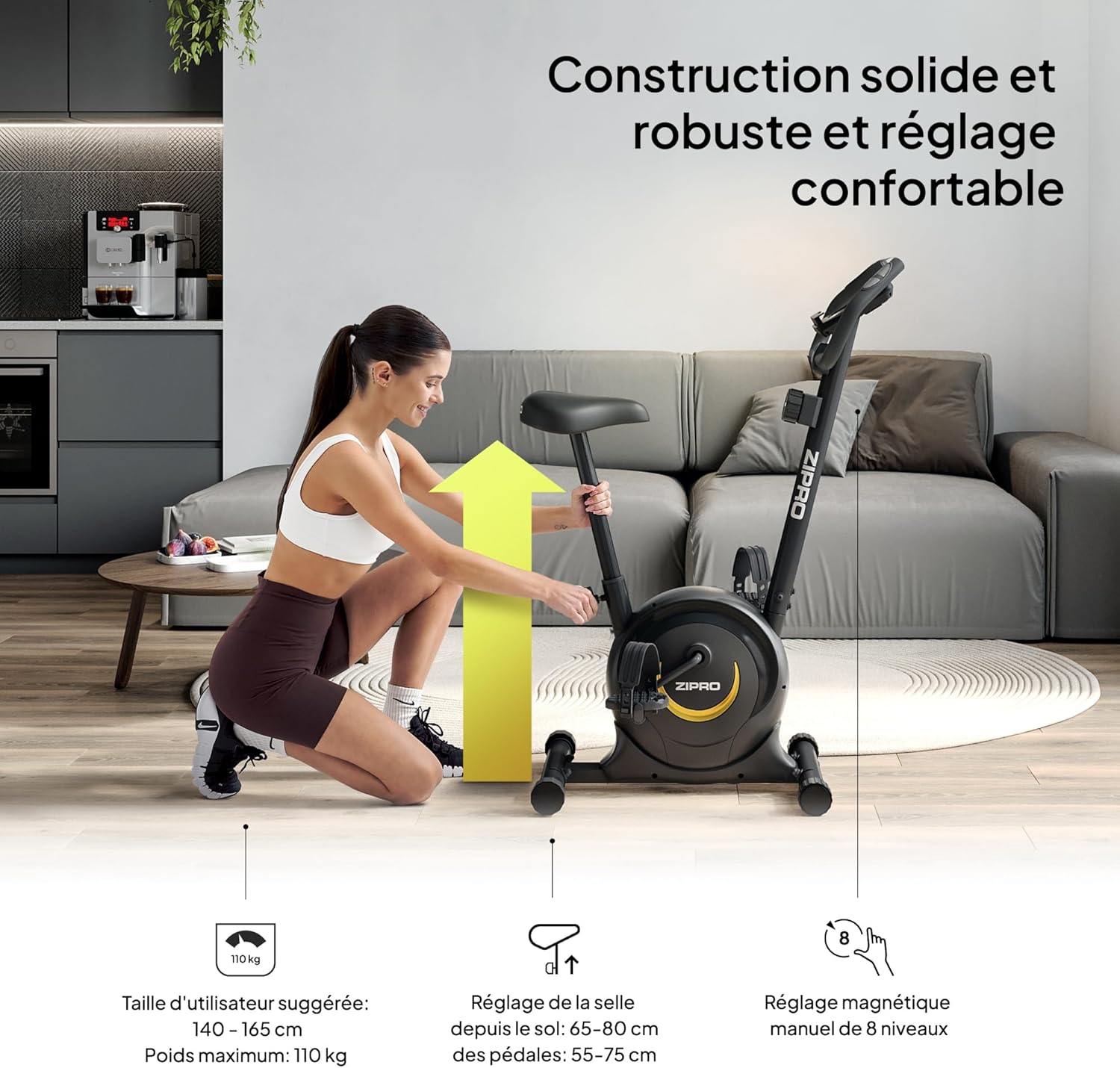
Image 4.1: A user demonstrating the saddle height adjustment, which is crucial for ergonomic and effective training. The image also indicates suggested user height (140-165 cm) and maximum weight (110 kg).
4.2 Using the Console
The LCD console tracks your workout data. It is powered by 2 AAA batteries.

სურათი 4.2: დეტალური view of the LCD display, showing various metrics, and the integrated pulse sensors on the handlebars for heart rate monitoring.
- ჩვენების ფუნქციები: The console displays Time, Distance, Calories, and Pulse. It also features a SCAN function that cycles through these parameters automatically.
- Pulse Measurement: Grip the pulse sensors on the handlebars to measure your heart rate.
- სმარტფონის დამჭერი: Use the integrated holder to place your smartphone or tablet for entertainment or tracking during your workout.

Image 4.3: A smartphone securely placed in the integrated holder on the handlebars, allowing for easy access to media or fitness apps during a workout.
4.3 წინააღმდეგობის რეგულირება
The ZIPRO One S offers 8 levels of magnetic resistance.
- წინააღმდეგობის ღილაკი: Turn the resistance knob located below the console clockwise to increase resistance (harder pedaling) and counter-clockwise to decrease resistance (easier pedaling).
- Choose a resistance level that challenges you without causing excessive strain.

Image 4.4: This image illustrates the manual resistance adjustment knob, pedal straps, and saddle height adjustment, highlighting the bike's customizable features.
5. მოვლა
რეგულარული მოვლა უზრუნველყოფს თქვენი სავარჯიშო ველოსიპედის ხანგრძლივ მუშაობას და უსაფრთხო მუშაობას.
- დასუფთავება: გაასუფთავეთ ველოსიპედი რეკლამითamp ყოველი გამოყენების შემდეგ ნაჭერი ოფლისა და მტვრის მოსაშორებლად. მოერიდეთ აბრაზიულ საწმენდ საშუალებებს ან გამხსნელებს.
- ინსპექტირება: პერიოდულად შეამოწმეთ ყველა ჭანჭიკი, თხილი და მოძრავი ნაწილი მჭიდროდ და ცვეთაზე. მოუჭირეთ ყველა ფხვიერი შესაკრავი.
- შეზეთვა: The magnetic resistance system is generally maintenance-free. Do not attempt to lubricate internal components unless specifically instructed by customer support.
- შენახვა: When not in use, store the bike in a dry, cool place away from direct sunlight and moisture. The integrated transport wheels allow for easy relocation.

Image 5.1: A user easily moving the ZIPRO One S exercise bike, demonstrating its portability thanks to integrated transport wheels.
6. Დიაგნოსტიკა
If you encounter any issues, refer to the following common troubleshooting steps:
- კონსოლი არ ჩანს: Check if the 2 AAA batteries are correctly installed and not depleted. Replace if necessary.
- Inaccurate Pulse Reading: Ensure your hands are firmly gripping both pulse sensors. Dry hands or excessive movement can affect accuracy.
- არაჩვეულებრივი ხმები: Check all visible bolts and nuts for tightness. Ensure no parts are rubbing against each other. If the noise persists, discontinue use and contact customer support.
- წინააღმდეგობა არ იცვლება: Verify that the resistance knob is turning freely and engaging with the internal mechanism. If it feels stuck or unresponsive, contact customer support.
7. სპეციფიკაციები
Detailed technical specifications for the ZIPRO One S Exercise Bike.
| ფუნქცია | სპეციფიკაცია |
|---|---|
| მოდელის სახელი | ერთი ს |
| მოდელის ნომერი | 5941659 |
| ბრენდი | ZIPRO |
| წინააღმდეგობის მექანიზმი | მაგნიტური |
| წინააღმდეგობის დონეები | 8 (ხელით რეგულირება) |
| ჩვენების ტიპი | LCD |
| ჩვენების მეტრიკა | Time, Distance, Calories, Pulse, Scan |
| კვების წყარო (კონსოლი) | 2 x AAA ბატარეები (შედის) |
| მომხმარებლის მაქსიმალური წონა | 110 კგ (242 ფუნტი) |
| რეკომენდებული მომხმარებლის სიმაღლე | 140 - 165 სმ |
| Saddle Height Adjustment (from ground) | 65 - 80 სმ |
| Saddle Height Adjustment (from pedals) | 55 - 75 სმ |
| პროდუქტის ზომები (L x W x H) | 89.7 x 43.5 x 110 სმ |
| პროდუქტის წონა | 15.5 კგ |
| ძირითადი მასალა | ნახშირბადოვანი ფოლადი |
| განსაკუთრებული თვისებები | Compact design, Adjustable saddle, Smartphone holder, Transport wheels |
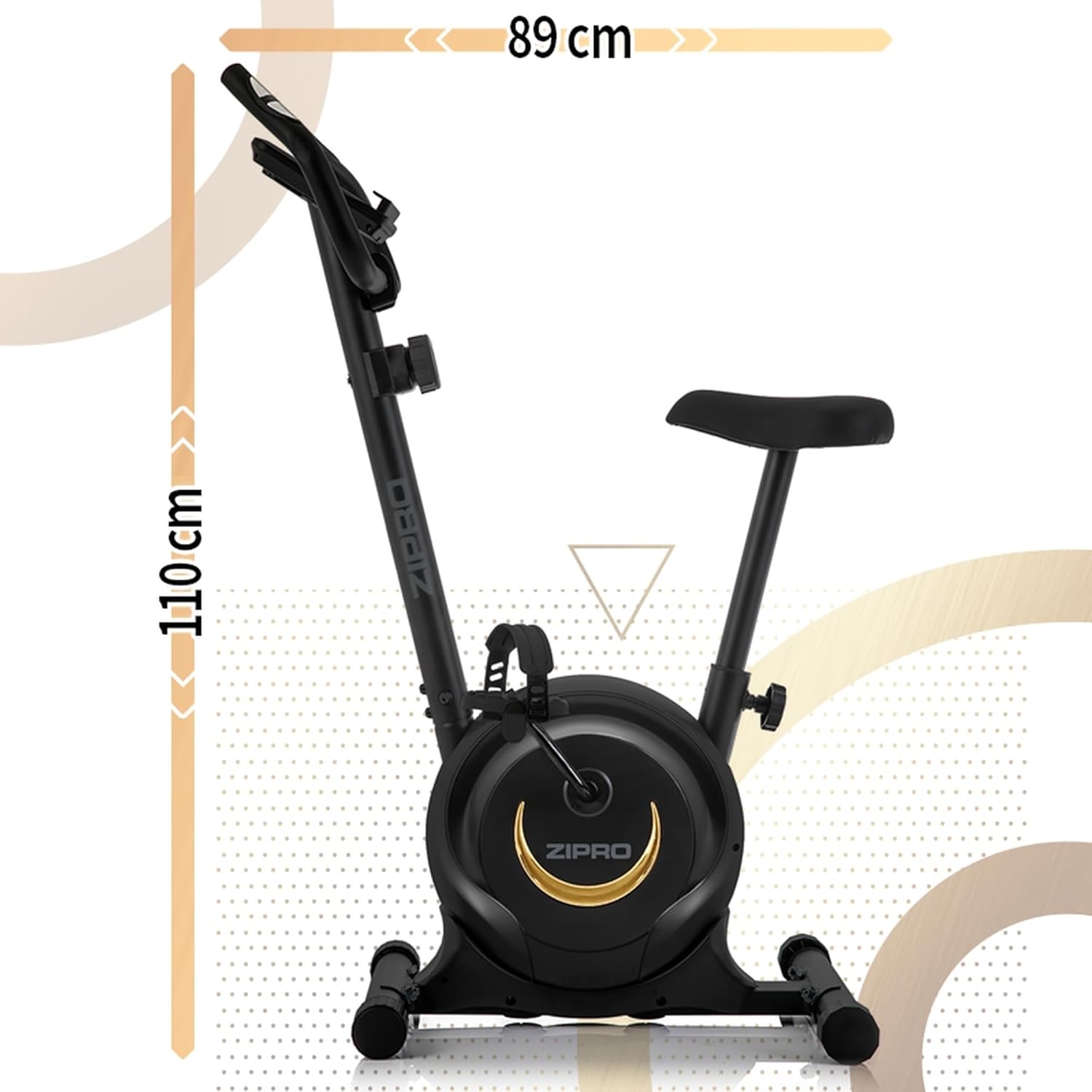
სურათი 7.1: გვერდი view of the ZIPRO One S Exercise Bike, illustrating its overall dimensions of approximately 110 cm in height and 89 cm in length.
8. გარანტია და მხარდაჭერა
For warranty information, product support, or to order replacement parts, please contact ZIPRO customer service. Refer to your purchase documentation for specific warranty terms and contact details.
- Keep your proof of purchase (receipt or order confirmation) for warranty claims.
- Do not attempt to repair the product yourself if it is under warranty, as this may void the warranty.


