1. შესავალი
Thank you for choosing the Ground Zero GZIA 4115HPX 4-Channel Car Audio Ampგამხსნელი. ეს amplifier is designed to deliver high-quality audio performance for your vehicle's sound system. This manual provides essential information for the proper installation, operation, and maintenance of your ampგამათავისუფლებელი. ოპტიმალური მუშაობისა და უსაფრთხოების უზრუნველსაყოფად, გთხოვთ, ინსტალაციის ან გამოყენების დაწყებამდე ყურადღებით წაიკითხოთ ეს სახელმძღვანელო.
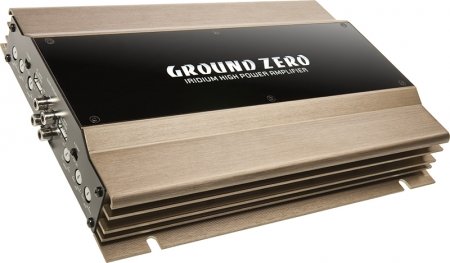
Figure 1: Ground Zero GZIA 4115HPX 4-Channel Car Audio Amplifier. This image displays the external casinგრამი amplifier, highlighting its compact design and heat sink fins.
2. უსაფრთხოების ინსტრუქციები
უსაფრთხოების მნიშვნელოვანი ინფორმაცია: Improper installation or use can lead to serious injury, damage to the amplifier, or damage to your vehicle.
- ელექტრო სამუშაოების დაწყებამდე ყოველთვის გათიშეთ ავტომობილის აკუმულატორის უარყოფითი ტერმინალი.
- Ensure all wiring is properly routed and secured to prevent pinching, chafing, or short circuits.
- Use appropriate gauge wiring for power, ground, and speaker connections as recommended by the manufacturer.
- Install a fuse or circuit breaker on the main power wire as close to the battery as possible.
- მოერიდეთ მონტაჟს amplifier in locations exposed to direct sunlight, excessive heat, moisture, or dust.
- არ იმოქმედოთ ampთუ მაცივარი დაზიანებულია ან გაუმართავია, მიმართეთ პროფესიონალურ დახმარებას.
- შეინახეთ amplifier's ventilation areas clear to prevent overheating.
3. დაყენება და ინსტალაცია
სათანადო ინსტალაცია გადამწყვეტი მნიშვნელობისაა თქვენი მოწყობილობის მუშაობისა და ხანგრძლივი მუშაობისთვის amplifier. If you are unsure about any part of the installation process, consult a professional car audio installer.
3.1 შეფუთვა
ფრთხილად ამოიღეთ amplifier from its packaging. Inspect the unit for any signs of damage that may have occurred during shipping. Retain the packaging for future transport or service needs.
3.2 მონტაჟი
The GZIA 4115HPX amplifier is designed for surface mount installation. Choose a mounting location that is:
- Secure and stable, preventing vibration.
- Well-ventilated to allow for proper heat dissipation.
- Protected from moisture and direct sunlight.
- ხელმისაწვდომია გაყვანილობისა და რეგულირებისთვის.
გამოიყენეთ მოწოდებული სამონტაჟო ხრახნები დასამაგრებლად amplifier to a solid surface in your vehicle. Ensure no existing wiring, fuel lines, or brake lines are damaged during drilling.
3.3 გაყვანილობის კავშირები
Refer to the connection diagrams below for proper wiring. All connections should be tight and secure to prevent signal loss or electrical issues.
3.3.1 Power and Ground Wiring
- სიმძლავრე (B+): Connect a suitable gauge power cable directly from the positive terminal of the vehicle's battery to the amplifier's B+ terminal. Install an inline fuse (not included) within 18 inches (45 cm) of the battery.
- მიწა (GND): Connect a suitable gauge ground cable from the amplifier's GND terminal to a clean, unpainted metal surface of the vehicle's chassis. Ensure a good electrical connection. The ground cable should be as short as possible.
- დისტანციური მართვა (REM): თქვენი თავის ბლოკის დისტანციური გამომავალიდან დისტანციური ჩართვის მავთული შეაერთეთ ampგამაძლიერებლის REM ტერმინალი. ეს მავთული ატრიალებს ampლიფიკატორის ჩართვა და გამორთვა თქვენი სათავე ბლოკის გამოყენებით.
3.3.2 დინამიკის გაყვანილობა
The GZIA 4115HPX is a 4-channel amplifier. Connect your speakers to the corresponding speaker output terminals (CH1, CH2, CH3, CH4). Ensure correct polarity (+ to + and - to -) for each speaker.
- For stereo operation, connect one speaker per channel.
- For bridged operation (e.g., for a subwoofer), refer to the specific bridging instructions on the amplifier or in a detailed wiring diagram.
3.3.3 RCA Input Connections
შეაერთეთ RCA კაბელები თქვენი მთავარი ბლოკის წინასწარი განყოფილებიდან.amp გამომავალი რომ amplifier's RCA input jacks (INPUT CH1/2, INPUT CH3/4).

სურათი 2: შიდა view of the Ground Zero GZIA 4115HPX amplifier's circuit board. This image shows the internal components, including capacitors, resistors, and the transformer, which are responsible for audio processing and power delivery.

სურათი 3: დეტალური შიდა view of the Ground Zero GZIA 4115HPX amplifier. This image provides a closer look at the power supply section and output stage components, indicating the amplifier's robust construction.
3.4 საწყისი კორექტირება
Before powering on, ensure all connections are correct and secure.
- Gain Control: Set the gain controls (LEVEL) on the amplifier to their minimum position.
- კროსოვერის პარამეტრები: თუ თქვენი amplifier has built-in crossovers (HPF/LPF), set them according to your speaker type. For full-range speakers, you might use the HPF (High Pass Filter) to protect them from low frequencies. For subwoofers, use the LPF (Low Pass Filter).
4. ოპერირება Ampუფრო ცოცხალი
ერთხელ დაინსტალირებული, amplifier will turn on automatically with your head unit via the remote wire.
4.1 Setting Gain Levels
The gain control is not a volume knob; it matches the output voltagთქვენი სათავე ბლოკის e შეყვანის მგრძნობელობამდე ampმაცოცხლებელი.
- Turn your head unit volume to about 75-80% of its maximum.
- ნელა გაზარდეთ amplifier's gain control until you hear slight distortion, then back it off slightly until the sound is clear.
- Repeat for all channels if independent gain controls are present.
4.2 Adjusting Crossovers and Bass Boost
- მაღალი გამშვები ფილტრი (HPF): Used for full-range speakers to block low frequencies that they cannot reproduce effectively. Adjust to protect speakers and improve clarity.
- დაბალი გამშვები ფილტრი (LPF): Used for subwoofers to allow only low frequencies to pass through. Adjust to blend with your main speakers.
- Ბასის დასტიმულირება, ბასის გაძლიერება: Use sparingly. Excessive bass boost can lead to distortion and potential damage to speakers or the amplifier. Adjust to enhance low-frequency response as desired, but avoid overdriving the system.
5. მოვლა
The Ground Zero GZIA 4115HPX amplifier requires minimal maintenance.
- დასუფთავება: პერიოდულად გაწმინდეთ გარე ზედაპირი amplifier with a soft, dry cloth to remove dust. Do not use harsh chemicals or abrasive cleaners.
- ვენტილაცია: დარწმუნდით, რომ amplifier's heat sink fins and surrounding area remain free of obstructions to allow for proper airflow and cooling.
- კავშირის შემოწმება: Occasionally check all power, ground, remote, and speaker connections to ensure they remain tight and free of corrosion.
6. Დიაგნოსტიკა
თუ თქვენ გაქვთ პრობლემები თქვენს ampლიფიერი, მხარდაჭერასთან დაკავშირებამდე გაეცანით შემდეგ პრობლემების მოგვარების სახელმძღვანელოს.
| პრობლემა | შესაძლო მიზეზი | გამოსავალი |
|---|---|---|
| Ampგამაძლიერებელი არ ირთვება (არ არის დენის ინდიკატორი). |
|
|
| ხმა არ არის დინამიკებიდან. |
|
|
| დამახინჯებული ან ცუდი ხმის ხარისხი. |
|
|
| Amplifier overheats (protection light on). |
|
|
7. სპეციფიკაციები
The following are the technical specifications for the Ground Zero GZIA 4115HPX 4-Channel Car Audio Ampუფრო ცოცხალი:
| ფუნქცია | დეტალი |
|---|---|
| მოდელის ნომერი | GZIA 4115HPX |
| არხების რაოდენობა | 4 |
| გამომავალი არხის რაოდენობა | 4 |
| ტtage | 14.4 ვოლტი |
| ვატtage (მაქს) | 500 ვატი |
| სამონტაჟო ტიპი | ზედაპირის მთა |
| ნივთის წონა | 2 კგ 900 გ |
| პაკეტის ზომები | 43.4 x 25 x 7.9 სმ |
| ASIN | B006VTSQ8C |
8. ინფორმაცია გარანტიის შესახებ
Ground Zero products are designed and manufactured to the highest quality standards. For detailed warranty terms and conditions, please refer to the warranty card included with your product or visit the official Ground Zero webსაიტი. შეინახეთ შეძენის დამადასტურებელი საბუთი გარანტიასთან დაკავშირებული ნებისმიერი პრეტენზიისთვის.
9. მომხმარებელთა მხარდაჭერა
If you require further assistance or have questions not covered in this manual, please contact Ground Zero customer support or your authorized dealer. Contact information can typically be found on the official Ground Zero webსაიტი.


