1. შესავალი
Thank you for choosing the TFA 30.5027.02 Digital Thermometer/Hygrometer. This device is designed to accurately measure and display indoor temperature and humidity, providing a clear indication of the comfort level in your environment. Its ultra-flat design and high-gloss surface make it a discreet and functional addition to any room. Please read this manual carefully to ensure proper setup and operation.
2. უსაფრთხოების ინფორმაცია
- შეინახეთ ეს ინსტრუქციის სახელმძღვანელო მომავალი მითითებისთვის.
- ეს მოწყობილობა განკუთვნილია მხოლოდ შიდა გამოყენებისთვის.
- Do not expose the device to extreme temperatures, direct sunlight, moisture, or strong vibrations.
- არ ჩაძიროთ მოწყობილობა წყალში ან სხვა სითხეში.
- Do not attempt to open or modify the device. This will void the warranty.
- შეინახეთ ბატარეები ბავშვებისთვის მიუწვდომელ ადგილას. გადაყლაპვის შემთხვევაში დაუყოვნებლივ მიმართეთ სამედიცინო დახმარებას.
- გადაყარეთ გამოყენებული ბატარეები ადგილობრივი წესების შესაბამისად.
- გაასუფთავეთ მოწყობილობა რბილი, დamp ქსოვილი. არ გამოიყენოთ აბრაზიული გამწმენდები ან გამხსნელები.
3. პაკეტის შიგთავსი
გთხოვთ, შეამოწმოთ, რომ ყველა კომპონენტი ადგილზეა და დაუზიანებელია:
- 1x TFA 30.5027.02 Digital Thermometer/Hygrometer
- 1x CR2 Lithium Battery (pre-installed or separate)
- 1x ინსტრუქციის სახელმძღვანელო (ეს დოკუმენტი)
4. პროდუქტი დასრულდაview
The TFA 30.5027.02 features a clear digital display showing current temperature and humidity. It also includes a comfort level indicator and a maximum/minimum value memory function.

სურათი 1: წინა view of the TFA 30.5027.02 Digital Thermometer/Hygrometer. The display shows temperature in Celsius and relative humidity percentage, along with a comfort level icon.
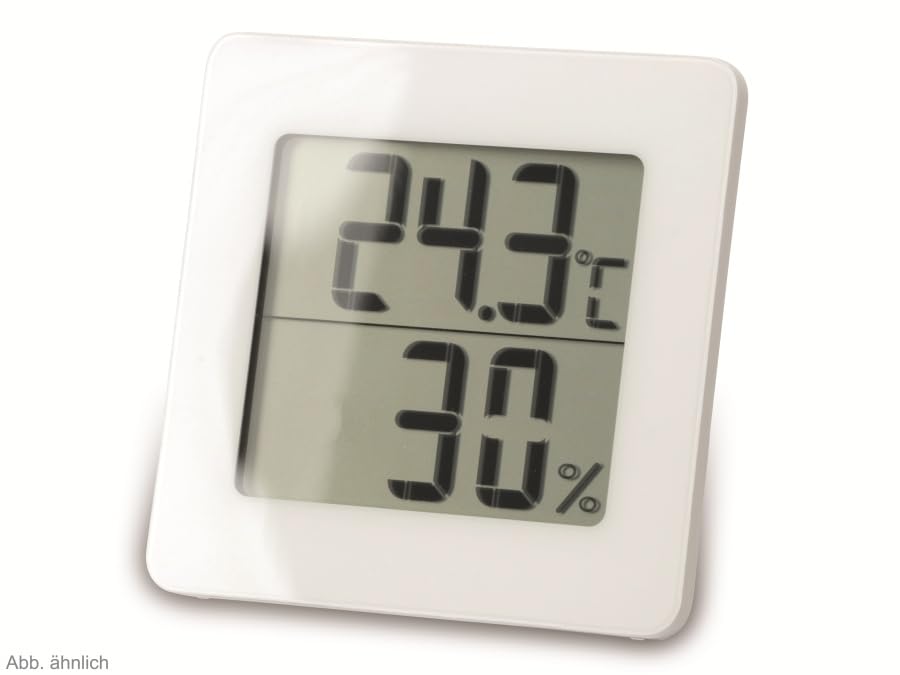
სურათი 2: ალტერნატიული view of the TFA 30.5027.02 showing different temperature and humidity readings, demonstrating the device's clear digital display.
ძირითადი მახასიათებლები:
- Digital display for temperature (°C) and humidity (% RH)
- Ultra-flat design with high-gloss finish
- Comfort level indicator (smiley icon)
- Maximum and minimum value memory function
- კედელზე დასამაგრებელი
5. დაყენება
5.1 ბატარეის დაყენება
- იპოვეთ ბატარეის განყოფილების საფარი მოწყობილობის უკანა მხარეს.
- საფარის მოხსნა შეგიძლიათ მისი ფრთხილად გასრიალებით ან გახსნით.
- Insert one CR2 Lithium battery, ensuring the correct polarity (+/-) as indicated inside the compartment.
- უსაფრთხოდ შეცვალეთ ბატარეის განყოფილების საფარი.
- The device display should activate, showing current temperature and humidity readings.
5.2 საწყისი განთავსების ადგილი
For accurate readings, place the thermometer/hygrometer in a location free from direct sunlight, drafts, or heat sources. The device can be placed on a flat surface or mounted on a wall using the integrated mounting hole on the back.
- კედელზე მონტაჟი: Use a small screw (not included) suitable for your wall type. Hang the device securely.
- მაგიდის განთავსება: Ensure the device is stable on a flat, level surface.
6. საოპერაციო ინსტრუქციები
6.1 ჩვენება დასრულდაview
The large digital display shows two main values:
- ზედა ეკრანი: Current temperature in degrees Celsius (°C).
- ქვედა ჩვენება: მიმდინარე ფარდობითი ტენიანობა პროცენტებშიtage (% რეაქციის სიმტკიცე).
- კომფორტის დონის ინდიკატორი: A small icon (e.g., a smiley face) indicates the current indoor climate comfort level based on temperature and humidity.
6.2 მაქს/მინის ფუნქცია
The device records the maximum and minimum temperature and humidity values measured since the last reset. To access these values:
- დააჭირეთ MAX/MIN button (if present, typically on the back or side). The display will show the maximum recorded temperature and humidity.
- დააჭირეთ MAX/MIN ღილაკი ისევ view მინიმალური დაფიქსირებული ტემპერატურა და ტენიანობა.
- დააჭირეთ MAX/MIN button a third time to return to current readings.
To reset the MAX/MIN values, press and hold the MAX/MIN button for a few seconds while viewing the MAX or MIN values. The memory will clear, and new maximum and minimum values will begin recording from that point.
6.3 კომფორტის დონის ინდიკატორი
The comfort level indicator provides a quick visual reference for indoor climate conditions:
- Happy Face: Indicates optimal comfort (e.g., 20-25°C and 40-70% RH).
- Neutral Face: Indicates acceptable but not optimal conditions.
- Sad Face: Indicates uncomfortable conditions (e.g., too dry, too humid, too hot, or too cold).
Note: Specific ranges for comfort levels may vary slightly by model. Refer to the device's display for the exact icon representation.
7. მოვლა
7.1 დასუფთავება
გაასუფთავეთ მოწყობილობა რბილი, ოდნავ დamp cloth. Do not use abrasive cleaning agents, solvents, or alcohol, as these can damage the surface and display.
7.2 ბატარეის გამოცვლა
When the battery power is low, a low battery indicator (if available) will appear on the display. Replace the battery as follows:
- გახსენით ბატარეის განყოფილების საფარი მოწყობილობის უკანა მხარეს.
- Remove the old CR2 Lithium battery.
- Insert a new CR2 Lithium battery, observing the correct polarity (+/-).
- დახურეთ ბატარეის განყოფილების საფარი.
Note: After battery replacement, the device may reset, and MAX/MIN values will be cleared.
8. Დიაგნოსტიკა
| პრობლემა | შესაძლო მიზეზი | გამოსავალი |
|---|---|---|
| ეკრანი არ არის ან ეკრანი სუსტია | ბატარეა დაცლილია ან არასწორად არის ჩასმული. | Replace the battery with a new CR2 Lithium battery, ensuring correct polarity. |
| არაზუსტი წაკითხვები | Device is placed in an unsuitable location (e.g., near a window, heat source, or vent). | Relocate the device to a stable indoor environment away from direct influences. Allow 15-30 minutes for readings to stabilize. |
| Comfort indicator always shows the same face | Environmental conditions are consistently outside or within a specific comfort range. | This indicates the device is functioning correctly. Adjust your indoor environment if desired. |
9. სპეციფიკაციები
- მოდელის ნომერი: 30.5027.02
- ბრენდი: TFA
- ფერი: თეთრი
- პროდუქტის ზომები (L x W x H): 10 x 1.2 x 8.2 სმ (3.94 x 0.47 x 3.23 ინჩი)
- ნივთის წონა: 70 გრამი (2.47 უნცია)
- ბატარეა: 1 x CR2 ლითიუმი (მოყვება)
- სამონტაჟო ტიპი: კედლის სამაგრი
- Operational Humidity Range: 20%-დან 95%-მდე RH
- Upper Rated Temperature: 50°C (122°F)
- ტემპერატურის სიზუსტე: ±1°C
- ტემპერატურის წაკითხვის სიზუსტე: ±1°C
10. გარანტია და მხარდაჭერა
გარანტიის შესახებ ინფორმაციისა და მომხმარებელთა მხარდაჭერისთვის, გთხოვთ, იხილოთ თქვენი საცალო მოვაჭრის მიერ მოწოდებული წესები და პირობები ან დაუკავშირდეთ პირდაპირ მწარმოებელს. შეინახეთ შეძენის დამადასტურებელი საბუთი გარანტიასთან დაკავშირებული ნებისმიერი პრეტენზიისთვის.
მწარმოებელი: TFA Dostmann GmbH & Co. KG
For further assistance, please visit the official TFA webსაიტი ან დაუკავშირდით მათ მომხმარებელთა მომსახურების განყოფილებას.


