1. პროდუქტი დასრულდაview
The MOOER Rage Machine is a compact, high-gain metal distortion pedal designed for electric guitarists seeking a wide variety of heavy metal style distortion tones. Its full metal shell ensures durability, while its miniature size makes it ideal for pedalboards with limited space. This pedal features true bypass circuitry to maintain signal integrity when disengaged.
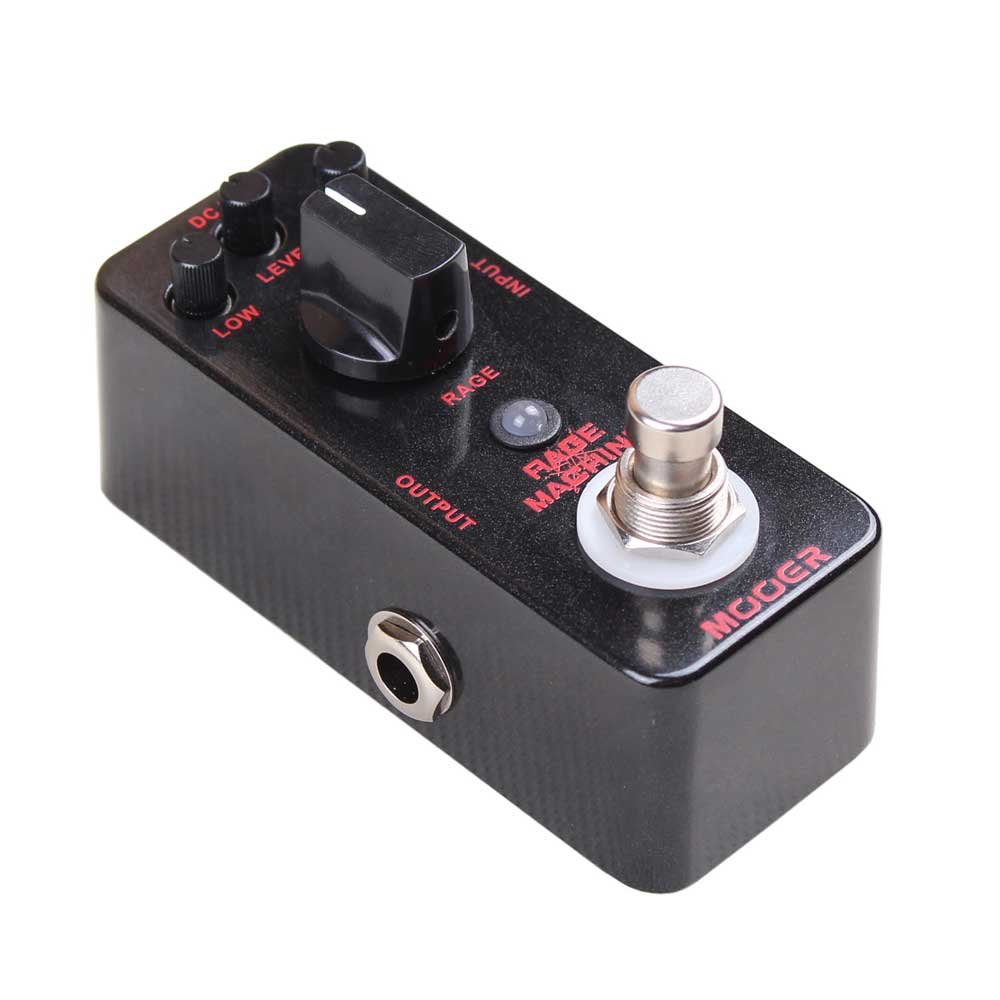
სურათი 1: წინა view of the MOOER Rage Machine pedal, showcasing its compact design, control knobs (Level, Low, High, Rage), and input/output jacks.
2. მახასიათებლები
- Provides a wide variety of heavy metal style distortion tones.
- Constructed with a durable full metal shell.
- Compact and exquisite design, suitable for small pedalboards.
- Features true bypass for transparent tone when the effect is off.
3. კონტროლი და ფუნქციები
The Rage Machine pedal features four primary control knobs and a footswitch:
- დონე: Adjusts the overall output volume of the effect. Turn clockwise to increase volume, counter-clockwise to decrease.
- დაბალი: Controls the amount of bass frequencies in the distorted tone. Use to add depth or tighten the low end.
- მაღალი: Controls the amount of treble frequencies in the distorted tone. Use to add brightness or reduce harshness.
- RAGE: This knob adjusts the EQ voicing or "Q frequency" of the distortion, rather than the amount of gain. It allows you to dial in different tonal characteristics, from a hollow, wah-like sound to a sharp, aggressive tone.
- ფეხის ჩამრთველი: Engages or bypasses the effect. When the LED indicator is lit, the effect is active. When off, the pedal is in true bypass mode.
4. დაყენება
- დენის კავშირი: Connect a standard 9V DC power adapter (center negative, not included) to the DC IN jack on the pedal. The pedal can also be battery powered (9V battery, not included).
- შეყვანის კავშირი: Connect your guitar or the output of a preceding effect pedal to the INPUT jack on the right side of the Rage Machine using a standard 1/4-inch instrument cable.
- გამომავალი კავშირი: Connect the OUTPUT jack on the left side of the Rage Machine to your amplifier's input or the input of the next effect pedal in your chain using a standard 1/4-inch instrument cable.
- საწყისი პარამეტრები: Before powering on, set the LEVEL knob to a low position (e.g., 9 o'clock) to avoid sudden loud sounds. Set LOW, HIGH, and RAGE knobs to their mid-point (12 o'clock) for a neutral starting point.
5. საოპერაციო ინსტრუქციები
Once the pedal is connected and powered:
- ეფექტის ჩართვა: Press the footswitch to activate the distortion effect. The LED indicator will illuminate.
- Bypassing the Effect: Press the footswitch again to bypass the effect. The LED indicator will turn off, and your signal will pass through the pedal unaffected due to its true bypass design.
- ტონის რეგულირება: Experiment with the LOW, HIGH, and RAGE knobs to sculpt your desired metal tone.
- For a scooped mid-range sound often associated with classic metal, try reducing the LOW and HIGH slightly while adjusting RAGE.
- For a brighter, more cutting tone, increase the HIGH knob.
- For a thicker, heavier sound, increase the LOW knob.
- The RAGE knob is crucial for finding the specific character of the distortion, from tight and focused to more open and resonant.
- Volume Matching: Adjust the LEVEL knob to match the volume of your bypassed signal, or to boost it for solos.
6. მოვლა
- დასუფთავება: პედლის გარე ნაწილის გასაწმენდად გამოიყენეთ რბილი, მშრალი ქსოვილი. მოერიდეთ აბრაზიული საწმენდი საშუალებების ან გამხსნელების გამოყენებას.
- შენახვა: შეინახეთ პედლები მშრალ ადგილას, მოარიდეთ ექსტრემალურ ტემპერატურას და მზის პირდაპირ სხივებს.
- სიმძლავრე: Disconnect the power supply when the pedal is not in use for extended periods to prevent battery drain (if applicable) and prolong component life.
- კავშირები: Ensure all cables are securely connected but do not overtighten. Periodically check cables for wear and tear.
7. Დიაგნოსტიკა
- ხმა არ არის:
- Check all cable connections (guitar to input, output to amp).
- Ensure the power supply is correctly connected and functioning, or that the battery has sufficient charge.
- Verify that your guitar's volume and ampლიფიკატორის ხმა გაზრდილია.
- გაუმართავი კავშირების გამოსარიცხად, შეამოწმეთ სხვადასხვა კაბელებით.
- არასასურველი ხმაური/ზუზუნი:
- Ensure you are using a regulated 9V DC power supply specifically designed for guitar pedals. Unregulated power supplies can introduce noise.
- Check for ground loops in your setup. Try isolating power to different pedals.
- Move the pedal away from power transformers, fluorescent lights, or other sources of electromagnetic interference.
- Faulty cables can also cause noise; try swapping them out.
- ეფექტი არ არის მიმზიდველი:
- Confirm the power supply is connected and working.
- Press the footswitch firmly. If the LED does not light up, there might be a power issue or a fault with the switch.
8. სპეციფიკაციები
| ბრენდი | მუერი |
| მოდელის სახელი | Rage Machine |
| ნივთის წონა | 5.6 უნცია (0.16 კილოგრამი) |
| პროდუქტის ზომები | 1.75 x 4.25 x 2.25 ინჩი |
| აპარატურა ინტერფეისი | 1/4 დიუმიანი აუდიო |
| სიგნალის ფორმატი | ანალოგი |
| დენის წყარო | Battery Powered (9V DC adapter compatible) |
| ტtage | 9V |
| სტილი | დამახინჯება |
| ფერის სახელი | Black Metal Flake |
| ASIN | B008TNAFZA |
9. გარანტია და მხარდაჭერა
For specific warranty information and technical support, please refer to the documentation included with your purchase or visit the official MOOER webსაიტი. შეინახეთ შეძენის დამადასტურებელი საბუთი გარანტიასთან დაკავშირებული ნებისმიერი პრეტენზიისთვის.


