1. პროდუქტი დასრულდაview
The BFT P121011 Intro Key Selector is a robust, surface-mounted key switch designed for controlling access systems, such as automatic gates or doors. It features a durable plastic construction and operates with a normally closed contact type, providing a secure and reliable control mechanism.
This device utilizes a key for activation, offering a simple on-off operational mode. It is designed for a single-circuit application and connects via screw terminals for straightforward wiring.
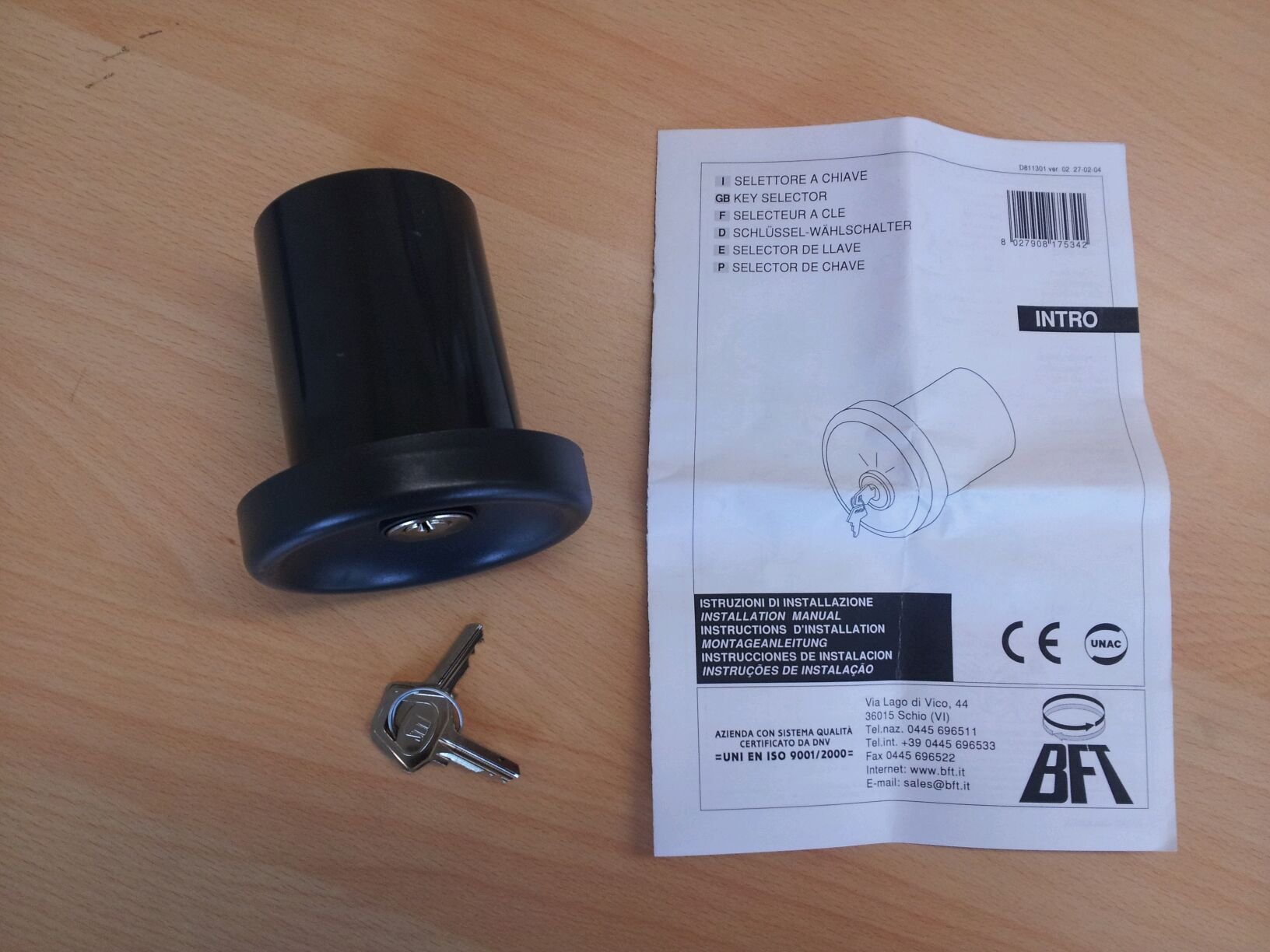
Figure 1: BFT P121011 Intro Key Selector. This image shows the circular key selector unit, dark gray in color, with the BFT logo at the top. Below the logo, the positions 'A', '0', and 'B' are marked around the central keyhole. Two silver keys are visible in the foreground, resting on a wooden surface.
2. უსაფრთხოების ინფორმაცია
- ინსტალაციამდე და გამოყენებამდე ყურადღებით წაიკითხეთ ყველა ინსტრუქცია.
- მონტაჟი უნდა განხორციელდეს კვალიფიციური პერსონალის მიერ ადგილობრივი ელექტრო კოდებისა და რეგულაციების შესაბამისად.
- Disconnect power to the system before performing any installation, maintenance, or troubleshooting.
- დარწმუნდით, რომ ყველა სადენიანი შეერთება უსაფრთხოდ და სათანადოდ არის იზოლირებული, რათა თავიდან აიცილოთ მოკლე ჩართვა.
- Do not expose the device to extreme temperatures, moisture, or corrosive substances.
- Keep keys out of reach of children and unauthorized personnel.
3. სპეციფიკაციები
| ფუნქცია | სპეციფიკაცია |
|---|---|
| ბრენდი | BFT |
| მოდელი | P121011 |
| ოპერაციული რეჟიმი | Ჩართვა გამორთვა |
| კონტაქტის ტიპი | ჩვეულებრივ დახურულია |
| გადამრთველის ტიპი | გასაღები |
| ტერმინალის ტიპი | ხრახნი |
| მასალა | პლასტიკური |
| ზომები (LxWxH) | 30 x 195 x 260 cm (Note: These dimensions seem unusually large for a key selector. Please verify with product packaging.) |
| სქემის ტიპი | 1 გზა |
| სამონტაჟო ტიპი | ზედაპირი |
| აქტივატორის ტიპი | Button, Knob (Note: This refers to the key as the actuator) |
4. ინსტალაცია და დაყენება
4.1. წინასწარი ინსტალაციის შემოწმება
- დარწმუნდით, რომ ყველა კომპონენტი ადგილზეა და დაუზიანებელია.
- Ensure the mounting surface is flat, stable, and suitable for surface mounting.
- Confirm that the power supply to the gate or access system is disconnected.
4.2. Mounting the Key Selector
- Choose an appropriate location for the key selector, ensuring it is easily accessible but protected from potential damage.
- Mark the drilling points on the mounting surface using the key selector's base as a template.
- გაბურღეთ საპილოტე ხვრელები მონიშნულ წერტილებზე.
- Secure the key selector base to the surface using appropriate screws and fasteners (not included).
4.3. გაყვანილობის კავშირები
- Route the necessary control cables through the designated entry points on the key selector's housing.
- Connect the control wires to the screw terminals inside the key selector. Refer to the wiring diagram provided with your gate or access system control unit for specific connections. The key selector typically acts as a momentary contact switch.
- დარწმუნდით, რომ ყველა კავშირი მჭიდრო და უსაფრთხოა.
- Close the key selector housing, ensuring it is properly sealed.
4.4. ინსტალაციის შემდგომი
- აღადგინეთ ძალა სისტემაში.
- Test the key selector's functionality as described in the Operating Instructions section.
5. საოპერაციო ინსტრუქციები
The BFT P121011 Intro Key Selector provides a simple, key-operated control for your access system.
- გასაღების ჩასმა: Insert the provided key into the keyhole on the front of the selector.
- გააქტიურება: Turn the key to the desired position (e.g., 'A' or 'B' if multiple functions are supported, or simply to activate the single function). The key selector is designed to provide a momentary contact closure, which signals the connected control unit to perform an action (e.g., open/close gate).
- დაბრუნების გასაღები: After activation, return the key to the '0' (neutral) position and remove it. The key selector will return to its normally closed state.
The specific action triggered by turning the key (e.g., opening, closing, or stopping a gate) depends on how the key selector is wired to the main control unit of your access system.
6. მოვლა
Regular maintenance ensures the longevity and reliable operation of your BFT P121011 Intro Key Selector.
- დასუფთავება: Periodically clean the exterior of the key selector with a soft, damp ქსოვილი. არ გამოიყენოთ აბრაზიული გამწმენდები ან გამხსნელები.
- Keyhole Inspection: Ensure the keyhole remains free of debris. If necessary, use a small, soft brush to clear any obstructions. Avoid using lubricants that may attract dust.
- გაყვანილობის შემოწმება: Annually, or if issues arise, disconnect power and inspect the wiring connections inside the unit for any signs of corrosion or loosening. Re-tighten connections as needed.
- ძირითადი პირობა: Inspect the keys for wear or damage. Worn keys may not operate the selector smoothly or reliably.
7. Დიაგნოსტიკა
| პრობლემა | შესაძლო მიზეზი | გამოსავალი |
|---|---|---|
| Key selector does not activate the system. | საკონტროლო განყოფილებას არ მიეწოდება ენერგია. არასწორი გაყვანილობა. Faulty key selector contacts. |
Check power supply to the main control unit. Verify wiring connections against the system's diagram. Test the key selector's contacts with a multimeter. Replace if faulty. |
| Key is difficult to turn or remove. | Debris in keyhole. Worn key or lock mechanism. |
Clean keyhole with a soft brush. Try a different key. If issue persists, the lock mechanism may need replacement. |
| წყვეტილი ოპერაცია. | ფხვიერი გაყვანილობის კავშირები. გარემოს ჩარევა. |
შეამოწმეთ და გამკაცრეთ ყველა გაყვანილობის კავშირი. Ensure the unit is properly sealed and protected from elements. |
8. გარანტია და მხარდაჭერა
Specific warranty information for the BFT P121011 Intro Key Selector is typically provided at the point of purchase or within the product packaging. Please refer to your purchase documentation for details regarding warranty coverage and duration.
For technical support, spare parts, or service inquiries, please contact your authorized BFT dealer or the BFT customer service department. Contact information can usually be found on the BFT official webსაიტზე ან პროდუქტის ორიგინალ დოკუმენტაციაში.