შესავალი
This manual provides essential instructions for the safe and effective use of your Pentax MX-1 Digital Camera. Please read this manual thoroughly before using the camera and keep it in a safe place for future reference.
პროდუქტი დასრულდაview
The Pentax MX-1 is a high-end compact digital camera featuring a 12-megapixel back-illuminated CMOS sensor and a 4x optical zoom lens (28-112mm equivalent) with an f/1.8-2.5 aperture. It includes a 3-inch tilting LCD display and a dual shake reduction system for clear images and video.

სურათი 1: წინა view of the Pentax MX-1 Digital Camera.
დაყენება
1. ბატარეის მონტაჟი და დატენვა
- გახსენით ბატარეის განყოფილების საფარი, რომელიც კამერის ქვედა ნაწილში მდებარეობს.
- Insert the provided Lithium-Ion battery, ensuring the correct orientation as indicated inside the compartment.
- უსაფრთხოდ დახურეთ ბატარეის განყოფილების საფარი.
- Connect the camera to the AC adapter using the supplied USB cable. The charging indicator will illuminate.
- პირველი გამოყენების წინ სრულად დატენეთ ბატარეა. სრულ დატენვას, როგორც წესი, დაახლოებით 3 საათი სჭირდება.
2. მეხსიერების ბარათის ინსტალაცია
- იპოვეთ მეხსიერების ბარათის სლოტი, რომელიც, როგორც წესი, ბატარეის განყოფილების გვერდით ან კამერის გვერდზეა.
- Insert an SD, SDHC, or SDXC memory card into the slot with the label facing the correct direction until it clicks into place.
- To remove the card, push it in gently until it springs out.

სურათი 2: მხარე view of the camera showing the open port cover for USB/HDMI connections.
3. საწყისი პარამეტრები
- ჩართეთ კამერა დაჭერით ჩართვა/გამორთვა ღილაკი.
- მიჰყევით ეკრანზე გამოტანილ მითითებებს ენის, თარიღისა და დროის დასაყენებლად.
- Format the memory card before first use to ensure optimal performance. Navigate to the მენიუ, აირჩიეთ SETUP, და შემდეგ ფორმატის ბარათი.
კამერის მართვა
1. ფოტოგრაფიის საბაზისო ცოდნა
- ჩართვა: დააჭირეთ ჩართვა/გამორთვა ღილაკი. ლინზა გაიჭიმება.
- აირჩიეთ რეჟიმი: Rotate the mode dial on the top of the camera to select your desired shooting mode (e.g., Auto Pict, Program, Aperture Priority, Shutter Priority, Manual).
- ფოკუსირება: Point the camera at your subject. Press the shutter button halfway down to focus. The focus frame will turn green when focus is achieved.
- სროლა: სურათის გადასაღებად სრულად დააჭირეთ ჩამკეტის ღილაკს.

სურათი 3: ზედა view of the camera showing the mode dial, shutter button, and exposure compensation dial.
2. Using the Tilting LCD Monitor
The 3-inch LCD monitor can be tilted up or down to facilitate shooting from various angles, such as low-angle shots or overhead shots. Gently pull the top or bottom edge of the LCD screen to adjust its position.
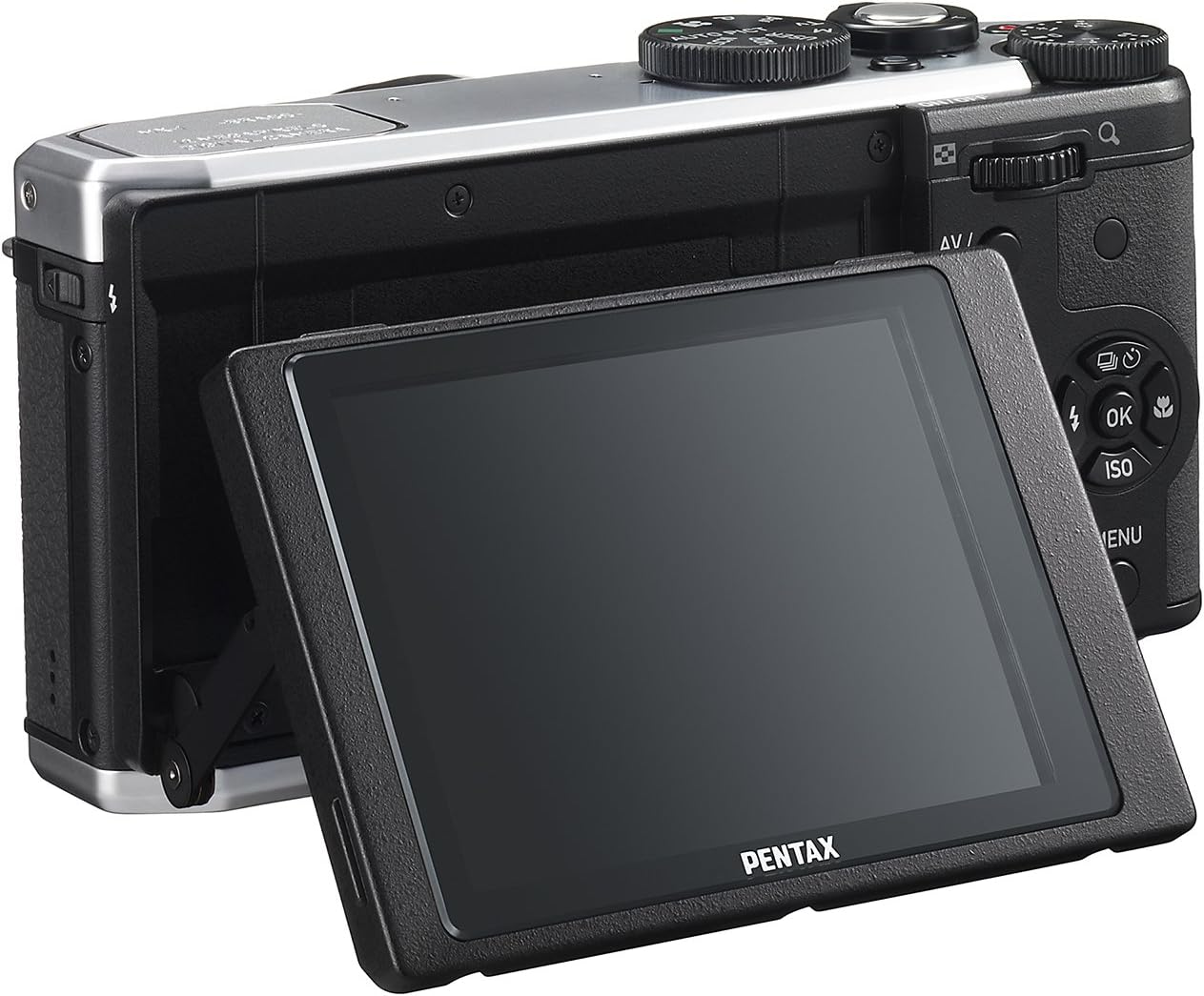
სურათი 4: უკანა view of the camera demonstrating the tilting LCD screen.
3. Flash Operation
To use the built-in flash, slide the flash release lever to pop up the flash unit. The flash modes (Auto, On, Off, Slow Sync, Rear Curtain Sync) can be selected via the camera's menu or a dedicated button, depending on the shooting mode.

სურათი 5: წინა view of the camera with the pop-up flash in the extended position.
4. აღწარმოების რეჟიმი
- დააჭირეთ ითამაშე ღილაკი დაკვრის რეჟიმში შესასვლელად.
- Use the directional pad to scroll through your photos and videos.
- დააჭირეთ OK ღილაკი view information about the selected image or to play a video.
- დააჭირეთ მენიუ button to access playback options such as deleting, rotating, or resizing images.
მოვლა
1. კამერის გაწმენდა
- კამერის სხეული: კამერის კორპუსის გასაწმენდად გამოიყენეთ რბილი, მშრალი ქსოვილი. ჯიუტი ჭუჭყის შემთხვევაში, ოდნავ გაწმინდეთ.ampen the cloth with water or a mild cleaning solution. Avoid using organic solvents.
- ობიექტივი: Use a lens brush or a blower to remove dust. For smudges, use a lens cleaning cloth and lens cleaning fluid. Do not touch the lens surface with your fingers.
- LCD მონიტორი: ფრთხილად გაწმინდეთ ეკრანი რბილი, ბუსუსების გარეშე ქსოვილით. მოერიდეთ ეკრანზე ძლიერად დაჭერას.
2. შენახვა
- დიდი ხნის განმავლობაში არ გამოყენების შემთხვევაში, ამოიღეთ ბატარეა კამერიდან.
- Store the camera in a cool, dry, and well-ventilated place, away from direct sunlight, high temperatures, and humidity.
- Use a desiccant to prevent mold growth if storing in humid environments.
პრობლემების მოგვარება
If you encounter issues with your Pentax MX-1, refer to the table below for common problems and their solutions.
| პრობლემა | შესაძლო მიზეზი | გამოსავალი |
|---|---|---|
| კამერა არ ირთვება. | ბატარეა დაცლილია ან არასწორად არის ჩასმული. | დატენეთ ბატარეა ან სწორად ჩადეთ ხელახლა. |
| სურათების გადაღება არ შეიძლება. | მეხსიერების ბარათი სავსეა, დაბლოკილია ან არ არის ჩასმული. | Insert a memory card, unlock it, or delete unnecessary files. |
| სურათები ბუნდოვანია. | კამერის კანკალი, არასწორი ფოკუსირება ან დაბინძურებული ლინზა. | Hold the camera steady, ensure proper focus, or clean the lens. |
| ფლეში არ ანათებს. | Flash is set to "Off" or not popped up. | Pop up the flash and set the flash mode to "Auto" or "On". |
| LCD screen is difficult to see in bright light. | High ambient light. | Adjust the tilting LCD for a better viewing angle or find shade. |
სპეციფიკაციები
| ფუნქცია | დეტალი |
|---|---|
| მოდელის სახელი | პენტაქსი MX-1 |
| ფოტო სენსორის გარჩევადობა | 12 დეპუტატი |
| ფოტო სენსორის ზომა | 1/1.7 ინჩი |
| ოპტიკური ზუმი | 4x |
| ლინზის ფოკუსური სიგრძე | 28-112mm (35mm equivalent) |
| დიაფრაგმის დიაპაზონი | ვ/1.8-2.5 |
| გამოსახულების სტაბილიზაცია | სენსორების შეცვლა |
| ეკრანის ზომა | 3 ინჩი |
| ჩვენების ტიპი | დახრილი LCD ეკრანი |
| მხარდაჭერილი File ფორმატი | JPEG 2.3, RAW |
| ვიდეო რეზოლუცია | FHD 1080p (H.264) |
| ISO დიაპაზონი (გაფართოებული) | 100-12800 წწ |
| ჩამკეტის სიჩქარის დიაპაზონი | 30 წამიდან 1/8000 წამამდე |
| მეხსიერების ბარათის ტიპი | SD/SDHC/SDXC |
| დაკავშირება | HDMI (Mini HDMI type-D), USB |
| ბატარეის ტიპი | ლითიუმის იონი |
| ნივთის წონა | 13.76 უნცია |
გარანტია და მხარდაჭერა
საგარანტიო ინფორმაცია
The Pentax MX-1 Digital Camera comes with a 1 წლიანი გარანტია covering parts and labor from the date of purchase. This warranty covers manufacturing defects and malfunctions under normal use. It does not cover damage caused by misuse, accidents, unauthorized repairs, or normal wear and tear. Please retain your proof of purchase for warranty claims.
მომხმარებელთა მხარდაჭერა
For technical assistance, service, or further inquiries, please visit the official Pentax support website or contact their customer service department. Refer to the product packaging or the official Pentax webსაიტი უახლესი საკონტაქტო ინფორმაციისთვის.
ეწვიეთ Pentax-ის მაღაზიას Amazon-ზე დამატებითი ინფორმაციისა და აქსესუარების მისაღებად პროდუქტის შესახებ.


