1. შესავალი
The Grandstream GS-GXP2200EXT is an expansion module designed to enhance the functionality of compatible Grandstream VoIP phones. It provides additional programmable buttons for features such as speed dial, Busy Lamp Field (BLF), and call transfer, significantly increasing the call handling capacity for users like receptionists or administrative assistants. This module features a large 128x384 graphic LCD for clear display of button labels and status indicators. Each module offers 20 programmable buttons and, with two page switch keys, can manage up to 40 extensions. Up to four GXP2200EXT modules can be daisy-chained together, providing a total of up to 160 programmable buttons.
2. პაკეტის შიგთავსი
გთხოვთ, დარწმუნდეთ, რომ თქვენი პაკეტი შეიცავს შემდეგ ნივთებს:
- Grandstream GS-GXP2200EXT Expansion Module
- Connecting Cable (for linking to the main VoIP phone)
- Module Stand
- სწრაფი ინსტალაციის სახელმძღვანელო
3. ფიზიკური ზეწოლაview
The GXP2200EXT module is a compact unit designed to sit alongside your compatible Grandstream VoIP phone. It features a prominent graphic LCD screen and a grid of programmable buttons.
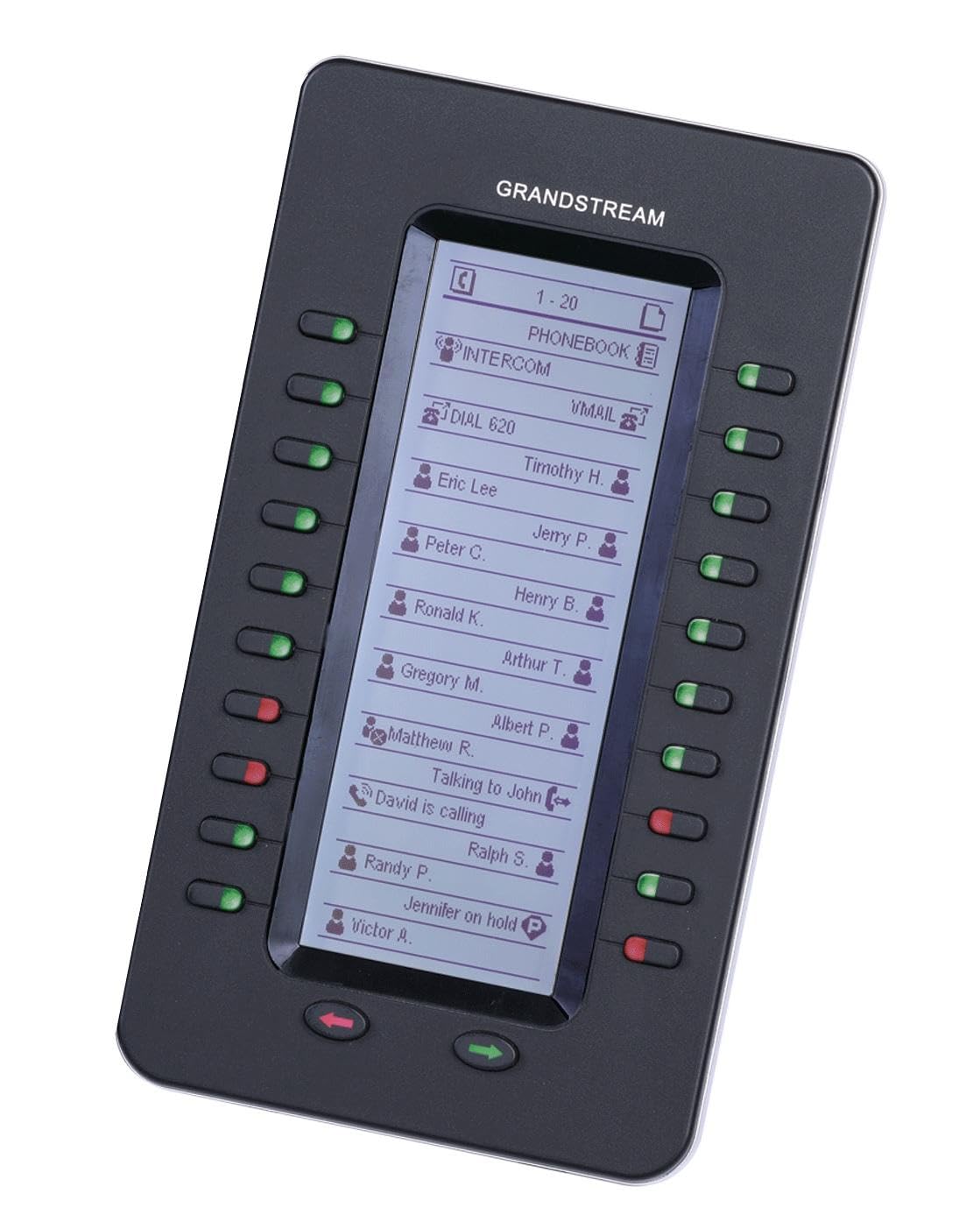
Image showing the Grandstream GS-GXP2200EXT Expansion Module, a black unit with a large graphic LCD screen and multiple programmable buttons, designed to extend the functionality of compatible Grandstream VoIP phones.
ძირითადი კომპონენტები:
- Graphic LCD: Displays the labels and status for each programmable button.
- პროგრამირებადი ღილაკები: 20 buttons per module, each with a dual-color LED indicator (red/green) for status.
- Page Switch Keys: Two buttons located at the bottom of the module to switch between two pages of programmable buttons, effectively doubling the capacity to 40 extensions per module.
- Connecting Port: Located on the back or side, used to connect to the main VoIP phone or to daisy-chain additional modules.
4. დაყენება
Follow these steps to set up your Grandstream GS-GXP2200EXT Expansion Module:
- განთავსება: Position the GXP2200EXT module next to your compatible Grandstream VoIP phone (e.g., GXP2140, GXP2200). Ensure stable placement using the provided stand.
- კავშირი: Connect the GXP2200EXT module to the main VoIP phone using the dedicated connecting cable. This cable typically provides both power and data communication. Refer to your main phone's manual for the specific expansion module port location.
- ჯვარედინი ჯაჭვის შეერთება (არასავალდებულო): If connecting multiple GXP2200EXT modules, connect the first module to the main phone, then connect subsequent modules to the previous module in a chain using the provided cables. Up to four modules can be daisy-chained.
- ჩართვა: Ensure your main VoIP phone is powered on. The GXP2200EXT module will draw power from the main phone and should power on automatically.
- კონფიგურაცია: All programming and configuration of the programmable buttons are performed through the web interface of the main VoIP phone. Access the phone's web ინტერფეისი ა web browser and navigate to the appropriate settings section for expansion modules or programmable keys.
5. Operating the Expansion Module
The GXP2200EXT module is designed for intuitive operation, extending the capabilities of your main VoIP phone.
პროგრამირებადი ღილაკები:
- Each of the 20 buttons can be configured for various functions, such as:
- სწრაფი აკრეფა: Pressing the button will dial a pre-programmed number.
- დაკავებულია ლamp ველი (BLF): Monitors the status of another extension. A green LED indicates the extension is idle, while a red LED indicates it is busy or ringing.
- Call Park/Pickup: For advanced call management features.
- Line Appearance: Provides additional line keys for handling multiple calls.
- The LCD screen adjacent to each button displays the configured label (e.g., contact name, function) and the current status.
Page Switching:
- The two page switch keys at the bottom of the module allow you to toggle between two sets of 20 programmable buttons.
- Pressing the left or right page key will switch the display on the LCD and change the active functions of the 20 physical buttons. This provides access to a total of 40 programmable functions per module.
6. მოვლა
To ensure the longevity and optimal performance of your GXP2200EXT Expansion Module, follow these maintenance guidelines:
- დასუფთავება: Use a soft, dry cloth to clean the exterior of the module, including the LCD screen and buttons. Avoid using abrasive cleaners, solvents, or harsh chemicals, as these can damage the surfaces.
- გარემო: Keep the module in a clean, dry environment, away from direct sunlight, excessive heat, moisture, and dust.
- საკაბელო მენეჯმენტი: Ensure all connecting cables are securely attached and not under strain. Avoid bending or crimping cables sharply.
- Firmware განახლებები: პერიოდულად შეამოწმეთ Grandstream website for firmware updates for your main VoIP phone, as these updates may include improvements or new features for the expansion module. Firmware updates are typically applied through the main phone's web ინტერფეისი.
7. Დიაგნოსტიკა
If you encounter issues with your GXP2200EXT Expansion Module, refer to the following troubleshooting steps:
- მოდული არ არის ჩართული:
- Ensure the connecting cable between the expansion module and the main VoIP phone is securely plugged in at both ends.
- Verify that the main VoIP phone is powered on and functioning correctly.
- Try connecting the module to a different port on the main phone if available, or try a different connecting cable if possible.
- Buttons Not Functioning/LEDs Not Lighting Up:
- Confirm that the module is properly recognized and configured in the main VoIP phone's web ინტერფეისი.
- Check the programming for the specific buttons in the phone's web interface to ensure they are assigned correctly.
- Ensure the main phone's firmware is up to date, as compatibility issues can sometimes arise with older firmware versions.
- შენიშვნა: Some specific phone models or firmware versions may have known compatibility considerations. Refer to Grandstream's support documentation for your specific main phone model.
- LCD ეკრანის პრობლემები:
- If the display is blank or shows incorrect information, check the connection to the main phone.
- Reboot the main VoIP phone to refresh the connection and display.
- Verify display settings or contrast adjustments within the main phone's web interface, if applicable.
- Daisy-Chained Modules Not Working:
- Ensure each module in the chain is correctly connected to the previous one.
- Verify that the main VoIP phone supports the number of daisy-chained modules you are attempting to use (e.g., up to 4 for GXP2200EXT).
- Check the configuration for each module in the main phone's web ინტერფეისი.
8. სპეციფიკაციები
| ფუნქცია | დეტალი |
|---|---|
| მოდელის ნომერი | GXP2200EXT |
| ბრენდი | გრანდსტრიმი |
| პროდუქტის ზომები (L x W x H) | 10 x 6 x 3 ინჩი |
| ნივთის წონა | 0.85 ფუნტი (13.6 უნცია) |
| ჩვენება | 128x384 Graphic LCD |
| პროგრამირებადი ღილაკები | 20 per module (40 with 2 pages) |
| LED ინდიკატორები | Dual-color (red/green) for each button |
| Daisy-Chain მხარდაჭერა | Up to 4 modules (160 programmable buttons total) |
| მასალა | პლასტიკური |
| ფერი | შავი |
| ბატარეები | 1 CR123A batteries required (for internal clock or similar function) |
| დენის წყარო | Powered by main VoIP phone |
9. გარანტია და მხარდაჭერა
დეტალური გარანტიის ინფორმაციისთვის, გთხოვთ, იხილოთ თქვენს პროდუქტთან ერთად მოწოდებული გარანტიის ბარათი ან ეწვიეთ Grandstream-ის ოფიციალურ ვებგვერდს. website. Technical support and additional resources can be found on the Grandstream support portal. It is recommended to register your product to receive updates and support notifications.
გრანდსტრიმის ოფიციალური პირი Webსაიტი: www.grandstream.com