შესავალი
This manual provides essential information for the safe and effective use of your Olympus PEN E-PL6 Mirrorless SLR Camera. Please read it thoroughly before operating the camera and keep it for future reference. The Olympus PEN E-PL6 is designed to deliver superior image quality and performance, featuring a 16 MP Live MOS Sensor and TruePic VI image processing engine.
პროდუქტი დასრულდაview
The Olympus PEN E-PL6 offers advanced photographic capabilities in a compact mirrorless body. Key features include:
- 16 Megapixel Live MOS Sensor: For high-resolution images with rich detail.
- TruePic VI Image Processing Engine: Ensures vibrant colors and fast performance.
- 3-Axis In-Body Image Stabilization: Reduces blur from camera shake, especially in low light.
- ISO Range from 100 to 25,600: Excellent low-light performance.
- 8 fps Sequential Shooting: Capture fast-moving subjects with ease.
- Full HD Video 1080i: მაღალი გარჩევადობის ვიდეოების ჩაწერა.
- 12 Art Filters and Effects: Enhance creativity directly in-camera.
- Customizable Settings (My Set) and Self-Timer: Personalize your shooting experience.
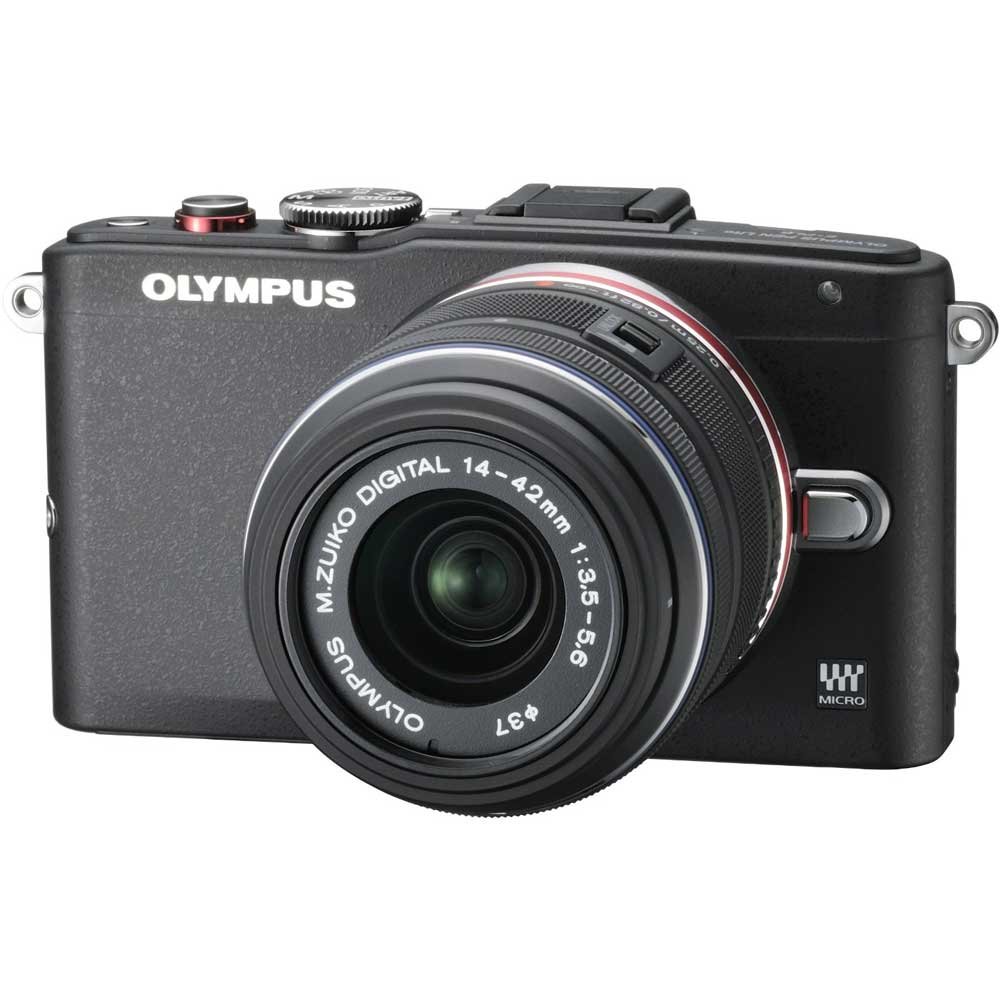
Figure 1: Olympus PEN E-PL6 Mirrorless SLR Camera with M.Zuiko Digital 14-42mm Lens attached.
დაყენება
1. ბატარეის მონტაჟი
- გახსენით ბატარეის განყოფილების საფარი, რომელიც კამერის ქვედა ნაწილში მდებარეობს.
- Insert the supplied Lithium-Ion battery, ensuring the correct orientation.
- უსაფრთხოდ დახურეთ ბატარეის განყოფილების საფარი.
- Charge the battery using the provided charger before first use.
2. ლინზის სამაგრი
- Remove the body cap from the camera and the rear lens cap from the M.Zuiko Digital 14-42mm lens.
- ლინზაზე თეთრი ინდექსის ნიშნული კამერის კორპუსზე არსებულ თეთრ ინდექსის ნიშნულს გაუსწორეთ.
- დაამაგრეთ ლინზა საათის ისრის მიმართულებით მისი შემობრუნებით, სანამ არ დააწკაპუნებს თავის ადგილზე.
3. მეხსიერების ბარათის ჩასმა
- გახსენით მეხსიერების ბარათის სლოტის საფარი.
- Insert an SD/SDHC/SDXC memory card with the label facing the front of the camera until it clicks.
- დახურეთ მეხსიერების ბარათის სლოტის საფარი.
კამერის მართვა
ფოტოგრაფიის ძირითადი რეჟიმები
Turn the mode dial to select your desired shooting mode (e.g., Program Auto, Aperture Priority, Shutter Priority, Manual, Art Filter, Scene Mode).
ფოკუსირება
- ავტოფოკუსი (AF): კამერა ავტომატურად ფოკუსირდება, როდესაც ჩამკეტის ღილაკს ნახევრად დააჭერთ.
- მექანიკური ფოკუსირება (MF): Rotate the focus ring on the lens to adjust focus manually. Use the magnified view or focus peaking for precision.
ექსპოზიციის პარამეტრები
- ISO: Adjust sensitivity to light (ISO 100-25600). Higher ISO allows shooting in darker conditions but may introduce noise.
- დიაფრაგმა: Controls the amount of light entering the lens and the depth of field.
- ჩამკეტის სიჩქარე: Controls the duration the sensor is exposed to light. Faster speeds freeze motion, slower speeds allow for motion blur.
გამოსახულების სტაბილიზაცია
The 3-axis in-body image stabilization system helps reduce blur. Activate or deactivate it via the camera's menu settings.
Art Filters and Effects
Explore the 12 built-in Art Filters to add creative effects to your photos and videos. Select 'ART' on the mode dial to access these options.
ვიდეო გადაღება
To record Full HD 1080i video, switch the mode dial to the video recording setting and press the dedicated video record button.
დააკონფიგურიროთ პარამეტრები
Utilize the 'My Set' feature to save your preferred camera settings for quick recall. The customizable self-timer allows for delayed shooting.
მოვლა
კამერისა და ლინზის გაწმენდა
- კამერის კორპუსის გასაწმენდად გამოიყენეთ რბილი, უბუშტო ქსოვილი.
- For the lens and sensor, use a blower brush to remove dust, followed by a lens cleaning solution and cloth if necessary. Avoid touching the lens surface directly.
ბატარეის მოვლა
- შეინახეთ ბატარეები გრილ, მშრალ ადგილას, როდესაც არ იყენებთ.
- მოერიდეთ ელემენტების რეგულარულად სრულად დაცლას მათი სიცოცხლის ხანგრძლივობის გასახანგრძლივებლად.
შენახვა
When storing the camera for extended periods, remove the battery and memory card. Store the camera in a dry, dust-free environment, preferably with a desiccant to prevent mold.
პრობლემების მოგვარება
კამერა არ ირთვება
- დარწმუნდით, რომ ბატარეა სრულად დატენილია და სწორად არის ჩასმული.
- შეამოწმეთ, სუფთაა თუ არა ბატარეის კონტაქტები.
სურათები ბუნდოვანია
- Verify that the lens is properly focused.
- Check shutter speed; use a faster speed or tripod in low light.
- საჭიროების შემთხვევაში, დარწმუნდით, რომ გამოსახულების სტაბილიზაცია აქტიურია.
მეხსიერების ბარათის შეცდომა
- მეხსიერების ბარათი ხელახლა ჩადეთ.
- Try a different memory card to rule out card malfunction.
- მეხსიერების ბარათის ფორმატირება (შენიშვნა: ეს წაშლის ყველა მონაცემს).
სპეციფიკაციები
| ფუნქცია | სპეციფიკაცია |
|---|---|
| მოდელის ნომერი | PEN E-PL6 |
| სენსორი | 16 Megapixel Live MOS |
| გამოსახულების პროცესორი | TruePic VI |
| გამოსახულების სტაბილიზაცია | 3-Axis In-Body, Sensor-shift |
| ISO დიაპაზონი | 100 to 25,600 (Expanded Minimum 100) |
| ვიდეო გადაღება | Full HD 1080i |
| მხარდაჭერილი File ფორმატები | RAW (Olympus ARW), JPEG, MPO (3D still) |
| თავსებადი სამონტაჟოები | მიკრო ოთხი მესამედი |
| Optical Zoom (with 14-42mm lens) | 3x |
| Maximum Focal Length (with 14-42mm lens) | 42 მილიმეტრი |
| აღრიცხვის აღწერა | მრავალჯერადი, ცენტრში შეწონილი, ლაქა |
| პროდუქტის ზომები | 4.37 x 1.5 x 2.52 ინჩი |
| ნივთის წონა | 9.8 უნცია |
| ბატარეები | 1 ლითიუმ იონური ბატარეა (შედის) |
| მწარმოებელი | ოლიმპი |
გარანტია და მხარდაჭერა
Your Olympus PEN E-PL6 camera is covered by a manufacturer's warranty. For specific details regarding warranty coverage, duration, and terms, please refer to the warranty card included with your product or visit the official Olympus support website. For technical assistance, troubleshooting, or service inquiries, please contact Olympus customer support.


