შესავალი
This manual provides comprehensive instructions for the setup, operation, and maintenance of your VTech CS6829-2 2-Handset Cordless Phone with Answering System. This system is designed for home use, offering features such as caller ID, a digital answering machine, backlit keypad, and a full duplex speakerphone for enhanced communication.
რა არის ყუთში
დარწმუნდით, რომ ყველა ნივთი შედის თქვენს პაკეტში:
- საბაზისო ერთეული
- 2 უსადენო აპარატი
- დამტენი
- 2 ადაპტერი
- 2 ბატარეის პაკეტი
- სატელეფონო ხაზის კაბელი
- კედელზე სამაგრი
- სწრაფი დაწყების სახელმძღვანელო
დაყენება
Follow these steps to set up your VTech CS6829-2 phone system:
- ბაზის ერთეულის დაკავშირება:
Plug one end of the telephone line cord into the TEL LINE jack on the back of the base unit. Plug the other end into a telephone wall jack. Plug the small end of the power adapter into the POWER jack on the back of the base unit. Plug the large end of the power adapter into a wall outlet not controlled by a wall switch.
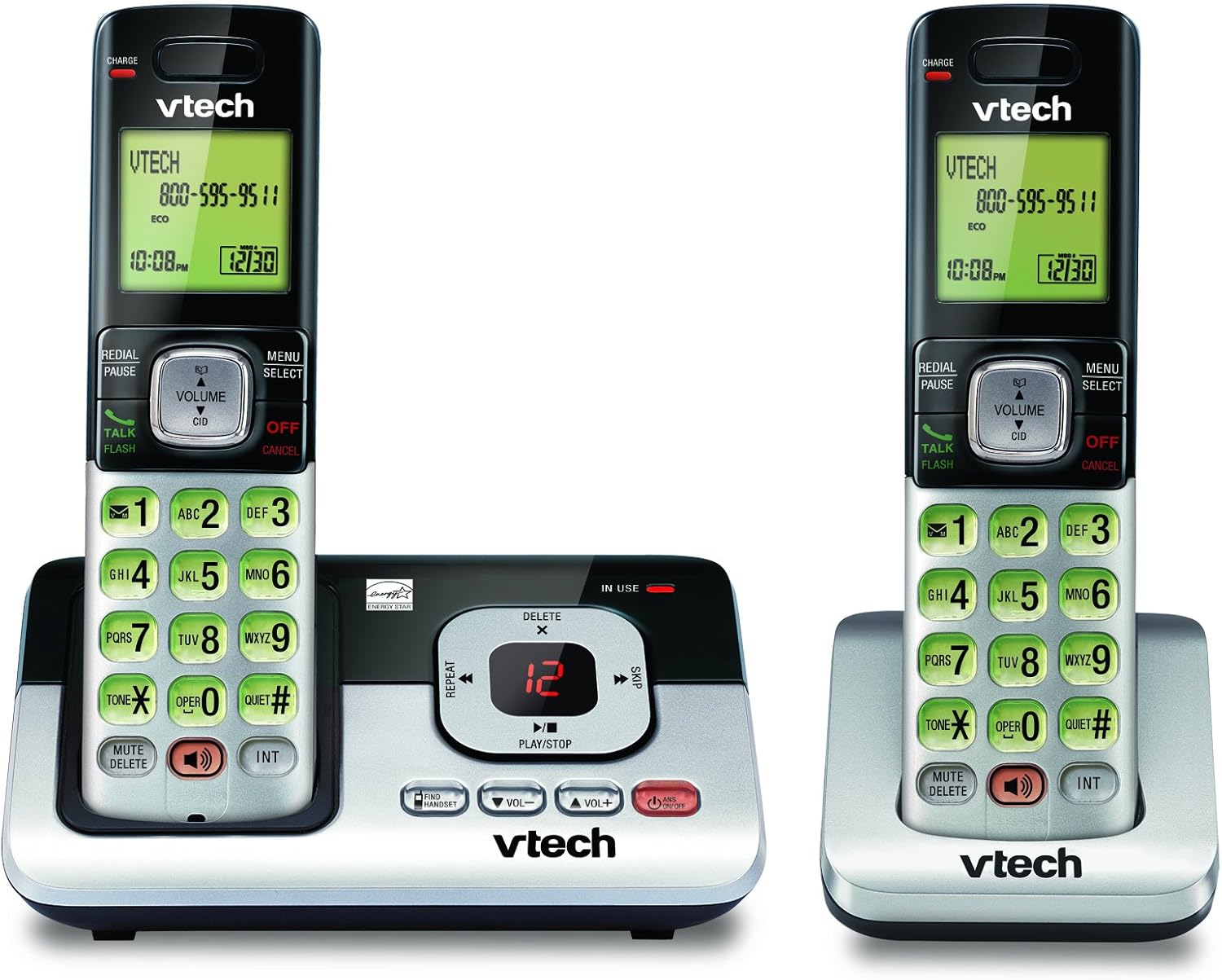
Image: The VTech CS6829-2 base unit with one handset docked, and a second handset with its charging cradle. This illustrates the main components of the phone system.
- ტელეფონის ბატარეების დაყენება:
Open the battery compartment cover on the back of each handset. Connect the battery pack connector securely into the jack inside the compartment. Place the battery pack with the label facing up and tuck the wires inside the compartment. Close the battery compartment cover.
- ტელეფონების დატენვა:
Place each handset in the base unit or charger with the display facing up. The CHARGE light on the handset will illuminate, indicating proper charging. Allow the handsets to charge for at least 16 hours before initial use for optimal battery performance.

სურათი: კუთხოვანი view of the VTech CS6829-2 base unit with one handset docked, and the second handset in its separate charging cradle. This shows how the handsets are placed for charging.
- დააყენეთ თარიღი და დრო:
After the handsets are charged, follow the on-screen prompts or refer to the quick start guide to set the date and time. This is important for accurate caller ID and answering system timestamps.
ოპერაციული ინსტრუქციები
ზარების განხორციელება და მათზე პასუხის გაცემა
- დარეკვისთვის: დააჭირეთ საუბარი / ფლეში or any dialing key to get a dial tone, then dial the phone number.
- ზარზე პასუხის გასაცემად: როდესაც ტელეფონი დარეკავს, დააჭირეთ საუბარი / ფლეში ან ნებისმიერი აკრიფის გასაღები.
- ზარის დასასრულებლად: დააჭირეთ გამორთვა/გაუქმება or place the handset back in the base unit/charger.
ციფრული პასუხების სისტემა
- შეტყობინებების დაკვრა: საბაზო ერთეულზე დააჭირეთ PLAY/STOP. On a handset, press მენიუ/არჩევა, scroll to "Answering System", then select "Play Messages".
- Recording an Outgoing Announcement: On the base unit or handset, navigate to the answering system menu and select "Record OGM" (Outgoing Message).
- შეტყობინებების წაშლა: While a message is playing, press წაშლა on the base unit or handset.
სპიკერის ფუნქცია
- To Use Speakerphone: ზარის დროს დააჭირეთ ღილაკს დინამიკი button on the handset. Press it again to switch back to the handset earpiece.
ძირითადი მახასიათებლები
- Digital Answering System with LED Indicator and Volume Control: This system records up to 14 minutes of messages, announcements, and memos. An LED indicator notifies you of new messages. Volume control keys on the base allow easy adjustment of message playback volume.
- Caller ID / Call Waiting — Stores up to 50 Calls: Displays the name, number, time, and date of incoming calls, helping you identify callers before answering.
- სრული დუპლექსის სპიკერი: The handset features a full duplex speakerphone, enabling natural two-way conversations where both parties can speak and be heard simultaneously.
- განათებული კლავიატურა და ეკრანი: The entire keypad and LCD screen on the handset illuminate, ensuring clear visibility and easy dialing even in low-light conditions.
- ეკო რეჟიმის ენერგიის დაზოგვის ტექნოლოგია: This technology optimizes power consumption for extended battery performance and energy efficiency.
- მშვიდი რეჟიმი: Allows you to silence the ringer on both the handset and base unit immediately or for a set period, providing peace and quiet when needed.
მოვლა
- დასუფთავება: გაწმინდეთ ტელეფონი და ბაზა რბილი ქსოვილით.amp ქსოვილი. არ გამოიყენოთ საწმენდი სპრეი ან თხევადი საწმენდი საშუალებები.
- ბატარეის მოვლა: Replace batteries when they no longer hold a charge. Use only the specified battery type. Dispose of old batteries responsibly according to local regulations.
- გარემო პირობები: მოერიდეთ ტელეფონის პირდაპირ მზის სხივებზე, სითბოს წყაროებთან ახლოს ან ჭარბი ტენიანობის მქონე ადგილებში განთავსებას.
პრობლემების მოგვარება
If you experience issues with your phone, try the following solutions:
| პრობლემა | გამოსავალი |
|---|---|
| აკრიფეთ ტონი. | Ensure the telephone line cord is securely plugged into both the base unit and the wall jack. Check that the power adapter is plugged into a working electrical outlet. |
| ყურსასმენი არ იტენება. | Ensure the handset is properly seated in the base unit or charger. Clean the charging contacts on both the handset and base/charger with a dry cloth. Verify the power adapter is connected. |
| ცუდი ხმის ხარისხი / სტატიკური. | Move the handset closer to the base unit. Avoid placing the phone near other electronic devices (e.g., microwaves, computers) that may cause interference. Check the telephone line cord for damage. |
| ავტომოპასუხე არ იწერს შეტყობინებებს. | დარწმუნდით, რომ ავტომოპასუხე ჩართულია. შეამოწმეთ, მეხსიერება ხომ არ არის სავსე; საჭიროების შემთხვევაში, წაშალეთ ძველი შეტყობინებები. |
სპეციფიკაციები
| ფუნქცია | დეტალი |
|---|---|
| მოდელის ნომერი | CS6829-2 |
| პროდუქტის ზომები | 5.77 x 3.41 x 6.77 ინჩი |
| ნივთის წონა | 1.41 ფუნტი |
| ბატარეები | საჭიროა 2 პროდუქტის სპეციფიკური ბატარეები (შედის) |
| პასუხების სისტემის ტიპი | ციფრული |
| აბონენტის ID მეხსიერება | 50-მდე ზარი |
| ავტომოპასუხეების ჩაწერის დრო | 14 წუთამდე |
| ფერი | შავი/ვერცხლისფერი |
| ტელეფონის ტიპი | უკაბელო |
გარანტია და მხარდაჭერა
გარანტიის შესახებ ინფორმაციისა და ტექნიკური მხარდაჭერისთვის, გთხოვთ, იხილოთ თქვენს პროდუქტთან ერთად მოწოდებული გარანტიის ბარათი ან ეწვიოთ VTech-ის ოფიციალურ ვებგვერდს. webსაიტი. შეინახეთ თქვენი შესყიდვის ქვითარი, როგორც შეძენის დამადასტურებელი საბუთი გარანტიის მოთხოვნის შემთხვევაში.
თქვენ ასევე შეგიძლიათ ეწვიოთ VTech მაღაზია Amazon-ზე დამატებითი პროდუქტის შესახებ ინფორმაციისა და მხარდაჭერის რესურსებისთვის.


