შესავალი
Welcome to the user manual for your Alcatel Sigma 260 DECT Cordless Phone. This guide provides detailed instructions on how to set up, operate, maintain, and troubleshoot your new phone. Please read this manual carefully to ensure optimal performance and longevity of your device.
The Alcatel Sigma 260 is a reliable DECT cordless phone featuring a 50-entry phonebook, hands-free function, and caller ID, designed for clear communication and ease of use.
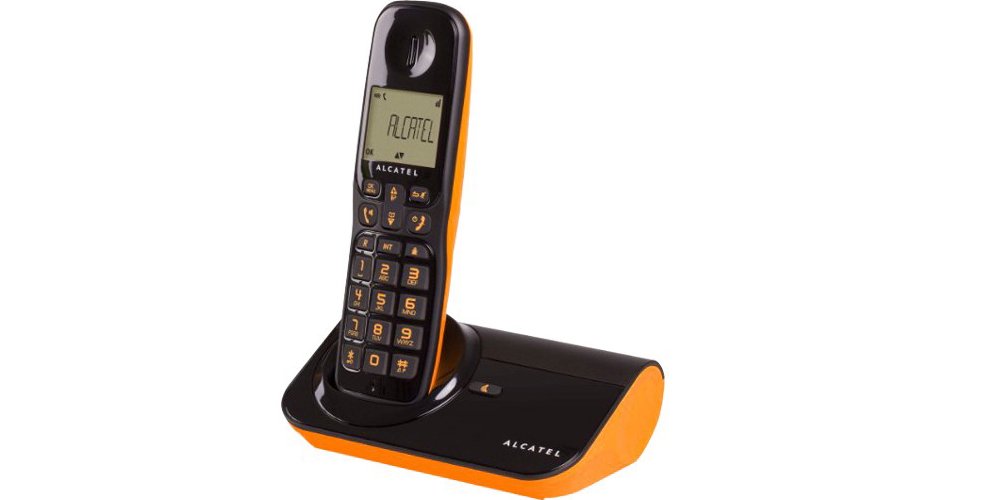
სურათი 1: Alcatel Sigma 260 DECT Cordless Phone Handset and Base Station.
1. დაყენება
Follow these steps to set up your Alcatel Sigma 260 phone.
1.1 ყუთის გახსნა და შეფუთვის შიგთავსი
Carefully unpack all items and ensure you have the following components:
- Alcatel Sigma 260 Handset
- Alcatel Sigma 260 Base Station
- ბაზის სადგურის კვების ადაპტერი
- სატელეფონო ხაზის კაბელი
- Rechargeable AAA Batteries (typically 2x)
- მომხმარებლის სახელმძღვანელო (ეს დოკუმენტი)
1.2 ბატარეის დაყენება
- იპოვეთ ბატარეის განყოფილების საფარი ტელეფონის უკანა მხარეს.
- განყოფილების გასახსნელად გადაწიეთ ან ასწიეთ სახურავი.
- Insert the rechargeable AAA batteries, observing the correct polarity (+ and -) as indicated inside the compartment.
- დაახურეთ ბატარეის განყოფილების საფარი და დარწმუნდით, რომ ის მყარად დამაგრდება თავის ადგილზე.
მნიშვნელოვანია: Only use the supplied rechargeable batteries or equivalent approved replacements. Non-rechargeable batteries may damage the device.
1.3 საბაზო სადგურის დაკავშირება
- Connect one end of the telephone line cord to the TEL socket on the base station.
- ტელეფონის ხაზის კაბელის მეორე ბოლო შეაერთეთ თქვენი ტელეფონის კედლის სოკეტთან.
- Plug the power adapter into the DC IN socket on the base station.
- შეაერთეთ დენის ადაპტერი შესაბამის ელექტრო განყოფილებაში.
- Place the handset on the base station to charge the batteries. Allow at least 12-15 hours for the initial charge.
შენიშვნა: Position the base station away from other electrical appliances to avoid interference.
1.4 Handset Registration (for additional handsets or re-registration)
Your primary handset is usually pre-registered. If you have additional handsets (up to 4 connectable handsets are supported) or need to re-register a handset, follow these general steps:
- On the base station, press and hold the registration button (often marked with a signal icon or "PAGE") for approximately 5 seconds until an indicator light on the base starts flashing.
- On the handset, access the menu, navigate to "Registration" or "Register Handset" (refer to the handset display for exact menu options).
- Enter the system PIN (default is usually 0000 or 1234).
- The handset will search for the base station and register. A confirmation message will appear on the handset display once successful.
რჩევა: If registration fails, ensure the handset is close to the base station and try again.
2. ტელეფონის მართვა
This section covers the basic functions of your Alcatel Sigma 260.
2.1 ზარების განხორციელება
- პირდაპირი აკრეფა: აიღე ტელეფონი ან დააჭირე ღილაკს საუბარი button. Enter the phone number using the keypad. The call will connect automatically.
- ტელეფონის წიგნიდან: დააჭირეთ ᲡᲐᲢᲔᲚᲔᲤᲝᲜᲝ ᲬᲘᲒᲜᲘ button (or navigate via menu). Use the arrow keys to scroll through entries. Press საუბარი არჩეული ნომრის დასარეკად.
- ხელახლა აკრეფა: დააჭირეთ განკურნება ღილაკი view a list of recently dialed numbers. Use arrow keys to select, then press საუბარი.
2.2 ზარების მიღება
- როდესაც ტელეფონი რეკავს, დააჭირეთ ღილაკს საუბარი ზარზე პასუხის ღილაკი.
- ზარის დასასრულებლად დააჭირეთ ღილაკს დასასრული ღილაკს ან დააბრუნეთ ყურმილი ბაზის სადგურზე.
2.3 Phonebook (50 Entries)
თქვენს ტელეფონს შეუძლია 50-მდე სახელისა და ნომრის შენახვა.
- კონტაქტის დამატება: Access the menu, select "Phonebook", then "Add New Entry". Enter the name and number using the keypad. Save the entry.
- კონტაქტის რედაქტირება: Access the phonebook, select the contact, then "Edit". Make changes and save.
- კონტაქტის წაშლა: Access the phonebook, select the contact, then "Delete". Confirm deletion.
2.4 ხელების გარეშე ფუნქცია
ზარის დროს ხელების გარეშე დინამიკის გასააქტიურებლად დააჭირეთ ღილაკს დინამიკი button (often marked with a speaker icon). Press it again to switch back to handset mode.
2.5 აბონენტის ID
If you subscribe to Caller ID service from your telephone provider, the caller's number (and name, if available in your phonebook or provided by the service) will be displayed on the handset screen before you answer the call.
3. მოვლა
Proper care ensures the longevity of your Alcatel Sigma 260.
3.1 დასუფთავება
გაწმინდეთ ყურმილი და ბაზის სადგური რბილი ქსოვილით.amp cloth. Do not use abrasive cleaners, solvents, or strong chemicals, as these can damage the surfaces. Ensure no liquid enters the device openings.
3.2 ბატარეის მოვლა
- როდესაც არ იყენებთ, ყოველთვის დააბრუნეთ ტელეფონი ბაზის სადგურზე, რათა დარწმუნდეთ, რომ ის დამუხტულია.
- თუ ტელეფონს დიდი ხნის განმავლობაში არ გამოიყენებთ, გაჟონვის თავიდან ასაცილებლად ამოიღეთ ბატარეები.
- Replace batteries when their performance significantly degrades. Use only approved rechargeable AAA batteries.
4. Დიაგნოსტიკა
If you encounter issues with your phone, try the following solutions before seeking professional assistance.
| პრობლემა | შესაძლო მიზეზი / გამოსავალი |
|---|---|
| არ არის აკრიფეთ ხმა |
|
| ზარების განხორციელება ან მიღება შეუძლებელია |
|
| ცუდი ხმის ხარისხი / სტატიკური |
|
| ტელეფონი არ იტენება |
|
| ეკრანი ცარიელია ან არ იკითხება |
|
5. ტექნიკური მახასიათებლები
Below are the key technical specifications for the Alcatel Sigma 260 DECT Cordless Phone:
| ბრენდი | ალკატელი |
| მოდელის ნომერი | სიგმა 260 |
| ტელეფონის ტიპი | უსადენო ტელეფონი DECT |
| დენის წყარო | Battery Powered (Rechargeable AAA) |
| კლავიატურის ტიპი | ერთჯერადი კლავიატურა |
| აბონენტის ID | დიახ |
| ტელეფონების წიგნის მოცულობა | 50 ჩანაწერი |
| ხელის თავისუფალი ფუნქცია | დიახ |
| Connectable Handsets | 4-მდე |
| ჩვენების ტიპი | ალფანუმერული |
| ავტომოპასუხე | არა |
6. გარანტია და მხარდაჭერა
For information regarding warranty terms and conditions, please refer to the warranty card included with your product or contact your retailer. Specific warranty details are not provided in this manual.
For technical support or inquiries, you may contact the seller directly via email:
ელფოსტა: tecnotorba.amazon@gmail.com
Please provide your product model (Alcatel Sigma 260) and a detailed description of your issue when contacting support.


