შესავალი
The Logitech UE Boom is a 360-degree wireless Bluetooth speaker designed for portable audio. It features a durable, go-anywhere shape and is equipped with a water and stain resistant acoustic skin. This speaker allows for wireless music playback, phone calls, and can be paired with another UE Boom for stereo sound.

სურათი: წინა მხარე view of the Logitech UE Boom Wireless Bluetooth Speaker in Northern Light color.
ძირითადი მახასიათებლები
- 360 გრადუსიანი ხმა: Delivers immersive audio in all directions.
- პორტატული დიზაინი: Versatile, cylindrical shape for easy transport.
- Water and Stain Resistant: Features a colorful acoustic skin with plasma coating for durability against water and stains.
- უსადენო კავშირი: Connects via Bluetooth from up to 50 feet away. Easy pairing via NFC for compatible devices.
- Double Up Feature: Wirelessly connect two UE BOOM speakers in stereo using the UE BOOM app for enhanced sound.
- ბატარეის ხანგრძლივი ხანგრძლივობა: Rechargeable battery provides up to 15 hours of playback.
- დინამიკი: Integrated crystal-clear speakerphone for calls.
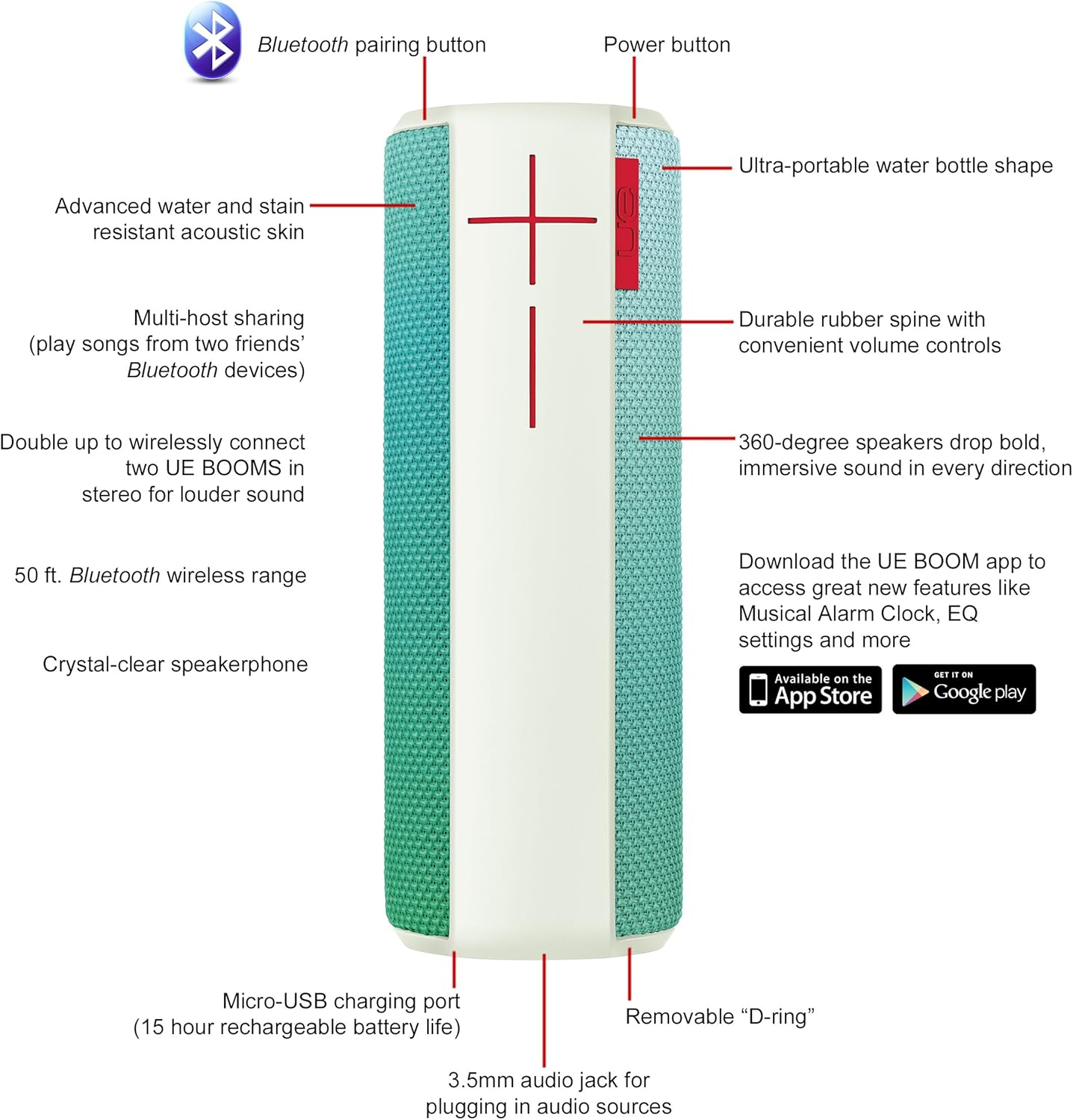
Image: Diagram highlighting key features and controls of the UE Boom speaker, including Bluetooth pairing button, power button, volume controls, micro-USB charging port, and 3.5mm audio jack.
დაყენება
სპიკერის დამუხტვა
Before initial use, fully charge your UE Boom speaker. Connect the provided micro-USB cable to the charging port located at the bottom of the speaker and plug the other end into a USB power source. The speaker's battery provides approximately 15 hours of playback on a full charge.
Bluetooth დაწყვილება
- Power on your UE Boom speaker by pressing the power button.
- Press and hold the Bluetooth pairing button (usually indicated by a Bluetooth icon) until you hear an audible tone and the LED indicator flashes rapidly.
- On your mobile device (smartphone or tablet), navigate to the Bluetooth settings.
- Select "UE Boom" from the list of available devices to pair.
- Once paired, you will hear a confirmation tone from the speaker.
For NFC-enabled devices, simply tap your device to the NFC area on the speaker for quick pairing.
ოპერაციული ინსტრუქციები
ძირითადი კონტროლი
- დენის ღილაკი: Located on the top of the speaker to turn it on or off.
- ხმის კონტროლი: Large '+' and '-' buttons on the side of the speaker adjust the volume.
- Bluetooth ღილაკი: იწყებს Bluetooth-ის დაწყვილების რეჟიმს.
Using the UE BOOM App
Download the official UE BOOM app from your device's app store (available on App Store and Google Play) to unlock additional features:
- Musical Alarm Clock: Wake up to your favorite music.
- დისტანციური გააქტიურება: Turn your speaker on/off from your device.
- EQ პარამეტრები: ხმის პროფესიონალის მორგებაfile თქვენი სურვილისამებრ.
- გაორმაგება: Connect two UE BOOM speakers for a stereo sound experience.
სპიკერფონის ფუნქციონირება
When connected to a smartphone, the UE Boom can be used as a speakerphone. Incoming calls will be routed through the speaker, allowing for hands-free communication.
მოვლა
The UE Boom speaker features a water and stain resistant acoustic skin. To clean, gently wipe the speaker with a damp cloth. Avoid using harsh chemicals or abrasive cleaners. Ensure all ports are dry before charging or connecting other devices.
პრობლემების მოგვარება
- ძალა არ არის: Ensure the speaker is charged. Connect it to a power source using the micro-USB cable.
- Bluetooth-ის საშუალებით დაწყვილება შეუძლებელია:
- დარწმუნდით, რომ დინამიკი დაწყვილების რეჟიმშია (მოციმციმე LED).
- შეამოწმეთ, რომ Bluetooth ჩართულია თქვენს მოწყობილობაზე.
- Move your device closer to the speaker (within 50 feet).
- სცადეთ მოწყობილობის დაწყვილების გაუქმება და ხელახლა დაწყვილება.
- დაბალი ხმა ან დამახინჯებული ხმა:
- დაარეგულირეთ ხმა როგორც დინამიკზე, ასევე თქვენს დაკავშირებულ მოწყობილობაზე.
- დარწმუნდით, რომ დინამიკი სრულად დატენულია.
- Check for any obstructions around the speaker.
- აპლიკაცია არ უკავშირდება: Ensure the speaker is powered on and connected via Bluetooth to your device. Update the app to the latest version.
პროდუქტის სპეციფიკაციები
| მოდელის სახელი | Logitech UE Boom Wireless Bluetooth Speaker |
| მოდელის ნომერი | 980-001023 წწ |
| ბრენდი | Logitech |
| ფერი | Northern Light |
| სპიკერის ტიპი | გარე |
| დაკავშირების ტექნოლოგია | Bluetooth, უსადენო |
| უსადენო დიაპაზონი | 50 ფუტამდე (15.24 მეტრი) |
| დენის წყარო | იკვებება ბატარეით (1 ლითიუმ-იონური ბატარეა მოყვება) |
| ბატარეის საშუალო ხანგრძლივობა | 15 საათი |
| წყლის წინააღმდეგობის დონე | წყალგაუმტარი |
| ნივთის წონა | 2.2 ფუნტი |
| პროდუქტის ზომები (LxWxH) | 2.6 x 2.6 x 7.1 ინჩი |
| მასალა | პლასტიკური |
| UPC | 097855112125 |
ოფიციალური პროდუქტის ვიდეო
ვიდეო: ოვერview of the Logitech UE Boom speaker's features, including 360-degree sound, water resistance, wireless connectivity, and the ability to pair two speakers for louder sound. This video demonstrates the speaker's durability and portability in various environments.
გარანტია და მხარდაჭერა
The Logitech UE Boom Wireless Bluetooth Speaker comes with a Limited Warranty. For specific warranty details, please refer to the documentation included with your product or visit the official Logitech webსაიტი.
For technical support or customer service, you may contact Logitech at: 646-454-3200.


