შესავალი
The Miops Smart Digital Camera Trigger is an advanced device designed to expand the capabilities of your DSLR or mirrorless camera. It offers various triggering modes, including lightning, sound, laser, and timelapse, allowing photographers to capture unique moments with precision. This manual provides detailed instructions for setup, operation, and maintenance to ensure optimal performance of your Miops device.
უსაფრთხოების ინფორმაცია
- არ დაუშვათ მოწყობილობის წყალთან ან ჭარბ ტენიანობასთან შეხება.
- მოერიდეთ ექსტრემალურ ტემპერატურას.
- არ სცადოთ მოწყობილობის დამოუკიდებლად დაშლა ან შეკეთება. მიმართეთ კვალიფიციურ სერვის პერსონალს.
- შეინახეთ ბავშვებისთვის მიუწვდომელ ადგილას.
- Use only specified charging cables and power sources.
პაკეტის შიგთავსი
დარწმუნდით, რომ შეფუთვაში ყველა ნივთია:
- Miops Smart Digital Camera Trigger device
- USB დამტენი კაბელი
- Camera connection cable (specific to your camera model, may be sold separately)
- სწრაფი დაწყების სახელმძღვანელო

სურათი 1: Miops Smart Digital Camera Trigger product box, showing the device and key features.
პროდუქტი დასრულდაview
The Miops Smart Trigger features a compact design with an LCD screen and intuitive controls. It connects wirelessly to your smartphone via Bluetooth for advanced control and mode selection.

სურათი 2: The Miops Smart Digital Camera Trigger device shown alongside a DSLR camera, illustrating its compact size and purpose.
დაყენება
1. მოწყობილობის დატენვა
Before first use, fully charge your Miops device using the provided USB cable. Connect the cable to the device's charging port and a standard USB power adapter (not included) or a computer USB port. The charging indicator will show the charging status.
2. Connecting to Your Camera
Connect the Miops device to your camera's remote port using the appropriate camera connection cable. Ensure the cable is securely plugged into both the Miops unit and your camera.
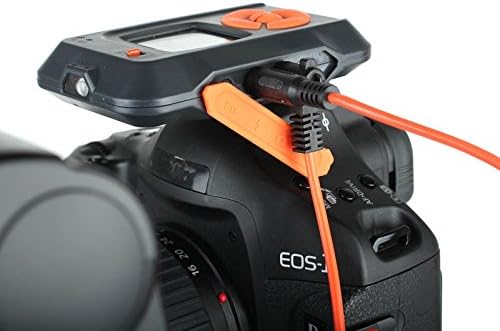
სურათი 3: The Miops device connected to a camera's remote port using a dedicated cable, ready for operation.
3. აპლიკაციის ინსტალაცია და დაწყვილება
- Download the Miops app from your smartphone's app store (iOS or Android).
- Turn on the Miops device.
- ჩართეთ Bluetooth თქვენს სმარტფონზე.
- Open the Miops app and follow the on-screen instructions to pair with your device. The app will search for available Miops devices.
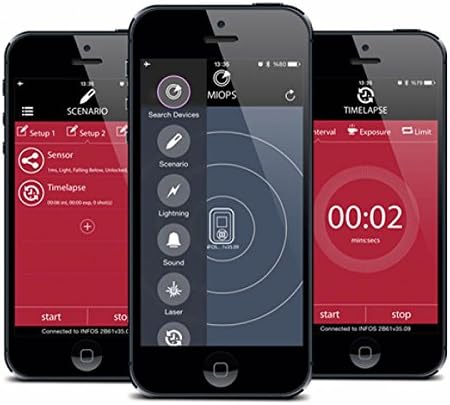
სურათი 4: Screenshots of the Miops smartphone application interface, demonstrating its intuitive design for controlling the trigger.
ოპერაციული რეჟიმები
The Miops Smart Trigger offers various modes for different photographic scenarios, controllable via the mobile app.
ელვის რეჟიმი
This mode is designed to capture lightning strikes. The device detects sudden changes in light and triggers the camera instantly. Adjust sensitivity settings in the app for optimal performance.

სურათი 5: ყოფილიample photograph captured using the Miops Smart Trigger's lightning mode, showing multiple lightning bolts over a city.
ხმის რეჟიმი
The sound mode triggers the camera when a sound above a set threshold is detected. Ideal for capturing breaking objects, balloons popping, or other sound-activated events.
ლაზერული რეჟიმი
Utilizes a laser beam to detect movement. When the laser beam is broken, the camera is triggered. Useful for wildlife photography or capturing fast-moving subjects.
Timelapse Mode
Allows you to set intervals and exposure times for creating stunning timelapse sequences. Configure the number of shots, interval, and exposure duration directly from the app.

სურათი 6: The Miops device mounted on a camera, demonstrating its use in capturing high-speed events, such as shattering glass.

სურათი 7: A high-speed photograph illustrating the Miops trigger's capability to capture precise moments, such as an egg breaking upon impact.
მოვლა
- დასუფთავება: მოწყობილობის გასაწმენდად გამოიყენეთ რბილი, მშრალი ქსოვილი. არ გამოიყენოთ თხევადი საწმენდი საშუალებები ან გამხსნელები.
- შენახვა: შეინახეთ მოწყობილობა გრილ, მშრალ ადგილას, მოარიდეთ მზის პირდაპირ სხივებს და ექსტრემალურ ტემპერატურას.
- ბატარეა: ხანგრძლივი შენახვისას, დარწმუნდით, რომ ბატარეა ნაწილობრივ დატენილია (დაახლოებით 50%), რათა შეინარჩუნოთ მისი სიცოცხლის ხანგრძლივობა.
პრობლემების მოგვარება
| პრობლემა | შესაძლო მიზეზი | გამოსავალი |
|---|---|---|
| მოწყობილობა არ ჩართულია. | დაბალი ბატარეა. | დატენეთ მოწყობილობა სრულად. |
| სმარტფონთან დაწყვილება შეუძლებელია. | Bluetooth is off; device not in pairing mode; interference. | Ensure Bluetooth is on; restart both devices; try pairing in a different location. |
| კამერა არ ირთვება. | Incorrect cable connection; camera settings; trigger sensitivity. | Check cable connection; ensure camera is in remote trigger mode; adjust sensitivity in the app. |
სპეციფიკაციები
| ფუნქცია | დეტალი |
|---|---|
| ბრენდი | Miops |
| მოდელის სახელი | Miops |
| დაკავშირების ტექნოლოგია | Bluetooth |
| თავსებადი მოწყობილობები | კამერა |
| განსაკუთრებული თვისებები | Digital display, Rechargeable |
| მაქს დიაპაზონი | 10 მეტრი |
| ბატარეის ტიპი | საჭიროა 1 ლითიუმ-იონური ბატარეა |
გარანტია და მხარდაჭერა
For warranty information and technical support, please refer to the official Miops webსაიტზე ან დაუკავშირდით მათ მომხმარებელთა მომსახურების სამსახურს. შეინახეთ შეძენის დამადასტურებელი საბუთი გარანტიის მოთხოვნებისთვის.
მწარმოებელი: Miops