1. შესავალი
This manual provides detailed instructions for the setup, operation, and maintenance of your Marathon Digital Desktop Clock, Model CL030050BK. This compact and versatile digital clock is designed for use on a desk or nightstand, offering time, date, day of the week, and temperature displays, along with a dual alarm function and a button-activated backlight.
2. პროდუქტი დასრულდაview

სურათი 2.1: წინა view of the Marathon Digital Desktop Clock CL030050BK, showing its large digital display with time, date, day, and temperature.
2.1 ძირითადი მახასიათებლები
- Large, High-Quality Display: Enhanced contrast for clear legibility.
- Nightowl Super Glow Backlight: Button-activated, gentle blue backlight that illuminates for approximately 10 seconds.
- ორმაგი სიგნალიზაციის ფუნქცია: Separate alarm settings for weekdays (Monday-Friday) and weekends (Saturday-Sunday).
- ჩაჩუმების ღილაკი: Conveniently located for temporary alarm suspension.
- ჩვენების მრავალი რეჟიმი: Time in 12 or 24-hour format, temperature in Fahrenheit or Celsius.
- Multilingual Day of Week: Displays the day of the week in seven languages: English, Dutch, French, Spanish, Italian, Danish, and German.
- კომპაქტური და მსუბუქი დიზაინი: Ideal for desktop, nightstand, or travel.
2.2 პაკეტის შიგთავსი
- 1 x Marathon Digital Desktop Clock CL030050BK
- 3 x AAA ბატარეები (შედის)
- 1 x მომხმარებლის სახელმძღვანელო
3. დაყენება
3.1 ბატარეის დაყენება
- იპოვეთ ბატარეის განყოფილების საფარი საათის უკანა მხარეს.
- განყოფილების გასახსნელად გადაწიეთ სახურავი ქვემოთ.
- ჩადეთ 3 ახალი AAA ელემენტი, დარწმუნდით, რომ სწორი პოლარობა (+ და -) დაცულია, როგორც ეს მითითებულია განყოფილებაში.
- დააბრუნეთ ბატარეის განყოფილების საფარი ზემოთ ასწიეთ, სანამ არ დააწკაპუნებს.
3.2 საწყისი ჩართვა
Upon successful battery installation, the clock display will activate, typically showing a default time and date. It is recommended to perform a reset after battery installation to ensure optimal performance.
3.3 საათის გადატვირთვა
To reset the clock, use a thin, pointed object (like a paperclip) to press the recessed გადატვირთვა button located on the back of the unit. This will clear all settings and return the clock to its factory defaults.
4. საოპერაციო ინსტრუქციები
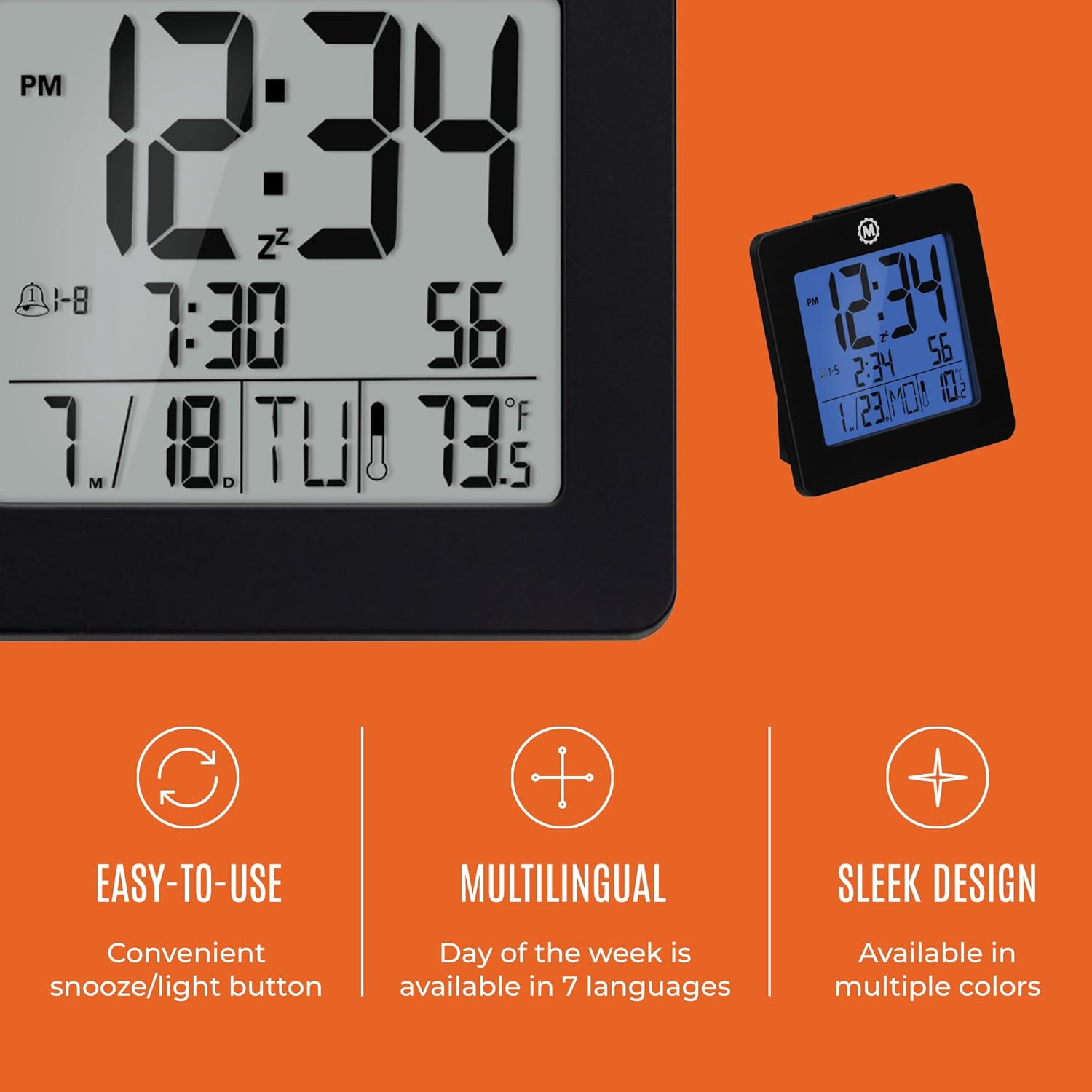
სურათი 4.1: დასრულდაview of key features and design elements.
4.1 ღილაკის ფუნქციები
საათს უკანა მხარეს აქვს რამდენიმე ღილაკი კონფიგურაციისთვის:
- რეჟიმი: Toggles between Time, Alarm, and Timer display modes.
- დაყენება: Enters setting mode for the currently displayed mode (Time, Alarm, Timer).
- UP / 12/24: In setting mode, increases the value. In time display mode, toggles between 12-hour and 24-hour format.
- DOWN / °C/°F: In setting mode, decreases the value. In time display mode, toggles between Celsius and Fahrenheit temperature units.
- LIGHT / SNOOZE: Activates the backlight for 10 seconds. When the alarm sounds, press to activate snooze.
- განთავსება: Resets the clock to factory defaults (requires a pointed object).
4.2 დროისა და თარიღის დაყენება
- დააჭირეთ MODE button until the time is displayed.
- დააჭირეთ და გააჩერეთ SET ღილაკს დაახლოებით 3 წამის განმავლობაში, სანამ წელიწადი არ აციმციმებს.
- გამოიყენეთ UP or ქვემოთ ღილაკები წლის რეგულირებისთვის.
- დააჭირეთ SET to confirm and move to the month setting.
- Repeat steps 3 and 4 to set the month, day, 12/24-hour format, hour, and minute.
- After setting the minutes, press SET to exit time/date setting mode.
4.3 Setting the Day of Week Language
While in time display mode, repeatedly press the UP or ქვემოთ button to cycle through the 7 available languages for the day of the week display (English, Dutch, French, Spanish, Italian, Danish, German).
4.4 Setting the Temperature Unit
დროის ჩვენების რეჟიმში ყოფნისას დააჭირეთ ღილაკს DOWN / °C/°F button to toggle the temperature display between Celsius (°C) and Fahrenheit (°F).
4.5 Setting the Dual Alarm
- დააჭირეთ MODE button until the alarm time is displayed (indicated by an alarm icon).
- დააჭირეთ და გააჩერეთ SET button for approximately 3 seconds until the alarm hour flashes.
- გამოიყენეთ UP or ქვემოთ ღილაკები განგაშის საათის დასარეგულირებლად.
- დააჭირეთ SET to confirm and move to the alarm minute setting.
- Repeat steps 3 and 4 to set the alarm minute.
- After setting the minutes, press SET to select the alarm type: Weekday (1-5) or Weekend (6-7). Use UP or ქვემოთ აირჩიოს.
- დააჭირეთ SET სიგნალიზაციის დაყენების რეჟიმის დასადასტურებლად და გასასვლელად.
- სიგნალიზაციის ჩასართავად/გამოსართავად დააჭირეთ ღილაკს UP button while in alarm display mode. An alarm icon will appear/disappear on the screen.
4.6 Using the Snooze and Backlight
დააჭირეთ დიდს მსუბუქი / snooze button on the top of the clock to activate the blue backlight. The backlight will remain illuminated for approximately 10 seconds. If the alarm is sounding, pressing this button will activate the snooze function, temporarily silencing the alarm for a short period before it sounds again.
5. მოვლა
- დასუფთავება: Wipe the clock with a soft, dry cloth. Avoid using abrasive cleaners or solvents.
- ბატარეის გამოცვლა: Replace all 3 AAA batteries when the display becomes dim or the clock functions erratically. Always replace with new batteries of the same type.
- შენახვა: თუ საათს დიდი ხნის განმავლობაში ინახავთ, გაჟონვის თავიდან ასაცილებლად ამოიღეთ ელემენტები.
6. Დიაგნოსტიკა
| პრობლემა | შესაძლო მიზეზი | გამოსავალი |
|---|---|---|
| ეკრანი ცარიელია ან ბუნდოვანია. | დაბალი ან მკვდარი ბატარეები. | შეცვალეთ ყველა 3 AAA ელემენტი. |
| არასწორი დრო/თარიღია ნაჩვენები. | Settings were not saved or incorrect. | Perform a reset and re-enter time/date settings as per Section 4.2. |
| სიგნალიზაცია არ ჟღერს. | სიგნალიზაცია არ არის გააქტიურებული ან არასწორად არის დაყენებული. | Ensure the alarm is activated (alarm icon visible) and the alarm time is correctly set (Section 4.5). |
| უკანა განათება არ მუშაობს. | Low batteries or button malfunction. | შეცვალეთ ელემენტები. თუ პრობლემა კვლავ გაგრძელდა, დაუკავშირდით მომხმარებელთა მხარდაჭერის სამსახურს. |
7. სპეციფიკაციები
- მოდელის ნომერი: CL030050BK
- ბრენდი: მარათონი
- ჩვენების ტიპი: ციფრული
- ფერი: შავი
- პროდუქტის ზომები: 3.7" სიგანე x 3.7" სიმაღლე
- ნივთის წონა: 5.6 უნცია
- დენის წყარო: ბატარეით მუშაობს (მოყვება 3 x AAA ბატარეა)
- მასალა: პლასტიკური
- სამონტაჟო ტიპი: მაგიდის
- განსაკუთრებული თვისება: Button-activated backlight, dual alarm, temperature display, multilingual day of week.
8. გარანტია და მხარდაჭერა
8.1 ინფორმაცია გარანტიის შესახებ
This Marathon Digital Desktop Clock CL030050BK comes with a 1 წლიანი გარანტია შეძენის დღიდან. ეს გარანტია ფარავს წარმოების დეფექტებს და დამუშავებას ნორმალური გამოყენების პირობებში. ის არ ფარავს არასწორი გამოყენებით, უბედური შემთხვევებით, არაავტორიზებული მოდიფიკაციებით ან ნორმალური ცვეთის შედეგად გამოწვეულ ზიანს.
8.2 მომხმარებელთა მხარდაჭერა
For technical assistance, troubleshooting, or warranty claims, please visit the official Marathon website or contact their customer service department. Please have your model number and proof of purchase ready when contacting support.


