1. შესავალი
This manual provides detailed instructions for the installation, operation, and maintenance of your Alpine CDE-163BT Advanced Bluetooth CD Receiver. Please read this manual thoroughly before using the unit to ensure proper operation and to prevent damage. Keep this manual for future reference.
The Alpine CDE-163BT is a versatile car stereo receiver featuring advanced Bluetooth connectivity for hands-free calling and audio streaming, CD playback, USB input, and FM/AM tuner capabilities. It is designed to deliver high-quality audio performance and user-friendly control.
2. დაყენება და ინსტალაცია
2.1 პაკეტის შიგთავსი
ინსტალაციის დაწყებამდე დარწმუნდით, რომ ყველა კომპონენტი ხელმისაწყოფია:
- Alpine CDE-163BT Head Unit
- გაყვანილობა აღკაზმულობა
- Mounting Sleeve and Trim Ring
- Microphone for Bluetooth Hands-Free Calling
- მფლობელის სახელმძღვანელო (ეს დოკუმენტი)
- სამონტაჟო აქსესუარები (ხრახნები, სამაგრები)
2.2 გაყვანილობის დიაგრამა
Refer to the wiring diagram provided with the unit's installation guide for specific connections. Key connections include:
- სიმძლავრე: Yellow (constant 12V), Red (switched 12V), Black (ground).
- მომხსენებლები: White/White-Black (Front Left), Gray/Gray-Black (Front Right), Green/Green-Black (Rear Left), Purple/Purple-Black (Rear Right).
- ანტენა: Blue (power antenna/amplifier remote turn-on).
- მიკროფონი: Connect the supplied microphone to the dedicated input for hands-free calling.
სიფრთხილე: Incorrect wiring can cause damage to the unit or vehicle's electrical system. If you are unsure about any wiring connections, consult a qualified professional installer.
2.3 საწყისი ჩართვა
ინსტალაციის შემდეგ, ჩართეთ თქვენი ავტომობილის ანთება. მოწყობილობა უნდა ჩაირთოს. საწყისი დაყენებისთვის მიჰყევით ეკრანზე გამოტანილ ნებისმიერ მითითებას, როგორიცაა ენის შერჩევა ან საათის დაყენება.
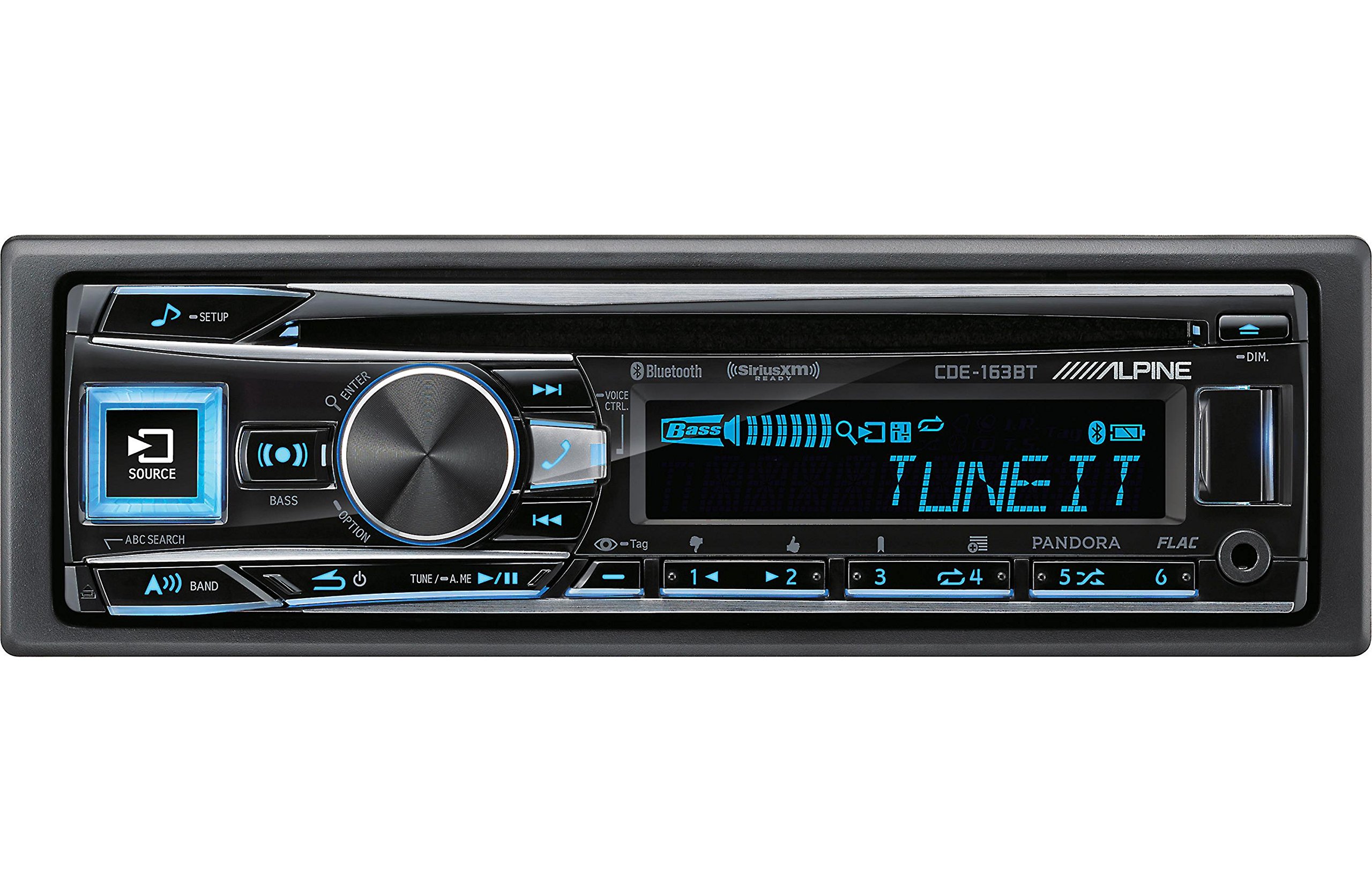
Figure 2.3.1: Front panel of the Alpine CDE-163BT receiver. This image displays the main controls, including the large rotary knob, source button, setup button, and display screen showing "TUNEIT" and "Bass" indicators.
3. ოპერაცია
3.1 წინა პანელის კონტროლიview
Familiarize yourself with the main controls on the front panel:
სურათი 3.1.1: დეტალური view of the Alpine CDE-163BT front panel. Key controls include the SOURCE button (left, illuminated), SETUP button (top left), large central rotary knob for volume and selection, BASS/OPTION button, VOICE CTRL button, and various preset/track skip buttons along the bottom.
- SOURCE ღილაკი: Selects the audio source (CD, Tuner, USB, Bluetooth Audio, AUX).
- SETUP ღილაკი: Accesses the main setup menu for system adjustments.
- Rotary Knob (Volume/ENTER): Turns to adjust volume. Press to confirm selections in menus.
- BASS/OPTION Button: Provides quick access to bass settings or other options depending on the current mode.
- VOICE CTRL Button: Activates voice control features on connected smartphones.
- BAND ღილაკი: Switches between FM1, FM2, FM3, and AM bands in tuner mode.
- TUNE/A.ME/II Buttons: Used for manual tuning, auto memory, and play/pause functions.
- Track Skip/Preset Buttons (1-6): Used for skipping tracks or selecting radio presets.
- DIM ღილაკი: არეგულირებს ეკრანის სიკაშკაშეს.
3.2 Power On/Off and Source Selection
- ერთეულის დასაბრუნებლად ON, press any button (e.g., SOURCE or the Rotary Knob).
- ერთეულის დასაბრუნებლად გამორთულია, press and hold the power button (often integrated with the TUNE/A.ME button).
- დააჭირეთ წყარო button repeatedly to cycle through available audio sources: CD, Tuner, USB, Bluetooth Audio, AUX.
3.3 ხმის კონტროლი
Rotate the large central Rotary Knob საათის ისრის მიმართულებით ხმის გასაზრდელად და საათის ისრის საწინააღმდეგო მიმართულებით ხმის შესამცირებლად.
3.4 აუდიო პარამეტრები
დააჭირეთ BASS/OPTION button or navigate through the SETUP menu to adjust audio settings such as Bass, Treble, Balance (left/right), and Fader (front/rear). Use the Rotary Knob to adjust values and press it to confirm.
3.5 Radio Operation (FM/AM Tuner)
- Select "Tuner" as the source using the წყარო ღილაკი.
- დააჭირეთ BAND ღილაკი FM1, FM2, FM3 და AM დიაპაზონებს შორის გადართვისთვის.
- სახელმძღვანელო რეგულირება: დააჭირეთ TUNE buttons (◀ / ▶) to manually tune frequencies.
- ეძიეთ tuning: დააჭირეთ და გააჩერეთ TUNE ღილაკები შემდეგი ძლიერი სადგურის ავტომატურად მოსაძებნად.
- წინასწარ დაყენებული სადგურები: To store a station, tune to the desired frequency, then press and hold one of the numbered preset buttons (1-6) until you hear a beep. To recall a preset, simply press the corresponding numbered button.
3.6 CD დაკვრა
- Insert a CD into the disc slot. The unit will automatically switch to CD source and begin playback.
- Use the ◀ / ▶ buttons to skip tracks.
- დააჭირეთ TUNE/A.ME/II button for Play/Pause.
- დააჭირეთ ABC SEARCH button to search for tracks by name.
3.7 Bluetooth კავშირი
The CDE-163BT features built-in Bluetooth for hands-free calling and audio streaming.
3.7.1 Bluetooth მოწყობილობის დაწყვილება
- დარწმუნდით, რომ Bluetooth ჩართულია თქვენს მობილურ მოწყობილობაზე.
- On the CDE-163BT, go to the SETUP menu and select "Bluetooth Setup".
- Choose "Pairing" or "Device Search".
- On your mobile device, search for available Bluetooth devices and select "Alpine CDE-163BT".
- Confirm the pairing code if prompted. Once paired, the Bluetooth icon on the receiver's display will illuminate.
3.7.2 ხელების გარეშე ზარები
- როდესაც ზარი შემოვა, მოწყობილობა აჩვენებს აბონენტის ID-ს. დააჭირეთ ღილაკს ENTER button (Rotary Knob) to answer.
- ზარის დასასრულებლად დააჭირეთ ღილაკს ENTER ისევ ღილაკი.
- Use the supplied microphone for clear communication.
- დააჭირეთ VOICE CTRL button to activate your smartphone's voice assistant.
3.7.3 Bluetooth აუდიო სტრიმინგი
- Select "Bluetooth Audio" as the source.
- Start playback on your paired mobile device. Audio will stream through the receiver.
- Use the ◀ / ▶ buttons on the receiver to skip tracks.
3.8 USB-ით დაკვრა
- Connect a USB storage device (e.g., USB flash drive) to the USB port.
- Select "USB" as the source. The unit will automatically detect and begin playing compatible audio files (including FLAC format).
- Use the ◀ / ▶ buttons to skip tracks.
- The unit supports various audio formats.
3.9 Pandora and SiriusXM Ready
- პანდორა: Connect your iPhone or Android smartphone via USB or Bluetooth and launch the Pandora app. Select Pandora as the source on the receiver to control the app.
- SiriusXM: This unit is SiriusXM Ready. An optional SiriusXM Connect Vehicle Tuner and subscription are required for satellite radio reception. Connect the tuner and select SiriusXM as the source.
3.10 ეკრანის პარამეტრები
- დააჭირეთ DIM button to adjust the display brightness.
- Access the SETUP menu to customize display colors for buttons and the screen.
4. მოვლა
4.1 დანადგარის გაწმენდა
Wipe the front panel with a soft, dry cloth. For stubborn stains, dampen the cloth lightly with water. Avoid using harsh chemicals, abrasive cleaners, or solvents as they can damage the finish.
4.2 დისკის მოვლა
Handle CDs by their edges. Keep discs clean and free of scratches. If a disc is dirty, wipe it gently from the center outwards with a soft, lint-free cloth. Do not use solvents or abrasive cleaners on discs.
5. Დიაგნოსტიკა
If you experience issues with your CDE-163BT, refer to the table below for common problems and solutions.
| პრობლემა | შესაძლო მიზეზი | გამოსავალი |
|---|---|---|
| არავითარი ძალა | არასწორი გაყვანილობა; გაფუჭებული დაუკრავი; ავტომობილის ანთება გამორთულია. | შეამოწმეთ კვების კავშირები; შეცვალეთ დაუკრავი; ჩართეთ ავტომობილის ანთება. |
| ხმა არ არის | ხმა ძალიან დაბალია; დადუმება გააქტიურებულია; დინამიკის არასწორი გაყვანილობა; Ampუფრო სიცოცხლისუნარიანი | ხმის გაზრდა; დადუმების გამორთვა; დინამიკების კავშირების შემოწმება; შემოწმება ampგამხსნელის ძალა. |
| Bluetooth არ უკავშირდება | Device not in pairing mode; Bluetooth off on phone; Interference. | Ensure phone Bluetooth is on and discoverable; Re-attempt pairing; Move closer to unit. |
| CD skips or won't play | Dirty or scratched disc; Disc inserted incorrectly. | Clean disc; Insert disc correctly; Try a different disc. |
| USB მოწყობილობა არ არის ამოცნობილი | შეუთავსებელი ფორმატი; დაზიანებული USB მოწყობილობა; სუსტი კავშირი. | უზრუნველყოს files are compatible; Try a different USB device; Reconnect USB device. |
If the problem persists after attempting these solutions, please contact Alpine customer support.
6. სპეციფიკაციები
Below are the technical specifications for the Alpine CDE-163BT Advanced Bluetooth CD Receiver:
- მოდელის ნომერი: 79380
- პროდუქტის ზომები: 5 x 11 x 10 ინჩი
- ნივთის წონა: 4.05 ფუნტი (4.1 ფუნტი)
- უსადენო საკომუნიკაციო ტექნოლოგიები: Bluetooth
- დაკავშირების ტექნოლოგიები: Bluetooth
- განსაკუთრებული მახასიათებლები: Built-In Bluetooth, FM Tuner
- ჩვენების სხვა მახასიათებლები: უსადენო
- ფერი: შავი
- მწარმოებელი: ალპური
- კავშირის ტექნოლოგია: Bluetooth
- თავსებადი მოწყობილობები: სმარტფონი
- კონექტორის ტიპი: 3.5 მმ ჯეკი, USB
- აუდიო გამომავალი რეჟიმი: მონო, სტერეო
- გარშემორტყმული ხმის არხის კონფიგურაცია: 4 არხი
- ვატtage: 200 ვატი
- პირველი ხელმისაწვდომი თარიღი: 19 წლის 2016 იანვარი
7. გარანტია და მომხმარებელთა მხარდაჭერა
7.1 ინფორმაცია გარანტიის შესახებ
Alpine products are manufactured to the highest quality standards. This product is covered by a limited warranty. Please refer to the separate warranty card included with your purchase for specific terms, conditions, and duration of coverage. Retain your proof of purchase for warranty claims.
7.2 მომხმარებელთა მხარდაჭერა
For technical assistance, troubleshooting beyond this manual, or warranty service, please contact Alpine customer support:
- Webსაიტი: Visit the official Alpine webსაიტი დახმარების რესურსებისთვის, ხშირად დასმული კითხვებისთვის და საკონტაქტო ფორმებისთვის.
- ტელეფონი: Refer to the Alpine website or your warranty card for regional customer service phone numbers.
- ავტორიზებული სერვის ცენტრები: For repairs, locate an authorized Alpine service center through the official webსაიტი.
When contacting support, please have your product model number (CDE-163BT) and serial number ready.


