UNIC UC46 მინი პროექტორის მომხმარებლის სახელმძღვანელო
Model: UC46 IDSP-011
1. შესავალი
This user manual provides detailed instructions for the operation, setup, and maintenance of your UNIC UC46 Mini Projector. Please read this manual thoroughly before using the product to ensure proper and safe operation. Keep this manual for future reference.
უსაფრთხოების ინფორმაცია
- პროექტორის ლინზაში პირდაპირ არ შეხედოთ, როდესაც...amp ჩართულია.
- Ensure proper ventilation around the projector to prevent overheating. It is recommended to rest the projector after 4-5 hours of continuous operation.
- Keep the projector away from water or any liquids.
- გამოიყენეთ მხოლოდ პროექტორთან ერთად მოწოდებული კვების ადაპტერი.
- არ სცადოთ პროექტორის დამოუკიდებლად დაშლა ან შეკეთება. დახმარებისთვის დაუკავშირდით კვალიფიციურ სერვის პერსონალს.
- This projector is designed for home entertainment and is not suitable for professional teaching, meetings, or business presentations.
2. პროდუქტის მახასიათებლები
- პორტატული დიზაინი: Compact and lightweight, ideal for home use, camping, and outdoor parties.
- მაღალი სიკაშკაშე: 1200 lumens LED lamp for clear and vibrant images.
- მშობლიური რეზოლუცია: 800x480 pixels, supporting up to 1920x1080 (Full HD) via input.
- დიდი პროექციის ზომა: Projects images from 34 to 130 inches.
- დაკავშირების მრავალი ვარიანტი: HDMI, VGA, USB, AV, SD Card, and IR.
- უსადენო კავშირი: Supports WiFi, Miracast, and DLNA for seamless smartphone integration (iOS, Android, Windows).
- ხანგრძლივი LED სიცოცხლე: Lamp life of approximately 20,000 hours.
3. პაკეტის შიგთავსი
გთხოვთ, მონიშნოთ ველი შემდეგი ნივთებისთვის:
- UNIC UC46 Mini Projector
- დენის კაბელი
- 3-in-1 AV კაბელი
- დისტანციური მართვა
- მომხმარებლის სახელმძღვანელო (ეს დოკუმენტი)
4. პროდუქტი დასრულდაview
Familiarize yourself with the different parts and controls of your UNIC UC46 Mini Projector.
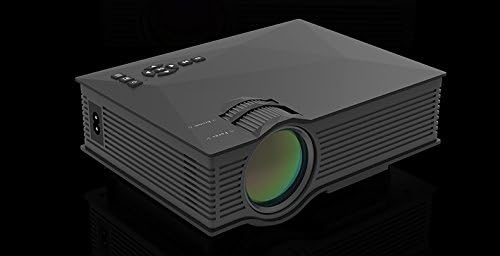
სურათი 4.1: წინა და გვერდითი მხარეები View of the UNIC UC46 Mini Projector. Shows the main lens, focus wheel, and ventilation grilles.

სურათი 4.2: უკანა View of the Projector. Displays various input ports including HDMI, USB, AV, SD card slot, and audio output.

სურათი 4.3: ზედა View of the Projector. Shows the control panel buttons for navigation, power, and input selection.

Figure 4.4: Lens Focus and Keystone Adjustment Diagram. Illustrates the location of the lens focus and keystone correction wheels, along with a diagram of the remote control functions.
5. დაყენება
5.1 განთავსება
Place the projector on a stable, flat surface. Ensure there is adequate space around the projector for ventilation. The projection distance will determine the screen size. Refer to the specifications for recommended distances.
5.2 დენის კავშირი
- Connect the power cable to the projector's AC power input port.
- კვების კაბელის მეორე ბოლო შეაერთეთ სტანდარტულ ელექტროგადამცემში (100-240 ვ, 50/60 ჰერცი).
- პროექტორზე დენის ინდიკატორის შუქი აინთება.
5.3 საწყისი ჩართვა
- მოწყობილობის ჩასართავად დააჭირეთ პროექტორზე ან დისტანციურ მართვაზე ჩართვის ღილაკს.
- პროექტორი აჩვენებს გაშვების ეკრანს.
5.4 გამოსახულების რეგულირება
- ფოკუსირება: Rotate the focus wheel (located near the lens) until the projected image is clear and sharp.
- საკვანძო შესწორება: If the image appears trapezoidal, adjust the keystone correction wheel (usually next to the focus wheel) to square the image.
6. საოპერაციო ინსტრუქციები
6.1 მოწყობილობების დაკავშირება
The UNIC UC46 projector supports various input sources:
- HDMI: Connect a PC, laptop, DVD player, game console (PS3, PS4), or Smart TV box using an HDMI cable. Select "HDMI" as the input source.
- VGA: Connect a PC or laptop using a VGA cable. Select "VGA" as the input source.
- USB: მედიის დასაკრავად USB ფლეშ დრაივის ჩასმა files (videos, photos, music, text). Select "USB" as the input source and navigate through the files.
- AV: Use the included 3-in-1 AV cable to connect devices with AV output (e.g., older DVD players, VCRs). Select "AV" as the input source.
- SD ბარათი: Insert an SD card into the slot to play media files. Select "SD" as the input source.
6.2 უკაბელო კავშირი (WiFi)
The projector supports WiFi connectivity for screen mirroring from smartphones (iOS, Android, Windows) and DLNA.
- Go to the "WiFi" or "Wireless" menu on the projector.
- Select your WiFi network and enter the password to connect the projector to your home network.
- For screen mirroring (Miracast/AirPlay):
- Ensure your smartphone and the projector are connected to the same WiFi network.
- On your smartphone, enable screen mirroring (e.g., "Screen Mirroring," "Smart View," "AirPlay," "Wireless Display").
- აირჩიეთ პროექტორი ხელმისაწვდომი მოწყობილობების სიიდან.
- For DLNA:
- Ensure your smartphone and the projector are connected to the same WiFi network.
- Use a DLNA-compatible app on your smartphone to stream media to the projector.
6.3 აუდიო გამომავალი
The projector has a built-in speaker. For enhanced audio, you can connect external speakers or a sound system via the 3.5mm audio output port.
7. მოვლა
7.1 ლინზის გაწმენდა
პროექტორის ლინზის ნაზად გასაწმენდად გამოიყენეთ რბილი, უბუტუსო ქსოვილი, რომელიც სპეციალურად ოპტიკური ლინზებისთვისაა შექმნილი. არ გამოიყენოთ აბრაზიული საწმენდები ან გამხსნელები.
7.2 პროექტორის კორპუსის გაწმენდა
Wipe the exterior of the projector with a soft, dry cloth. For stubborn dirt, a slightly damp შესაძლებელია ქსოვილის გამოყენება, შემდეგ კი მშრალი ქსოვილის გასუფთავება.
7.3 ვენტილაცია
Regularly check that the ventilation grilles are not blocked by dust or debris. Use a soft brush or compressed air to clean them if necessary. Proper airflow is crucial for preventing overheating and extending the projector's lifespan.
7.4 ლamp ცხოვრება
LED lamp has an estimated life of 20,000 hours. To maximize lamp life, avoid frequent on/off cycles and allow the projector to cool down properly after use.
8. Დიაგნოსტიკა
| პრობლემა | შესაძლო მიზეზი | გამოსავალი |
|---|---|---|
| სურათი არ არის პროეცირებული | Power cable not connected; Projector not turned on; Incorrect input source selected; Input device not connected or powered on. | Check power connection; Press power button; Select correct input source (HDMI, VGA, USB, AV, SD); Ensure input device is connected and powered on. |
| გამოსახულება ბუნდოვანია | Lens out of focus; Incorrect projection distance. | Adjust the focus wheel; Adjust the projection distance. |
| სურათი ტრაპეციულია | პროექტორი ეკრანის მიმართ პერპენდიკულარული არ არის. | Adjust the keystone correction wheel. |
| ხმა არ არის | Volume too low; Muted; External audio device not connected or powered on; Audio format not supported. | Increase volume; Unmute; Check external audio connection; Ensure audio format is supported. |
| დისტანციური მართვა არ მუშაობს | Batteries dead or incorrectly inserted; Obstruction between remote and IR receiver. | შეცვალეთ ელემენტები; უზრუნველყავით პროექტორის ინფრაწითელი მიმღების ხილვადობის თავისუფალი არე. |
| Overheating / Shuts down automatically | ვენტილაციის დაბლოკვა; ხანგრძლივი გამოყენება. | Ensure ventilation grilles are clear; Allow projector to rest after 4-5 hours of use. |
9. სპეციფიკაციები

Figure 9.1: Detailed Specifications of the UNIC UC46 Mini Projector.
| ფუნქცია | დეტალი |
|---|---|
| გამოსახულების სისტემა | LCD |
| Lamp | LED |
| მშობლიური რეზოლუცია | 800 x 480 პიქსელი |
| მაქსიმალური რეზოლუციის მხარდაჭერა | 1920 x 1080 პიქსელი (Full HD) |
| სიკაშკაშე | 1200 ლუმენი |
| კონტრასტის თანაფარდობა | 800:1 |
| ენერგიის მოხმარება | 50-55 ვატი |
| ელექტრომომარაგება | 100-240 ვ, 50/60 ჰც |
| ხმაურის დონე | <25 დბ |
| პროექციის ზომა | 34 - 130 ინჩი |
| გადაყარეთ მანძილი | 1.07-დან 3.8 მეტრამდე (3.51-დან 12.47 ფუტამდე) |
| ასპექტის თანაფარდობა | 4:3 / 16:9 |
| წმინდა წონა | 1 კგ |
| ობიექტივი | მრავალშრიანი დაფარული მინის ლინზა |
| შეყვანის ტერმინალები | USB, SD, HDMI, AV, VGA, IR |
| გამოყვანის ტერმინალი | ყურსასმენი, სპიკერი |
| უსადენო | WiFi 2.4G |
| პროდუქტის ზომები | 201 მმ x 153 მმ x 67.5 მმ |
10. გარანტია და მხარდაჭერა
For warranty information and technical support, please refer to the product packaging or contact your retailer. Keep your purchase receipt as proof of purchase.


