შესავალი და მეტიview
The Como Audio Duetto is a sophisticated wireless music system designed to deliver high-fidelity audio with extensive connectivity options. It features a multi-room music system with one-touch streaming, internet radio, Bluetooth, and Wi-Fi capabilities. The unit is housed in hand-crafted, furniture-grade real wood veneer cabinets, ensuring both aesthetic appeal and superior acoustic performance. With its custom digital signal processor and powerful 30 watts per channel RMS digital amplifier, the Duetto provides a rich and immersive listening experience.
Most functions can be accessed directly from the unit without the need for a separate device or app, offering intuitive control. For advanced features and multi-room synchronization, a dedicated mobile application is available.
დაყენება
1. გახსნა და განთავსება
Carefully remove the Duetto from its packaging. Place the unit on a stable, flat surface. For optimal sound performance, ensure the unit is not surrounded by objects and is at least 3.5 inches from a rear wall to allow for proper bass reflection.
2. დენის კავშირი
Connect the provided power adapter to the '20V DC' input on the rear panel of the Duetto. Plug the other end into a suitable wall outlet (100-240V AC, 50-60Hz).
3. ანტენის კავშირი
Extend the telescoping FM antenna located on the rear panel for optimal FM radio reception.
4. Initial Wi-Fi Setup
Upon first power-up, the Duetto will enter setup mode. Follow the on-screen prompts to connect to your Wi-Fi network. You will need to select your network from the list and enter your password using the unit's controls.
5. Auxiliary Inputs
The Duetto features multiple auxiliary inputs on the rear panel:
- ხაზის გასვლა: გარე მოწყობილობასთან დასაკავშირებლად ampგამხსნელები ან დინამიკები.
- AUX In 1 & AUX In 2: High-resolution auxiliary inputs for connecting external audio devices (e.g., Amazon Echo Dot, MP3 players).
- ოპტიკური შესვლა: ციფრული აუდიო წყაროების, როგორიცაა ტელევიზორები ან სათამაშო კონსოლები, დასაკავშირებლად.
- USB: მუსიკის დაკვრისთვის files USB დისკიდან.
Operating the Duetto
1. ჩართვა/გამორთვა
Press the 'O/VOLUME' knob to power the unit on or off.
2. ხმის კონტროლი
Rotate the 'O/VOLUME' knob to adjust the volume. You can also use the included remote control or the Como Audio app.
3. წყაროს შერჩევა
Press the 'SOURCE /<' knob to cycle through available audio sources, including FM radio, Internet radio, Bluetooth, and auxiliary inputs. The current source will be displayed on the color screen.
4. პრესები
The Duetto features six preset buttons (1-6) at the top of the faceplate. To save a current station or source as a preset, press and hold one of the numbered buttons until the display confirms it has been saved. To recall a preset, simply press the corresponding numbered button.
5. მენიუს ნავიგაცია
Use the 'MENU /↓' knob to access the system menu. Rotate the knob to navigate through options and press to select. Press the 'SOURCE /<' knob to go back to the previous menu or exit the menu.
6. Bluetooth დაწყვილება
Select Bluetooth as the source. The unit will automatically enter pairing mode. On your mobile device, search for 'Como Audio Duetto' in your Bluetooth settings and select it to pair.
7. Multi-room Functionality
If you have multiple Como Audio units, you can group them together using the Como Audio app for synchronized multi-room audio. This allows you to play the same music across different rooms seamlessly.
8. Using the Como Audio App
The Como Audio app (available for iOS and Android) provides comprehensive control over your Duetto. It allows you to select sources, manage presets, adjust volume, and configure multi-room groups. While the Duetto is designed for standalone operation, the app enhances convenience and control, especially for managing multiple units.
9. დისტანციური მართვა
The included remote control provides convenient access to basic functions such as power, volume, source selection, and presets from a distance.
მახასიათებლები
აუდიო შესრულება
- Custom digital signal processor (DSP) for optimized sound.
- 30 watts per channel RMS digital ampმაცოცხლებელი.
- High-quality speaker components: 4-layer voice coil woofer and dome tweeter for clear and powerful sound.
- Robust wooden cabinet construction to minimize resonance and enhance audio fidelity.
დაკავშირება
- Wi-Fi: Seamless streaming and internet radio access.
- Bluetooth: უსადენო აუდიო სტრიმინგი თავსებადი მოწყობილობებიდან.
- FM რადიო: Traditional radio reception.
- ინტერნეტ რადიო: Access to thousands of stations worldwide.
- დამხმარე საშუალებები: Two 3.5mm auxiliary inputs and one optical input for versatile wired connections.
- USB: Playback of digital audio files from USB storage.
დიზაინი და გამოყენებადობა
- Hand-crafted furniture-grade real wood veneer cabinets.
- Intuitive color display for easy navigation and information.
- Physical controls (knobs and preset buttons) for direct interaction.
მოვლა
დასუფთავება
To clean the unit, use a soft, dry cloth. Do not use abrasive cleaners, waxes, or solvents, as these may damage the finish. Avoid spraying liquids directly onto the unit.
განთავსება
Avoid placing the Duetto in areas with extreme temperatures, high humidity, or direct sunlight. Ensure adequate ventilation around the unit to prevent overheating.
პრობლემების მოგვარება
- ძალა არ არის: Ensure the power adapter is securely connected to both the unit and a working electrical outlet.
- ხმა არ არის: Check the volume level on the Duetto and any connected external devices. Verify that the correct audio source is selected. Ensure speaker connections (if external speakers are used) are secure.
- Wi-Fi კავშირის პრობლემები: Confirm your Wi-Fi network is active and within range. Re-enter your Wi-Fi password if necessary. Restart your Wi-Fi router and the Duetto unit.
- Bluetooth-ის დაწყვილების შეცდომა: Ensure the Duetto is in Bluetooth mode and discoverable. Make sure your mobile device's Bluetooth is enabled and it is within range of the Duetto. Try unpairing and re-pairing the device.
- რადიოს ცუდი მიღება: Adjust the position of the FM antenna. If using Internet radio, ensure a strong Wi-Fi signal.
- არ რეაგირებს კონტროლი: Try restarting the unit by unplugging it from the power outlet for a few seconds and then plugging it back in.
სპეციფიკაციები
| პროდუქტის ზომები | 5.5 x 5.3 x 14.6 ინჩი |
| ნივთის წონა | 6.6 ფუნტი |
| მწარმოებელი | კომო აუდიო |
| საქონლის მოდელის ნომერი | Duetto Walnut/Black |
| ბატარეები (დისტანციური მართვისთვის) | საჭიროა 2 AAA ბატარეა |
| დაკავშირების ტექნოლოგია | Bluetooth, WiFi |
| ფერი | Walnut (Global Edition) |
| Amplifier გამომავალი | 30 watts per channel RMS |
| სპიკერის კონფიგურაცია | 4-layer voice coil woofer, dome tweeter |
გარანტია და მხარდაჭერა
For warranty information and technical support, please refer to the official Como Audio webსაიტზე ან პირდაპირ დაუკავშირდით მათ მომხმარებელთა მომსახურების სამსახურს. შეინახეთ შეძენის დამადასტურებელი საბუთი გარანტიის მოთხოვნებისთვის.
Product Visuals and Demonstrations

წინა view of the Como Audio Duetto Wireless Speaker in Walnut/Black finish.

The Duetto's display showing music playback from Spotify, highlighting the intuitive interface.

Rear panel of the Duetto, showcasing various input and output ports including auxiliary and optical connections.
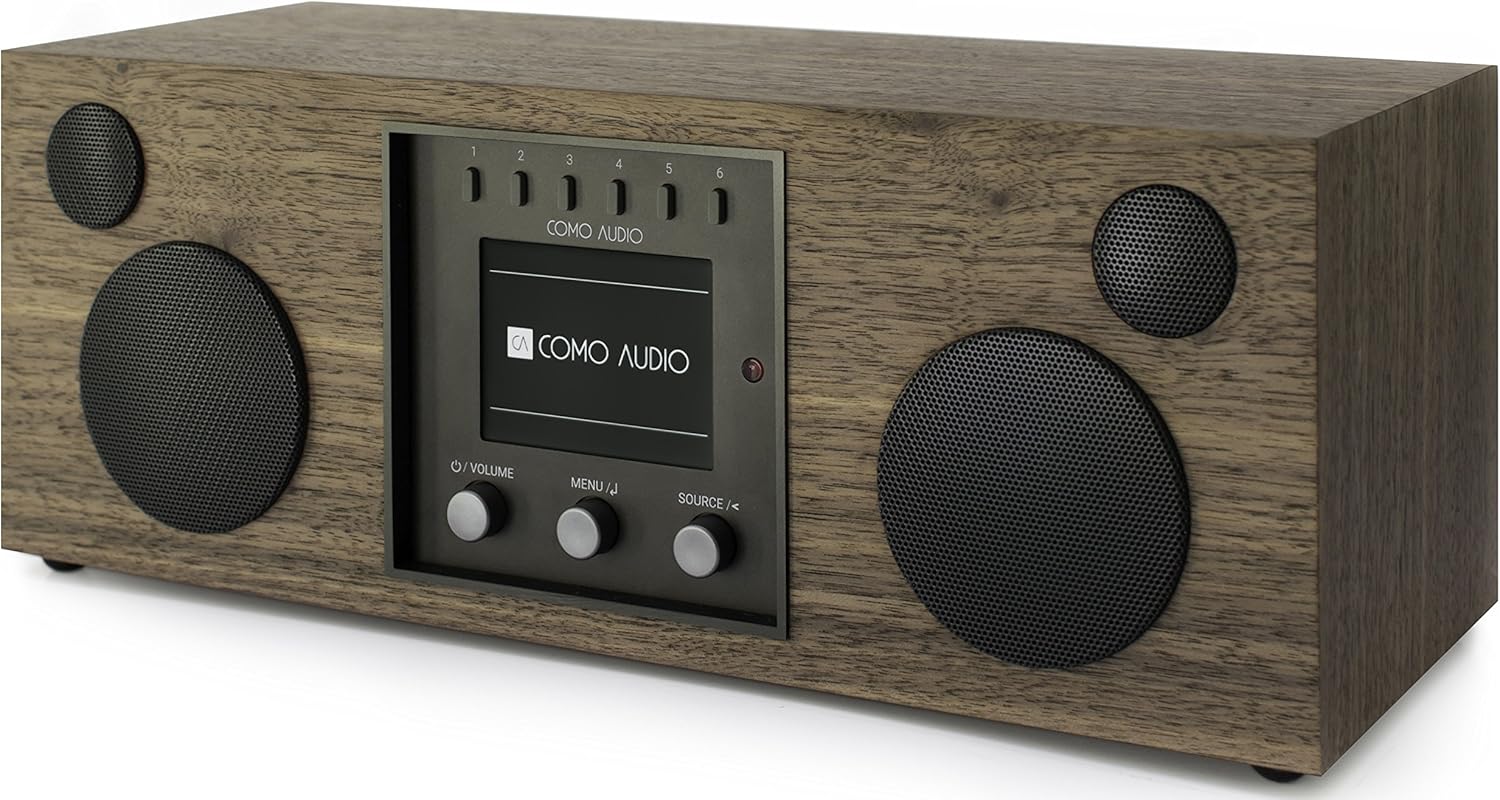
დახრილი view of the Como Audio Duetto, emphasizing its compact and elegant design.

The Duetto seamlessly integrated into a modern living room environment.

Detailed dimensions of the Como Audio Duetto for placement planning.
ოფიციალური პროდუქტის ვიდეო
ეს ვიდეო იძლევა ზედმეტსview of the Como Audio Duetto Wireless Music System, highlighting its design, features, and ease of use. It demonstrates various functionalities including one-touch access to different music sources, multi-room audio capabilities, and the quality of its sound components. The video also features the founder, Thomas DeVesto, discussing the product's philosophy.


