1. შესავალი
This manual provides comprehensive instructions for the operation and maintenance of your MIDAS DM16 16 Input Analogue Live and Studio Mixer. The DM16 is designed for both live performance and studio recording environments, featuring award-winning MIDAS microphone preamplifiers and robust construction.
Please read this manual thoroughly before operating the device to ensure proper usage and to maximize its lifespan.
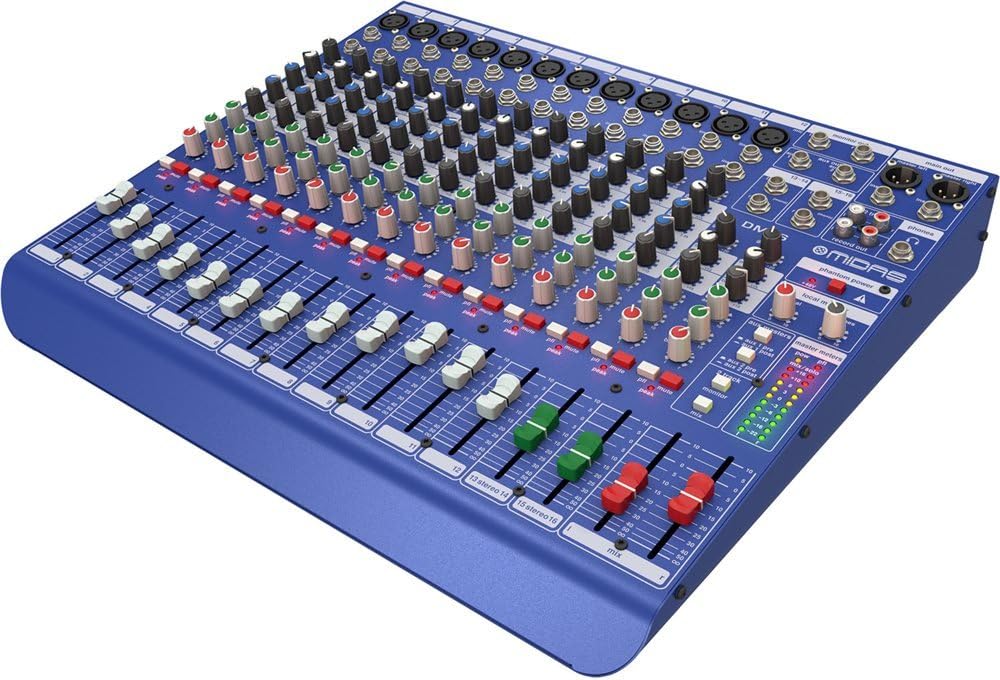
სურათი 1.1: წინა კუთხით view of the MIDAS DM16 mixer.
2. დაყენება
2.1 შეფუთვა და შემოწმება
Upon receiving your MIDAS DM16, carefully unpack the unit and inspect it for any signs of damage that may have occurred during transit. Retain the original packaging materials for future transport or storage.
ყუთში შედის:
- MIDAS DM16 16-შეყვანის ანალოგური ცოცხალი და სტუდიური მიქსერი
- დენის კაბელი
- მომხმარებლის სახელმძღვანელო (ეს დოკუმენტი)
2.2 დენის კავშირი
The DM16 operates on a standard AC power supply. Connect the provided power cord to the AC inlet on the rear panel of the mixer and then to a suitable power outlet. Ensure the power switch is in the 'Off' position before connecting to power.
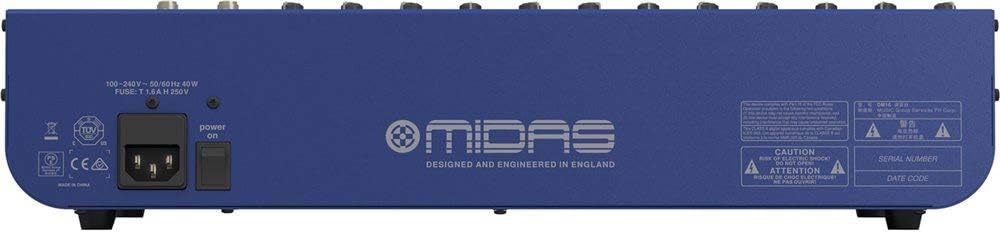
Figure 2.1: Rear panel of the MIDAS DM16 showing power input and warnings.
2.3 შეყვანისა და გამომავალი კავშირები
The DM16 features a variety of input and output options for connecting microphones, instruments, and other audio devices.
- მიკროფონის შეყვანა: 12 mono input channels with XLR connectors for microphones. These channels feature MIDAS microphone preampმებრძოლები.
- ხაზის შეყვანა: 2 electronically-balanced stereo line input channels on 1/4" TRS connectors for instruments or line-level devices.
- ძირითადი შედეგები: Connect to your main PA system or recording interface.
- დამხმარე გზავნილები: For monitor mixes or effects sends.
- ყურსასმენის გამომავალი: For monitoring audio.
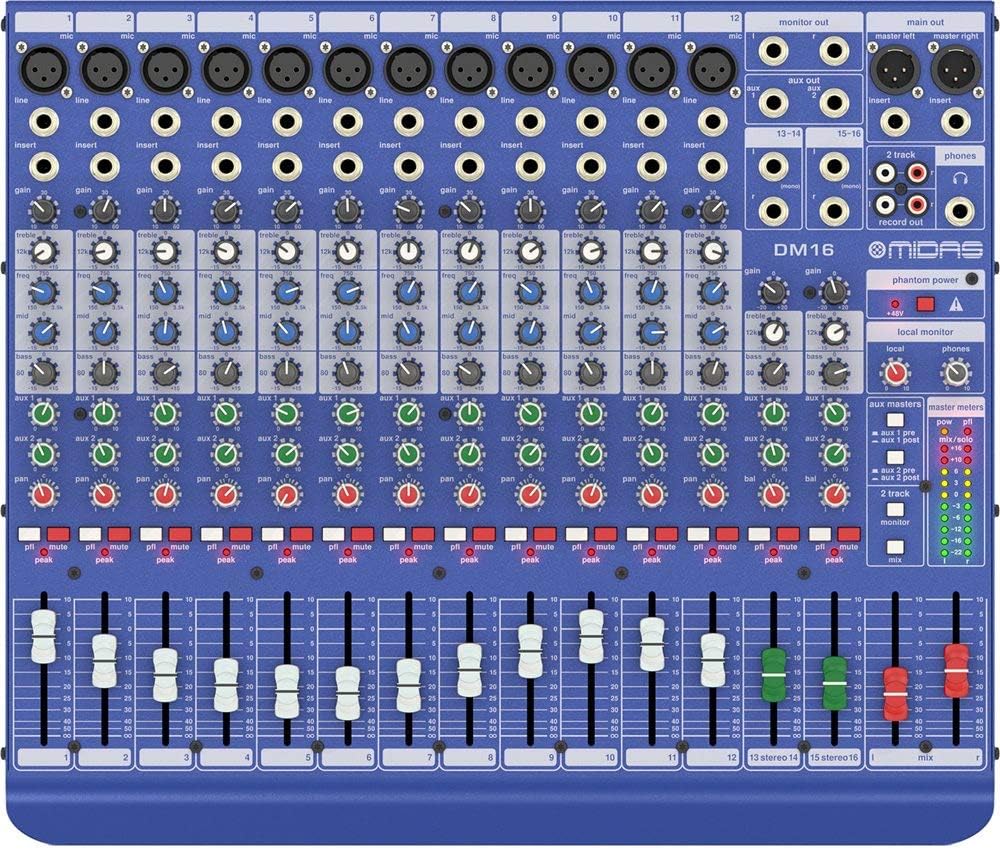
სურათი 2.2: ზედა view of the MIDAS DM16 showing all input/output connections and controls.
3. საოპერაციო ინსტრუქციები
3.1 არხის კონტროლი
Each mono input channel on the DM16 features the following controls:
- მოგება: Adjusts the input sensitivity for the microphone preampმაცოცხლებელი.
- EQ: A 3-band equalizer with a swept mid-band for precise tone shaping.

სურათი 3.1: დეტალური view of the 3-band EQ section on a mono channel.
- AUX 1/2: Controls the level sent to the auxiliary outputs. These can be switched pre/post fader.

Figure 3.2: Aux masters section with pre/post fader switching.
- პან: არეგულირებს არხის სტერეო პოზიციას.
- მუნჯი: Silences the channel.
- PEAK LED: Indicates when the input signal is clipping.
- FADER: Controls the output level of the channel to the main mix.

Figure 3.3: Channel faders for precise level control.
3.2 Phantom Power
The DM16 provides +48V phantom power for condenser microphones. This is a global switch, meaning it applies to all microphone inputs simultaneously. Ensure all connections are made before activating phantom power to prevent damage to non-phantom powered devices.

Figure 3.4: Phantom power switch.
3.3 მონიტორინგი
Use the headphone output and monitor controls to listen to the main mix or specific auxiliary sends. The monitor section includes controls for local monitor and phones output levels.

Figure 3.5: Monitor and headphone controls.
4. მოვლა
Proper maintenance ensures the longevity and optimal performance of your MIDAS DM16 mixer.
- დასუფთავება: Use a soft, dry cloth to clean the exterior of the mixer. Avoid abrasive cleaners or solvents that could damage the finish or controls.
- მტვრისგან დაცვა: მტვრის დაგროვების თავიდან ასაცილებლად, განსაკუთრებით ფეიდერებისა და ღილაკების გარშემო, მიქსერი დახურული გქონდეთ, როდესაც მას არ იყენებთ.
- ვენტილაცია: გადახურების თავიდან ასაცილებლად, მოწყობილობის გარშემო უზრუნველყოთ საკმარისი ჰაერის ნაკადი. არ დაბლოკოთ ვენტილაციის ღიობები.
- შენახვა: შეინახეთ მიქსერი გრილ, მშრალ ადგილას, მოარიდეთ მზის პირდაპირ სხივებს და ექსტრემალურ ტემპერატურას.
5. Დიაგნოსტიკა
This section addresses common issues you might encounter with your DM16 mixer.
- ძალა არ არის:
- Check if the power cord is securely connected to both the mixer and the power outlet.
- დარწმუნდით, რომ დენის განყოფილება ფუნქციონირებს.
- Ensure the power switch on the rear panel is in the 'On' position.
- ხმის გამომავალი არ არის:
- Check all input and output cable connections.
- Ensure channel faders and the main mix fader are raised.
- Verify that the MUTE buttons on active channels are not engaged.
- Check the gain settings for each channel.
- Confirm that your connected speakers or monitoring system are powered on and functioning correctly.
- დამახინჯებული ხმა:
- Reduce the GAIN setting on the input channel if the PEAK LED is frequently illuminating.
- Lower the output level of the connected source device.
- შეამოწმეთ გაუმართავი კაბელები.
- გუგუნი ან ხმაური:
- დარწმუნდით, რომ ყველა კაბელი სათანადოდ არის დაცული და კარგ მდგომარეობაშია.
- შეამოწმეთ დამიწების მარყუჟები; სცადეთ ყველა აუდიო აპარატურა ერთსა და იმავე დენის ზოლზე დააკავშიროთ.
- აუდიო კაბელები დენის კაბელებისგან მოშორებით შეინახეთ.
თუ აქ არ განხილულ პრობლემებს წააწყდებით, გთხოვთ, იხილოთ დახმარების განყოფილება.
6. სპეციფიკაციები
| ფუნქცია | დეტალი |
|---|---|
| პროდუქტის ტიპი | ანალოგური Live და Studio Mixer |
| შეყვანის არხები | 16 (12 მონო, 2 სტერეო) |
| მიკროფონი წინასწარიampმებრძოლები | Award-winning MIDAS preampმებრძოლები |
| EQ on Mono Channels | 3-band with swept mid band |
| Aux აგზავნის | 2 (with pre/post fader switching) |
| დენის წყარო | კაბელიანი ელექტრო |
| ნივთის წონა | 11.02 ფუნტი (5.0 კგ) |
| პროდუქტის ზომები (L x W x H) | 17.24 x 14.57 x 3.74 ინჩი (438 x 370 x 95 მმ) |
| წარმოშობის ქვეყანა | ჩინეთი |
| მოდელის ნომერი | DM16 |
| დაკავშირების ტექნოლოგია | დამხმარე |
7. გარანტია და მხარდაჭერა
7.1 ინფორმაცია გარანტიის შესახებ
Your MIDAS DM16 mixer is covered by a limited warranty against defects in materials and workmanship. Please refer to the warranty card included with your product or visit the official MIDAS webსაიტზე დეტალური გარანტიის პირობებისთვის.
შენიშვნა: The warranty may not cover damage caused by improper use, unauthorized modifications, or natural disasters.
7.2 მომხმარებელთა მხარდაჭერა
For technical assistance, troubleshooting, or service inquiries, please contact MIDAS customer support through their official webსაიტი ან თქვენი პროდუქტის დოკუმენტაციაში მოცემული საკონტაქტო ინფორმაცია.
ონლაინ რესურსები:
- Official MIDAS Webსაიტი: www.midasconsoles.com
- Product Support Page: (Specific link if available, otherwise general webსაიტი)
When contacting support, please have your product model number (DM16) and serial number ready.


