1. შესავალი
მადლობა შენაძენისთვისasing the Supersonic SC-20H DVD Player. This manual provides essential information for the proper installation, operation, and maintenance of your device. Please read this manual thoroughly before using the product and retain it for future reference.
2. უსაფრთხოების ინფორმაცია
უსაფრთხო მუშაობისა და დაზიანების თავიდან ასაცილებლად, დაიცავით შემდეგი უსაფრთხოების ზომები:
- დენის წყარო: Connect the player only to a power supply within the specified range (110-240V, 50/60Hz).
- ვენტილაცია: არ დაბლოკოთ ვენტილაციის ღიობები. მოწყობილობის გარშემო უზრუნველყავით საკმარისი სივრცე ჰაერის სათანადო ნაკადისთვის.
- ტენიანობა: Do not expose the player to rain, moisture, or dripping/splashing liquids. Do not place objects filled with liquids, such as vases, on the apparatus.
- სითბო: Keep the player away from heat sources such as radiators, heat registers, stoves, or other apparatus (including ampგამხსნელები), რომლებიც წარმოქმნიან სითბოს.
- დასუფთავება: Unplug the player from the wall outlet before cleaning. Use a dry cloth for cleaning.
- მომსახურება: ნუ ეცდებით ამ პროდუქტის საკუთარ მომსახურებას. მიაწოდეთ ყველა სერვისი კვალიფიციურ მომსახურე პერსონალს.
- კალიფორნიის წინადადება 65 გაფრთხილება: ეს პროდუქტი შეიცავს ქიმიკატებს, რომლებიც ცნობილია კალიფორნიის შტატისთვის, რომლებიც იწვევს კიბოს და დაბადების დეფექტებს ან სხვა რეპროდუქციულ ზიანს.
3. პაკეტის შიგთავსი
დარწმუნდით, რომ შეფუთვაში ყველა ნივთია:
- Supersonic SC-20H DVD Player
- კვების ბლოკი
- AV Cables (Composite)
- Full Function Remote Control (Batteries not included)
- მომხმარებლის სახელმძღვანელო (ეს დოკუმენტი)
4. პროდუქტი დასრულდაview
4.1 წინა პანელი
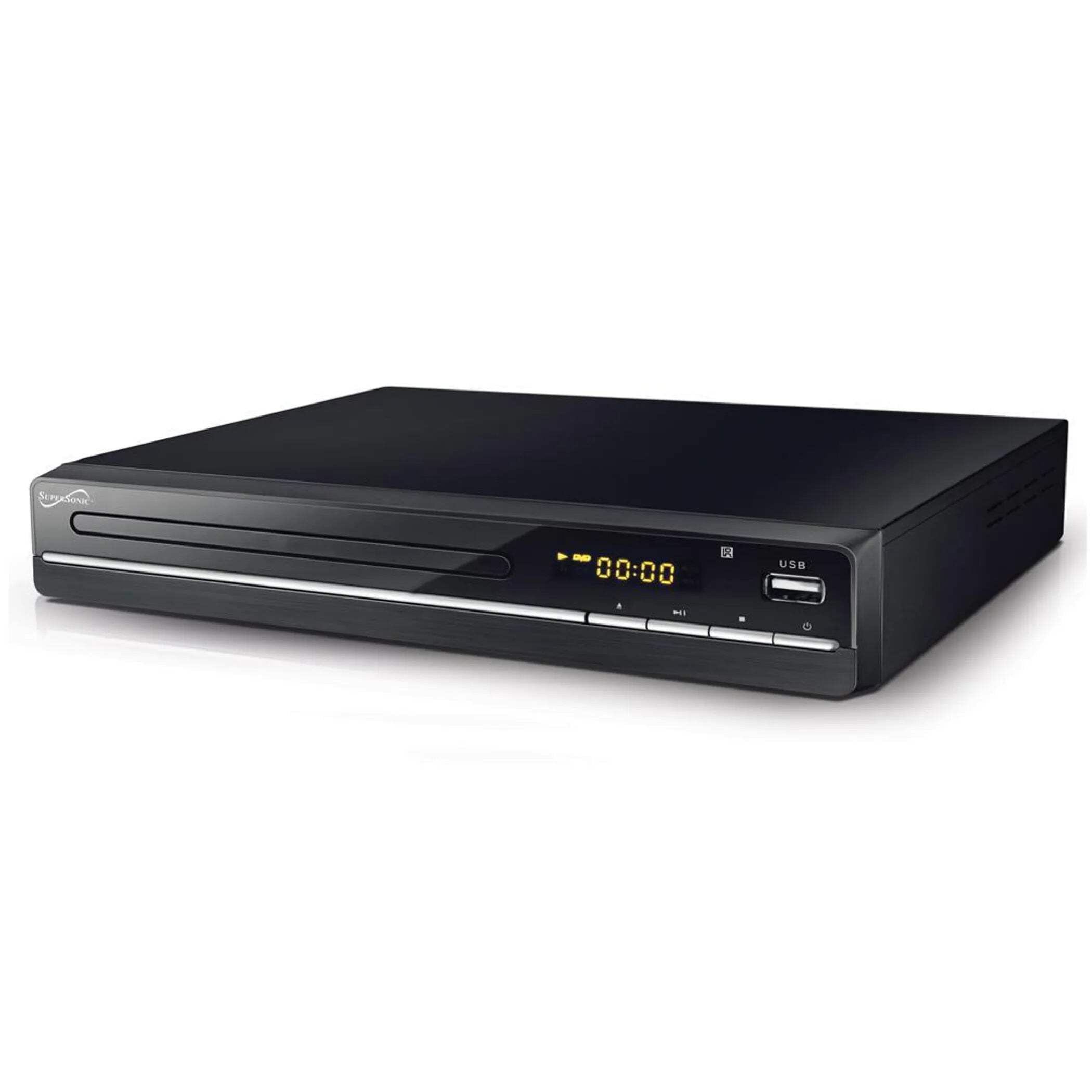
The image above displays the front panel of the SC-20H DVD Player. Key features include:
- დისკის უჯრა: For inserting DVDs, VCDs, CDs, and other compatible discs.
- ეკრანის ჩვენება: Shows playback time, track number, and other operational information.
- საკონტროლო ღილაკები: Includes Play/Pause, Stop, Previous, Next, and Power buttons for direct control.
- USB შეყვანა: Allows connection of USB flash drives for media playback.
- SD ბარათის სლოტი: მედიის დასაკრავად SD ბარათების ჩასასმელად files. (Note: The image primarily shows the USB port, but the product features indicate an SD input as well, typically located near the USB port or on the side).
4.2 უკანა პანელი
The rear panel of the DVD player contains all the necessary connection ports for audio and video output.
- HDMI გამომავალი: Connects to an HDMI-enabled TV or display for high-definition audio and video.
- Composite A/V Output (RCA): Yellow (Video), White (Left Audio), Red (Right Audio) jacks for standard definition connection to older TVs.
- Component YUV Output: Y (Luminance), Pb (Blue difference), Pr (Red difference) jacks for progressive scan video output, offering better quality than composite.
- დენის შეყვანა: For connecting the power supply cable.
5. დაყენება
5.1 ტელევიზორთან დაკავშირება
აირჩიეთ ერთ-ერთი შემდეგი კავშირის მეთოდი:
- HDMI კავშირი (რეკომენდებულია):
- Connect one end of an HDMI cable (not included) to the HDMI OUT port on the DVD player.
- HDMI კაბელის მეორე ბოლო შეაერთეთ თქვენი ტელევიზორის HDMI IN პორტთან.
- დისტანციური მართვის პულტის გამოყენებით, ტელევიზორზე აირჩიეთ შესაბამისი HDMI შესასვლელი.
- Composite A/V Connection:
- Connect the yellow RCA cable to the VIDEO OUT port on the DVD player and the VIDEO IN port on your TV.
- Connect the white RCA cable to the L AUDIO OUT port on the DVD player and the L AUDIO IN port on your TV.
- Connect the red RCA cable to the R AUDIO OUT port on the DVD player and the R AUDIO IN port on your TV.
- Select the corresponding A/V input on your TV.
- Component YUV Connection:
- Connect the Y, Pb, and Pr cables to the corresponding YUV OUT ports on the DVD player and YUV IN ports on your TV.
- For audio, use the white and red RCA cables to connect the L/R AUDIO OUT ports on the DVD player to the L/R AUDIO IN ports on your TV.
- Select the corresponding Component input on your TV.
5.2 დენის კავშირი
After connecting the audio/video cables, plug the power supply cable into the DVD player's power input and then into a wall outlet.
6. საოპერაციო ინსტრუქციები
6.1 დისკის ძირითადი დაკვრა
- ჩართვა: Press the Power button on the front panel or remote control.
- დისკის ჩასმა: Press the OPEN/CLOSE button to open the disc tray. Place a compatible disc (DVD, VCD, CD, KODAK CD, DVD±R/RW, CD-R, CD-RW) onto the tray with the label side facing up. Press OPEN/CLOSE again to close the tray.
- დაკვრა: The player will typically begin playback automatically. If not, press the PLAY button.
- პაუზა/რეზიუმე: Press the PAUSE button to temporarily stop playback. Press PLAY again to resume.
- გაჩერება: დაკვრის დასასრულებლად დააჭირეთ STOP ღილაკს.
- გამოტოვეთ ტრეკები/თავები: Use the PREVIOUS and NEXT buttons to navigate between tracks or chapters.
6.2 USB/SD მედიის დაკვრა
- მედიის ჩასმა: USB პორტში ჩადეთ USB ფლეშ დრაივი ან SD ბარათი SD ბარათის სლოტში.
- აირჩიეთ წყარო: Use the SOURCE or USB/SD button on the remote control to switch to the USB or SD input.
- დათვალიერება Files: Use the navigation buttons (Up, Down, Left, Right) and OK button on the remote to browse through your media files (MP3, video formats).
- ითამაშეთ File: აირჩიეთ სასურველი file and press the PLAY button to begin playback.
6.3 System Settings (OSD Menu)
Access the On-Screen Display (OSD) menu to configure various settings:
- წვდომის მენიუ: Press the SETUP button on the remote control.
- ნავიგაცია: მენიუს პარამეტრებში გადასაადგილებლად გამოიყენეთ ნავიგაციის ღილაკები.
- შერჩევა: Press OK to select an option or enter a sub-menu.
- გასვლა: Press SETUP again to exit the menu.
ძირითადი პარამეტრები მოიცავს:
- ენა: Set OSD menu language and subtitle language (supports multiple languages).
- ასპექტის თანაფარდობა: Choose between 4:3 (Standard) and 16:9 (Widescreen) for video output.
- მშობელთა კონტროლი: Set a password and rating level to restrict playback of certain content.
- აუდიო პარამეტრები: Adjust audio output modes (e.g., Surround).
7. მოვლა
Proper maintenance ensures the longevity of your DVD player:
- განყოფილების გაწმენდა: Wipe the exterior of the player with a soft, dry cloth. Do not use liquid cleaners or aerosol sprays.
- საწმენდი დისკები: Use a soft, lint-free cloth to wipe discs from the center outwards. Do not use abrasive cleaners or solvents.
- დისკის მართვა: Always hold discs by their edges to avoid fingerprints and scratches. Store discs in their cases when not in use.
- ვენტილაცია: გადახურების თავიდან ასაცილებლად, დარწმუნდით, რომ ვენტილაციის ღიობები მტვრისა და ნარჩენებისგან თავისუფალია.
8. Დიაგნოსტიკა
თუ პრობლემებს წააწყდებით, იხილეთ შემდეგი გავრცელებული პრობლემები და მათი გადაჭრის გზები:
| პრობლემა | შესაძლო მიზეზი | გამოსავალი |
|---|---|---|
| არავითარი ძალა | დენის კაბელი არ არის შეერთებული; დენის წყარო გაუმართავია | Ensure power cable is securely plugged in. Test the outlet with another device. |
| სურათი არ არის | Incorrect video connection; Wrong TV input selected | Check video cables (HDMI, Composite, Component) are correctly connected. Select the correct input source on your TV. |
| ხმა არ არის | Incorrect audio connection; TV/player volume too low; Mute activated | Check audio cables (HDMI, RCA) are correctly connected. Increase volume on TV and player. Deactivate mute function. |
| დისკი არ უკრავს | Disc inserted incorrectly; Disc is dirty or scratched; Incompatible disc format | Ensure disc is inserted label-side up. Clean the disc. Check if the disc format is supported (DVD, VCD, CD, KODAK CD, DVD±R/RW, CD-R, CD-RW, MP3). |
| USB/SD media not playing | Incorrect source selected; Incompatible file format; USB/SD device faulty | Select USB or SD source. Ensure media files are compatible. Try another USB/SD device. |
9. სპეციფიკაციები
Detailed technical specifications for the Supersonic SC-20H DVD Player:
- მოდელი: SC-20H
- ბრენდი: ზებგერითი
- დისკის თავსებადობა: DVD, VCD, KODAK CD, DVD±R/RW, CD, CD-R, CD-RW, MP3
- ვიდეო გამომავალი: HDMI, Composite A/V, Component YUV
- აუდიო გამომავალი რეჟიმი: გარს
- რეზოლუცია: 1920x1080 (via HDMI)
- დაკავშირება: USB 2.0, SD Card Slot
- ელექტრომომარაგება: 110-240 ვ, 50/60 ჰც
- ენერგიის მოხმარება: 15 W
- ზომები (L x W x H): 10.5 x 10 x 3.3 ინჩი
- ნივთის წონა: 1.75 ფუნტი
- განსაკუთრებული მახასიათებლები: Multi-language subtitles (up to 32 languages), PAL/NTSC compatible, Parental Lock, Aspect Ratio (4:3, 16:9)
10. გარანტია და დახმარება
For warranty information and technical support, please refer to the documentation included with your purchase or visit the official Supersonic webსაიტი. შეინახეთ შეძენის დამადასტურებელი საბუთი გარანტიასთან დაკავშირებული ნებისმიერი პრეტენზიისთვის.


