1. შესავალი
This manual provides detailed instructions for the assembly, operation, and maintenance of your VIVO STAND-V102F Dual Monitor Free-Standing Desk Mount. This mount is designed to hold two flat or curved display screens ranging from 13 to 30 inches, with a maximum weight capacity of 17.6 lbs per screen. It supports VESA mounting patterns of 75x75mm or 100x100mm.
უსაფრთხოების გაფრთხილება:
- გამოყენებამდე დარწმუნდით, რომ ყველა კომპონენტი საიმედოდ არის დამაგრებული.
- Do not exceed the maximum weight capacity of 17.6 lbs per screen.
- Avoid pulling monitors too far forward or backward unless the stand is bolted down, as this may compromise stability.
- Always check that the base size fits your available desk space to prevent tipping.
2. პაკეტის შიგთავსი
Please verify that all components listed below are present in your package. If any parts are missing or damaged, contact VIVO customer support.
- Heavy-Duty Base (11" x 15.4")
- Center Pole (16.4" height)
- Dual Monitor Arms with VESA Plates
- საკაბელო მართვის კლიპები
- All necessary hardware (screws, washers, Allen keys)
3. შეკრების ინსტრუქცია
Follow these steps to assemble your VIVO Dual Monitor Free-Standing Desk Mount.
- Attach the Center Pole to the Base: Securely fasten the center pole to the heavy-duty base using the provided screws and Allen key. Ensure it is stable.
- Install Monitor Arms: Slide the dual monitor arms onto the center pole. Adjust their height to your preference and tighten the locking mechanism.
- VESA ფირფიტების მონიტორებზე მიმაგრება: Remove the VESA plates from the monitor arms. Attach these plates to the back of your monitors using the appropriate screws for your monitor's VESA pattern (75x75mm or 100x100mm).
- მონიტორების დამონტაჟება: Carefully slide the monitors (with attached VESA plates) onto the monitor arms. Ensure they click securely into place.
- საკაბელო მენეჯმენტი: Utilize the included cable management clips to route and organize your monitor cables along the arms and down the center pole for a tidy setup.

Figure 1: Assembled VIVO Dual Monitor Free-Standing Desk Mount with monitors.

Figure 2: Detail of VESA plate for monitor attachment.
4. საოპერაციო ინსტრუქციები
The VIVO STAND-V102F offers full articulation for optimal viewing კუთხეები.
- სიმაღლის რეგულირება: გაათავისუფლეთ კლamp on the center pole to slide the monitor arms up or down. Re-tighten the clamp firmly once the desired height is achieved.
- დახრის რეგულირება: Monitors can be tilted +45° to -45°. Adjust the tilt knob on the VESA plate to achieve your preferred vertical viewing კუთხე
- მბრუნავი რეგულირება: The monitor arms allow for 180° swivel, enabling you to adjust the horizontal angle of each monitor independently.
- როტაცია: Monitors can be rotated 360° for portrait or landscape orientation. Simply turn the monitor to the desired orientation.
- Arm Articulation: The double center arm joints provide additional articulation, allowing for flexible monitor placement and positioning.

Figure 3: Full articulation features including tilt, swivel, and rotation.
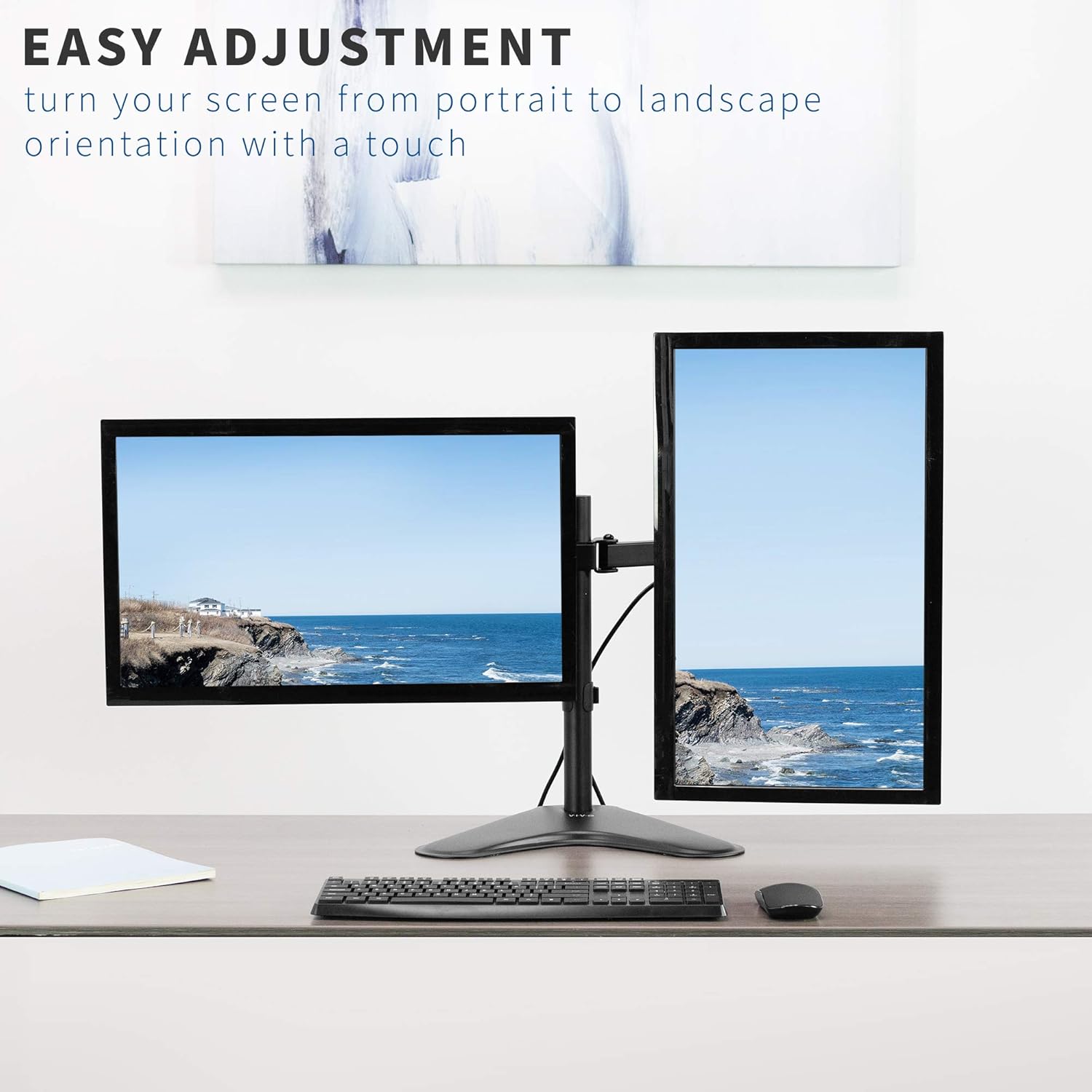
სურათი 4: მაგample of monitors in both portrait and landscape orientations.
5. მახასიათებლები
- უნივერსალური თავსებადობა: Fits two screens from 13" to 30" and up to 17.6 lbs each. Supports VESA 75x75mm or 100x100mm mounting patterns.
- Full Articulation: Offers +45° to -45° tilt, 180° swivel, and 360° rotation for flexible viewინგ.
- სიმაღლის რეგულირება: Monitors can be adjusted along the 16.4" center pole.
- მძიმე დანიშნულების ბაზა: A solid steel 11" x 15.4" base ensures stability for your monitor setup.
- ინტეგრირებული კაბელების მართვა: Clips are included to keep cables organized and out of sight.

Figure 5: Key dimensions and compatibility information.

Figure 6: The heavy-duty base providing stability.

Figure 7: Integrated cable management system.
6. სპეციფიკაციები
| ატრიბუტი | დეტალი |
|---|---|
| მოდელის ნომერი | STAND-V102F |
| ეკრანის ზომის თავსებადობა | 13" to 30" (Dual) |
| წონის ტევადობა | 17.6 lbs per screen |
| VESA თავსებადობა | 75x75 მმ, 100x100 მმ |
| დახრის კუთხე | +45°-დან -45°-მდე |
| მბრუნავი კუთხე | 180° |
| როტაცია | 360° (პორტრეტი/ლანდშაფტი) |
| პოლუსის სიმაღლე | 16.4 ინჩი |
| ბაზის ზომები | 11" x 15.4" |
| მასალა | შენადნობის ფოლადი |
| ფერი | შავი |
7. მოვლა
თქვენი VIVO მონიტორის სამაგრის ხანგრძლივი მომსახურებისა და ოპტიმალური მუშაობის უზრუნველსაყოფად, დაიცავით შემდეგი ტექნიკური ინსტრუქციები:
- რეგულარული გაწმენდა: გაწმინდეთ სამაგრი რბილი ქსოვილით,amp cloth to remove dust and debris. Avoid abrasive cleaners or solvents.
- შეამოწმეთ შესაკრავები: Periodically inspect all screws and bolts to ensure they remain tight. Re-tighten as necessary to maintain stability.
- შეზეთვა: If any joints become stiff, a small amount of silicone-based lubricant can be applied to the moving parts.
8. Დიაგნოსტიკა
If you encounter any issues with your monitor mount, refer to the following common problems and solutions:
- Mount is Unstable/Tipping:
- Ensure the heavy-duty base is fully on a flat, stable surface.
- Verify that the combined weight of your monitors does not exceed the maximum capacity.
- Avoid extending monitors too far forward or backward from the center pole without securing the base to the desk (if applicable).
- Monitors Sagging/Not Holding Position:
- Tighten the tilt adjustment knob on the VESA plate.
- Ensure all arm joints are securely tightened with the provided Allen key.
- Difficulty Adjusting Tilt:
- Some tilt bolts may require a specific Allen key or tool for proper tightening/loosening. Refer to the assembly diagram for exact locations.
- Ensure the monitor is not exceeding the weight limit, which can make adjustments difficult.
9. ოფიციალური პროდუქტის ვიდეოები
Full Motion Dual Monitor Free-Standing Desk Stand
This video demonstrates the full motion capabilities of the VIVO Dual Monitor Free-Standing Desk Stand, including articulation and double center arm joints for flexible monitor positioning.
Dual Monitor Free-Standing Desk Stand (STAND-V102F) Overview
ეს ვიდეო იძლევა ზედმეტსview of the VIVO STAND-V102F Dual Monitor Free-Standing Desk Stand, showcasinგ მისი დიზაინი და მახასიათებლები.
10. გარანტია და მხარდაჭერა
VIVO products are backed by a manufacturer's warranty. For specific warranty details, product registration, or technical support, please visit the official VIVO webადგილზე ან დაუკავშირდით მათ მომხმარებელთა მომსახურების განყოფილებას. შეინახეთ თქვენი შესყიდვის ქვითარი გარანტიის მოთხოვნებისთვის.
VIVO is a US-based company committed to providing quality ergonomic solutions. Their sales and technical support teams are available to assist with any product-related inquiries.
Figure 8: VIVO's commitment to customer support.