Apple MLA02LL/A

Apple Magic Mouse 2 (MLA02LL/A) Instruction Manual

Model: MLA02LL/A

პროდუქტი დასრულდაview

The Apple Magic Mouse 2 is a wireless, rechargeable mouse designed for seamless integration with Mac OS X. It features a multi-touch surface for intuitive gestures and an ambidextrous design for comfortable use by both left and right-handed users. Its optimized foot design allows for smooth gliding across surfaces, enhancing precision and ease of use.

ძირითადი მახასიათებლები

დაყენება

Pairing Your Magic Mouse 2

The Magic Mouse 2 pairs automatically with your Mac when connected via the included USB-C to Lightning cable. For initial setup or re-pairing:

  1. Ensure your Mac's Bluetooth is turned on. Go to სისტემის პარამეტრები > Bluetooth.
  2. Connect your Magic Mouse 2 to your Mac using the USB-C to Lightning cable. This will automatically pair the mouse and begin charging it.
  3. Once paired, you can disconnect the cable for wireless use. The mouse will remain connected via Bluetooth.
  4. If the mouse does not appear in the Bluetooth settings, ensure it is charged and the power switch on the bottom of the mouse is in the 'On' position.

ბატარეის დატენვა

The Magic Mouse 2 features a built-in rechargeable lithium-ion battery. To charge:

  1. Connect the Lightning port on the bottom of the Magic Mouse 2 to a USB-C port on your Mac or a USB power adapter using the provided USB-C to Lightning cable.
  2. A full charge typically takes about 2 hours. A quick 2-minute charge can provide approximately 9 hours of use.
  3. You can check the battery level in the Bluetooth menu on your Mac's menu bar.
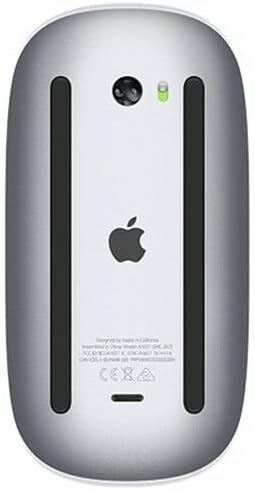
ქვედა view of the Apple Magic Mouse 2 showing the Lightning charging port and power switch.
ქვედა view of the Apple Magic Mouse 2, highlighting the Lightning charging port and power switch. The green indicator light shows the mouse is powered on.

Operating Your Magic Mouse 2

მრავალ შეხების ჟესტები

The Magic Mouse 2's smooth, seamless Multi-Touch surface allows for simple gestures to navigate your Mac:

ზედა view of the Apple Magic Mouse 2, showcasing its sleek, white multi-touch surface.
ზედა view of the Apple Magic Mouse 2, illustrating its minimalist design and multi-touch surface for gesture control.

მაუსის პარამეტრების მორგება

You can customize the tracking speed, scrolling speed, and gesture settings for your Magic Mouse 2:

  1. გადადით System Settings > Mouse თქვენს Mac-ზე.
  2. დაარეგულირეთ თვალთვალის სიჩქარე და გადახვევის სიჩქარე sliders to your preference.
  3. ში მეტი ჟესტები tab, you can enable or disable specific Multi-Touch gestures and view demonstrations of how to perform them.

მოვლა

Cleaning Your Magic Mouse 2

To keep your Magic Mouse 2 clean and functioning optimally:

ბატარეის მოვლა

To maximize the lifespan of your Magic Mouse 2's rechargeable battery:

პრობლემების მოგვარება

საერთო საკითხები და გადაწყვეტილებები

სპეციფიკაციები

ფუნქციადეტალი
პროდუქტის ზომები2 x 2 x 2 ინჩი
ნივთის წონა12.3 უნცია
ASINB074T2NWVL
ბატარეებიRechargeable (built-in)
ბრენდიApple
ფერივერცხლი
დაკავშირების ტექნოლოგიაუსადენო (Bluetooth)
ღილაკების რაოდენობა3 (virtual, via Multi-Touch)

გარანტია და მხარდაჭერა

პროდუქტის გარანტია

Apple products typically come with a one-year limited warranty against defects in materials and workmanship. For detailed warranty information, please refer to the official Apple warranty documentation included with your product or visit the Apple Support webსაიტი.

მომხმარებელთა მხარდაჭერა

დამატებითი დახმარების, ტექნიკური მხარდაჭერის ან მომსახურების შესახებ შეკითხვებისთვის, გთხოვთ, ეწვიოთ Apple-ის ოფიციალურ მხარდაჭერის საიტს. website or contact Apple Customer Service:

დაკავშირებული დოკუმენტები - MLA02LL/A

წინასწარიview Apple Magic Mouse-ის დაშლის სახელმძღვანელო
Apple Magic Mouse-ის დეტალური დაშლის სახელმძღვანელო, რომელიც შეისწავლის მის შიდა კომპონენტებსა და დიზაინს.
წინასწარიview Apple Magic Mouse-ის მომხმარებლის სახელმძღვანელო: დაყენება, ფუნქციები და პრობლემების მოგვარება
Apple Magic Mouse-ის ოფიციალური მომხმარებლის სახელმძღვანელო, რომელიც მოიცავს სწრაფ ჩართვას, პროგრამული უზრუნველყოფის განახლებებს, Mac-ებთან დაწყვილებას, ელემენტის შეცვლას, მრავალშეხებიან ჟესტებს, გაწმენდას, ერგონომიკას და მარეგულირებელ ნორმებთან შესაბამისობის შესახებ ინფორმაციას.
წინასწარიview Apple Magic Mouse 2-ის დაშლის სახელმძღვანელო
ყოვლისმომცველი დაშლის სახელმძღვანელო, რომელიც დეტალურად აღწერს Apple Magic Mouse 2-ის შიდა კომპონენტებს, აწყობას და შეკეთების შესაძლებლობას.
წინასწარიview Apple iMac Quick Start Guide: Setup and Basic Usage
Get started with your Apple iMac. This guide covers initial setup, connecting accessories like Magic Mouse and Keyboard, understanding ports, and basic navigation.
წინასწარიview Apple iMac Quick Start Guide: Setup, Usage, and Support
A concise guide to setting up and using your Apple iMac, covering accessories, ports, basic operations, and support resources. Learn how to connect peripherals, navigate the interface, and find help.
წინასწარიview iMac Quick Start Guide
Get started with your new iMac. This guide covers accessory setup, basic usage, and identifies key components of your iMac desktop computer.