1. შესავალი
The SmartGen HAT560NB ATS Controller is an intelligent dual-supply module designed for Automatic Transfer Systems (ATS). It integrates digital, intelligent, and networked functionalities to provide precise voltage measurement and control for various power supply configurations. This controller is suitable for specialized ATS, Contactor ATS, and Air Break ATS applications, offering a compact structure, advanced circuitry, and high reliability.
It is engineered to reduce operational errors through automatic measurement and control, making it an ideal solution for managing power transfer between different sources like mains and generators.

სურათი 1: წინა view of the SmartGen HAT560NB ATS Controller, showing the LCD display and operational buttons.
2. Features and Characteristics
The HAT560NB controller incorporates a powerful microprocessor for accurate monitoring and control. Key features include:
- System type configuration: Mains (1#) & Generator (2#), Generator (1#) & Mains (2#), Mains (1#) & Mains (2#), Generator (1#) & Generator (2#).
- 132x64 LCD with backlight, offering optional Chinese and English display with push-button operation.
- Measurement and display of 2-way 3-phase voltage და სიხშირე.
- დაცვა მეტი/დაქვეითებული მოცულობისგანtage, loss of phase, reverse phase sequence, and over/under frequency.
- Automatic and Manual operating modes. Manual mode allows forced switch closure or opening.
- All parameters are configurable on-site, secured by two different passwords for authorized access.
- Genset commissioning can be set to On-load or Off-load mode.
- Automatic re-closing function for the ATS Controller.
- Configurable closing output signal as either on intervals or continuous output.
- Applicable for ATS with one neutral position, two neutral positions, and non-position types.
- Monitors 1-3 phase AC mains voltagეს.
- Manages changeover of both generator and mains contactors.
- Sends remote start commands to the generating set.
- Compatible with various contactors and changeover switch types.
3. დაყენება და ინსტალაცია
Proper installation is crucial for the safe and reliable operation of the HAT560NB controller. Ensure all power is disconnected before beginning installation. Refer to the wiring diagrams and terminal descriptions for correct connections.
3.1 გაყვანილობის დიაგრამები
The HAT560NB controller supports various wiring configurations depending on the ATS type. Below are typical wiring diagrams for different setups. Always consult a qualified electrician for installation.
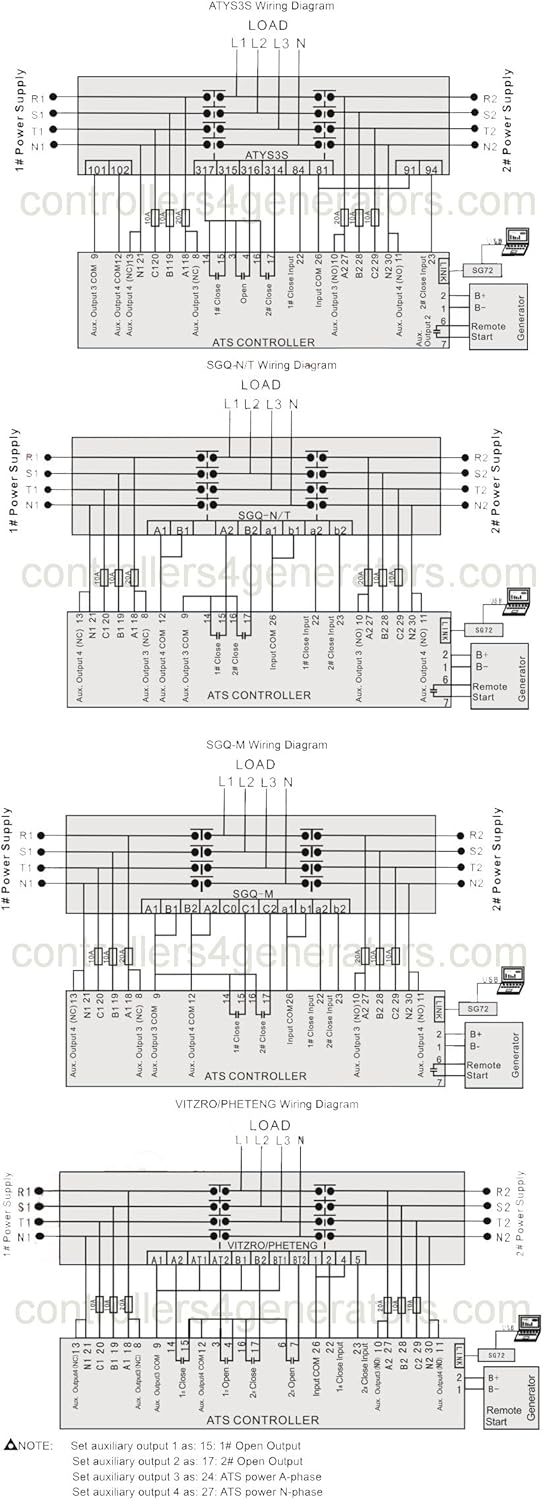
Figure 2: Comprehensive wiring diagrams illustrating connections for ATYS3S, SGQ-N/T, SGQ-M, and VITZRO/PHETENG ATS controller types. These diagrams show connections for 1# and 2# power supplies, load, and remote start signals.

Figure 3: Additional wiring diagrams focusing on SGQ-N/T, SGQ-M, and Contactor ATS configurations, detailing input and output connections for the controller.
3.2 Connecting Terminals
The controller features clearly labeled terminals for power input, auxiliary outputs, and control signals. Ensure each wire is securely connected to its designated terminal.

სურათი 4: უკანა view of the HAT560NB controller, displaying the layout and labeling of all connecting terminals, including power inputs, auxiliary outputs, and communication ports.
4. საოპერაციო ინსტრუქციები
The HAT560NB controller offers both automatic and manual operation modes, accessible via its front panel buttons and LCD display.
4.1 ჩართვა და საწყისი ჩვენება
Upon powering on, the LCD will display system information, including voltage and frequency readings for both power sources. The backlight ensures visibility in various lighting conditions.
4.2 რეჟიმის შერჩევა
- ავტომატური რეჟიმი: The controller automatically monitors the power sources and initiates transfer based on pre-set parameters and detected abnormalities (e.g., over/under voltage, frequency deviations, phase loss).
- მექანიკური რეჟიმი: Allows the user to manually control the opening or closing of the transfer switches. This mode is typically used for testing or specific operational requirements.
4.3 პარამეტრის დაყენება
All operational parameters can be configured directly on the unit using the push-buttons and LCD interface. Access to parameter settings is protected by a two-level password system to prevent unauthorized changes. Refer to the detailed programming guide (not included in this manual) for specific parameter definitions and adjustment procedures.
5. მოვლა
Regular maintenance ensures the longevity and reliable performance of your HAT560NB ATS Controller.
- დასუფთავება: Keep the controller's exterior clean and free from dust and debris. Use a soft, dry cloth. Avoid abrasive cleaners or solvents.
- კავშირის შემოწმება: Periodically inspect all wiring connections to ensure they are secure and free from corrosion. Loose connections can lead to intermittent operation or system failures.
- გარემო პირობები: დარწმუნდით, რომ სამუშაო გარემო რჩება მითითებულ ტემპერატურისა და ტენიანობის დიაპაზონში, რათა თავიდან აიცილოთ შიდა კომპონენტების დაზიანება.
For any internal maintenance or repairs, contact qualified service personnel.
6. Დიაგნოსტიკა
This section provides guidance on common issues you might encounter with the HAT560NB controller.
| პრობლემა | შესაძლო მიზეზი | გამოსავალი |
|---|---|---|
| კონტროლერი არ ჩართულია | No DC power supply; Incorrect wiring | Check DC 8.0V-35.0V power supply connections; Verify wiring according to diagrams. |
| ATS not transferring automatically | Automatic mode not selected; Fault detected on active power source (e.g., over/under voltage, frequency); Incorrect parameters | Ensure controller is in Automatic mode; Check power source status; Verify parameter settings. |
| Display shows error for voltagე/სიხშირე | Actual power source issue; Sensor/input wiring problem | შეამოწმეთ რეალური ტომიtage and frequency of the power source; Inspect AC voltage შეყვანის გაყვანილობა. |
| ღილაკები არ რეაგირებს | Temporary software glitch; Hardware issue | Restart the controller by cycling power; If issue persists, contact support. |
7. სპეციფიკაციები
The following table details the technical specifications for the SmartGen HAT560NB ATS Controller.
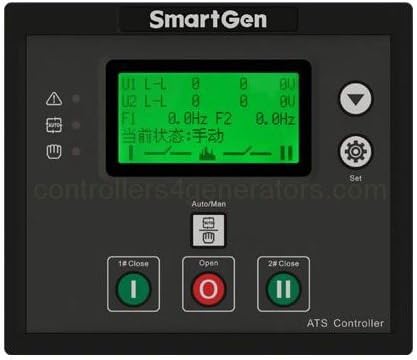
Figure 5: Detailed specifications table for the HAT560N series ATS Controller, including operating voltage, power consumption, AC voltage input ranges, rated frequency, relay outputs, communication, dimensions, and environmental conditions.
| ელემენტი | სპეციფიკაცია |
|---|---|
| საოპერაციო ტომიtage | DC 8.0V-35.0V (continuous power supply) |
| AC ტომიtage შეყვანა | AC170V-270V (during AC power L1N1/L2N2 supply) |
| ენერგიის მოხმარება | <3W (ლოდინის რეჟიმი: <2W) |
| რეიტინგული სიხშირე | 50/60 ჰც |
| დახურეთ სარელეო გამომავალი | 16A AC250V (Volts free output) |
| დამხმარე სარელეო გამომავალი 1 | 7A AC250V (Volts free output) |
| დამხმარე სარელეო გამომავალი 2 | 7A AC250V (Volts free output) |
| დამხმარე სარელეო გამომავალი 3 | 16A AC250V (Volts free output) |
| დამხმარე სარელეო გამომავალი 4 | 16A AC250V (Volts free output) |
| ციფრული შეყვანა | GND connect is active |
| კომუნიკაცია | LINK ინტერფეისი, MODBUS პროტოკოლი |
| საქმის ზომები | 139 მმ x 120 მმ x 48 მმ (5.47 x 4.72 x 1.89 ინჩი) |
| პანელის ამოჭრა | 130 მმ x 111 მმ |
| სამუშაო პირობები | Temperature: (-25~+70)°C, Humidity: (20~93)%RH |
| შენახვის მდგომარეობა | ტემპერატურა: (-25~+70)°C |
| დაცვის დონე | IP55 შუასადებები |
| საიზოლაციო სიძლიერე | გამოიყენეთ AC2.2kV მოცtage მაღალი მოცულობის შორისtage ტერმინალი და დაბალი ტომიtage ტერმინალი; გაჟონვის დენი არ არის 3 mA-ზე მეტი 1 წუთის განმავლობაში. |
| წონა | 0.62 კგ (1.63 ფუნტი) |


