1. შესავალი
The MOOER Micro Preamp M013 Matchbox is a compact digital preamp pedal designed to accurately recreate the sound and feel of a Matchless amplifier. It features dual channels (Clean and Gain), a 3-band EQ, and an integrated cabinet simulator, making it suitable for direct recording, practice, or integration into a pedalboard setup.
2. უსაფრთხოების ინფორმაცია
- Use only the specified 9V DC power adapter (center negative).
- არ დაუშვათ მოწყობილობის წყლის, ტენიანობის ან ექსტრემალური ტემპერატურის ზემოქმედების ქვეშ მოქცევა.
- მოერიდეთ პედლის დავარდნას ან ძლიერ დარტყმებს.
- არ სცადოთ მოწყობილობის დაშლა ან მოდიფიცირება.
- შეინახეთ ბავშვებისთვის მიუწვდომელ ადგილას.
3. პროდუქტი დასრულდაview
The M013 Matchbox pedal features a robust metal casing and intuitive controls for shaping your tone.

სურათი 1: ზემოდან ქვემოთ view of the MOOER Micro Preamp M013 Matchbox pedal, illustrating the layout of controls and jacks.
კონტროლი:
- VOL (ტომი): Adjusts the overall output level of the selected channel.
- TRE (Treble): აკონტროლებს მაღალი სიხშირის პასუხს.
- MID (Middle): აკონტროლებს საშუალო სიხშირის პასუხს.
- ბასი (ბასი): აკონტროლებს დაბალი სიხშირის რეაქციას.
- მოგება: Adjusts the amount of overdrive/distortion for the selected channel.
- CH/CAB Switch: This toggle switch has two functions:
- In normal operation, it switches between the Clean and Gain channels.
- When holding down the footswitch, it toggles the cabinet simulator on/off.
- ფეხის ჩამრთველი: Toggles between the two channels (Clean/Gain) or bypasses the pedal.
კავშირები:

Figure 2: Input Jack (left side)

Figure 3: Output Jack (right side)
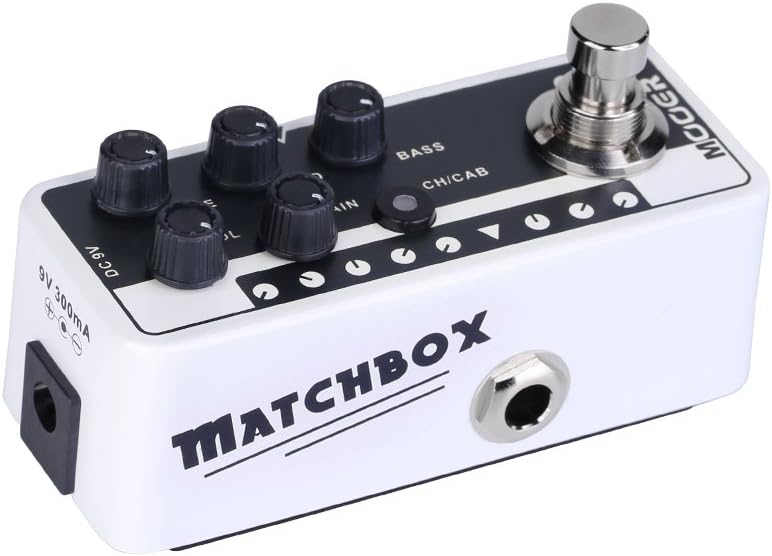
Figure 4: DC 9V Power Input
- შეყვანის ჯეკი: Connect your guitar or other instrument here.
- გამომავალი ჯეკი: დაუკავშირდით თქვენს ampლიფიერი, მიქსერი ან აუდიო ინტერფეისი.
- DC 9V: Power input for a 9V DC (center negative) power supply.
4. დაყენება
- შეაერთეთ თქვენი გიტარა შეყვანის ჯეკი on the right side of the pedal.
- დააკავშირეთ გამომავალი ჯეკი on the left side of the pedal to your amplifier's input, a mixer, or an audio interface.
- Connect a 9V DC (center negative) power adapter to the DC 9V შეყვანა.
- ჩართვის წინ დარწმუნდით, რომ ყველა შეერთება საიმედოა ampგამხსნელი ან აუდიო სისტემა.
5. საოპერაციო ინსტრუქციები
არხის შერჩევა:
The M013 Matchbox offers two distinct channels: Clean and Gain. Use the CH/CAB switch to toggle between these channels. The LED indicator will change color to show the active channel (typically blue for Clean, red for Gain).
Cabinet Simulator:
The integrated cabinet simulator can be toggled on or off. To activate or deactivate the cabinet simulator, press and hold the ფეხის შეცვლა for approximately 1 second. The LED will flash to indicate the change in status.
ტონის ფორმირება:
დაარეგულირეთ VOL, TRE, შუა რიცხვები, BASS, და მოგება knobs to achieve your desired tone for each channel. Experiment with different settings to explore the full range of sounds this pedal can produce.
ფეხის გადამრთველის ფუნქციონირება:
A quick press of the ფეხის შეცვლა will toggle between the currently selected channel and bypass mode. The LED will indicate whether the pedal is active or bypassed.
სადემონსტრაციო ვიდეო:
Video 1: Official MOOER demonstration of the Micro Preamp M013 Matchbox, showcasing both Clean and Gain channels with and without cabinet simulation. This video provides examples of the pedal's tonal capabilities.
6. მოვლა
- გაწმინდეთ პედლები რბილი, მშრალი ქსოვილით. არ გამოიყენოთ აბრაზიული საწმენდები ან გამხსნელები.
- Store the pedal in a dry environment away from direct sunlight and extreme temperatures.
- Regularly check cable connections for wear and tear.
7. Დიაგნოსტიკა
ძალა არ არის:
- Ensure the 9V DC power adapter is correctly connected and functioning.
- დარწმუნდით, რომ კვების ბლოკი აქტიურია.
ხმა არ არის:
- Check all cable connections (guitar to input, output to amp/mixer).
- Ensure the pedal is not in bypass mode (check LED indicator).
- Verify that the volume knobs on the pedal and your amplifier are turned up.
- თუ შესაძლებელია, შეამოწმეთ სხვადასხვა კაბელებით და სხვა კვების წყაროთი.
არასასურველი ხმაური/ზუზუნი:
- Ensure you are using a regulated 9V DC (center negative) power supply. Unregulated power supplies can introduce noise.
- Check for ground loops by trying different power outlets or isolating the pedal's power.
- Keep the pedal away from other electronic devices that may cause interference.
8. სპეციფიკაციები
- ნივთის წონა: 5.8 უნცია (165 გრამი)
- პროდუქტის ზომები: 3.58 x 1.26 x 1.42 ინჩი
- დენის წყარო: კაბელიანი ელექტრო
- ტtage: 9 ვოლტი DC
- გამომავალი ვატიtage: 30 Watts (referring to the amp model it simulates, not the pedal's power output)
- კონექტორის ტიპი: 6.35 მმ ჯეკი
- თავსებადი მოწყობილობები: გიტარა
- ფერი: შავი
9. გარანტია და მხარდაჭერა
For warranty information and technical support, please refer to the official MOOER website or contact your local dealer. Keep your purchase receipt as proof of purchase for any warranty claims.


