1. პროდუქტი დასრულდაview
The Sharp EL-531TG-GY is a scientific calculator designed for students and professionals requiring advanced mathematical functions. It features a 2-line display and Multi-Line Playback, facilitating the input and review of complex equations. This model is suitable for general math, algebra, geometry, trigonometry, statistics, biology, chemistry, and general science applications.
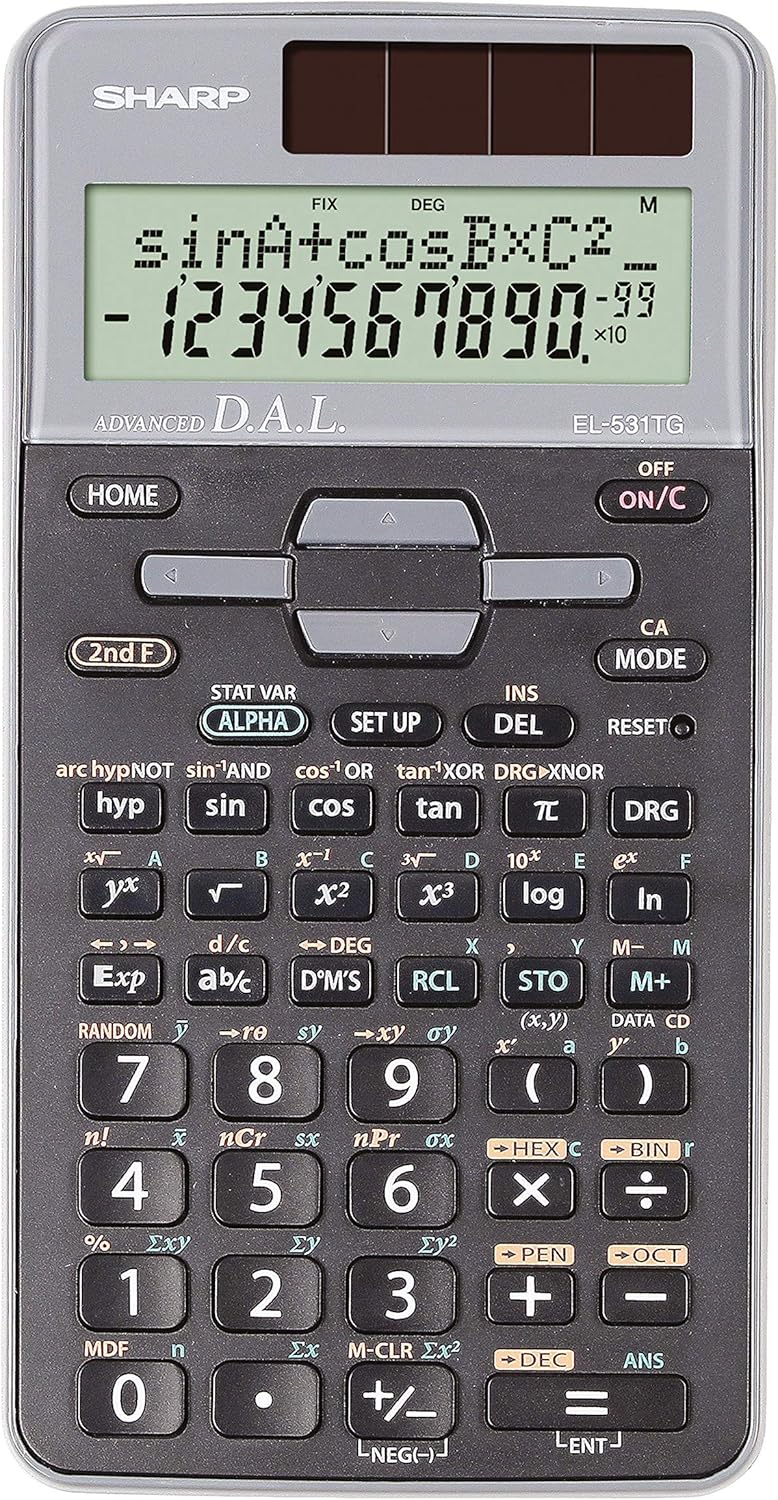
სურათი 1: წინა view of the Sharp EL-531TG-GY Scientific Calculator, showing the display, keypad, and solar panel.
2. დაყენება და პირველადი გამოყენება
2.1 დენის წყარო
The EL-531TG-GY calculator operates using both solar power and a single LR44 button cell battery. The solar panel provides power in well-lit environments, while the battery ensures operation in low-light conditions or when solar power is insufficient. An LR44 battery is included with the calculator.
2.2 ჩართვა/გამორთვა
- To turn the calculator ON, დააჭირეთ ON/C გასაღები.
- To turn the calculator გამორთულია, დააჭირეთ მე-2 ფ გასაღები მოყვება გამორთულია key (which is typically the same as ON/C).
2.3 Initial Display Settings
Upon first use or after a reset, the calculator will typically default to certain settings (e.g., DEG for angle units). Refer to Section 3.3 for details on changing mode settings.
3. საოპერაციო ინსტრუქციები
3.1 ძირითადი არითმეტიკული ოპერაციები
შეიყვანეთ რიცხვები ციფრული კლავიატურის გამოყენებით. გამოიყენეთ +, -, ×, და ÷ keys for addition, subtraction, multiplication, and division, respectively. Press = შედეგის მისაღებად.
3.2 სამეცნიერო ფუნქციები
The calculator performs over 273 advanced scientific functions. Many functions are accessed by pressing the მე-2 ფ სასურველი ფუნქციის ღილაკის წინ დააჭირეთ ღილაკს.
- ტრიგონომეტრიული ფუნქციები: გამოყენება ცოდვა, cos, რუჯი. Inverse functions (sin⁻¹, cos⁻¹, tan⁻¹) წვდომა შესაძლებელია მეშვეობით მე-2 ფ.
- ლოგარითმული ფუნქციები: გამოყენება ჟურნალი (ბაზა 10) და ln (ბუნებრივი ლოგარითმი).
- ძალები და ფესვები: გამოყენება x², √, x³, ³√.
- ფრაქციები: გამოიყენეთ დ/გ key for fraction input and conversion.
3.3 Mode Settings (DEG/RAD/GRAD)
To change the angle unit mode (Degrees, Radians, Gradians):
- დააჭირეთ DRG გასაღები.
- განმეორებით დააჭირეთ DRG to cycle through DEG (Degrees), RAD (Radians), and GRAD (Gradians). The current mode is indicated on the display.
3.4 მეხსიერების ფუნქციები
The calculator includes memory functions for storing and recalling values.
- მაღაზია (STO): დააჭირეთ STO followed by a variable key (e.g., A, B) to store the displayed value.
- RCL (გამოძახება): დააჭირეთ RCL followed by the variable key to recall the stored value.
- M+ (Memory Plus): Adds the displayed value to the independent memory.
- M- (მეხსიერების მინუსი): Subtracts the displayed value from the independent memory.
3.5 Multi-Line Playback
The 2-line display allows for Multi-Line Playback, enabling users to review previous calculations and expressions. Use the directional arrow keys (up/down) to scroll through past entries and results. This feature is useful for checking work or re-using parts of previous calculations.
4. მოვლა
4.1 დასუფთავება
To clean the calculator, wipe the surface gently with a soft, dry cloth. Do not use abrasive cleaners, solvents, or excessive moisture, as these can damage the display or internal components.
4.2 ბატარეის გამოცვლა
The calculator uses one LR44 button cell battery. If the display becomes dim or erratic in low-light conditions, the battery may need replacement. To replace the battery:
- დარწმუნდით, რომ კალკულატორი გამორთულია.
- იპოვეთ ბატარეის განყოფილება კალკულატორის უკანა მხარეს.
- ფრთხილად გახსენით განყოფილების სახურავი.
- Remove the old LR44 battery and insert a new one, ensuring correct polarity (+/-).
- უსაფრთხოდ დახურეთ ბატარეის განყოფილების საფარი.
4.3 შენახვა
When not in use, store the calculator in a cool, dry place away from direct sunlight and extreme temperatures. The hard cover included with the calculator provides protection from scratches and minor impacts.
5. Დიაგნოსტიკა
5.1 ჩვენების პრობლემები
- ცარიელი ან ბუნდოვანი ეკრანი: Ensure sufficient light for the solar panel. If the issue persists, replace the LR44 battery.
- Erratic Display: This may indicate a low battery. Replace the LR44 battery.
5.2 Incorrect Results
- Check Mode Settings: Verify that the angle unit (DEG, RAD, GRAD) is set correctly for trigonometric calculations.
- Input Error: Review your input using the Multi-Line Playback feature to ensure the expression was entered correctly.
- Memory Contents: If using memory functions, ensure the stored values are correct.
5.3 კალკულატორი არ პასუხობს
თუ კალკულატორი აღარ რეაგირებს, სცადეთ გადატვირთვა. იპოვეთ გადატვირთვა button (often a small recessed button requiring a thin object like a paperclip to press). Pressing this button will clear all memory and return the calculator to its factory default settings.
6. სპეციფიკაციები

სურათი 2: წინა view of the Sharp EL-531TG-GY Scientific Calculator, illustrating its dimensions.
| ფუნქცია | აღწერა |
|---|---|
| მოდელის ნომერი | SH-EL531TGGY |
| ჩვენების ტიპი | 2-line LCD with Multi-Line Playback |
| ფუნქციები | Over 273 advanced scientific functions |
| დენის წყარო | მზის ენერგია და 1 x LR44 აკუმულატორი (მოყვება) |
| მასალა | პლასტიკური |
| ზომები (L x W x H) | 16.1 x 8 x 1.5 სმ (დაახლოებით) |
| წონა | 100 გ (დაახ.) |

სურათი 3: მხარე view of the Sharp EL-531TG-GY Scientific Calculator, showing its slim profile.
7. გარანტია და მხარდაჭერა
7.1 ინფორმაცია გარანტიის შესახებ
This product is covered by a manufacturer's warranty. Please refer to the warranty card included with your purchase or visit the official Sharp webთქვენი რეგიონისთვის სპეციფიკური გარანტიის დეტალური პირობებისა და წესების სანახავად იხილეთ საიტი.
7.2 მომხმარებელთა მხარდაჭერა
For technical assistance, troubleshooting not covered in this manual, or service inquiries, please contact Sharp customer support. Contact information can typically be found on the Sharp official webსაიტზე ან პროდუქტის შეფუთვაზე.


