შესავალი
This manual provides essential information for the safe and efficient operation of your Behringer EUROPORT MPA200BT portable PA system. Please read these instructions thoroughly before using the device to ensure proper setup, usage, and maintenance. Retain this manual for future reference.
The Behringer EUROPORT MPA200BT is an all-in-one portable PA system designed for various applications, featuring 200 watts of power, Bluetooth connectivity for audio streaming, and a wireless microphone for vocal performances or presentations. Its battery operation allows for use in locations without direct power access.
უსაფრთხოების მნიშვნელოვანი ინსტრუქციები
ყოველთვის დაიცავით უსაფრთხოების ძირითადი ზომები ელექტრო მოწყობილობების გამოყენებისას:
- წაიკითხეთ ყველა ინსტრუქცია პროდუქტის გამოყენებამდე.
- Do not use this product near water or in wet environments.
- გაწმინდეთ მხოლოდ მშრალი ქსოვილით.
- არ დაბლოკოთ ვენტილაციის ღიობები. დაამონტაჟეთ მწარმოებლის ინსტრუქციის შესაბამისად.
- არ დააინსტალიროთ სითბოს წყაროსთან ახლოს, როგორიცაა რადიატორები, სითბოს რეგისტრები, ღუმელები ან სხვა მოწყობილობა (მათ შორის ampგამხსნელები), რომლებიც წარმოქმნიან სითბოს.
- არ დაამარცხოთ პოლარიზებული ან დამიწების ტიპის დანამატის უსაფრთხოების დანიშნულება. პოლარიზებულ დანამატს აქვს ორი პირი, რომელთაგან ერთი მეორეზე ფართოა. დამიწების ტიპის შტეფსელს აქვს ორი პირი და მესამე დამიწების ღერი. ფართო დანა ან მესამე ღერი მოწოდებულია თქვენი უსაფრთხოებისთვის. თუ მოწოდებული შტეფსელი არ ჯდება თქვენს განყოფილებაში, მიმართეთ ელექტრიკოსს მოძველებული განყოფილების შესაცვლელად.
- დაიცავით დენის კაბელი სიარულისგან ან დაჭიმვისგან, განსაკუთრებით შტეფსელებთან, მოსახერხებელ კონტეინერებთან და იმ ადგილას, სადაც ისინი გამოდიან აპარატიდან.
- გამოიყენეთ მხოლოდ მწარმოებლის მიერ მითითებული დანართები/აქსესუარები.
- გამორთეთ ეს მოწყობილობა ელვისებური ქარიშხლის დროს ან დიდი ხნის განმავლობაში გამოუყენებლობისას.
- მიმართეთ ყველა მომსახურება კვალიფიციურ მომსახურე პერსონალს. სერვისი საჭიროა, როდესაც აპარატი რაიმე ფორმით დაზიანებულია, მაგალითად, დაზიანებულია კვების კაბელი ან შტეფსელი, დაიღვარა სითხე ან ჩავარდა მოწყობილობაში საგნები, აპარატი წვიმს ან ტენიანობას ექვემდებარება, ნორმალურად არ მუშაობს. , ან ჩამოაგდეს.
პაკეტის შიგთავსი
Upon unpacking your Behringer EUROPORT MPA200BT, please verify that all components are present and in good condition:
- Behringer EUROPORT MPA200BT Portable PA System
- Wireless Microphone (ULM300M)
- USB Receiver for Wireless Microphone (ULM300USB)
- დენის კაბელი
- მომხმარებლის სახელმძღვანელო (ეს დოკუმენტი)

Image: The Behringer EUROPORT MPA200BT portable PA system shown with its accompanying wireless microphone.
პროდუქტი დასრულდაview: კონტროლი და კავშირები
Familiarize yourself with the various controls and connection points on your MPA200BT unit.

Image: Rear panel of the MPA200BT, highlighting the main control interface, inputs, and outputs.

სურათი: დეტალური view of the MPA200BT's control panel, including display, rotary encoder, and buttons.
საკონტროლო პანელის მახასიათებლები:
- ეკრანის ჩვენება: Shows current settings, input levels, and Bluetooth status.
- მბრუნავი ენკოდერი: Used to navigate menus and adjust parameters. Press to confirm selections.
- PROCESS Button: Activates or deactivates sound processing effects.
- SETUP ღილაკი: შედის სისტემის დაყენების მენიუში.
- EXIT ღილაკი: Exits current menu or setting.
- ENTER ღილაკი: ადასტურებს არჩევანს მენიუში.
- Bluetooth ღილაკი: იწყებს Bluetooth-ის დაწყვილების რეჟიმს.
შემავალი/გამომავალი კავშირები:
- INPUT 1 & 2 (XLR/TRS Combo Jacks): For connecting microphones or line-level instruments.
- WIRELESS SYSTEM (USB Port): For connecting the ULM300USB wireless microphone receiver.
- MP3 Input (3.5mm Stereo Jack): For connecting external audio players.
- MIX OUTPUT (XLR): For sending the mixed audio signal to another PA system or recording device.
- AC დენის შესასვლელი: დენის კაბელის დასაკავშირებლად.
დაყენება
- დენის კავშირი:
Connect the supplied power cable to the AC Power Inlet on the rear of the MPA200BT and then to a suitable power outlet. The unit can also operate on its internal battery.
- საწყისი ჩართვა:
Press the power switch to turn on the unit. The display will illuminate.
- პოზიციონირება:
Place the MPA200BT on a stable, flat surface or mount it on a speaker stand (sold separately). Ensure proper ventilation around the unit.
- შემაერთებელი საშუალებები:
- Wired Microphones/Instruments: Connect to INPUT 1 or INPUT 2 using XLR or 1/4" TRS cables.
- External Audio Players: Connect to the MP3 Input using a 3.5mm stereo cable.
ოპერაციული ინსტრუქციები
Bluetooth აუდიო ნაკადი

Image: The Bluetooth logo, representing wireless audio streaming capability.
- დარწმუნდით, რომ MPA200BT ჩართულია.
- დააჭირეთ Bluetooth button on the control panel. The Bluetooth icon on the display will flash, indicating pairing mode.
- On your smartphone or Bluetooth-enabled device, navigate to the Bluetooth settings and select "BEHRINGER MPA200BT" from the list of available devices.
- Once paired, the Bluetooth icon on the MPA200BT display will stop flashing and remain solid.
- You can now stream audio from your device to the MPA200BT. Adjust the volume using your device's controls and the MPA200BT's master volume.
Wireless Microphone Usage (ULM300M/ULM300USB)
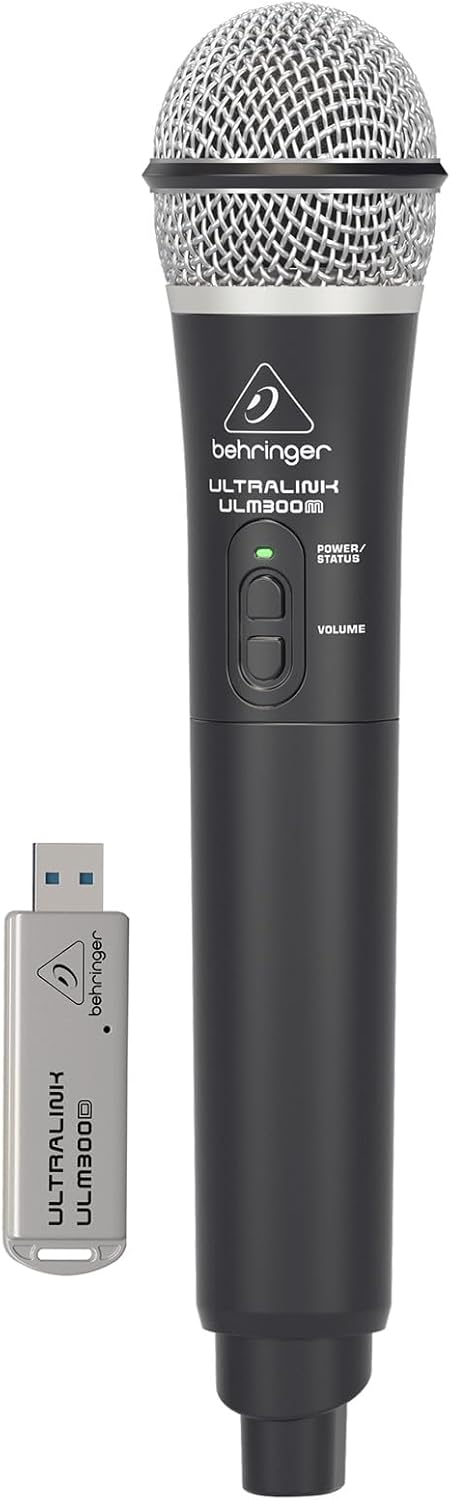
Image: The Behringer ULM300M wireless microphone shown with its USB receiver, the ULM300USB.
- Insert the ULM300USB receiver into the უკაბელო სისტემა USB port on the MPA200BT.
- Ensure the ULM300M wireless microphone has fresh batteries installed.
- Power on the wireless microphone. The status LED on both the microphone and the receiver should indicate a successful connection (usually a solid green light).
- Adjust the microphone's volume using the controls on the microphone itself and the MPA200BT's input gain settings.
Remote Control via Smartphone App

Image: A smartphone screen showing the graphical user interface of the Behringer remote control application, used to manage the PA system settings.
The MPA200BT can be controlled remotely using a dedicated smartphone application. This allows for adjustments to volume, EQ, and effects from a distance.
- Download the official Behringer MPA200BT control app from your device's app store (iOS/Android).
- Ensure your smartphone is connected to the MPA200BT via Bluetooth (as described in the "Bluetooth Audio Streaming" section).
- Open the app. It should automatically detect and connect to your MPA200BT unit.
- Use the app's interface to control various parameters of the PA system.
ბატარეის მუშაობა
The MPA200BT features an internal rechargeable battery for portable use.
- The battery charges automatically when the unit is connected to AC power.
- A battery level indicator on the display shows the remaining charge.
- For optimal battery life, fully charge the unit before its first use and periodically when not in use for extended periods.
მოვლა
- დასუფთავება: მოწყობილობის გარე ზედაპირის გასაწმენდად გამოიყენეთ რბილი, მშრალი ქსოვილი. არ გამოიყენოთ აბრაზიული საწმენდები ან გამხსნელები.
- შენახვა: When not in use, store the MPA200BT in a cool, dry place, away from direct sunlight and extreme temperatures.
- ბატარეის მოვლა: If storing for extended periods, ensure the battery is partially charged (around 50%) and recharge it every few months to prevent deep discharge.
- ვენტილაცია: Ensure that the ventilation openings are not obstructed during operation to prevent overheating.
პრობლემების მოგვარება
| პრობლემა | შესაძლო მიზეზი | გამოსავალი |
|---|---|---|
| არავითარი ძალა | Power cable not connected; unit not switched on; battery depleted. | Check power cable connection; ensure power switch is ON; charge battery. |
| ხმის გამომავალი არ არის | Volume too low; input source not connected or selected; faulty cable; microphone off. | Increase master volume and input gain; check input connections; test cables; ensure microphone is powered on and paired. |
| Bluetooth დაწყვილება ვერ ხერხდება | MPA200BT not in pairing mode; device too far; interference. | Press Bluetooth button to enter pairing mode; move device closer; restart both devices. |
| უკაბელო მიკროფონი არ მუშაობს | USB receiver not connected; microphone off; depleted batteries in microphone; interference. | Ensure ULM300USB is fully inserted; power on microphone; replace microphone batteries; ensure clear line of sight. |
| Squealing/Feedback | Microphone too close to speaker; microphone gain too high. | Move microphone further from speaker; reduce microphone input gain. |
სპეციფიკაციები
| ფუნქცია | დეტალი |
|---|---|
| მოდელი | EUROPORT MPA200BT |
| გამომავალი ვატიtage | 200 ვატი |
| დენის წყარო | Battery Powered / AC Power |
| დაკავშირების ტექნოლოგია | Bluetooth |
| არხების რაოდენობა | 2 |
| ნივთის წონა | 12.1 კგ (26.6 ფუნტი) |
| პროდუქტის ზომები (L x W x H) | 11.02 x 10.11 x 16.53 ინჩი |
| სამონტაჟო ტიპი | მაგიდის |
| თავსებადი მოწყობილობები | სმარტფონი |
| მწარმოებელი | მუსიკის ტომი აშშ |
გარანტია და მხარდაჭერა
დეტალური გარანტიის შესახებ ინფორმაციისა და ტექნიკური მხარდაჭერისთვის, გთხოვთ, მიმართოთ Behringer-ის ოფიციალურ ვებგვერდს. webსაიტზე ან დაუკავშირდით მათ მომხმარებელთა მომსახურების სამსახურს. შეინახეთ თქვენი შესყიდვის ქვითარი შეძენის დასადასტურებლად.
ონლაინ რესურსები: www.behringer.com
მწარმოებელი: მუსიკის ტომი აშშ
ოფიციალური პროდუქტის ვიდეოები
No relevant official product videos from the seller were found in the provided data for embedding.


