1. შესავალი და მეტიview
The Dio DiOCAMRI01 is an advanced 360° HD WiFi camera designed for indoor surveillance, offering comprehensive monitoring while prioritizing user privacy. This camera features a motorized lens, 1080p resolution, and infrared night vision, ensuring clear visuals day and night. Its unique geo-fencing capability automatically activates a privacy mode when you are home, retracting the lens to ensure your personal space remains private. The camera also includes motion and noise detection, two-way audio communication, and local recording options via a Micro SD card.
This manual provides essential information for the proper installation, operation, and maintenance of your DiOCAMRI01 camera.
2. უსაფრთხოების ინფორმაცია
- გამოყენებამდე ყურადღებით წაიკითხეთ ყველა ინსტრუქცია.
- გამოიყენეთ მხოლოდ მოწყობილობასთან მიწოდებული კვების ადაპტერი.
- Do not expose the camera to water, moisture, or extreme temperatures.
- მოერიდეთ კამერის განთავსებას სითბოს წყაროებთან ახლოს ან მზის პირდაპირ სხივებში.
- არ სცადოთ კამერის დამოუკიდებლად დაშლა ან შეკეთება. ყველა სახის მომსახურება კვალიფიციურ პერსონალს მიმართეთ.
- Ensure the camera is securely mounted if using wall or ceiling installation.
3. პაკეტის შიგთავსი
დარწმუნდით, რომ თქვენს პაკეტში ყველა კომპონენტია:
- DiOCAMRI01 HD WiFi Camera
- დენის ადაპტერი
- Mounting Kit (screws, wall plugs, mounting bracket)
- მომხმარებლის სახელმძღვანელო (ეს დოკუმენტი)
4. პროდუქტის მახასიათებლები
- დისტანციური მონიტორინგი: Day and night vision (infrared night vision up to 10m).
- Wide-Angle Motorized Lens: Offers 360° horizontal and 150° vertical rotation for comprehensive coverage.
- კონფიდენციალურობის დაცვა: Geo-fencing feature automatically puts the camera in standby mode and closes the lens when the owner is present. Manual standby mode is also available via the app.
- Motion and Noise Detection: Adjustable sensitivity with 3 levels. Sends direct notifications to your smartphone.
- ორმხრივი აუდიო: Built-in microphone and intercom function allow you to hear and speak through the camera.
- ადგილობრივი ჩანაწერი: Supports Micro SD card (up to 128GB, not included) for manual or automatic recording upon detection. Remote viewing of recordings is available via the smartphone app.
- მარტივი დაყენება: Quick and intuitive installation via the DiO Cam+ mobile application.
- მოქნილი მონტაჟი: Designed for discreet integration, can be mounted on a wall, ceiling, or placed on a shelf.
5. დაყენება
5.1 საწყისი დაყენება
- დენის კავშირი: Connect the camera to a power outlet using the provided power adapter. The camera will power on.
- Download DiO Cam+ App: ძიება "DiO Cam+" in your smartphone's app store (iOS or Android) and download the application.
- რეგისტრაცია/შესვლა: გახსენით აპლიკაცია და მიჰყევით ეკრანზე მოცემულ ინსტრუქციებს ანგარიშის შესაქმნელად ან შესასვლელად, თუ უკვე გაქვთ ანგარიში.
- კამერის დამატება: Within the DiO Cam+ app, select the option to add a new device. Follow the in-app wizard to connect your camera to your Wi-Fi network. This typically involves scanning a QR code on the camera or entering Wi-Fi credentials.
- განთავსება: Position the camera in your desired location. It can be placed on a flat surface, or mounted on a wall or ceiling using the included mounting kit. Ensure the camera has a clear line of sight to the area you wish to monitor.
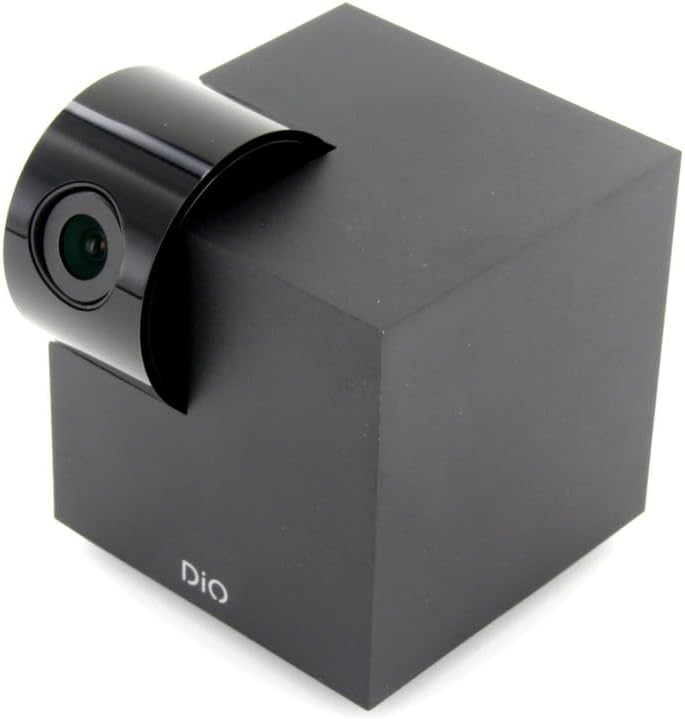
Figure 5.1: The DiOCAMRI01 camera in its standard upright position.

Figure 5.2: Camera placed on a shelf, demonstrating discreet integration.

Figure 5.3: Camera mounted on a ceiling for overhead surveillance.
5.2 მიკრო SD ბარათის ინსტალაცია (არასავალდებულო)
To enable local video recording, insert a Micro SD card (up to 128GB, not included) into the designated slot on the camera. Ensure the camera is powered off before inserting or removing the card.
5.3 კამერაზე წვდომის გაზიარება
The DiO Cam+ app allows you to easily share access to your camera with family members or trusted friends. Navigate to the camera settings within the app and select the sharing option to invite others to view პირდაპირი ტრანსლაცია და ჩანაწერები.
6. საოპერაციო ინსტრუქციები
6.1 ცოცხალი View და დისტანციური კონტროლი
Once connected, open the DiO Cam+ app to access the live video feed from your camera. From the live view screen, you can:
- მორგება View კუთხე: Use the on-screen controls to remotely rotate the camera lens up to 350° horizontally and 150° vertically to cover all corners of your room.
- ორმხრივი აუდიო: Tap the microphone icon to speak through the camera's speaker, and listen to audio from the camera's microphone.
- Take Snapshots/Record Video: Capture still images or start manual video recordings directly from the live view.

Figure 6.1: Camera interacting with the DiO Cam+ smartphone application.

სურათი 6.2: მხარე view of the camera, highlighting the rotating lens mechanism.
6.2 Privacy Features (Geo-Fencing and Manual Standby)
The DiOCAMRI01 camera offers advanced privacy protection:
- Geo-Fencing: Configure geo-fencing in the app to automatically switch the camera to privacy mode when your smartphone enters a predefined home zone. In privacy mode, the camera lens will retract, ensuring no recording or live viewხდება.
- Manual Standby: You can manually activate or deactivate the camera's standby mode (privacy mode) at any time through the DiO Cam+ app.
- Scheduled Standby: Set a schedule within the app for the camera to automatically enter or exit standby mode at specific times.

Figure 6.3: Camera with lens retracted, indicating privacy mode.
6.3 Motion and Noise Detection
The camera can detect motion and noise within its field of view. When triggered, it will send a notification to your smartphone and can automatically begin recording to the Micro SD card.
- მგრძნობელობის რეგულირება: Adjust the detection sensitivity (3 levels) in the app settings to minimize false alarms.
- ჩაწერის პარამეტრები: Configure recording duration (1, 3, or 5 minutes per clip) or continuous recording if a Micro SD card is installed.
7. მოვლა
- დასუფთავება: Use a soft, dry cloth to clean the camera body and lens. Do not use liquid cleaners or abrasive materials.
- პროგრამული განახლებები: Regularly check the DiO Cam+ app for firmware updates to ensure optimal performance and security. Follow the in-app instructions for any available updates.
- მიკრო SD ბარათის მართვა: პერიოდულად რეview and manage recordings on your Micro SD card. Format the card through the app if necessary to maintain performance.
8. Დიაგნოსტიკა
- კამერა ხაზგარეშე: Ensure the camera is powered on and connected to your Wi-Fi network. Check your Wi-Fi router and internet connection. Try restarting the camera and your router.
- აპლიკაციასთან დაკავშირება შეუძლებელია: Verify your Wi-Fi password. Ensure your smartphone is connected to a 2.4GHz Wi-Fi network during initial setup, as the camera may not support 5GHz networks.
- ვიდეოს ცუდი ხარისხი: შეამოწმეთ თქვენი ინტერნეტ კავშირის სიჩქარე. დარწმუნდით, რომ კამერის ლინზა სუფთაა და არ აქვს დაბრკოლებები. ოპტიმალური განათებისთვის შეცვალეთ კამერის განლაგება.
- Motion/Noise Detection Not Working: Check the sensitivity settings in the app. Ensure the detection zones are correctly configured.
- No Recording to SD Card: Ensure the Micro SD card is correctly inserted and formatted. Check if the card is full. The camera supports up to 128GB.
- Privacy Mode Not Activating: Verify that geo-fencing is enabled and configured correctly in the app, and that your smartphone's location services are active.
9. სპეციფიკაციები
| ფუნქცია | სპეციფიკაცია |
|---|---|
| მოდელის ნომერი | DIOCAM-RI01 |
| სამონტაჟო ტიპი | კედლის სამაგრი |
| ვიდეო გადაღების გარჩევადობა | 1080p |
| ფერი | თეთრი |
| პუნქტების რაოდენობა | 1 |
| მოყვება კომპონენტები | DiOCAMRI01 WiFi HD 360° Rotating 1080P 2MP Camera with Geo-Fencing |
| უსადენო საკომუნიკაციო ტექნოლოგია | Wi-Fi |
| ფორმის ფაქტორი | Dome (Cube with rotating lens) |
| ეფექტური ვიდეო რეზოლუცია | 1080 |
| Viewing კუთხე | 360 გრადუსი (ჰორიზონტალური) |
| ღამის ხედვის დიაპაზონი | 10 მეტრი |
| მასალა | მეტალი |
| ტtage | 5 ვოლტი |
| ვატtage | 5 ვატი |
| ელემენტის ზომები (L x W x H) | 9.4 x 4.9 x 31.9 სანტიმეტრი |
| მწარმოებელი | შაქარი |
| განსაკუთრებული თვისებები | ადგილობრივი ჩაწერა, ღამის ხედვა |
| მოყვება ბატარეები | არა |
| საჭიროა ბატარეები | არა |
| რეკომენდებული გამოყენება | მოძრაობის ამოცნობა, ღამის ხედვა |
| დაკავშირების ტექნოლოგია | უსადენო |
| შიდა/გარე გამოყენება | შიდა |
| თავსებადი მოწყობილობები | სმარტფონი |
| დენის წყარო | Battery Powered (Note: Product specs indicate 'No batteries required', implying external power) |
| დაკავშირების პროტოკოლი | Wi-Fi |
| კონტროლერის ტიპი | Android |
10. გარანტია და მხარდაჭერა
For information regarding warranty coverage, technical support, or service, please refer to the official Dio webადგილზე ან დაუკავშირდით შეძენის პუნქტს. შეინახეთ შეძენის დამადასტურებელი საბუთი გარანტიის მოთხოვნებისთვის.
მწარმოებელი: შაქარი


