1. შესავალი
This manual provides essential information for the safe and efficient operation of your Behringer NX3000D Ultra-Lightweight 3000 Watt Class-D Power Amplifier. Please read it thoroughly before use to ensure optimal performance and longevity of your device.
ძირითადი მახასიათებლები:
- Delivers 2 x 1500 Watts into 2 Ohms; 2 x 900 Watts into 4 Ohms; 3000 Watts into 4 Ohms (Bridge mode).
- Weighs less than 7.9 lbs / 3.6 kg, ensuring portability.
- Features revolutionary cool-running high-density Class-D technology for ultimate reliability and near-zero thermal buildup.
- აღჭურვილია ულტრაეფექტური გადართვის რეჟიმის კვების წყაროთი ხმაურის გარეშე აუდიოსთვის, შესანიშნავი გარდამავალი რეაგირებისთვის და დაბალი ენერგომოხმარებისთვის.
- High-performance DSP and 24-bit/96 kHz converters provide ultimate signal integrity and extreme dynamic range.
- DSP section includes sophisticated delay, crossover (3 filter types, up to 48 dB/octave), EQ (8 parametric, 2 dynamic), dynamics processing, and lockable security settings.
2. უსაფრთხოების მნიშვნელოვანი ინსტრუქციები
ყოველთვის დაიცავით ეს ძირითადი უსაფრთხოების ზომები თქვენი მოწყობილობის გამოყენებისას ampუფრო ცოცხალი:
- წაიკითხეთ ეს ინსტრუქციები.
- შეინახეთ ეს ინსტრუქციები.
- გაითვალისწინეთ ყველა გაფრთხილება.
- მიჰყევით ყველა ინსტრუქციას.
- არ გამოიყენოთ ეს მოწყობილობა წყალთან ახლოს.
- გაწმინდეთ მხოლოდ მშრალი ქსოვილით.
- არ დაბლოკოთ სავენტილაციო ღიობები. დააინსტალირეთ მწარმოებლის ინსტრუქციის შესაბამისად.
- არ დააინსტალიროთ სითბოს წყაროსთან ახლოს, როგორიცაა რადიატორები, სითბოს რეგისტრები, ღუმელები ან სხვა მოწყობილობა (მათ შორის ampგამხსნელები), რომლებიც წარმოქმნიან სითბოს.
- არ დაამარცხოთ პოლარიზებული ან დამიწების ტიპის დანამატის უსაფრთხოების დანიშნულება. პოლარიზებულ დანამატს აქვს ორი პირი, რომელთაგან ერთი მეორეზე ფართოა. დამიწების ტიპის შტეფსელს აქვს ორი პირი და მესამე დამიწების ღერი. ფართო დანა ან მესამე ღერი მოწოდებულია თქვენი უსაფრთხოებისთვის. თუ მოწოდებული შტეფსელი არ ჯდება თქვენს განყოფილებაში, მიმართეთ ელექტრიკოსს მოძველებული განყოფილების შესაცვლელად.
- დაიცავით დენის კაბელი სიარულისგან ან დაჭიმვისგან, განსაკუთრებით შტეფსელებთან, მოსახერხებელ კონტეინერებთან და იმ ადგილას, სადაც ისინი გამოდიან აპარატიდან.
- გამოიყენეთ მხოლოდ მწარმოებლის მიერ მითითებული დანართები/აქსესუარები.
- გამოიყენეთ მხოლოდ მწარმოებლის მიერ მითითებულ ეტლთან, სადგამთან, სამფეხთან, სამაგრთან ან მაგიდასთან ერთად, ან გაიყიდება აპარატთან ერთად. ეტლის გამოყენებისას სიფრთხილე გამოიჩინეთ ეტლის/აპარატის კომბინაციის გადაადგილებისას, რათა თავიდან აიცილოთ დაზიანებები გადაბრუნებისგან.
- გამორთეთ ეს მოწყობილობა ელვისებური ქარიშხლის დროს ან დიდი ხნის განმავლობაში გამოუყენებლობისას.
- მიმართეთ ყველა მომსახურება კვალიფიციურ მომსახურე პერსონალს. სერვისი საჭიროა, როდესაც აპარატი რაიმე ფორმით დაზიანებულია, მაგალითად, დაზიანებულია კვების კაბელი ან შტეფსელი, დაიღვარა სითხე ან ჩავარდა მოწყობილობაში საგნები, აპარატი წვიმს ან ტენიანობას ექვემდებარება, ნორმალურად არ მუშაობს. , ან ჩამოაგდეს.
3. რა არის ყუთში
Upon unpacking your Behringer NX3000D, ensure all items listed below are present and in good condition:
- Behringer NX3000D 3000W Ultra-Lightweight Class-D Power Ampუფრო ცოცხალი
- დენის კაბელი
- Quick Start Guide (this document serves as the comprehensive manual)
თუ რაიმე ნივთი აკლია ან დაზიანებულია, დაუყოვნებლივ დაუკავშირდით თქვენს დილერს.
4. პროდუქტი დასრულდაview
Familiarize yourself with the front and rear panels of your NX3000D ampმაცოცხლებელი.
4.1 წინა პანელი

სურათი: წინა მხარე view of the Behringer NX3000D Power Amplifier, showing the main display, control knobs for channels A and B, and status indicators.
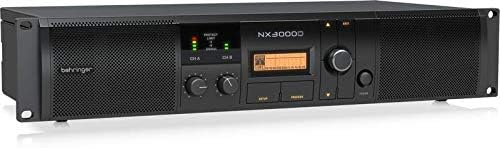
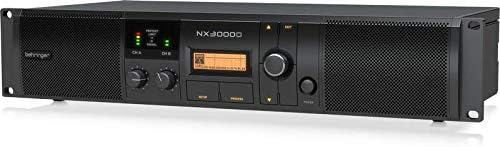
სურათი: დახრილი წინა მხარე view of the Behringer NX3000D Power Amplifier, highlighting the rack-mountable design and ventilation grilles.
- დენის ღილაკი: უხვევს ampუფრო ცოცხალი ჩართვა ან გამორთვა.
- Level Controls (CH A/CH B): შეყვანის მგრძნობელობის რეგულირება თითოეული არხისთვის.
- LCD ეკრანი: Shows DSP settings, operating modes, and status information.
- Navigation Buttons (SETUP, PROCESS, UP/DOWN, EXIT): Used to navigate and adjust DSP parameters.
- LED Indicators (SIGNAL, LIMIT, PROTECT): Provide visual feedback on signal presence, clipping, and protection status.
4.2 უკანა პანელი

სურათი: უკანა view of the Behringer NX3000D Power Amplifier, displaying input and output connectors, cooling fan, and power inlet.
სურათი: დახრილი უკანა მხარე view of the Behringer NX3000D Power Amplifier, showing the USB port for PC connection and additional ventilation.
- AC შეყვანა: Connects to the main power supply using the provided power cable.
- Input Connectors (CH A/CH B): XLR/TRS combo jacks for connecting audio sources.
- Output Connectors (CH A/CH B): Twist-lock speaker connectors for connecting loudspeakers.
- USB პორტი: For connecting to a computer for DSP control and firmware updates.
- გაგრილების ვენტილატორი: Ensures proper thermal management of the ampმაცოცხლებელი.
5. დაყენება
Follow these steps to set up your Behringer NX3000D ampუფრო ცოცხალი:
- განთავსება: პოზიციონირება amplifier in a well-ventilated area, away from direct sunlight, heat sources, and moisture. Ensure adequate space around the unit for airflow. For rack mounting, secure the amplifier using appropriate rack screws.
- დენის კავშირი: Connect the supplied AC power cable to the AC input on the rear panel of the amplifier and then to a suitable power outlet. Ensure the amplifier's power switch is in the OFF position before connecting.
- შეყვანის კავშირები: Connect your audio source (e.g., mixer, audio interface) to the Input Connectors (CH A and/or CH B) on the rear panel using XLR or 1/4" TRS cables.
- გამომავალი კავშირები: Connect your passive loudspeakers to the Output Connectors (CH A and/or CH B) using high-quality speaker cables with twist-lock connectors. Ensure correct polarity (+ to + and - to -) and that the impedance of your speakers matches the amplifier's capabilities (2 Ohms, 4 Ohms, or Bridge mode 4 Ohms).
- საწყისი ჩართვა: With all connections secure and input levels turned down, switch the amplifier's power button to the ON position. The display will illuminate, and the unit will perform a self-test.
6. ოპერირება Ampუფრო ცოცხალი
The Behringer NX3000D features advanced DSP control for precise sound optimization.
6.1 ძირითადი ოპერაცია
- დონის რეგულირება: Slowly increase the Level Controls for CH A and/or CH B until the desired volume is achieved. Monitor the SIGNAL and LIMIT LEDs to prevent clipping. The SIGNAL LED indicates audio presence, while the LIMIT LED indicates that the signal is approaching clipping.
- მონიტორინგის სტატუსი: The PROTECT LED will illuminate if the amplifier enters protection mode due to overheating, short circuits, or other issues. If this occurs, turn off the amplifier, resolve the issue, and then power it back on.
6.2 DSP Control
The integrated DSP allows for comprehensive sound shaping and system management:
- Accessing DSP Settings: გამოიყენეთ SETUP button to enter the main DSP menu. Navigate through options using the ზევით/ქვევით buttons and confirm selections with the rotary encoder.
- კროსოვერი: Configure high-pass and low-pass filters for each channel. Choose from 3 filter types (e.g., Butterworth, Linkwitz-Riley) and slopes up to 48 dB/octave. This is crucial for integrating subwoofers or bi-amping სისტემები.
- გათანაბრება (EQ): Utilize the 8 parametric EQs and 2 dynamic EQs per channel to fine-tune the frequency response. This helps in correcting room acoustics or tailoring the sound to specific preferences.
- დაგვიანება: Apply delay to individual channels to align speakers in different physical positions, ensuring phase coherence.
- დინამიური დამუშავება: Adjust compression, limiting, and gating settings to control the dynamic range of your audio.
- SmartSense Loudspeaker Impedance Compensation: This feature automatically adjusts the amplifier's output to match the loudspeaker impedance, providing consistent power delivery and improved sound quality.
- უსაფრთხოების პარამეტრები: Lock DSP settings to prevent unauthorized changes, ideal for fixed installations.
For detailed DSP parameter adjustments, refer to the full software manual available on the Behringer website or connect the amplifier to a PC via the USB port for software control.
7. მოვლა
სათანადო მოვლა უზრუნველყოფს თქვენი მოწყობილობის ხანგრძლივ მუშაობას და ოპტიმალურ მუშაობას. ampმაცოცხლებელი.
- დასუფთავება: რეგულარულად გაასუფთავეთ მისი ექსტერიერი amplifier with a soft, dry cloth. Do not use liquid cleaners or solvents. Ensure ventilation grilles are free from dust and debris.
- ვენტილაცია: ყოველთვის დარწმუნდით, რომ amplifier's ventilation openings are not obstructed. Overheating can lead to reduced performance and potential damage.
- შენახვა: თუ ინახება amplifier for an extended period, disconnect it from power, clean it, and store it in a cool, dry place, preferably in its original packaging or a protective case.
8. Დიაგნოსტიკა
If you encounter issues with your Behringer NX3000D, consult the table below for common problems and solutions.
| პრობლემა | შესაძლო მიზეზი | გამოსავალი |
|---|---|---|
| არავითარი ძალა | Power cable disconnected; Power outlet faulty; Ampგამაძლიერებლის დაუკრავენ. | Check power cable connection; Test outlet with another device; Contact qualified service personnel for fuse replacement. |
| ხმის გამომავალი არ არის | Input/output cables disconnected or faulty; Speaker impedance mismatch; Amplifier in protect mode; Input levels too low. | Check all cable connections; Verify speaker impedance; Check PROTECT LED and resolve underlying issue; Increase input levels gradually. |
| დამახინჯებული ხმა | Input signal too high (clipping); Speaker impedance mismatch; Faulty cables or speakers. | Reduce input signal (monitor LIMIT LED); Verify speaker impedance; Test with different cables/speakers. |
| Amplifier overheats (PROTECT LED on) | Insufficient ventilation; Excessive load (low impedance speakers); Prolonged high-power operation. | Ensure proper ventilation; Use speakers with correct impedance; Reduce output level or allow cooling time. |
If the problem persists after attempting these solutions, please contact Behringer support or a qualified service technician.
9. ტექნიკური მახასიათებლები
| ფუნქცია | სპეციფიკაცია |
|---|---|
| ბრენდი | ბერინგერი |
| მოდელის ნომერი | NX3000D |
| გამომავალი ვატიtage | 2 x 1500 Watts (2 Ohms); 2 x 900 Watts (4 Ohms); 3000 Watts (4 Ohms Bridge mode) |
| სპიკერი Ampლიფიკაციის ტიპი | კლასი- D |
| ნივთის წონა | 7.92 pounds / 3.6 Kilograms |
| პროდუქტის ზომები | 19.02 x 9.09 x 3.7 ინჩი |
| კონექტორის ტიპი | Twist-lock (Outputs), XLR/TRS Combo (Inputs) |
| დენის წყარო | კაბელიანი ელექტრო |
| ტtage | 100 ვ |
| ფერი | შავი |
| DSP | High-performance DSP with 24-bit/96 kHz converters, delay, crossover, EQ, dynamics processing, SmartSense Impedance Compensation |
10. გარანტია და მხარდაჭერა
10.1 პროდუქტის გარანტია
The Behringer NX3000D amplifier typically comes with a 3 წლიანი შეზღუდული გარანტია, indicating its design and engineering quality. Please refer to the warranty card included with your product or visit the official Behringer webსაიტი დეტალური პირობებისთვის.

Image: Behringer logo with a '3 Years Warranty' badge, indicating the product is designed and engineered in Germany.
10.2 ტექნიკური მხარდაჭერა
For technical assistance, troubleshooting beyond this manual, or service inquiries, please visit the official Behringer website or contact their customer support. You can find more information and resources at the Behringer-ის მაღაზია.


