შესავალი
This manual provides instructions for the VINABTY RM-YD056 replacement remote control, designed for use with various Sony TV models. Please read this guide carefully to ensure proper setup and operation of your new remote control.
დაყენება: ბატარეის მონტაჟი
The RM-YD056 remote control requires two AAA batteries for operation. Follow these steps to install the batteries:
- იპოვეთ ბატარეის განყოფილების საფარი დისტანციური მართვის უკანა მხარეს.
- განყოფილების გასახსნელად გადაწიეთ სახურავი ქვემოთ ან დააჭირეთ საკეტს (ასეთის არსებობის შემთხვევაში).
- ჩადეთ ორი AAA ელემენტი, დარწმუნდით, რომ დადებითი (+) და უარყოფითი (-) ტერმინალები სწორად ემთხვევა განყოფილების შიგნით მითითებულ ნიშნულებს.
- ბატარეის განყოფილების საფარი უკან, სანამ არ დააწკაპუნებს.
No additional programming or setup is required. The remote is ready for use once batteries are installed.
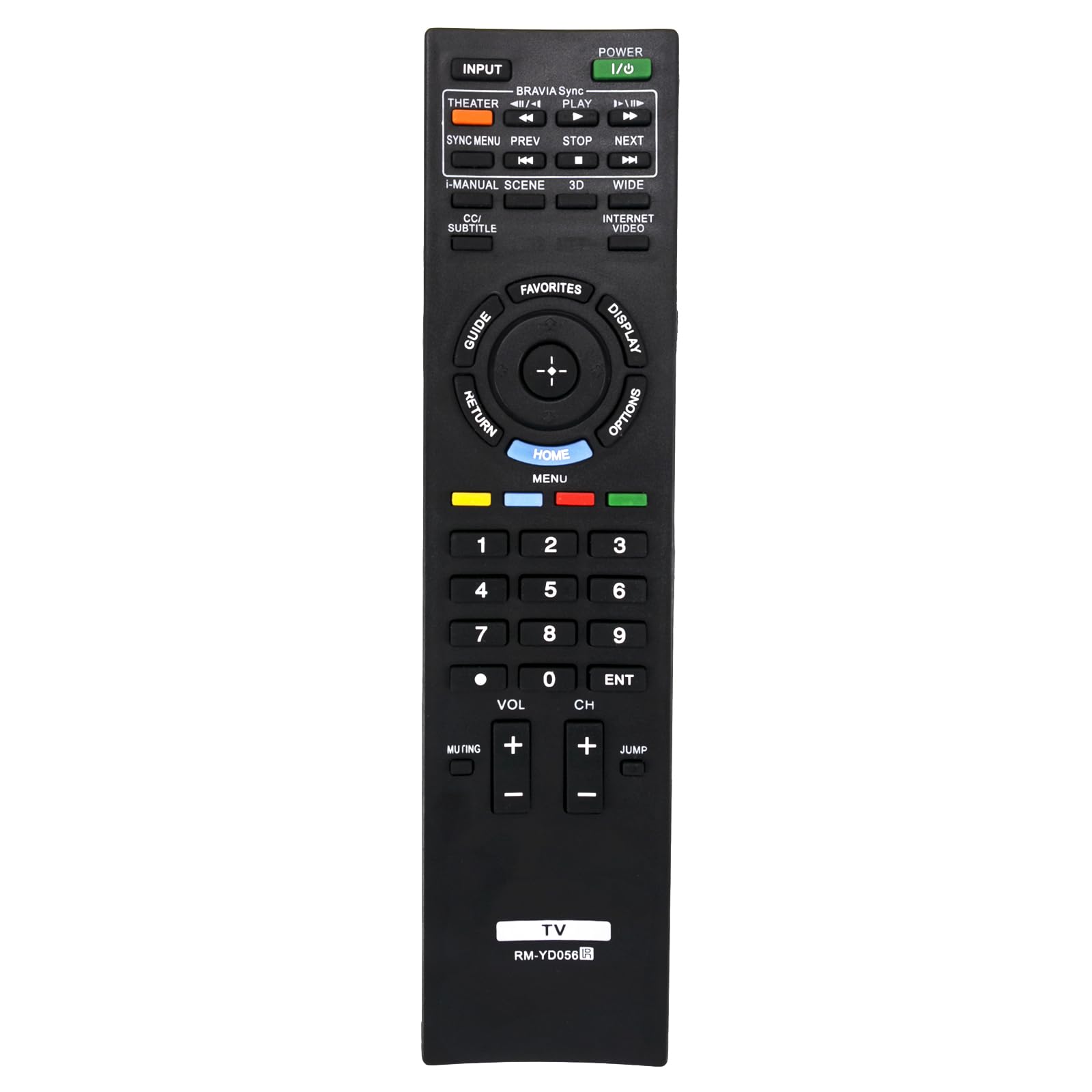
სურათი: წინა მხარე view of the VINABTY RM-YD056 remote control, showing all buttons and their labels. This image helps identify the battery compartment on the reverse side (not visible here) and the general layout of the remote.
ოპერაციული ინსტრუქციები
This remote control provides full functionality for compatible Sony TV models. Below is a general guide to common buttons and their functions:
- POWER (I/O): ტელევიზორის ჩართვა ან გამორთვა.
- INPUTშეყვანის წყაროს არჩევა (მაგ., HDMI 1, AV, Component).
- THEATER / BRAVIA Sync / PLAY: Accesses Theater mode, controls BRAVIA Sync compatible devices, or plays media.
- SYNC MENU / PREV / STOP / NEXT: Controls BRAVIA Sync menu, navigates media playback (previous, stop, next).
- I-MANUAL / SCENE / 3D / WIDE: Accesses the TV's i-Manual, selects scene modes, activates 3D display, or adjusts screen aspect ratio.
- CC/SUBTITLE / INTERNET VIDEO: Toggles Closed Captions/Subtitles or accesses internet video services.
- GUIDE / RETURN / HOME / DISPLAY / OPTIONS: Navigation and menu access buttons.
- გზამკვლევი: აჩვენებს ელექტრონული პროგრამის სახელმძღვანელოს.
- დაბრუნება: ბრუნდება წინა ეკრანზე ან მენიუში.
- მთავარი / მენიუ: Opens the TV's main menu or home screen.
- ჩვენება: Shows information about the current program or input.
- OPTIONS: Displays context-sensitive options.
- Directional Pad (Up, Down, Left, Right) and ENTER: მენიუებში ნავიგაცია და არჩევანის დადასტურება.
- რჩეულები: Accesses favorite channels or content.
- ფერადი ღილაკები (წითელი, მწვანე, ყვითელი, ლურჯი): Functionality varies depending on the TV menu or application.
- ნომრის ღილაკები (0-9): Directly selects channels or enters numerical input.
- VOL (+/-): Adjusts the volume up or down.
- CH (+/-): არხების ზემოთ ან ქვემოთ გადართვა.
- დადუმება: ტელევიზორის აუდიოს დადუმება ან მოხსნა.
- ENT: Confirms channel selection or numerical input.
- ხტომა: Switches between the current and previously viewed არხი.
Point the remote control directly at the TV's infrared sensor for optimal performance.
თავსებადი Sony ტელევიზორების მოდელები
This VINABTY RM-YD056 replacement remote control is compatible with the following Sony TV models:
- KDL-40HX800
- KDL-46HX800
- KDL-55HX800
- XBR-40HX800
- XBR-46HX800
- XBR-46HX909
- XBR-52HX909
- XBR-52LX900
- KDL-50R550A
- KDL-60R550A
- KDL-70R550A
It also serves as a replacement for RM-YD040 and RM-YD033 remote controls.
სპეციფიკაციები
| მოდელის ნომერი | RM-YD056 |
| ბრენდი | VINABTY |
| დენის წყარო | 2 x AAA ბატარეები (არ შედის) |
| ფერი | შავი |
| პროდუქტის ზომები | 8 x 2 x 0.5 ინჩი (დაახლოებით) |
| ნივთის წონა | 3 უნცია (დაახლოებით) |
| სპეციალური ფუნქცია | ერგონომიული დიზაინი |
| თავსებადი მოწყობილობები | ტელევიზია |
პრობლემების მოგვარება
If your remote control is not functioning as expected, please try the following troubleshooting steps:
- დისტანციური არ პასუხობს:
- დარწმუნდით, რომ ბატარეები სწორად არის ჩასმული სწორი პოლარობით (+/-).
- ძველი ელემენტები შეცვალეთ ახალი AAA ელემენტებით.
- შეამოწმეთ, ხომ არ არის რაიმე დაბრკოლება დისტანციურ მართვასა და ტელევიზორის ინფრაწითელ სენსორს შორის.
- დარწმუნდით, რომ დისტანციური მართვა პირდაპირ ტელევიზორისკენ გაქვთ მიმართული.
- Intermittent Button Response:
- This can sometimes be caused by low battery power. Try replacing the batteries.
- Ensure there is no debris or liquid under the buttons.
- Remote Not Controlling TV:
- Verify that your TV model is listed in the "Compatible Sony TV Models" section.
- დარწმუნდით, რომ ტელევიზორი ჩართულია.
მოვლა
დისტანციური მართვის პულტის ხანგრძლივი და გამართული მუშაობის უზრუნველსაყოფად, დაიცავით შემდეგი ტექნიკური ინსტრუქციები:
- დასუფთავებადისტანციური მართვის პულტის გასაწმენდად გამოიყენეთ რბილი, მშრალი ქსოვილი. არ გამოიყენოთ თხევადი საწმენდი საშუალებები ან აბრაზიული მასალები.
- ბატარეის მოვლა: Remove batteries if the remote control will not be used for an extended period to prevent leakage.
- შენახვა: Store the remote control in a cool, dry place, away from direct sunlight and extreme temperatures.
- მოერიდეთ წვეთებსდაიცავით პულტი ფიზიკური ზემოქმედებისგან, რადგან ვარდნამ შეიძლება დააზიანოს შიდა კომპონენტები.
გარანტია და მხარდაჭერა
Information regarding specific warranty terms or direct customer support for this VINABTY product was not provided in the available documentation. Please refer to your purchase receipt or contact the retailer for details on warranty coverage and support options.


