1. პროდუქტი დასრულდაview
The MOOER Micro Preamp 18 Custom 100 (MMPA18) is a compact digital preamp pedal designed to accurately recreate the sound, dynamics, and response of popular tube amplifiers. Utilizing advanced digital technology, this pedal offers a versatile solution for guitarists seeking high-quality amplifier tones in a miniature form factor.
Key features include dual channels for diverse tonal options, an integrated speaker cabinet simulation for direct recording or PA connection, and dual operating modes to adapt to various performance and recording setups.
2. მახასიათებლები
- Sonically accurate digital recreations of classic tube ampმახსნელი წინასწარamp სექციები.
- Dual channels for versatile clean and gain tones.
- Integrated speaker cabinet simulation for direct output.
- Dual operating modes to suit various user needs.
- კომპაქტური და გამძლე დიზაინი.
3. კონტროლი და კავშირი
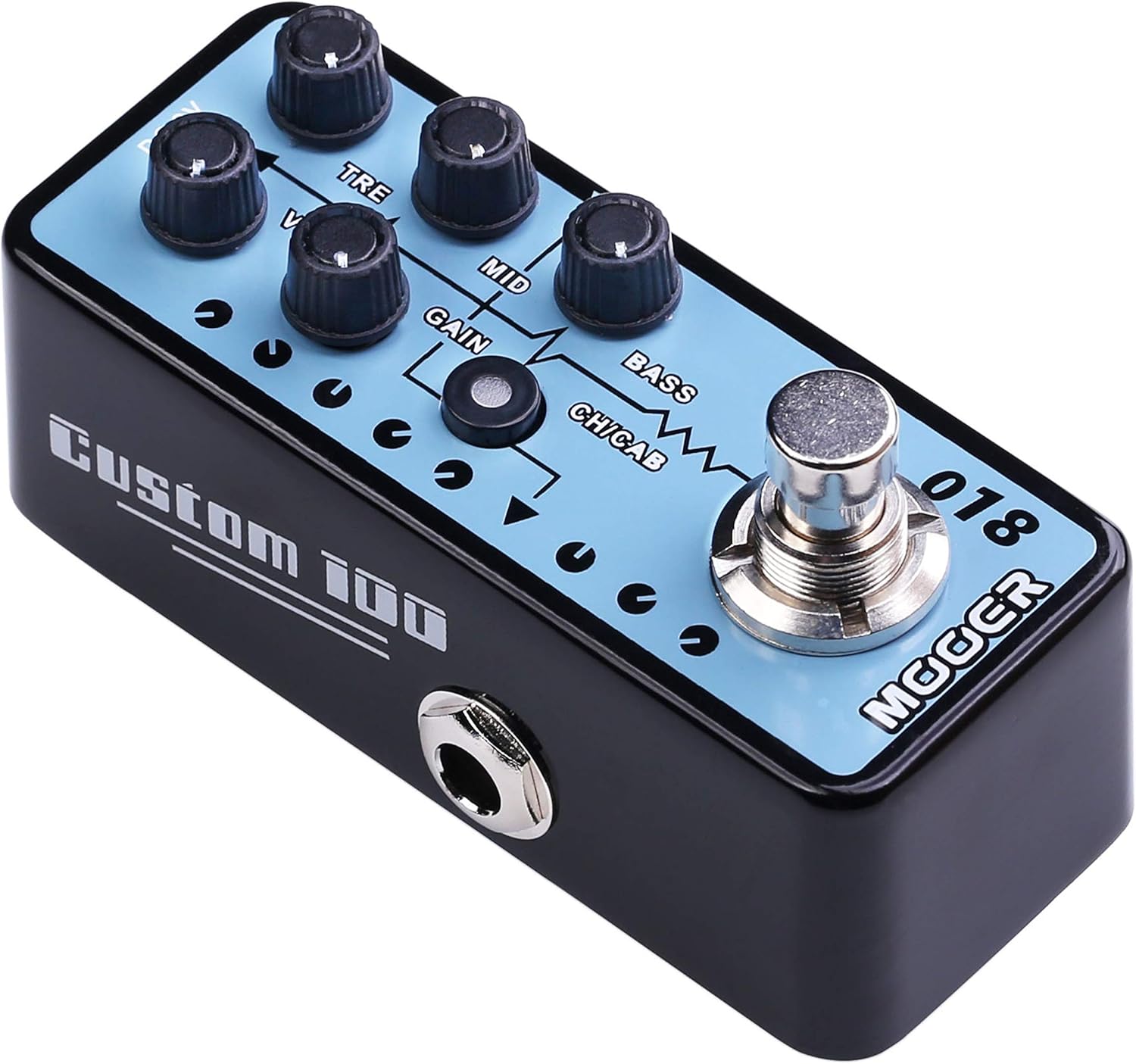
სურათი 1: ზედა view of the MOOER Micro Preamp 18 Custom 100, highlighting the control knobs and footswitch.
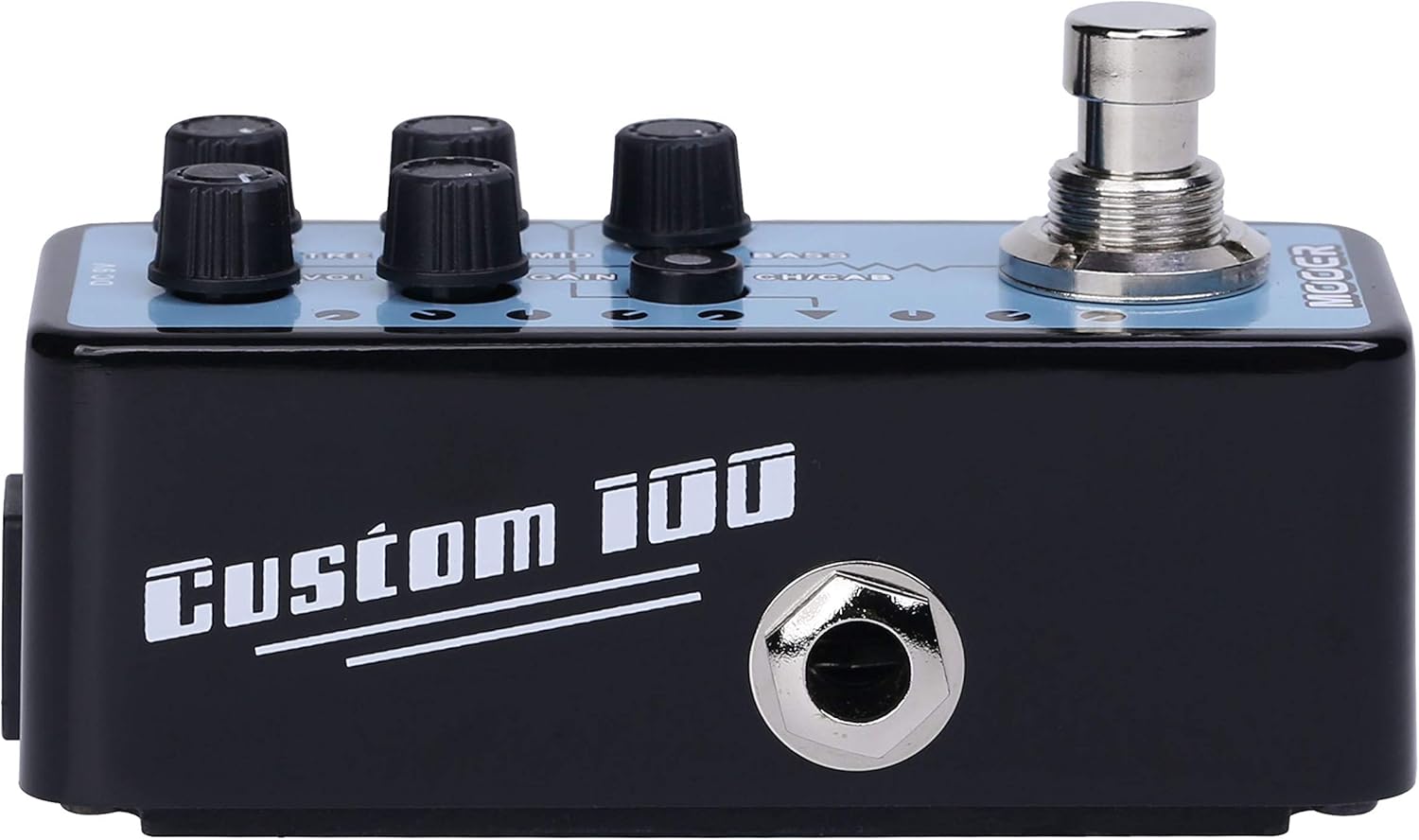
სურათი 2: მხარე view of the MOOER Micro Preamp 18 Custom 100, illustrating the 1/4" input and output jacks.
კონტროლი:
- VOL (ტომი): არეგულირებს პრე-ის საერთო გამომავალი დონესamp.
- TRE (Treble): აკონტროლებს მაღალი სიხშირის პასუხს.
- MID (Middle): არეგულირებს საშუალო დიაპაზონის სიხშირის რეაქციას.
- მოგება: აკონტროლებს ოვერდრაივის/დისტორსიის რაოდენობას.
- ბასი: არეგულირებს დაბალი სიხშირის რეაქციას.
- CH/CAB (Channel/Cabinet Simulation Switch): This switch serves two functions:
- In normal operation, it switches between the two available channels (e.g., Clean and Gain).
- When held down, it toggles the integrated speaker cabinet simulation on or off.
- ფეხის ჩამრთველი: Engages or bypasses the pedal.
კავშირები:
- Input Jack (1/4" / 6.35mm): Connect your guitar or other instrument here.
- Output Jack (1/4" / 6.35mm): დაუკავშირდით თქვენს amplifier, audio interface, or other effects pedals.
- DC 9V შეყვანა: Connect a 9V DC power adapter (center negative, 300mA minimum).
- USB 2.0 (Hardware Interface): For firmware updates or potential software integration.
4. დაყენება და ოპერაცია
Თავდაპირველი წყობა:
- უზრუნველყავით თქვენი amplifier and other audio equipment are turned off.
- შეაერთეთ თქვენი გიტარა შეყვანის ჯეკი of the MMPA18.
- დააკავშირეთ გამომავალი ჯეკი of the MMPA18 to the input of your ampგამხსნელი ან აუდიო ინტერფეისი.
- Connect a 9V DC power adapter (center negative, 300mA minimum) to the DC 9V შეყვანის.
- ჩართეთ თქვენი amplifier and other audio equipment.
ძირითადი ოპერაცია:
- Engaging/Bypassing: Press the footswitch to turn the preamp effect on or off. The LED indicator will illuminate when the effect is active.
- არხის გადართვა: მოკლედ დააჭირეთ CH/CAB switch to toggle between the two channels (e.g., a clean channel and a gain channel). The LED color or state may change to indicate the active channel.
- კაბინეტის სიმულაცია: დააჭირეთ და გააჩერეთ CH/CAB switch for a few seconds to activate or deactivate the integrated speaker cabinet simulation. This is particularly useful when connecting directly to a mixing console, audio interface, or headphones, providing a more natural, mic'd cabinet sound.
- ტონის რეგულირება: გამოიყენეთ VOL, TRE, MID, GAIN, და BASS knobs to sculpt your desired tone. Experiment with different settings for each channel.
5. მოვლა
- დასუფთავება: Use a soft, dry cloth to clean the pedal. Avoid abrasive cleaners or solvents.
- შენახვა: შეინახეთ პედლები გრილ, მშრალ ადგილას, მზის პირდაპირი სხივებისა და ექსტრემალური ტემპერატურისგან მოშორებით.
- ელექტრომომარაგება: Always use a compatible 9V DC (center negative) power supply with a minimum of 300mA. Using an incorrect power supply can damage the unit and void the warranty.
- კავშირები: პერიოდულად შეამოწმეთ ყველა კაბელის შეერთება ცვეთასა და დაზიანებაზე. დარწმუნდით, რომ ჯეკები მტვრისა და ნარჩენებისგან თავისუფალია.
6. Დიაგნოსტიკა
- ხმა არ არის:
- Check all cable connections (guitar, pedal, amplifier, power supply).
- Ensure the power supply is correctly connected and providing power.
- Verify the pedal is engaged (LED illuminated).
- Check the volume settings on the pedal and your ampმაცოცხლებელი.
- Poor Sound Quality / Excessive Noise:
- დარწმუნდით, რომ ყველა კაბელი კარგ მდგომარეობაშია და სათანადოდ დაცულია.
- Try a different power supply to rule out power-related noise.
- Adjust the GAIN knob; very high gain settings can introduce noise.
- If using the cabinet simulation, ensure it is appropriate for your output device.
- Ensure the pedal is not placed too close to power transformers or other sources of electromagnetic interference.
- პედლები არ რეაგირებს:
- გამორთეთ და ხელახლა შეაერთეთ კვების წყარო.
- If issues persist, contact MOOER support.
- გადახურება: While normal operation may cause some warmth, excessive heat could indicate an issue. Ensure proper ventilation and use the correct power supply. If the pedal becomes unusually hot, discontinue use and contact support.
7. სპეციფიკაციები
| სპეციფიკაცია | ღირებულება |
|---|---|
| მოდელის ნომერი | MMPA18 |
| ნივთის წონა | 5.8 უნცია (165 გრამი) |
| პროდუქტის ზომები | 3.54 x 3.54 x 3.54 ინჩი |
| თავსებადი მოწყობილობები | Musical Instrument(s) |
| კონექტორის ტიპი | 1/4" (6.35 მმ) ჯეკი, 1/8" (3.5 მმ) ჯეკი |
| აპარატურა ინტერფეისი | USB 2.0 |
| სიგნალის ფორმატი | ციფრული |
| გამომავალი ვატიtage | 100 ვატი |
| დენის წყარო | AC ადაპტერი |
| ტtage | 9 ვოლტი |
| ბრენდი | მუერი |
| ფერი | Mehrfarbig |
8. გარანტია და მხარდაჭერა
MOOER products are designed for reliability and performance. For specific warranty information, please refer to the warranty card included with your product or visit the official MOOER website. In case of any issues or technical support needs, please contact MOOER customer service through their official channels.
დამატებითი დახმარებისთვის შეგიძლიათ ეწვიოთ MOOER Store on Amazon.


