შესავალი
This manual provides essential instructions for the safe and efficient use of your Smart Kingfisher Rechargeable Lithium Battery and USB Charger. Please read this manual thoroughly before use and retain it for future reference.
უსაფრთხოების ინფორმაცია
- გაფრთხილება: არ შეეცადოთ დატენოთ არადამუხტავი ბატარეები.
- გაფრთხილება: Do not charge batteries from other suppliers unless explicitly stated as compatible.
- Keep the charger and batteries away from water and moisture.
- Do not disassemble, crush, or puncture the batteries or charger.
- მოერიდეთ ბატარეების ექსტრემალურ ტემპერატურაზე ან მზის პირდაპირ სხივებზე ზემოქმედებას.
- ელემენტები პასუხისმგებლობით გადააგდეთ ადგილობრივი რეგულაციების შესაბამისად.
პაკეტის შიგთავსი
დარწმუნდით, რომ თქვენს პაკეტში ყველა ნივთია:
- 2 x 425 Rechargeable Lithium Batteries
- 1 x Dual-Port USB Charger
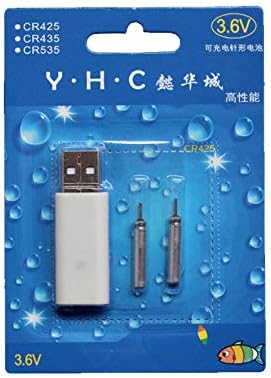
Image: Retail packaging showing the USB charger and two 425 rechargeable batteries.

Image: A pair of Smart Kingfisher 425 rechargeable lithium batteries.
დაყენება
The Smart Kingfisher USB charger is designed for ease of use. No complex setup is required.
- Identify the USB charger and the 425 rechargeable batteries.
- Connect the USB charger to a compatible power source (see "Operating Instructions" for options).

Image: The USB charger unit with its two charging pins visible.
ოპერაციული ინსტრუქციები
ბატარეების დატენვა
The charger features two ports, allowing for simultaneous charging of two batteries.
- Insert the 425 rechargeable batteries into the charging ports of the USB charger. Ensure a secure connection.
- Connect the USB charger to a power source. Compatible power sources include:
- USB power adapter (wall charger)
- Power Bank
- მანქანის დამტენი
- Laptop or PC USB port
- Observe the LED indicator on the charger:
- A მწვანე LED indicates that the batteries are currently charging.
- A წითელი LED indicates that the batteries are fully charged.
- სრული დატენვისთვის, როგორც წესი, დაახლოებით 3 საათი სჭირდება.
- Once fully charged, disconnect the charger from the power source and remove the batteries.
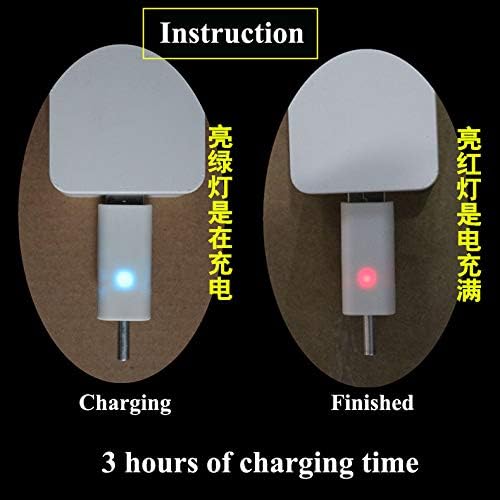
Image: Visual guide for charging status: green light for charging, red light for fully charged. Indicates a 3-hour charging time.

Image: Diagram illustrating multiple methods for charging the device, including car chargers, wall adapters, power banks, and laptops.
მოვლა
- Clean the charger and batteries with a dry, soft cloth. Do not use liquids or abrasive cleaners.
- Store the batteries and charger in a cool, dry place when not in use.
- Avoid storing fully discharged batteries for extended periods to prolong their lifespan.
პრობლემების მოგვარება
| პრობლემა | შესაძლო მიზეზი | გამოსავალი |
|---|---|---|
| Batteries not charging (no LED indication) |
|
|
| Charging takes longer than 3 hours |
|
|
| Red LED does not turn on after extended charging |
|
|
სპეციფიკაციები
- მასალა: პლასტიკური
- პროდუქტის წონა: 20 g (total for charger and batteries)
- ბატარეის ტიპი: 425 Rechargeable Lithium Battery (compatible with CR425, CR435, CR535)
- დამტენის ტიპი: ორპორტიანი USB დამტენი
- შეყვანა: USB (compatible with various USB power sources)
- დატენვის ინდიკატორი: Green LED (charging), Red LED (fully charged)
- დატენვის სავარაუდო დრო: 3 საათი
გარანტია და მხარდაჭერა
გარანტიის შესახებ ინფორმაციის ან ტექნიკური მხარდაჭერისთვის, გთხოვთ, იხილოთ საცალო მოვაჭრის დაბრუნების პოლიტიკა ან დაუკავშირდეთ პირდაპირ მწარმოებელს. შეინახეთ თქვენი შესყიდვის ქვითარი შეძენის დასადასტურებლად.
დამატებითი დახმარებისთვის შეგიძლიათ ეწვიოთ product page on Amazon.com.mx.


